Current candle HLC

Viewing 4 posts - 1 through 4 (of 4 total)
  • Author
    Posts
  • #190363 quote
    ThePenntChemistThePenntChemist
    Participant
    Average

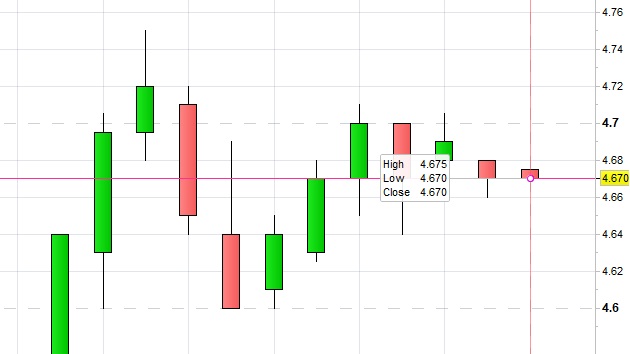
    Is there a method / indicator to display current candle’s HLC permanently on the chart?

    Something similar to the box pop up or maybe 3 horizontal lines displaying the HLC values of that particular current candle?

    Thanks,
    Wayne.

    J.jpg J.jpg
    #190367 quote
    robertogozzirobertogozzi
    Moderator
    Legend

    I moved this topic to ProBuilder support, as it’s not a screener related topic.

    There you go:

    DEFPARAM DrawOnLastBarOnly = True
    Offset   = average[20,0](range) //offset to plot text on the chart
    Distance = highest[20](high)    //price where data is plotted
    OO = open
    HH = high
    LL = low
    CC = close
    DrawText("Open  #OO#",BarIndex,Distance + Offset)
    DrawText("High  #HH#",BarIndex,Distance + Offset*1.5)
    DrawText("Close #CC#",BarIndex,Distance + Offset*2.0)
    DrawText("Low   #LL#",BarIndex,Distance + Offset*2.5)
    RETURN
    ThePenntChemist thanked this post
    #190373 quote
    ThePenntChemistThePenntChemist
    Participant
    Average

    Thanks Roberto,

    Possible to have the Close drawtext changes color? For example:

    If close is = or > than High, the color drawtext for close will display in green.
    If close is = or < than Low, the color drawtext for close will display in red.
    If close is = to Open, the color drawtext for close will display in blue.

    Also I have followed the guide https://www.prorealcode.com/documentation/drawtext/ , I tried adding font and size, doesn’t seem to work?

    DrawText(“C:#CC#”,BarIndex–1,Distance + Offset*1.0,Bold,16)coloured(204,0,204)

    #190426 quote
    robertogozzirobertogozzi
    Moderator
    Legend

    There you go:

    DEFPARAM DrawOnLastBarOnly = True
    Offset   = average[20,0](range) //offset to plot text on the chart
    Distance = highest[20](high)    //price where data is plotted
    OO = open
    HH = high
    LL = low
    CC = close
    DrawText("O:#OO#",BarIndex,Distance + Offset)
    DrawText("H:#HH#",BarIndex,Distance + Offset*1.5)
    DrawText("L:#LL#",BarIndex,Distance + Offset*2.0)
    r = 0                    //Black
    g = 0                    //Black
    b = 0                    //Black
    t = 255                  //Transparency (0-255, 0=invisible, 255=max visibility)
    IF close >= high THEN
       g = 255               //Green
    ELSIF CLOSE <= low THEN
       r = 255               //Red
    ELSIF close = open THEN
       b = 255               //Blue
    endif
    DrawText("C:#CC#",BarIndex,Distance + Offset*2.5,Dialog,Bold,16) coloured(r,g,b,t) //Verde
    RETURN
    ThePenntChemist thanked this post
Viewing 4 posts - 1 through 4 (of 4 total)
  • You must be logged in to reply to this topic.

ProRealAI ProRealAI New

Stuck on this ProBuilder code?

Describe what this topic is trying to build, in plain English, and ProRealAI writes the ProRealTime™ indicator, screener or system for you.

Available in 7 languages
Try ProRealAI

Current candle HLC


ProBuilder: Indicators & Custom Tools

New Reply
Author
Summary

This topic contains 3 replies,
has 2 voices, and was last updated by robertogozzirobertogozzi
4 years, 6 months ago.

Topic Details
Forum: ProBuilder: Indicators & Custom Tools
Language: English
Started: 03/23/2022
Status: Active
Attachments: 1 files
ProRealCode ProRealCode
Loading...