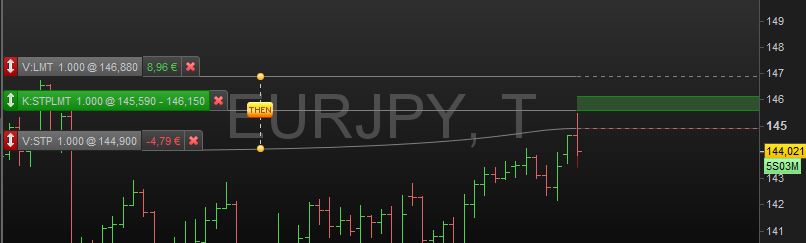
Hi, there are options to create stop-limit orders manually but I could not find documentation or examples on how to create them through an automatic trading system.
Just to specify what I mean: Let’s say current market price for a certain instrument is 50. I want to take a long position if the price reaches 60 (stop) and do not want to buy in case price is above 62 (limit) when the order is executed.
Thanks for your help.
Hi Jos,
It works a little differently. Just one example :
Sell LotSize contracts at StopPriceTF02 Limit
This means that I sell x contracts when the price reaches the StopPrice which is to be above the current price (for a Long position).
This example could be extra complicated for you, but it tells about all.
Anyway, with this you can search the (PDF) Manual(s) from ProBacktest and find the syntaxes for various combinations.
Combine in Google “Prorealcode” with parts of commands will also work, but things may be out of context for you at first.
Good luck !
Peter
PS: You may find things like my example impossible with Manual Trading. With AutoTrading about everything is possible, as long as you understand what to do. This is most of the time not easy at all.
Thanks, Peter. Good to hear that with AutoTrading about everything is possible.
I checked the ProBacktest PDF and searched for coding samples but could not find any on how to create a stop-limit order. What I mean is an order like the green long oder in the example attached.
From a logical perspective the coding should be something like
BUY 1 contracts AT 145,590 STOP AND AT 146,150 LIMIT
I would appreciate a coding example on how this can be accomplished with ProOrder.
Try …
If Close < 146,150 Then
Buy at 145,590 STOP
Endif
Hi Grahal,
Thanks. I think this is a bit different.
In my manual example I have a pending stop-limit order at the market, which is executed automatically once the price hits the stop level. The execution is done at the market at a price not higher than the limit price. If there is a very fast upwards movement, the order may not be executed at all.
If I understand it correctly, in your example you place a simple stop order at the market if the closing pricing before is below 146.150. I do not see how you ensure that the execution price cannot be above 146.150 once the order has been placed.
You would need to run your Account using Guaranteed Stops, a small cost is incurred if the Guaranteed Stop is triggered.
Guaranteed Stop is a box you can tick when you start an Aut0System.
It is not about the stop. It is about the limit. In your example I don’t see a limit in your order.
If this is all ProOrder has to offer in this regard, it is not what I’m looking for.
In this case I think it is missing important order types which are available in manual trading.
it is not what I’m looking for.
Somebody else may have a better idea than my suggestion?
 JS
JSParticipant
Master
I think you can do something with:
If NOT OnMarket then
Buy 1 contract at 60 STOP
Buy 1 contract at 62 LIMIT
EndIf
When the STOP order is executed, the LIMIT order expires because you are on market at that moment…
If the STOP order is not executed, the executing price will never exceed the LIMIT order price…
Thanks JS. I have 2 questions regarding this proposal. Assumption is still that the market price when placing the orders is below both prices, e.g. at 50:
- How is it ensured that the first order (stop order) is not executed above 62 ?
- What pevents the second order (limit order) from being executed immediately?
I understand that because market price is below the price for the second order, this order gets executed immediately. (See also page 12 of the tradings systems programming guide PDF.)
JSParticipant
Master
You are right, it is not correct what I write above because a LIMIT order must of course always be below the last price and not above it…
Maybe this solution works:
If Close < = 62 then
Buy 1 contract at 60 STOP
EndIf
The STOP order will be placed every time as long as the price is below 62…
When the price rises above 62, the STOP order will no longer be placed…
This is a similar proposal like the one from Grahal above. My same comments apply.
Once the order is placed, nothing prevents it from being executed at a price above 62. The if condition applies to the price before the order is placed.
JSParticipant
Master
It is the Close of the bar and during the Open of the next bar the STOP order is placed… But it is true that there is no guarantee that the order will not be executed above 62…
I agree. It seems to me that this is not possible with ProOrder – which would be a pity.
A workaround would be to create these orders manually. However, it does not seem possible to have the orders managed by an automated trading system afterwards. (For example, to adjust stop-loss limits or cancel dependent orders automatically.)