Conversione dell’indicatore CAM dal software di trading Tradestation

Viewing 2 posts - 1 through 2 (of 2 total)
  • Author
    Posts
  • #187904 quote
    guido1997
    Participant
    New

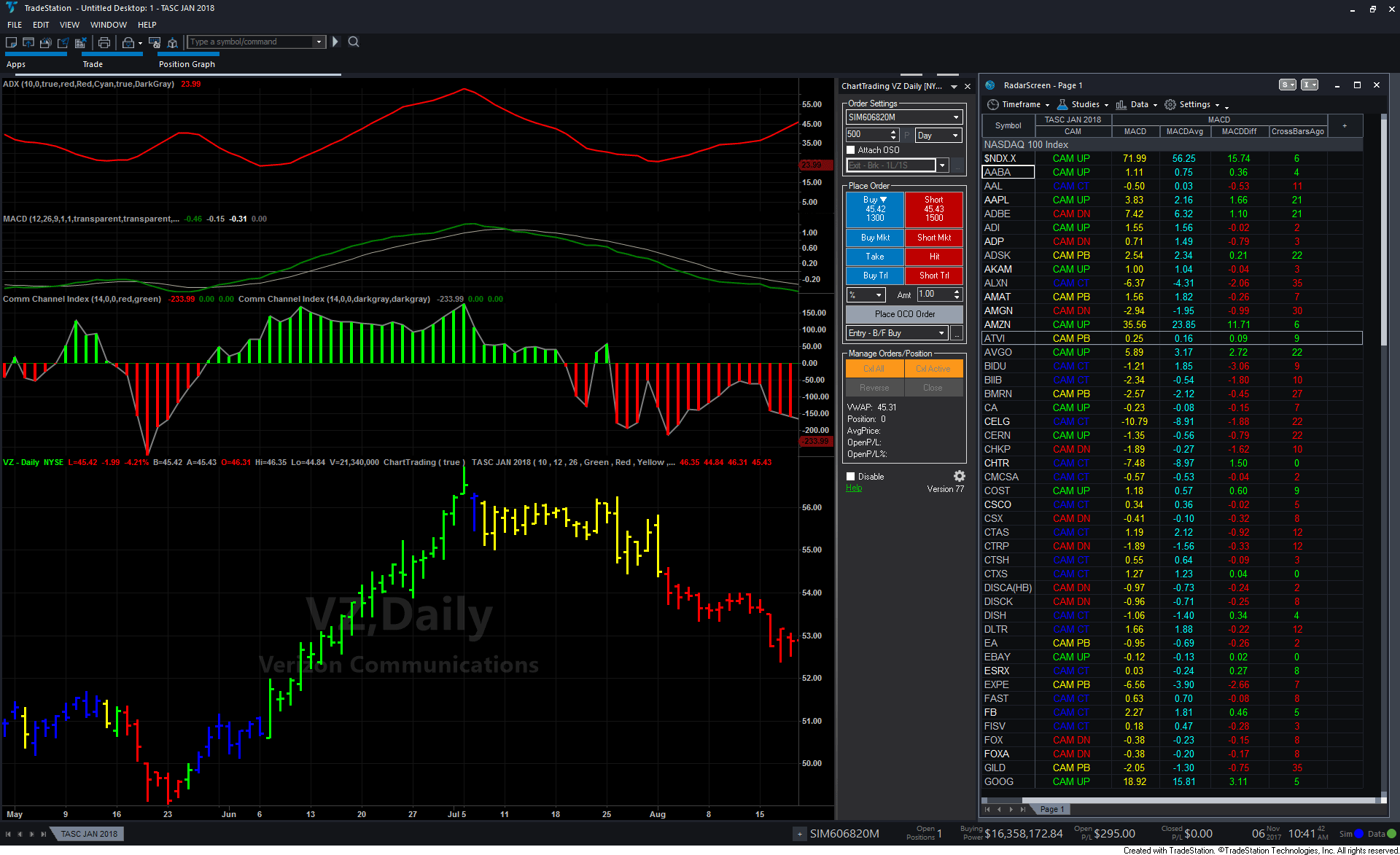
    Codice su Tradestation dell’indicatore CAM Indicator For Trends And Countertrends, pubblicato sul TASC di Gennaio del 2018 di Barbara Star.

    // TASC JAN 2018
    // The CAM Indicator
    // Barbara Star, PhD.

    inputs:
    ADXLength( 10 ),
    MACDFastLength( 12 ),
    MACDSlowLength( 26 ),
    CAMUPColor( Green ),
    CAMDNColor( Red ),
    CAMPBColor( Yellow ),
    CAMCTColor( Blue ) ;

    variables:
    MACDValue( 0 ),
    ADXValue( 0 ),
    PlotColor( 0 ),
    MACDRising( false ),
    ADXRising( false ),
    intrabarpersist InAChart( false ),
    PatternLabel( “” ) ;

    once
    begin
    InAChart = GetAppInfo( aiApplicationType ) = cChart ;
    end ;

    MACDValue = MACD( Close, MACDFastLength,
    MACDSlowLength ) ;
    ADXValue = ADX( ADXLength ) ;

    MACDRising = MACDValue > MACDValue[1] ;
    ADXRising = ADXValue > ADXValue[1] ;

    if ADXRising and MACDRising then
    begin
    PlotColor = CAMUPColor ;
    PatternLabel = “CAM UP” ;
    end
    else if not ADXRising and not MACDRising then
    begin
    PlotColor = CAMPBColor ;
    PatternLabel = “CAM PB” ;
    end
    else if ADXRising and not MACDRising then
    begin
    PlotColor = CAMDNColor ;
    PatternLabel = “CAM DN” ;
    end
    else if not ADXRising and MACDRising then
    begin
    PlotColor = CAMCTColor ;
    PatternLabel = “CAM CT” ;
    End ;

    // Format plot style as follows:
    // Plot1 Bar High
    // Plot2 Bar Low
    // Plot3 Left Tic
    // Plot4 Right Tic
    Plot1( High, “CAMH”, PlotColor ) ;
    Plot2( Low, “CAML”, PlotColor ) ;
    Plot3( Open, “CAMO”, PlotColor ) ;
    Plot4( Close, “CAMC”, PlotColor ) ;

    // Show current state in RadarScreen
    If not InAChart then
    Plot5( PatternLabel, “CAM”, PlotColor )

    TT-Tradestation.png TT-Tradestation.png
    #188271 quote
    Nicolas
    Keymaster
    Master

    Ecco il codice tradotto per l'indicatore CAM:

    ADXLength=10
    MACDFastLength=12
    MACDSlowLength=26
    
    //CAMUPColor( Green ),
    //CAMDNColor( Red ),
    //CAMPBColor( Yellow ),
    //CAMCTColor( Blue ) ;
    //
    MACDValue = MACD[MACDFastLength,MACDSlowLength,9](close)
    ADXValue = ADX[ADXLength]
    
    MACDRising = MACDValue > MACDValue[1] 
    ADXRising = ADXValue > ADXValue[1]
    
    if ADXRising and MACDRising then
    drawcandle(open,high,low,close) coloured("green")
    elsif not ADXRising and not MACDRising then
    drawcandle(open,high,low,close) coloured("yellow")
    elsif ADXRising and not MACDRising then
    drawcandle(open,high,low,close) coloured("red")
    elsif not ADXRising and MACDRising then
    drawcandle(open,high,low,close) coloured("blue")
    endif
    
    return
    guido1997 thanked this post
Viewing 2 posts - 1 through 2 (of 2 total)
  • You must be logged in to reply to this topic.

Conversione dell’indicatore CAM dal software di trading Tradestation


ProBuilder: Indicatori & Strumenti Personalizzati

New Reply
Author
author-avatar
guido1997 @guido1997 Participant
Summary

This topic contains 1 reply,
has 2 voices, and was last updated by Nicolas

4 years, 1 month ago.

Topic Details
Forum: ProBuilder: Indicatori & Strumenti Personalizzati
Language: Italian
Started: 02/08/2022
Status: Active
Attachments: 1 files
Logo Logo
Loading...