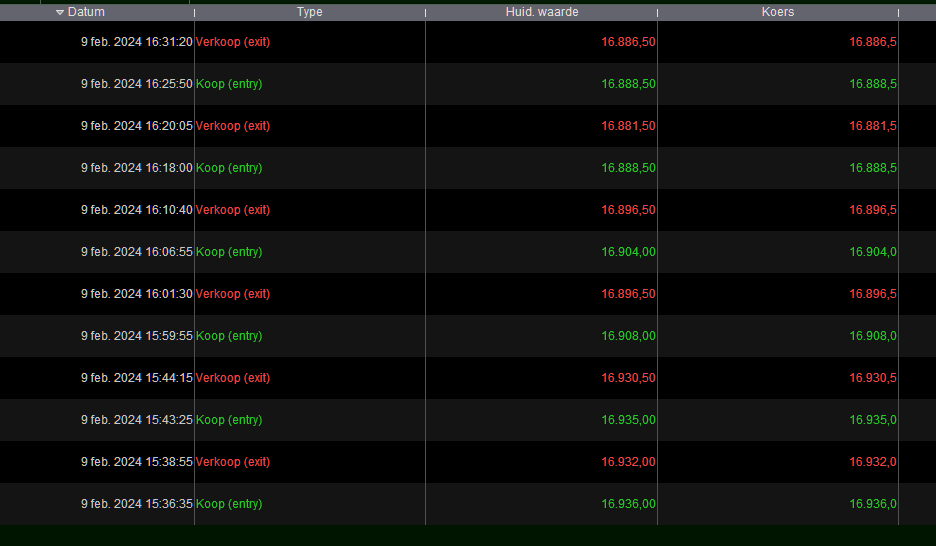
My first check was on DAX, useing IG.
I use 200 K bars for the exempel above.
thanks for your help!
I don’t know what is going on. So my test this morning was with PRT-IB. All fine (but poor result). Now with IG, I don’t get anything out of it; tried 1m, 5m and 5s timeframes. But wait … with 5s I do get trades. All on Feb 9 2024 which is the first day with 5s and 200K bars.
I noticed these things (maybe for Irván) : In PRT-IB it is too fast to be true (like 5 seconds), with the array manipulation. At least that is my feeling. In PRT-IG it takes extremely long (like a few minutes) which could be due to more ticks with IG (that IG bears more ticks is a fact). Now, seeing this result with quite some trades on that first day, it looks like something chokes. I thought of tooo many array elements used (max is 1 million AFAK), but that can’t be it after one day – I think.
I am afraid I have to hand this task to someone else because the time it takes to test it on IG is too long for me. Combined with the strange results (IB looking fine, apart from the very poor result) this is nothing to dive into, when it is not one’s own. Best advice could be to drop this all together and start over with another means of “SuperTrend”. There are some in the Library or just in the forum.
Sorry …
With 5 seconds TF it always does one day only (just the first day where backtesting starts). Even if I change the last part to this :
If C1 then //AND timeEnterBefore AND timeEnterAfter AND not daysForbiddenEntry then
  Buy 1 contract at Market
endif
iF c2 THEN
  SELL AT MARKET
ENDIF

SET STOP %loss 0.3
SET TARGET %PROFIT 0.3
this is so.
Hi,
I had a look, found a few things but there is still something weird about upperband and lowerband calculations. Anyway, starting with a couple of typos first in the indicator script (which have therefore been carried forward into the proorder code too and also need to be changed there):
To be on same tune, line numbers below are as per code listing in post #229004 of previous page:
line 34: lowerdband to be replaced by: lowerband
line 50: directon (missing letter i) to be replaced by: direction
Second, “myindex” defined in line 101 didn’t seem to be used anywhere else so it caught my eye, I am not a tradingview expert, but it feels like probably one “i” at least would need to be replaced by this “myindex” variable to make the probuilder code behave the same as the tradingview code, I’d say at least in line 102:
line 102: labeli = $labels[i] to be replaced by: labeli = $labels[myindex] (to be confirmed by those familiar with tradingview)
Next, even with these changes, (and even when modifying, just in case, line 28 into: upperband = vwma + factor*atr
and line 34 into: lowerband = vwma – factor*atr ),
upperband and lowerband calculations seem to not work properly in the backtest (seen by graphing them and comparing them with indicator version where added to return line). So, comparing how it starts and seeing where from behaviours diverge is the next thing. This requires adding a line: defparam PRELOADBARS =0 in the backtest to compare exact same starts (otherwise proorder code starts earlier in history than probuilder code). It seems that behaviour is the same on intraday bars of first day only, but at the first intraday bar with volume of the second day, that is when backtest version doesn’t update upperband/lowerband at all, where the indicator version does… not seeing instantly why…
Ok,
For vwma we have a division with an average of volume in denominator. Where PRT trading with Ibkr has real exchange data with volume at each candle, IG is OTC and has ovn candles with no volume, so you see it coming before I finish the sentence…: no issue calculating vwma with Ibkr, but on IG for the ovn candles before first non-zero volume morning candle for small intraday timeframe, average of 0 volume on a period shorter than ovn length is zero, and vwma having a division by zero is undefined, cascading through issues that wouldn’t appear with Ibkr. That’s one part of the mistery solved.
From there, why the further differences in upperband and lowerband between probuilder code and proorder code within an IG environment? My best guess is that when an if statement has an undefined value in its condition (here, the “undefined” is upperband[1] at first intraday bar with non-zero volume in line 27, and lowerband[1] in line 33), such if statement would be handled differently between probuilder and proorder: the probuilder code would go into the “else” but keep the defined earlier values given in lines 18-19, the proorder code goes into the “else” and propagates for upperband=upperband[1] and lowerband=lowerband [1] a recurringly undefined value.
So I tried to workaround this by adding to the if statements for lines 27 and 33 in the proorder version this further condition to try to emulate the probuilder behaviour: (volume<>0 and volume[1]=0) (again taking as reference post #229004 of previous page for probuilder, actual matching lines in proorder version would have a different number)
Proorder equivalent to probuilder version Lines 27-28 become:
if upperband < upperband[1] or close[1] > upperband[1] or (volume<>0 and volume[1]=0) then
   upperband = vwma + factor*atr
Proorder equivalent to probuilder version Lines 33-34 become:
if lowerband > lowerband[1] or close[1] < lowerband[1] or (volume<>0 and volume[1]=0) then
   lowerband = vwma – factor*atr
It seems to give trades from first to last day, although I haven’t tried several assets and timeframes, and didn’t check if trades are correct, only that they are – at least and at last – there… I let those who want a proorder version to further check from there…
thank you very much for this magnificent contribution!
hi, Guys
I noticed since last I commented on this thread there are various expert made minor changes to various lines.
Would it be possible that someone (as I am not that expert in this field yet) compile all correct changes and add publish this code (Indicator and strategy separately) here and also on the library? That will be very useful for future use?
Thanks, all participant.
 Ξ3
Ξ3Participant
Average
Thank you to everyone for your contributions!
Hello
bug line 50 it’s not “directon” it’s “direction”
Hello,
do you think, in line 80, that “currentsuperTrend[i]” could be replaced by “currentsuperTrend” only?
Ξ3Participant
Average
I don’t think that would yield the desired results as you effectively set the value to currentsuperTrend[0] for the entire loop.