Conversion d’un code pour PRT Dynamic Support/Resistance Zones

Viewing 10 posts - 1 through 10 (of 10 total)
  • Author
    Posts
  • #248166 quote
    Manu L.
    Participant
    Average

    Bonjour à tous,

    serait-il possible de transposer ce code Traving View en code PRT ?

    Merci d’avance

    indicator(“Dynamic Support/Resistance Zones [ChartPrime]”, overlay = true, max_labels_count = 500, max_boxes_count = 500, max_lines_count = 500, max_bars_back = 4000)
    sq(float source) => math.pow(source, 2)
    sinc(float source, float bandwidth) =>
        if source == 0
            1
        else
            math.sin(math.pi * source / bandwidth) / (math.pi * source / bandwidth)
    sinc_filter(float[] source, float length)=>
        if length > 0 and source.size() > 0
            src_size = array.size(source)
            estimate_array=array.new<float>(src_size)
            float current_price = na
            fori=0tosrc_size-1
                float sum = 0
                float sumw = 0
                forj=0tosrc_size-1
                    diff = i – j
                    weight = sinc(diff, length + 1)
                    sum += array.get(source, j) * weight
                    sumw += weight
                current_price := sum / sumw
                array.set(estimate_array, i, current_price >= 0 ? current_price : 0)
            estimate_array
        else
            source
    peak_detection(source, int scale, float real_minimum, bool enable) =>
        peak_idx = array.new<float>()
        i = -1
        if enable and source.size() > 0
            max = source.max() – real_minimum
            while i < array.size(source) – 1
                i += 1
                center = int((source.get(i) – real_minimum) / max * (scale – 1) + 1)
                previous = i > 0 ? int((source.get(i – 1) – real_minimum) / max * (scale – 1) + 1) : 0
                next = i < array.size(source) – 1 ? int((source.get(i + 1) – real_minimum) / max * (scale – 1) + 1) : 0
                if center > previous
                    j = i + 1
                    if center == next
                        while j <= array.size(source) – 1
                            j += 1
                            vary_previous = int((source.get(j – 1) – real_minimum) / max * (scale – 1) + 1)
                            very_next = j <= source.size() – 1 ? int((source.get(j) – real_minimum) / max * (scale – 1) + 1) : 0
                            if very_next != vary_previous
                                if center > very_next
                                    p_idx = int((i + j) / 2.0)
                                    peak_idx.push((j – i) > 2 and (j – i) % 2 != 0 ? p_idx : p_idx – 0.5)
                                    i:=j
                                else
                                    i := j – 1
                                break
                    if center > next
                        peak_idx.push(i)
        peak_idx
    method add_to_score(float[] self, float[] source, float[] weight, string weight_style, float min_range, float bin_size, int precision)=>
        if source.size() > 0
            for i = 0 to source.size() – 1
                w = weight.get(i)
                W = weight_style == “Time” ? 1 + (bar_index – weight.min()) – (bar_index – w) : w
                idx = math.min(math.floor((source.get(i) – min_range) / bin_size), precision – 1)
                self.set(idx, self.get(idx) + W)
    ma(float[] scores, float min_range, float bin_size, bool enable)=>
        float ma = na
        if enable
            weight = 0.
            sum = 0.
            if scores.max() > 0
                for i = 0 to scores.size() – 1
                    score = scores.get(i)
                    if score == 0
                        continue
                    bin_top = min_range + bin_size * (i + 1)
                    bin_bottom = min_range + bin_size * i
                    price = math.avg(bin_top, bin_bottom)
                    weight += score
                    sum += price * score
                ma := sum / weight
        ma
    method hit(label[] self, float level, int lookback, float atr, color bear_bounce, color bull_bounce)=>
        for i = 0 to lookback – 1
            h = high[i]
            l = low[i]
            candle_range = h – l
            p_level = level – l
            percent = p_level / candle_range
            if percent <= 1 and percent >= 0
                o = open[i]
                c = close[i]
                c_next = close[math.max(i – 1, 0)]
                polarity = c > o
                body_top = math.max(o, c)
                body_bottom = math.min(o, c)
                top_wick_range = h – body_top
                tw_level = level – body_top
                tw_percent = tw_level / top_wick_range
                bottom_wick_range = body_bottom – l
                bw_percent = p_level / bottom_wick_range
                top_wick_portion = top_wick_range / candle_range
                bottom_wick_portion = bottom_wick_range / candle_range
                top_wick_bounce = (tw_percent <= 1 and tw_percent >= 0 and tw_percent >= 0.5) or (top_wick_portion <= 0.25 and level < h and level > body_top) or (candle_range <= atr * 2 and level <= h and level >= body_top)
                bottom_wick_bounce = (bw_percent <= 1 and bw_percent >= 0 and bw_percent <= 0.5) or (bottom_wick_portion <= 0.25 and level > l and level < body_bottom) or (candle_range <= atr * 2 and level <= body_bottom and level >= l)
                bear_condition = o < level and c_next < level
                bull_condition = o > level and c_next > level
                candle_bear_bounce = polarity and percent >= 0.7
                candle_bull_bounce = not polarity and percent <= 0.3
                if (top_wick_bounce or candle_bear_bounce) and bear_condition
                    self.push(label.new(bar_index – i, h, “⬤”, xloc.bar_index, yloc.price, color.new(color.black, 100), label.style_label_down, bear_bounce))
                    continue
                if (bottom_wick_bounce or candle_bull_bounce) and bull_condition
                    self.push(label.new(bar_index – i, l, “⬤”, xloc.bar_index, yloc.price, color.new(color.black, 100), label.style_label_up, bull_bounce))
                    continue
            else
                continue
    weight_style = input.string(“Linear”, “Weighting”, [“Linear”, “Time”, “Volume”], group = “Settings”, tooltip =
     ” Linear: Each pivot in is treated equally.\n
     Time: Newer pivots will have a greater impact.\n
     Volume: Each pivot will be scored based on its volume.”)
    pivot_lookback = input.int(50, “Number of Pivots”, minval = 1, group = “Settings”, tooltip = “The number of pivots to take into account. Pivot high and low are treated separately so you will have that number of each.”)
    filter = input.float(3, “Filtering”, minval = 0, maxval = 12, group = “Settings”, tooltip = “When this is greater than 0 it will smooth the distribution of pivots. This can provide a smoother picture at the price of accuracy.”)
    precision = input.int(75, “Manual Precision”, minval = 3, inline = “Precision”, group = “Settings”, tooltip = “Use this to manually set the number of divisions of the range.”)
    auto_precision = not input.bool(true, “”, inline = “Precision”, group = “Settings”, tooltip = “Use the average range of a candle to divide the range with a minimum of 10.”)
    real_time_only = input.bool(false, “Calculate on Real Time Only”, group = “Settings”)
    length_1 = input.int(5, “Length 1”, minval = 1, inline = “Length_1”, group = “Pivots”)
    include_5 = input.bool(true, “”, inline = “Length_1”, group = “Pivots”)
    length_2 = input.int(10, “Length 2”, minval = 2, inline = “Length_2”, group = “Pivots”)
    include_10 = input.bool(true, “”, inline = “Length_2”, group = “Pivots”)
    length_3 = input.int(20, “Length 3”, minval = 3, inline = “Length_3”, group = “Pivots”)
    include_20 = input.bool(true, “”, inline = “Length_3”, group = “Pivots”)
    length_4 = input.int(50, “Length 4”, minval = 4, inline = “Length_4”, group = “Pivots”)
    include_50 = input.bool(true, “”, inline = “Length_4”, group = “Pivots”)
    include_ph = input.bool(true, “Include Pivot High”, group = “Pivots”)
    include_pl = input.bool(true, “Include Pivot Low”, group = “Pivots”)
    show_lines = input.bool(true, “Show Support/Resistance”, group = “Support/Resistance”)
    show_hits = input.bool(true, “Show Bounces”, inline = “Bounce”, group = “Support/Resistance”)
    hit_lookback = input.int(100, “”, minval = 1, inline = “Bounce”, group = “Support/Resistance”)
    show_zone = input.bool(false, “Show S/R Zone”, inline = “Zone”, group = “Support/Resistance”)
    zone_alpha = input.int(88, “”, minval = 0, maxval = 100, inline = “Zone”, group = “Support/Resistance”)
    support_color = input.color(#00FF00, “Support Color”, group = “Support/Resistance”)
    resistance_color = input.color(#FF0000, “Resistance Color”, group = “Support/Resistance”)
    show_dist = input.bool(true, “Show Distribution”, group = “Distribution”)
    show_score = input.bool(true, “Show Score in Distribution”, group = “Distribution”)
    scale = input.int(30, “Distribution Scale”, minval = 5, group = “Distribution”, tooltip = “This scales the distribution’s size on the screen. It also impacts the precision of the calculations.”)
    heat_map = input.bool(true, “Show Distribution Overlay”, inline = “MAP”, group = “Distribution”)
    heat_alpha = input.int(85, “”, minval = 0, maxval = 100, inline = “MAP”, group = “Distribution”)
    high_color=input.color(#00FFFF,”High Color”,group=”Distribution”)
    low_color = input.color(#FF00FF, “Low Color”, group = “Distribution”)
    txt_color = input.color(#111111, “Text Color”, group = “Distribution”)
    enable_ma = input.bool(false, “Pivot Level Average”, inline = “MA”, group = “Moving Average”, tooltip = “Show an average price weighted by the pivot points.”)
    ma_smoothing = input.int(12, “”, minval = 0, maxval = 200, inline = “MA”, group = “Moving Average”) + 1
    ma_color = input.color(#5536e4, “MA Color”, group = “Moving Average”)
    var pivot_high = array.new<float>()
    var pivot_high_weight = array.new<float>()
    var pivot_low = array.new<float>()
    var pivot_low_weight = array.new<float>()
    ph_5 = ta.pivothigh(high, length_1, length_1)
    ph_10 = ta.pivothigh(high, length_2, length_2)
    ph_20 = ta.pivothigh(high, length_3, length_3)
    ph_50 = ta.pivothigh(high, length_4, length_4)
    pl_5 = ta.pivotlow(low, length_1, length_1)
    pl_10 = ta.pivotlow(low, length_2, length_2)
    pl_20 = ta.pivotlow(low, length_3, length_3)
    pl_50 = ta.pivotlow(low, length_4, length_4)
    if not na(ph_5) and include_5
        w = switch weight_style
            “Linear” => 1
            “Time” => bar_index – length_1
            “Volume” => volume[length_1]
        pivot_high.push(ph_5)
        pivot_high_weight.push(w)
    if not na(ph_10) and include_10
        w = switch weight_style
            “Linear” => 1
            “Time” => bar_index – length_2
            “Volume” => volume[length_2]
        pivot_high.push(ph_10)
        pivot_high_weight.push(w)
    if not na(ph_20) and include_20
        w = switch weight_style
            “Linear” => 1
            “Time” => bar_index – length_3
            “Volume” => volume[length_3]
        pivot_high.push(ph_20)
        pivot_high_weight.push(w)
    if not na(ph_50) and include_50
        w = switch weight_style
            “Linear” => 1
            “Time” => bar_index – length_4
            “Volume” => volume[length_4]
        pivot_high.push(ph_50)
        pivot_high_weight.push(w)
    if not na(pl_5) and include_5
        w = switch weight_style
            “Linear” => 1
            “Time” => bar_index – length_1
            “Volume” => volume[length_1]
        pivot_low.push(pl_5)
        pivot_low_weight.push(w)
    if not na(pl_10) and include_10
        w = switch weight_style
            “Linear” => 1
            “Time” => bar_index – length_2
            “Volume” => volume[length_2]
        pivot_low.push(pl_10)
        pivot_low_weight.push(w)
    if not na(pl_20) and include_20
        w = switch weight_style
            “Linear” => 1
            “Time” => bar_index – length_3
            “Volume” => volume[length_3]
        pivot_low.push(pl_20)
        pivot_low_weight.push(w)
    if not na(pl_50) and include_50
        w = switch weight_style
            “Linear” => 1
            “Time” => bar_index – length_4
            “Volume” => volume[length_4]
        pivot_low.push(pl_50)
        pivot_low_weight.push(w)
    ifpivot_high.size()>pivot_lookback
        pivot_high.shift()
        pivot_high_weight.shift()
    ifpivot_low.size()>pivot_lookback
        pivot_low.shift()
        pivot_low_weight.shift()
    sudo_max = ta.max(high)
    max_range = math.max(include_ph ? pivot_high.max() : 0, include_pl ? pivot_low.max() : 0)
    min_range = math.min(include_ph ? pivot_high.min() : sudo_max, include_pl ? pivot_low.min() : sudo_max)
    cum = ta.cum(high – low)
    atr = cum > 0 ? cum / (bar_index + 1) : 10
    auto = auto_precision ? math.min(100, math.max(10, math.ceil((max_range – min_range) / atr))) : precision
    bin_size = (max_range – min_range) / auto
    scores = array.new<float>(auto, 0)
    if include_ph
        scores.add_to_score(pivot_high, pivot_high_weight, weight_style, min_range, bin_size, auto)
    if include_pl
        scores.add_to_score(pivot_low, pivot_low_weight, weight_style, min_range, bin_size, auto)
    var dist = array.new<box>()
    var peak = array.new<line>()
    var peak_box = array.new<box>()
    var heat = array.new<box>()
    var bounce = array.new<label>()
    if dist.size() > 0 and barstate.isconfirmed
        for i = dist.size() – 1 to 0
            dist.get(i).delete()
            dist.remove(i)
    if peak.size() > 0 and barstate.isconfirmed
        for i = peak.size() – 1 to 0
            peak.get(i).delete()
            peak.remove(i)
    if peak_box.size() > 0 and barstate.isconfirmed
        for i = peak_box.size() – 1 to 0
            peak_box.get(i).delete()
            peak_box.remove(i)
    if heat.size() > 0 and barstate.isconfirmed
        for i = heat.size() – 1 to 0
            heat.get(i).delete()
            heat.remove(i)
    if bounce.size() > 0 and barstate.isconfirmed
        for i = bounce.size() – 1 to 0
            bounce.get(i).delete()
            bounce.remove(i)
    float ma = na
    speed_hack = real_time_only ? barstate.isrealtime : true
    if speed_hack
        filtered_scores = sinc_filter(scores, filter)
        iffiltered_scores.max()>0
            float real_minimum = 0
            for i = 0 to filtered_scores.size() – 1
                s = filtered_scores.min(i)
                if s != 0
                    real_minimum := s
                    break
            peak_idx = peak_detection(filtered_scores, scale, real_minimum, true)
            if barstate.isconfirmed
                if peak_idx.size() > 0 and show_lines
                    for i = 0 to peak_idx.size() – 1
                        p_idx = peak_idx.get(i)
                        bin_top = min_range + bin_size * (p_idx + 1)
                        bin_bottom = min_range + bin_size * p_idx
                        score = (bin_top + bin_bottom) / 2
                        score_color = close > score ? support_color : resistance_color
                        if show_hits
                            bounce.hit(score, hit_lookback, atr, resistance_color, support_color)
                        peak.push(line.new(bar_index + 3, score, bar_index + scale + 3, score, color = score_color, width = 2, extend = extend.left))
                        if show_zone
                            zone_color = color.new(score_color, zone_alpha)
                            peak_box.push(box.new(bar_index – 1, bin_top, bar_index + scale + 3, bin_bottom, zone_color, bgcolor = zone_color, extend = extend.left))
                if show_dist or heat_map
                    for i = 0 to filtered_scores.size() – 1
                        max_score = filtered_scores.max() – real_minimum
                        raw_score = filtered_scores.get(i)
                        score = int((raw_score – real_minimum) / max_score * (scale – 1) + 1)
                        score_color = color.from_gradient(score, 0, scale, low_color, high_color)
                        bin_top = min_range + bin_size * (i + 1)
                        bin_bottom = min_range + bin_size * i
                        txt = show_score ? (weight_style == “Volume” ? str.tostring(raw_score, format.volume) : str.tostring(math.ceil(raw_score))) : na
                        if raw_score > 0
                            if show_dist
                                dist.push(
                                         box.new(bar_index + scale – score + 3, bin_top, bar_index + scale + 3, bin_bottom, bgcolor = score_color, border_color = score_color, text = txt, text_color = txt_color)
                                     )
                            if heat_map
                                heat.push(
                                     box.new(bar_index + scale – score + 3, bin_top, bar_index + scale + 3, bin_bottom, bgcolor = color.new(score_color, heat_alpha), border_color = color.new(score_color, heat_alpha), extend = extend.left)
                                 )
            ma := ta.sma(ma(filtered_scores, min_range, bin_size, enable_ma), ma_smoothing)
    ma_plot = plot(ma, “MA”, ma_color, 2)
    ma_plot_top = plot(ma + atr / 2, “”, color.new(ma_color, 100), display = display.data_window, editable = false)
    ma_plot_bottom = plot(ma – atr / 2, “”, color.new(ma_color, 100), display = display.data_window, editable = false)
    fill(ma_plot, ma_plot_top, ma + atr / 2, ma, color.new(ma_color, 100), color.new(ma_color, 80), “Glow Top”)
    fill(ma_plot, ma_plot_bottom, ma, ma – atr / 2, color.new(ma_color, 80), color.new(ma_color, 100), “Glow Bottom”)

    #248176 quote
    Iván González
    Moderator
    Master

    Aquí tienes:

    //---------------------------------------------------------------------//
    //PRC_Dynamic Support Resistance
    //version = 0
    //11.06.2025
    //Iván González @ www.prorealcode.com
    //Sharing ProRealTime knowledge
    //---------------------------------------------------------------------//
    DEFPARAM DrawOnLastBarOnly = true
    // =====================================================================
    // === INPUTS (Configuración del Usuario) ===
    // =====================================================================
    // -- Estilo de Ponderación: 1=""Linear"", 2=""Time"", 3=""Volume"" --
    weightStyle = 1
    // -- Longitudes para la detección de Pivotes --
    length1 = 5
    length2 = 10
    length3 = 20
    length4 = 50
    // -- Incluir Pivotes Altos y Bajos: 1 = sí, 0 = no --
    includePH = 1
    includePL = 1
    // -- Límite de Pivotes a Almacenar --
    pivotLookback = 50
    // -- Configuración de la Distribución y Filtro --
    precision = 75 // Número de ""contenedores"" para dividir el rango de precios
    filter = 3    // Fuerza del filtro de suavizado. 0 para desactivar.
    scale = 50     // Escala visual para el dibujo de objetos en el futuro
    // -- Configuración de Visualización --
    showLines = 1      // Mostrar líneas de S/R
    showZone = 1       // Mostrar zonas de S/R
    zoneAlpha = 50     // Transparencia de la zona (0-100)
    showHits = 1       // Mostrar rebotes en los niveles
    hitLookback = 200  // Cuántas velas hacia atrás buscar rebotes
    // -- Colores de Soporte (Verde) --
    supportColorR = 0
    supportColorG = 255
    supportColorB = 0
    // -- Colores de Resistencia (Rojo) --
    resistanceColorR = 255
    resistanceColorG = 0
    resistanceColorB = 0
    // =====================================================================
    // === INICIALIZACIÓN DE ARRAYS Y VARIABLES ===
    // =====================================================================
    ONCE phIndex = 0
    ONCE plIndex = 0
    ONCE $phPrice[0] = -1
    ONCE $phWeight[0] = -1
    ONCE $phIdx[0] = -1
    ONCE $plPrice[0] = -1
    ONCE $plWeight[0] = -1
    ONCE $plIdx[0] = -1
    PI = 3.14159
    // Pre-calculamos el ATR para usarlo en el dibujo de los rebotes
    atr = AverageTrueRange[14](close)
    // =====================================================================
    // === PASO 1: DETECCIÓN Y ALMACENAMIENTO DE PIVOTES ===
    // =====================================================================
    // --- Pivotes de Longitud 1 ---
    isHigh1 = high[length1] > highest[length1](high)[length1+1] AND high[length1] >= highest[length1](high)
    isLow1 = low[length1] < lowest[length1](low)[length1+1] AND low[length1] <= lowest[length1](low)
    
    IF isHigh1 AND includePH THEN
    IF weightStyle = 1 THEN
    w = 1
    ELSIF weightStyle = 2 THEN
    w = barindex - length1
    ELSIF weightStyle = 3 THEN
    w = volume[length1]
    ENDIF
    
    $phPrice[phIndex] = high[length1]
    $phWeight[phIndex] = w
    $phIdx[phIndex] = barindex[length1]
    phIndex = phIndex + 1
    ENDIF
    
    IF isLow1 AND includePL THEN
    IF weightStyle = 1 THEN
    w = 1
    ELSIF weightStyle = 2 THEN
    w = barindex - length1
    ELSIF weightStyle = 3 THEN
    w = volume[length1]
    ENDIF
    
    $plPrice[plIndex] = low[length1]
    $plWeight[plIndex] = w
    $plIdx[plIndex] = barindex[length1]
    plIndex = plIndex + 1
    ENDIF
    
    // --- Pivotes de Longitud 2 ---
    isHigh2 = high[length2] > highest[length2](high)[length2+1] AND high[length2] >= highest[length2](high)
    isLow2 = low[length2] < lowest[length2](low)[length2+1] AND low[length2] <= lowest[length2](low)
    
    IF isHigh2 AND includePH THEN
    IF weightStyle = 1 THEN
    w = 1
    ELSIF weightStyle = 2 THEN
    w = barindex - length2
    ELSIF weightStyle = 3 THEN
    w = volume[length2]
    ENDIF
    
    $phPrice[phIndex] = high[length2]
    $phWeight[phIndex] = w
    $phIdx[phIndex] = barindex[length2]
    phIndex = phIndex + 1
    ENDIF
    
    IF isLow2 AND includePL THEN
    IF weightStyle = 1 THEN
    w = 1
    ELSIF weightStyle = 2 THEN
    w = barindex - length2
    ELSIF weightStyle = 3 THEN
    w = volume[length2]
    ENDIF
    
    $plPrice[plIndex] = low[length2]
    $plWeight[plIndex] = w
    $plIdx[plIndex] = barindex[length2]
    plIndex = plIndex + 1
    ENDIF
    
    // --- Pivotes de Longitud 3 ---
    isHigh3 = high[length3] > highest[length3](high)[length3+1] AND high[length3] >= highest[length3](high)
    isLow3 = low[length3] < lowest[length3](low)[length3+1] AND low[length3] <= lowest[length3](low)
    
    IF isHigh3 AND includePH THEN
    IF weightStyle = 1 THEN
    w = 1
    ELSIF weightStyle = 2 THEN
    w = barindex - length3
    ELSIF weightStyle = 3 THEN
    w = volume[length3]
    ENDIF
    
    $phPrice[phIndex] = high[length3]
    $phWeight[phIndex] = w
    $phIdx[phIndex] = barindex[length3]
    phIndex = phIndex + 1
    ENDIF
    
    IF isLow3 AND includePL THEN
    IF weightStyle = 1 THEN
    w = 1
    ELSIF weightStyle = 2 THEN
    w = barindex - length3
    ELSIF weightStyle = 3 THEN
    w = volume[length3]
    ENDIF
    
    $plPrice[plIndex] = low[length3]
    $plWeight[plIndex] = w
    $plIdx[plIndex] = barindex[length3]
    plIndex = plIndex + 1
    ENDIF
    
    // --- Pivotes de Longitud 4 ---
    isHigh4 = high[length4] > highest[length4](high)[length4+1] AND high[length4] >= highest[length4](high)
    isLow4 = low[length4] < lowest[length4](low)[length4+1] AND low[length4] <= lowest[length4](low)
    
    IF isHigh4 AND includePH THEN
    IF weightStyle = 1 THEN
    w = 1
    ELSIF weightStyle = 2 THEN
    w = barindex - length4
    ELSIF weightStyle = 3 THEN
    w = volume[length4]
    ENDIF
    
    $phPrice[phIndex] = high[length4]
    $phWeight[phIndex] = w
    $phIdx[phIndex] = barindex[length4]
    phIndex = phIndex + 1
    ENDIF
    
    IF isLow4 AND includePL THEN
    
    IF weightStyle = 1 THEN
    w = 1
    ELSIF weightStyle = 2 THEN
    w = barindex - length4
    ELSIF weightStyle = 3 THEN
    w = volume[length4]
    ENDIF
    
    $plPrice[plIndex] = low[length4]
    $plWeight[plIndex] = w
    $plIdx[plIndex] = barindex[length4]
    plIndex = plIndex + 1
    ENDIF
    
    // --- Gestión del tamaño de los arrays ---
    
    IF phIndex >= pivotLookback THEN
    
    FOR i = 0 TO phIndex - 2 DO
    $phPrice[i] = $phPrice[i+1]
    $phWeight[i] = $phWeight[i+1]
    $phIdx[i] = $phIdx[i+1]
    NEXT
    
    phIndex = phIndex - 1
    
    ENDIF
    
    IF plIndex >= pivotLookback THEN
    
    FOR i = 0 TO plIndex - 2 DO
    $plPrice[i] = $plPrice[i+1]
    $plWeight[i] = $plWeight[i+1]
    $plIdx[i] = $plIdx[i+1]
    NEXT
    
    plIndex = plIndex - 1
    
    ENDIF
    
    // =====================================================================
    // === INICIO DEL BLOQUE DE CÁLCULO Y DIBUJO EN LA ÚLTIMA VELA ===
    // =====================================================================
    
    IF ISLASTBARUPDATE THEN
    
    // --- PASO 2: CONSTRUIR LA DISTRIBUCIÓN ---
    // 1. Calcular rango de precios
    IF phIndex > 0 THEN
    maxRange = $phPrice[0]
    ELSE
    maxRange = high
    ENDIF
    
    IF plIndex > 0 THEN
    minRange = $plPrice[0]
    ELSE
    minRange = low
    ENDIF
    
    FOR i = 1 TO phIndex - 1 DO
    IF $phPrice[i] > maxRange THEN
    maxRange = $phPrice[i]
    ENDIF
    NEXT
    
    FOR i = 0 TO plIndex - 1 DO
    IF $plPrice[i] > maxRange THEN
    maxRange = $plPrice[i]
    ENDIF
    NEXT
    
    FOR i = 0 TO phIndex - 1 DO
    IF $phPrice[i] < minRange THEN
    minRange = $phPrice[i]
    ENDIF
    NEXT
    
    FOR i = 1 TO plIndex - 1 DO
    IF $plPrice[i] < minRange THEN
    minRange = $plPrice[i]
    ENDIF
    NEXT
    
    // 2. Definir tamaño de Bins
    IF maxRange > minRange THEN
    binSize = (maxRange - minRange) / precision
    ELSE
    binSize = 0
    ENDIF
    
    // 3. Construir la Puntuación ($scores)
    UnSet($scores)
    
    FOR i = 0 TO precision - 1 DO
    $scores[i] = 0
    NEXT
    
    IF binSize > 0 THEN
    IF includePH THEN
    FOR i = 0 TO phIndex - 1 DO
    pivotPrice = $phPrice[i]
    pivotWeight = $phWeight[i]
    idx = MIN(FLOOR((pivotPrice - minRange) / binSize), precision - 1)
    IF idx >= 0 THEN
    $scores[idx] = $scores[idx] + pivotWeight
    ENDIF
    NEXT
    ENDIF
    
    IF includePL THEN
    FOR i = 0 TO plIndex - 1 DO
    pivotPrice = $plPrice[i]
    pivotWeight = $plWeight[i]
    idx = MIN(FLOOR((pivotPrice - minRange) / binSize), precision - 1)
    IF idx >= 0 THEN
    $scores[idx] = $scores[idx] + pivotWeight
    ENDIF
    NEXT
    ENDIF
    ENDIF
    
    // --- PASO 3: FILTRO SINC Y DETECCIÓN DE PICOS ---
    // 4. Aplicar Filtro Sinc
    UnSet($filteredScores)
    
    IF filter > 0 AND binSize > 0 THEN
    FOR i = 0 TO precision - 1 DO
    sum = 0
    sumw = 0
    FOR j = 0 TO precision - 1 DO
    diff = i - j
    IF diff = 0 THEN
    weight = 1
    ELSE
    angle = (PI * diff / (filter + 1)) * 180 / PI
    weight = SIN(angle) / (PI * diff / (filter + 1))
    ENDIF
    sum = sum + $scores[j] * weight
    sumw = sumw + weight
    NEXT
    
    IF sumw <> 0 THEN
    $filteredScores[i] = sum / sumw
    ELSE
    $filteredScores[i] = 0
    ENDIF
    NEXT
    ELSE
    FOR i = 0 TO precision - 1 DO
    $filteredScores[i] = $scores[i]
    NEXT
    ENDIF
    
    // 5. Detección de Picos
    UnSet($peakIdx)
    
    peakCount = 0
    FOR i = 1 TO precision - 2 DO
    isPeak = ($filteredScores[i] > $filteredScores[i-1]) AND ($filteredScores[i] > $filteredScores[i+1])
    IF isPeak THEN
    $peakIdx[peakCount] = i
    peakCount = peakCount + 1
    ENDIF
    NEXT
    
    // Encontramos la puntuación máxima para escalar el histograma
    maxFilteredScore = 0
    
    FOR i = 0 TO precision - 1 DO
    IF $filteredScores[i] > maxFilteredScore THEN
    maxFilteredScore = $filteredScores[i]
    ENDIF
    NEXT
    
    // Posición inicial del histograma en el eje X
    startHisto = barindex + 5
    
    // Dibujamos cada barra del histograma FILTRADO
    IF maxFilteredScore > 0 THEN
    FOR i = 0 TO precision - 1 DO
    binTop = minRange + binSize * (i + 1)
    binBottom = minRange + binSize * i
    score = $filteredScores[i]
    barLength = (score / maxFilteredScore) * scale
    // Color basado en la puntuación
    r = (score / maxFilteredScore) * 255
    g = 0
    b = 255 - r
    DRAWRECTANGLE(startHisto, binTop, startHisto + barLength, binBottom) coloured(r,g,b, 100)
    NEXT
    ENDIF
    
    // --- PASO 4: VISUALIZACIÓN FINAL ---
    IF binSize > 0 THEN
    FOR i = 0 TO peakCount - 1 DO
    idx = $peakIdx[i]
    binTop = minRange + binSize * (idx + 1)
    binBottom = minRange + binSize * idx
    level = (binTop + binBottom) / 2
    // Dibujamos un punto en el nivel del pico
    DRAWPOINT(startHisto, level,2) coloured("orange")
    
    IF close > level THEN
    r = supportColorR
    g = supportColorG
    b = supportColorB
    ELSE
    r = resistanceColorR
    g = resistanceColorG
    b = resistanceColorB
    ENDIF
    
    IF showLines THEN
    DRAWSEGMENT($phIdx[0], level, barindex + scale, level) coloured(r,g,b) style(line, 2)
    ENDIF
    
    IF showZone THEN
    DRAWRECTANGLE($phIdx[0], binTop, barindex + scale, binBottom) coloured(r,g,b,0)fillcolor(r,g,b,zoneAlpha)
    ENDIF
    
    IF showHits THEN
    FOR j = 0 TO hitLookback - 1 DO
    IF level <= high[j] AND level >= low[j] THEN
    isBullBounce = (level < open[j]) AND (close[j] > level) AND (close[j] > open[j])
    IF isBullBounce THEN
    drawpoint(barindex[j], low[j] - atr/2, 2) coloured(supportColorR, supportColorG, supportColorB, 255)
    ENDIF
    
    isBearBounce = (level > open[j]) AND (close[j] < level) AND (close[j] < open[j])
    
    IF isBearBounce THEN
    drawpoint(barindex[j], high[j] + atr/2, 2) coloured(resistanceColorR, resistanceColorG, resistanceColorB, 255)
    ENDIF
    ENDIF
    NEXT
    ENDIF
    NEXT
    ENDIF
    ENDIF
    
    RETURN
    #248194 quote
    Manu L.
    Participant
    Average

    Merci Ivàn pour ce super job et ça fonctionne à la perfection.

    Cependant il manque la courbe bleue 🙁
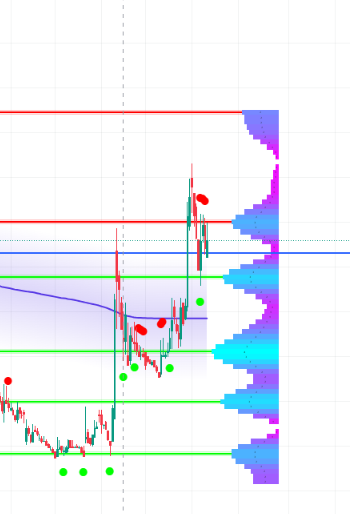
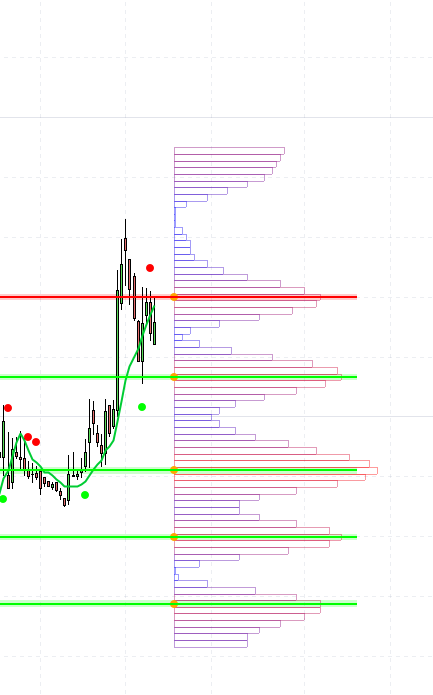
    De plus, est-il possible d’ajouter la nuance de couleur dans l’histogramme horizontale.

    Ci-joint les Screenshots pour voir la différence entre les 2 affichages.

    Merci d’avance pour ton aide

    #248208 quote
    Iván González
    Moderator
    Master

    Bonjour, vous pouvez remplacer la ligne 371 du code par celle-ci

    DRAWRECTANGLE(startHisto, binTop, startHisto + barLength, binBottom) coloured(r,g,b, 100)fillcolor(r,g,b)
    #248209 quote
    Manu L.
    Participant
    Average

    Bonjour, merci

    je vais tester

    Et pour la courbe bleue ?

    #250212 quote
    Manu L.
    Participant
    Average

    Merci Ivàn pour ce super job et ça fonctionne à la perfection.

    Cependant il manque la courbe bleue 🙁

    Ci-joint les Screenshots pour voir la différence entre les 2 affichages.

    Merci d’avance pour ton aide

    #255198 quote
    Manu L.
    Participant
    Average

    Bonjour à tous,

    une âme charitable pour me rajouter la ligne de code pour obtenir la courbe bleue?

    Merci

    #255201 quote
    jacquesgermain
    Participant
    Senior

    Bonjour

    voici l’indicateur ci-joint avec la courbe bleue (moyenne pondérée des pivots)

    #255207 quote
    Manu L.
    Participant
    Average

    Un grand merci merci

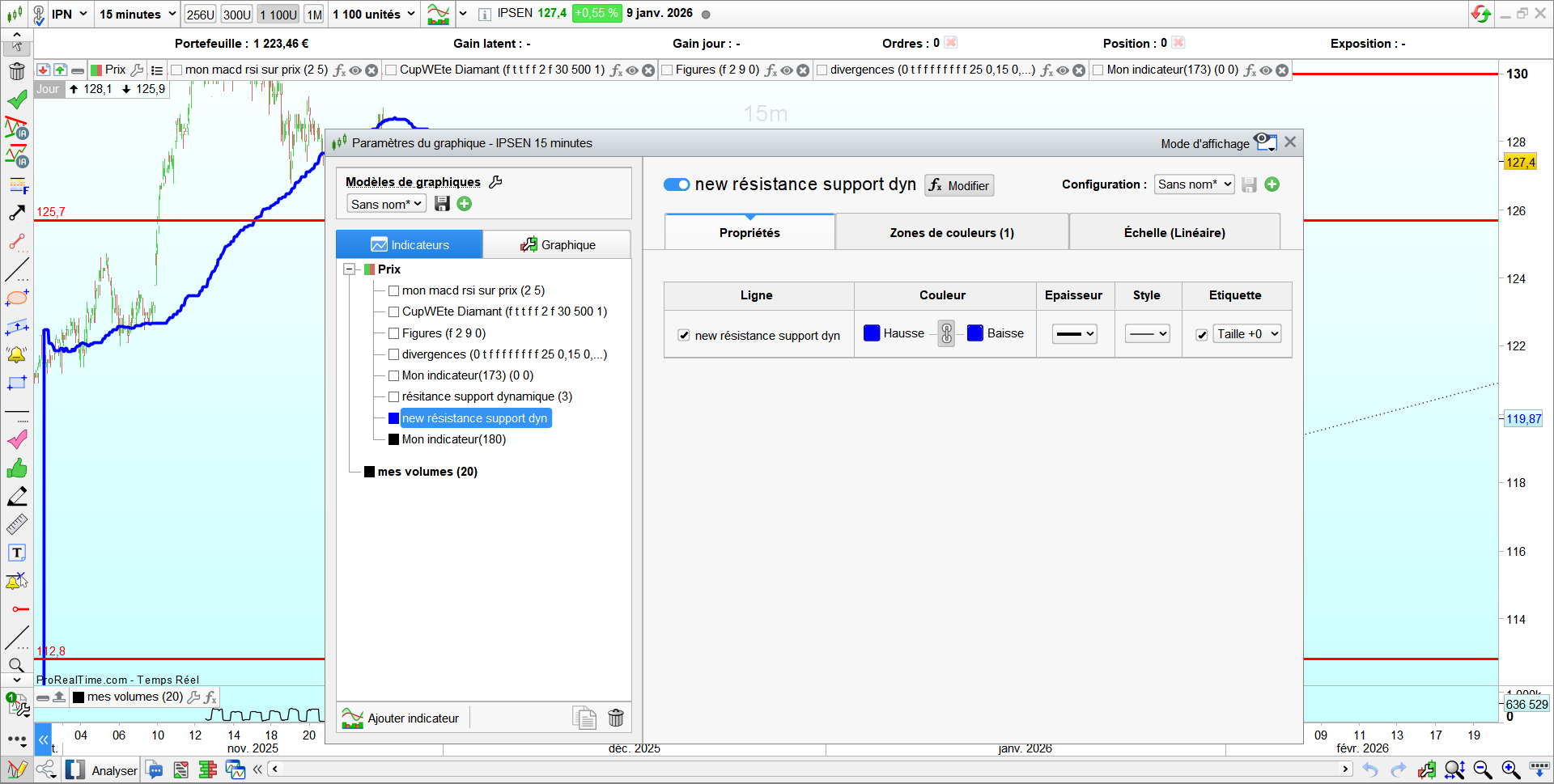
    Possible de la mettre en couleur bleue (ou autre) et un peu plus épaisse ?

    #255209 quote
    jacquesgermain
    Participant
    Senior

    a vous de régler épaisseur et couleur selon photo ci jointe

Viewing 10 posts - 1 through 10 (of 10 total)
  • You must be logged in to reply to this topic.

Conversion d’un code pour PRT Dynamic Support/Resistance Zones


ProBuilder : Indicateurs & Outils Personnalisés

New Reply
Author
author-avatar
Manu L. @manu-l Participant
Summary

This topic contains 9 replies,
has 3 voices, and was last updated by jacquesgermain
3 weeks, 2 days ago.

Topic Details
Forum: ProBuilder : Indicateurs & Outils Personnalisés
Language: French
Started: 06/10/2025
Status: Active
Attachments: 4 files
Logo Logo
Loading...