


Conversión del indicador Twin Range Filter de Tradingview

Viewing 3 posts - 1 through 3 (of 3 total)

  • Author
    Posts
  • #212247 quote
    sanchotasanchota
    Participant
    New

    ¿Puede alguien traducir este codigo de tradingnview a Prorealtime?Parece mas que interesante.

    El codigo es el siguiente:

    // This source code is subject to the terms of the Mozilla Public License 2.0 at https://mozilla.org/MPL/2.0/
    // © colinmck

    //@version=4

    study(title=”Twin Range Filter”, overlay=true)

    source = input(defval=close, title=”Source”)

    // Smooth Average Range

    per1 = input(defval=27, minval=1, title=”Fast period”)
    mult1 = input(defval=1.6, minval=0.1, title=”Fast range”)

    per2 = input(defval=55, minval=1, title=”Slow period”)
    mult2 = input(defval=2, minval=0.1, title=”Slow range”)

    smoothrng(x, t, m) =>
    wper = t * 2 – 1
    avrng = ema(abs(x – x[1]), t)
    smoothrng = ema(avrng, wper) * m
    smoothrng
    smrng1 = smoothrng(source, per1, mult1)
    smrng2 = smoothrng(source, per2, mult2)
    smrng = (smrng1 + smrng2) / 2
    // Range Filter

    rngfilt(x, r) =>
    rngfilt = x
    rngfilt := x > nz(rngfilt[1]) ? x – r nz(rngfilt[1]) ? nz(rngfilt[1]) : x + r
    rngfilt
    filt = rngfilt(source, smrng)

    upward = 0.0
    upward := filt > filt[1] ? nz(upward[1]) + 1 : filt < filt[1] ? 0 : nz(upward[1])
    downward = 0.0
    downward := filt filt[1] ? 0 : nz(downward[1])

    hband = filt + smrng
    lband = filt – smrng

    longCond = bool(na)
    shortCond = bool(na)
    longCond := source > filt and source > source[1] and upward > 0 or source > filt and source 0
    shortCond := source < filt and source 0 or source source[1] and downward > 0

    CondIni = 0
    CondIni := longCond ? 1 : shortCond ? -1 : CondIni[1]

    long = longCond and CondIni[1] == -1
    short = shortCond and CondIni[1] == 1

    // Plotting

    plotshape(long, title=”Long”, text=”Long”, style=shape.labelup, textcolor=color.black, size=size.tiny, location=location.belowbar, color=color.lime, transp=0)
    plotshape(short, title=”Short”, text=”Short”, style=shape.labeldown, textcolor=color.white, size=size.tiny, location=location.abovebar, color=color.red, transp=0)

    // Alerts

    alertcondition(long, title=”Long”, message=”Long”)
    alertcondition(short, title=”Short”, message=”Short”)

    #212294 quote
    NicolasNicolas
    Keymaster
    Legend

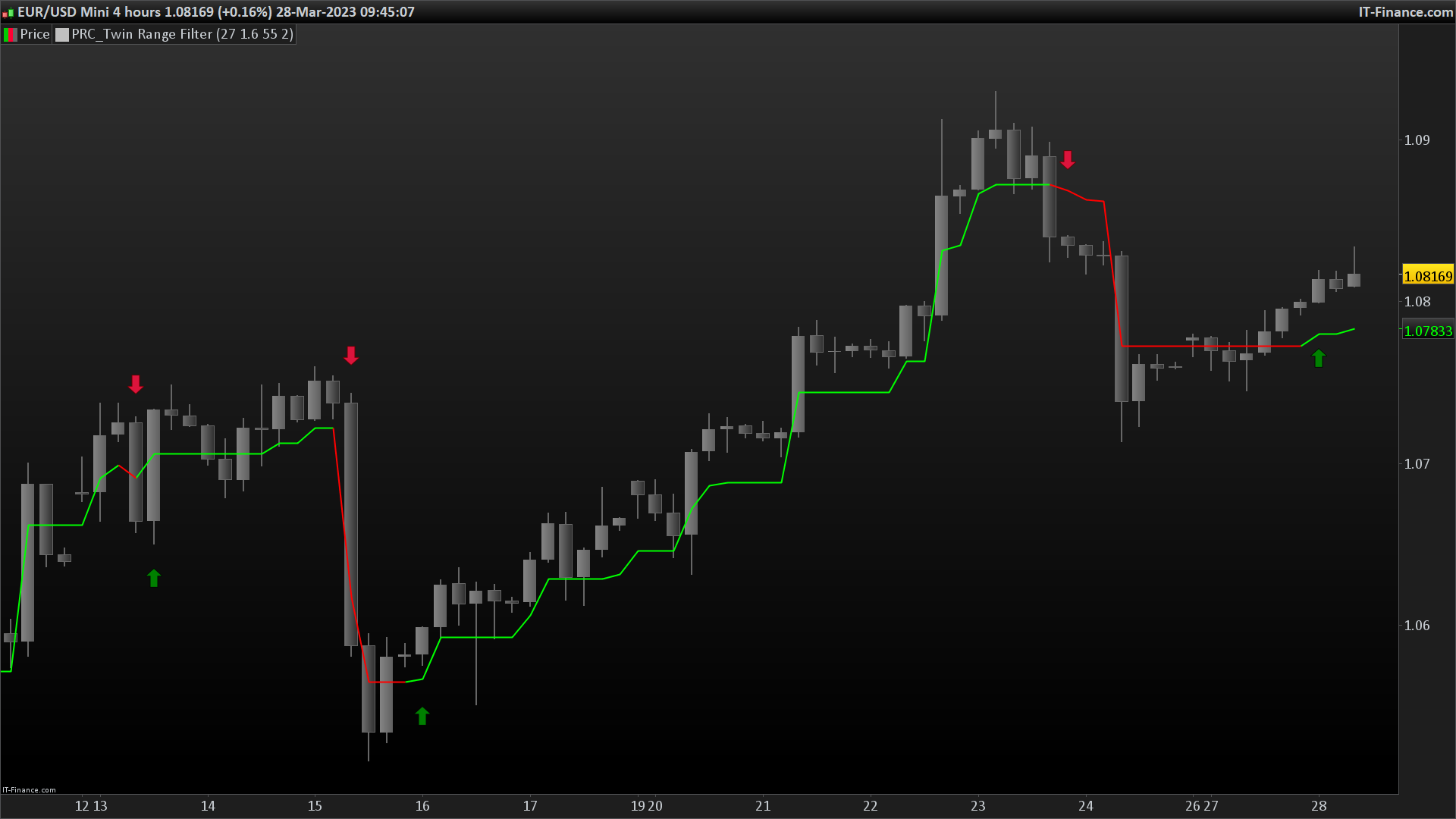
    Mismo indicador que: Filtro de rango pero esta vez usa 2 veces el indicador con diferentes periodos y hace un promedio. Agrega flechas cuando cambia el color. Hice la traducción completa del código, puedes encontrarlo aquí: Twin Range Filter

    twin-range-filter-prorealtime.png twin-range-filter-prorealtime.png
    #212296 quote
    sanchotasanchota
    Participant
    New

    Eres mi mejor amigo hoy… yo, yo,… muchas gracias.

Viewing 3 posts - 1 through 3 (of 3 total)
  • You must be logged in to reply to this topic.

ProRealAI ProRealAI New

Stuck on this ProBuilder code?

Describe what this topic is trying to build, in plain English, and ProRealAI writes the ProRealTime™ indicator, screener or system for you.

Available in 7 languages
Try ProRealAI

Conversión del indicador Twin Range Filter de Tradingview


ProBuilder: Indicadores y Herramientas

New Reply
Author
author-avatar
sanchota @sanchota Participant
Summary

This topic contains 2 replies,
has 2 voices, and was last updated by sanchotasanchota

3 years, 6 months ago.

Topic Details
Forum: ProBuilder: Indicadores y Herramientas
Language: Spanish
Started: 03/27/2023
Status: Active
Attachments: 1 files
ProRealCode ProRealCode
Loading...

