Constant Volume Candles Chart for ProOrder

Viewing 7 posts - 1 through 7 (of 7 total)

  • Author
    Posts
  • #225505 quote
    Fabienml
    Participant
    New

    Hi,

    As Constant Volume candles are not available for ProOrder, i tried to work on a code to develop an indicator that could be used to place orders through a ProOrder Strategy. However, i couldn’t make it work.

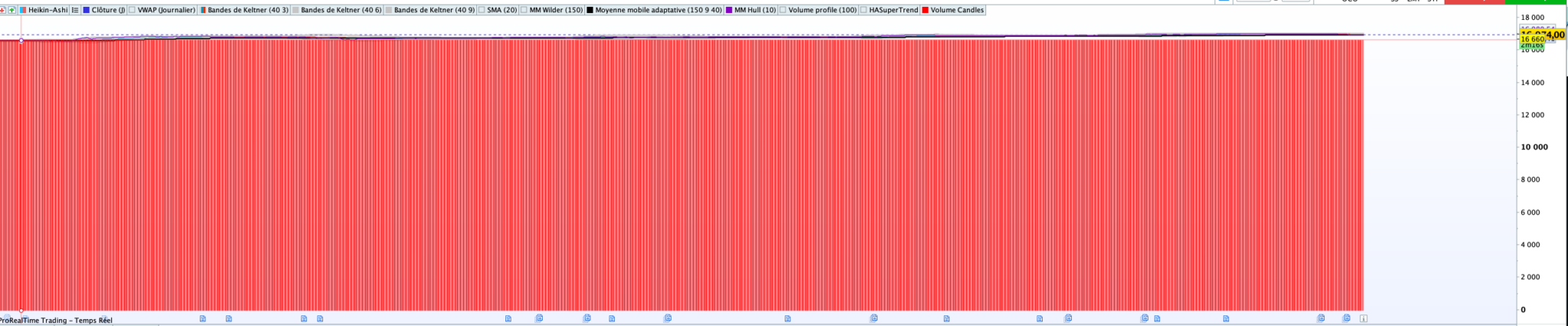
    It seems to not display the candles properly, therefore i must make mistake in the candles parameters calculations but i can’t find the solution.

    Here is the draft i started, can anyone help me to make that work properly ?

    Thanks a lot in advance !

    // Paramètres de l'indicateur
    volumeSeuil = 10000 // Volume seuil pour chaque bougie
    
    // Variables
    cumulVolume = 0 // Cumul du volume
    debutBougie = UNDEFINED // Début de la bougie à volume constant
    bougieEnCours = 0 // Indicateur si une bougie est en cours de formation (0 pour non, 1 pour oui)
    openBougie = 0
    highBougie = 0
    lowBougie = 0
    closeBougie = 0
    
    // Calcul des bougies à volume constant
    FOR i = 0 TO BarIndex
        cumulVolume = cumulVolume + volume[i]
    
        IF cumulVolume >= volumeSeuil THEN
            IF debutBougie = UNDEFINED THEN
                debutBougie = i
                openBougie = open[i]
                highBougie = high[i]
                lowBougie = low[i]
            ELSE
                highBougie = MAX(highBougie, high[i])
                lowBougie = MIN(lowBougie, low[i])
            ENDIF
            closeBougie = close[i]
            bougieEnCours = 1
        ENDIF
    
        IF bougieEnCours = 1 AND (cumulVolume >= volumeSeuil OR i = BarIndex) THEN
            // Affichage de la bougie
            DRAWCANDLE(openBougie, highBougie, lowBougie, closeBougie) COLOURED (255, 0, 0)
            
            // Réinitialisation pour la prochaine bougie
            debutBougie = UNDEFINED
            cumulVolume = 0
            bougieEnCours = 0
            // Réinitialiser highBougie et lowBougie pour la prochaine bougie
            highBougie = UNDEFINED
            lowBougie = UNDEFINED
        ENDIF
    NEXT
    
    RETURN
    
    Capture-decran-2023-12-20-a-11.17.44.png Capture-decran-2023-12-20-a-11.17.44.png
    #225510 quote
    JS
    Participant
    Senior

    Hi @Fabienmi,

    I think the “Constant Volume Candles” are present in PRT, because you have the option to select a time frame which is not based on time but on (equal) volumes…

    Go to “TimeFrame” in your graph and select “10k volumes”…

    Scherm­afbeelding-2023-12-20-om-13.23.22.png Scherm­afbeelding-2023-12-20-om-13.23.22.png
    #225512 quote
    Fabienml
    Participant
    New
    Hi JS, Yes i actually already use that for manual trading. The reason for this indicator is that auto trading doesn’t work with constant volume candle, so i need to rebuild an indicator to make it work.
    #225516 quote
    JS
    Participant
    Senior

    Hi Fabien,

    That’s right, the non-time related timeframes don’t work with pro-order…

    Do you think your indicator will work with pro-order…?

    (A “good” indicator for this will have to be based on “tick-data” which is also not time related…)

    #225517 quote
    ashehzi
    Participant
    Average
    I have tried it before and it works. In your chart, e.g. open nas chart with 12500 volume candles, then backtest/deploy your algo, it will run on that. At least it used to before.
    #225519 quote
    ashehzi
    Participant
    Average
    Please ignore my post, it isn’t working
    #225546 quote
    Jean FX
    Moderator
    New
    As far as I know, it’s impossible to reproduce this constant volume indicator using a linear unit of time, which is the only choice available in autotrading. It is the principle of this indicator to be dependent only on volume and not on time.
    ashehzi thanked this post
Viewing 7 posts - 1 through 7 (of 7 total)
  • You must be logged in to reply to this topic.

Constant Volume Candles Chart for ProOrder


ProOrder: Automated Strategies & Backtesting

New Reply
Author
author-avatar
Fabienml @fabienml Participant
Summary

This topic contains 6 replies,
has 4 voices, and was last updated by Jean FX

2 years, 2 months ago.

Topic Details
Forum: ProOrder: Automated Strategies & Backtesting
Language: English
Started: 12/20/2023
Status: Active
Attachments: 2 files
Logo Logo
Loading...