Computer performance?

Viewing 5 posts - 16 through 20 (of 20 total)
  • Author
    Posts
  • #137057 quote
    robertogozzi
    Moderator
    Master

    Cleaning tools, or Apps, get rid of garbage files left on hard disks by installers, orphaned entries in the registry (system file) etc…

    Together with defragmentation may help gain some performance.

    GraHal thanked this post
    #138358 quote
    nowuseeme
    Participant
    New

    I was asking for everyone as I’m interested in what cleaning tools did you try? I know that they do a great work and the PC can run very well. I’ve tried them and I really like their effect on my computer’s performance. I was informed about many programs and I found the best of them on the https://thinkmobiles.com/blog/best-registry-cleaner-tools/ . There are described so many details about them that it can help us to choose the suitable app for us. Now my PC is working faster and better and it is so cool that I must not wait for a long period of time to do all the operations and I have time for other things that I have to do.

    #138363 quote
    GraHal
    Participant
    Master

    Thanks for that useful link, I like comparison Tables.

    Which Apps / Tools did you use @nowuseeme?

    #138419 quote
    DowBoy
    Participant
    New

    Hi All


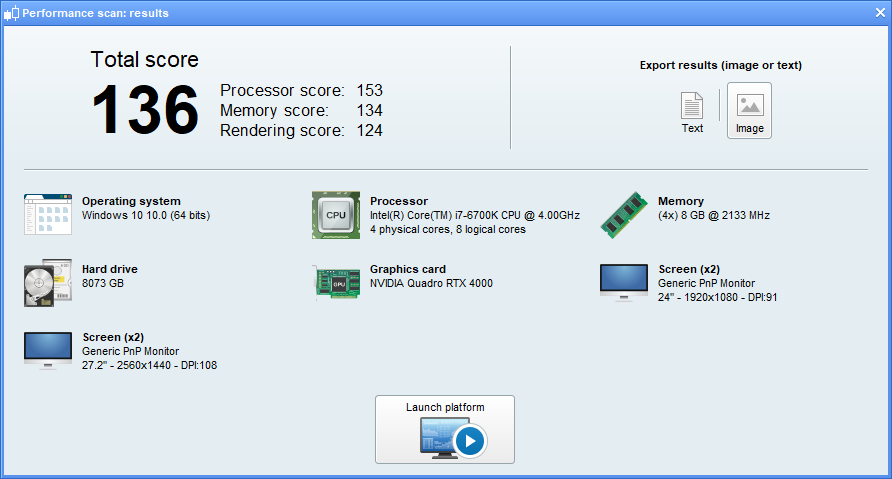
    I just ran a report.

    Got a total score of 136


    But I feel you need a comparison, like some kind of table / a guide to how the scores rank.

    Does PRT keep a database of ran performance scan results?

    Is this information relayed back to PRT?


    Cheers

    JC

    results.png results.png
    #191753 quote
    RafaelN
    Moderator
    Senior

    Hello DowBoy, as pointed out at the beginning of the thread this feature is more for you to compare two of your computers to find out which one would be better suited for the platform. To the best of my knowledge there isn’t a data base of results to benchmark your score, but after asking PRT’s support team a score above 100 is a good one and it is very hard to get to 150 so 136 seems really good.

    Also the feature breaks down your computer into 3 main components with their own respective scores which allows you to see where a potential weakness could come from if you suspect there is any.

    The results aren’t sent automatically to PRT: if you want to do that you have to send them an email yourself attaching the picture.

Viewing 5 posts - 16 through 20 (of 20 total)
  • You must be logged in to reply to this topic.

Computer performance?


Platform Support: Charts, Data & Broker Setup

New Reply
Author
author-avatar
Eric @eric Participant
Summary

This topic contains 19 replies,
has 12 voices, and was last updated by RafaelN

3 years, 10 months ago.

Topic Details
Forum: Platform Support: Charts, Data & Broker Setup
Language: English
Started: 03/11/2018
Status: Active
Attachments: 4 files
Logo Logo
Loading...