


Code to use ProScreener to search based on Ichimoku criteria

Viewing 2 posts - 1 through 2 (of 2 total)

  • Author
    Posts
  • #136291 quote
    Jon Lane
    Participant
    New

    Code to use ProScreener to search based on Ichimoku criteria

    Hi, I have just started to use PRT via my IG a/c. I am impressed with it but I have a Q please. I want to set up a ProScreener to search for instruments where the Ichimoko Tenkan (turning) line has crossed the Kijun (base) line plus ideally when it has done that above the Senkou span A (top of bullish cloud) or below the Senkou span B (below the bearish cloud). Can anyone in the forum advise has this been done before in the community, if so how can I get a copy of the code or could someone advise how I can set it up please. ProScreener does not seem to give me the option for Ichimoku in the same way as i could do that for e.g.Bollinger bands.  I don’t understand why i can’t do it. Any  help in setting up would be very much appreciated. Many thanks. I also want to add RSI and volume criteria but both of these seem straight forward. Thanks in advance. Best wishes, Jon lane

    #145820 quote
    robertogozzi
    Moderator
    Master

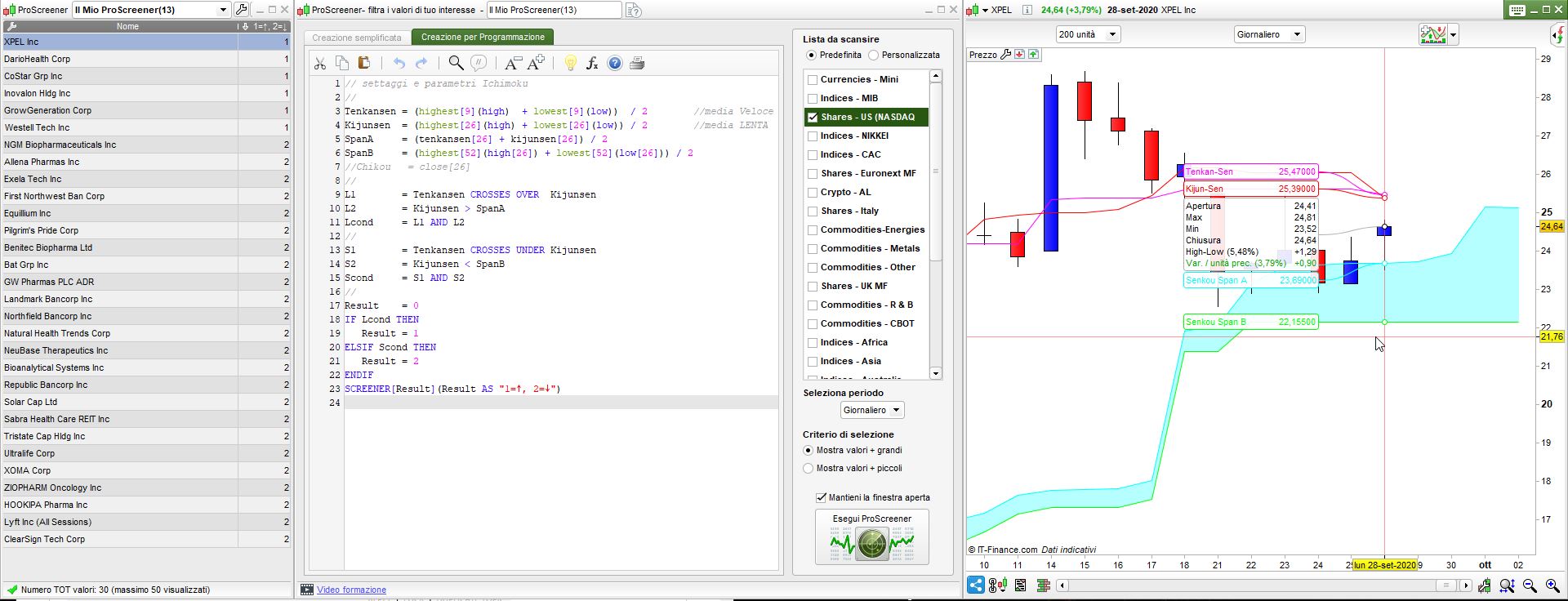
    There you go:

    // Ichimoku settings
    //
    TenkansenX = (highest[9](high)  + lowest[9](low))  / 2
    KijunsenX  = (highest[26](high) + lowest[26](low)) / 2
    SpanAx     = (TenkansenX[26] + KijunsenX[26]) / 2
    SpanBx     = (highest[52](high[26]) + lowest[52](low[26])) / 2
    //ChikouX  = close[26]
    //
    L1         = TenkansenX CROSSES OVER  KijunsenX
    L2         = KijunsenX > SpanAx
    Lcond      = L1 AND L2
    //
    S1        = TenkansenX CROSSES UNDER KijunsenX
    S2        = KijunsenX < SpanBx
    Scond     = S1 AND S2
    //
    Result    = 0
    IF Lcond THEN
       Result = 1
    ELSIF Scond THEN
       Result = 2
    ENDIF
    SCREENER[Result](Result AS "1=↑, 2=↓")

    I had to add a final “X” to Ichimoku names because v11 has those names built-in and can’t be used as variable names. This will work in v10.3, as well.

    x-13.jpg x-13.jpg
Viewing 2 posts - 1 through 2 (of 2 total)
  • You must be logged in to reply to this topic.

Code to use ProScreener to search based on Ichimoku criteria


ProScreener: Market Scanners & Detection

New Reply
Author
author-avatar
Jon Lane @jon-lane Participant
Summary

This topic contains 1 reply,
has 2 voices, and was last updated by robertogozzi
5 years, 5 months ago.

Topic Details
Forum: ProScreener: Market Scanners & Detection
Language: English
Started: 06/17/2020
Status: Active
Attachments: 1 files
Logo Logo
Loading...

