No, I was talking about your previous post, to exit 75% of the whole position in three steps, without using different flags and sevarel IF…ENDIF’s:
// partial close
ONCE partialclose = 1
ONCE PerCent      = 0.25             //25%  = positions to close
ONCE PerCentGain  = 0.005            //0.5% increase
ONCE MinLotSize   = 0.5              //0.5  lots minimum
//
if partialclose and OnMarket then
   ExitQuantity   = max(ExitQuantity[1],abs(CountOfPosition) * PerCent)
   LeftQty        = max(MinLotSize,abs(CountOfPosition) - ExitQuantity)
   CloseQuantity  = abs(CountOfPosition) - LeftQty
else
   CloseQuantity  = 0
endif
//
IF close >= (PositionPrice * (1 + PerCentGain)) AND LongOnMarket AND CloseQuantity > 0 THEN
   SELL CloseQuantity Contracts AT Market
ENDIF
Example on Dax, daily TF:
// partial close
ONCE partialclose = 1
ONCE PerCent      = 0.25             //25%  = positions to close
ONCE PerCentGain  = 0.005            //0.5% increase
ONCE MinLotSize   = 0.5              //0.5  lots minimum
//
if partialclose and OnMarket then
   ExitQuantity   = max(ExitQuantity[1],abs(CountOfPosition) * PerCent)
   LeftQty        = max(MinLotSize,abs(CountOfPosition) - ExitQuantity)
   CloseQuantity  = abs(CountOfPosition) - LeftQty
else
   CloseQuantity  = 0
endif
//
IF close crosses over average[200] and Not OnMarket then
   buy 10 contracts at market
   set target pProfit 1000
   set stop   pLoss   500
endif
//
IF close >= (PositionPrice * (1 + PerCentGain)) AND LongOnMarket AND CloseQuantity > 0 THEN
   SELL CloseQuantity Contracts AT Market
ENDIF
graph abs(countofposition)
The use of [1] in line 8 is to make sure it never falls below the previous value, so that the percentage of 25%, whatever the number it is calculated on, remains unchanged.
So that will make a 25% partial close at each .5% increase? Doesn’t it need the flag to keep it from repeating each step?
You are right ,
I added Increments to my example above, so that the percentage is increased each new closure by PerCentGain steps:
// partial close
ONCE partialclose = 1
ONCE PerCent      = 0.25             //25%  = positions to close
ONCE PerCentGain  = 0.005            //0.5% increase
ONCE MinLotSize   = 0.5              //0.5  lots minimum
ONCE Increments   = 1
//
if partialclose and OnMarket then
   ExitQuantity   = max(ExitQuantity[1],abs(CountOfPosition) * PerCent)
   LeftQty        = max(MinLotSize,abs(CountOfPosition) - ExitQuantity)
   CloseQuantity  = abs(CountOfPosition) - LeftQty
else
   CloseQuantity  = 0
   Increments     = 1
endif
//
IF close crosses over average[200] and Not OnMarket then
   buy 10 contracts at market
   set target pProfit 1000
   set stop   pLoss   500
endif
//
IF close >= (PositionPrice * (1 + (PerCentGain * Increments))) AND LongOnMarket AND CloseQuantity > 0 THEN
   SELL CloseQuantity Contracts AT Market
   Increments = Increments + 1
ENDIF
graph abs(countofposition)
graph PerCentGain * Increments
graph ExitQuantity
you can also remove and Not OnMarket to accumulate positions.
that looks great, and far more elegant.
but now I’m thinking it would be better to be able to alter the percent and percentgain independently. so, for example, it might close 0.3 of the position after a 0.6% gain, then 0.5 at 1.6% gain (all percentages to be optimized).
This seems to work, but it looks very clunky compared to yours:
ONCE partialclose = 1
ONCE PerCent     = pc              //10%  positions to close
ONCE PerCent2     = pc2              //25%  positions to close
ONCE PerCentGain = pcg            //0.5%  increase
ONCE PerCentGain2 = pcg2            //1%  increase
ONCE MinLotSize  = 0.5              //0.5  lots minimum
ExitQuantity     = abs(CountOfPosition) * PerCent
LeftQty          = max(MinLotSize,abs(CountOfPosition) - ExitQuantity)
CloseQuantity    = abs(CountOfPosition) - LeftQty

ExitQuantity2     = abs(CountOfPosition) * PerCent2
LeftQty2          = max(MinLotSize,abs(CountOfPosition) - ExitQuantity2)
CloseQuantity2    = abs(CountOfPosition) - LeftQty2

IF Not OnMarket THEN
Flag = 1
ENDIF

IF partialclose AND LongOnMarket and close >= (PositionPrice * (1 + PerCentGain))  AND Flag THEN
SELL CloseQuantity Contracts AT Market
Flag = 0
endif

IF Not OnMarket THEN
Flag2 = 1
ENDIF

IF partialclose AND LongOnMarket and  close >= (PositionPrice * (1 + PerCentGain2)) AND Flag2 THEN
SELL CloseQuantity2 Contracts AT Market
Flag2 = 0
endif
endif
Yes, but if percentages need to be different you have no choice but do as you’ve done.
Well… you could use arrays… but that’s more complicated!
Ok, I’ll stay with what I’ve got then – thanks for confirming.
I was wondering if this code is valid, bit confused with use of ONCE function
What I am trying is – once the price trades above 10% of Positionprice, LTU condition is valid forever – even if price comes under 10% of position price. I am trying to replace ONCE PIP in above code with percentage.
Once PercentLTU=1.1

LTU=Close>PERCENTLTU*Positionprice

IF longonmarket and ExitClose and LTU then
Sell at MARKET
ENDIF
Line 3 changes every bar, so LTU isn’t valid forever!
ONCE is used only in line 1 because PercentLTU never changes.
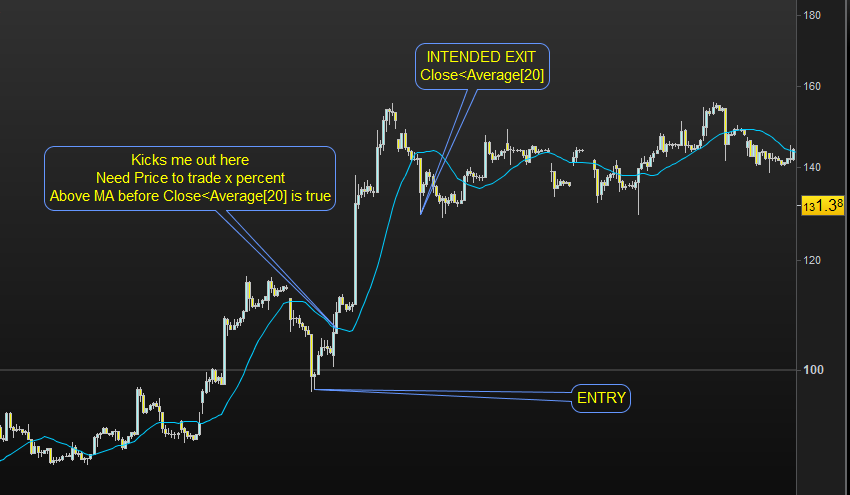
thanks. Then how would it be possible to allow price to trade above the MA and then exit it when it closes below MA. For example, how to have the strategy do nothing before price trades above a Moving average after entry (eg. price is now above Daily 20 MA, but entry was well below that MA.
Please see the attached image.
Exit:
If OnMarket AND close CROSSES OVER average[20] THEN
   SELL AT MARKET      //Long
   EXITSHORT AT MARKET //Short
ENDIF
I am not sure I really understood your question, though.
Can you make an example with the percentage you talked about?
Timeframe (daily)
MA=Average[20]
Dailyclose=close

//Entry price is well below daily MA or Daily MA is still bearish at Entry
Timeframe (1 Hour)
If price crosses over Average [10] then
Buy 1 contract at Market
Endif

//Below condition is triggered when Daily MA tries to turn bullish and exit trade prematurely
If longonmarket and Dailyclose<MA then
Sell at market
Endif
Entry is no issue. Problem is that the entry is below the daily MA, as the price hovers around the daily MA in the process of turning bullish for first time after trade entry, the exit condition is triggered. To solve this i wanted price to trade 20% above positionprice. Once the 20% mark is reached, the exit condition always remains true. For example, If entry price is $10, price goes to $15 and then returns to $11 – I want to exit if Dailyclose<MA in below code.
Once PercentLTU=1.1
LTU=Close>PERCENTLTU*Positionprice

If longonmarket and Dailyclose<MA and LTU then
Sell at market
Endif
I was assuming the below code does what I am saying above. I wanted to replace pips with percentage. For below code when price trades above 20 pips from position price, the condition is still true if the price comes back to say 10 pips from position price.
ONCE PerCent     = 0.5              //50%  = positions to close
ONCE Pips        = 20 * PipSize
ONCE MinLotSize  = 0.5              //0.5  lots minimum
ExitQuantity     = abs(CountOfPosition) * PerCent
RemainQty        = max(MinLotSize,abs(CountOfPosition) - ExitQuantity)
CloseQuantity    = abs(CountOfPosition) - RemainQty
IF close >= (PositionPrice + Pips) AND LongOnMarket THEN
   SELL CloseQuantity Contracts AT Market
ELSIF close <= (PositionPrice - Pips) AND ShortOnMarket THEN
   EXITSHORT CloseQuantity Contracts AT Market
ENDIF
This is the code you need (not tested):
Timeframe (daily)
MA=Average[20]
Dailyclose=close

//Entry price is well below daily MA or Daily MA is still bearish at Entry
Timeframe (1 Hour)
IF Not OnMarket THEN
   ExitFlag = 0
ENDIF
If price crosses over Average [10] then
   Buy 1 contract at Market
Endif
IF close >= (PositionPrice * 1.2) THEN
      ExitFlag = 1                       //Signal when current price reaches +20%
ENDIF
//Below condition is triggered when Daily MA tries to turn bullish and exit trade prematurely
If longonmarket and Dailyclose<MA AND ExitFlag then
   Sell at market
Endif
I just added a flag to signal when exit is allowed (after reaching +20%) once it retraces below MA.