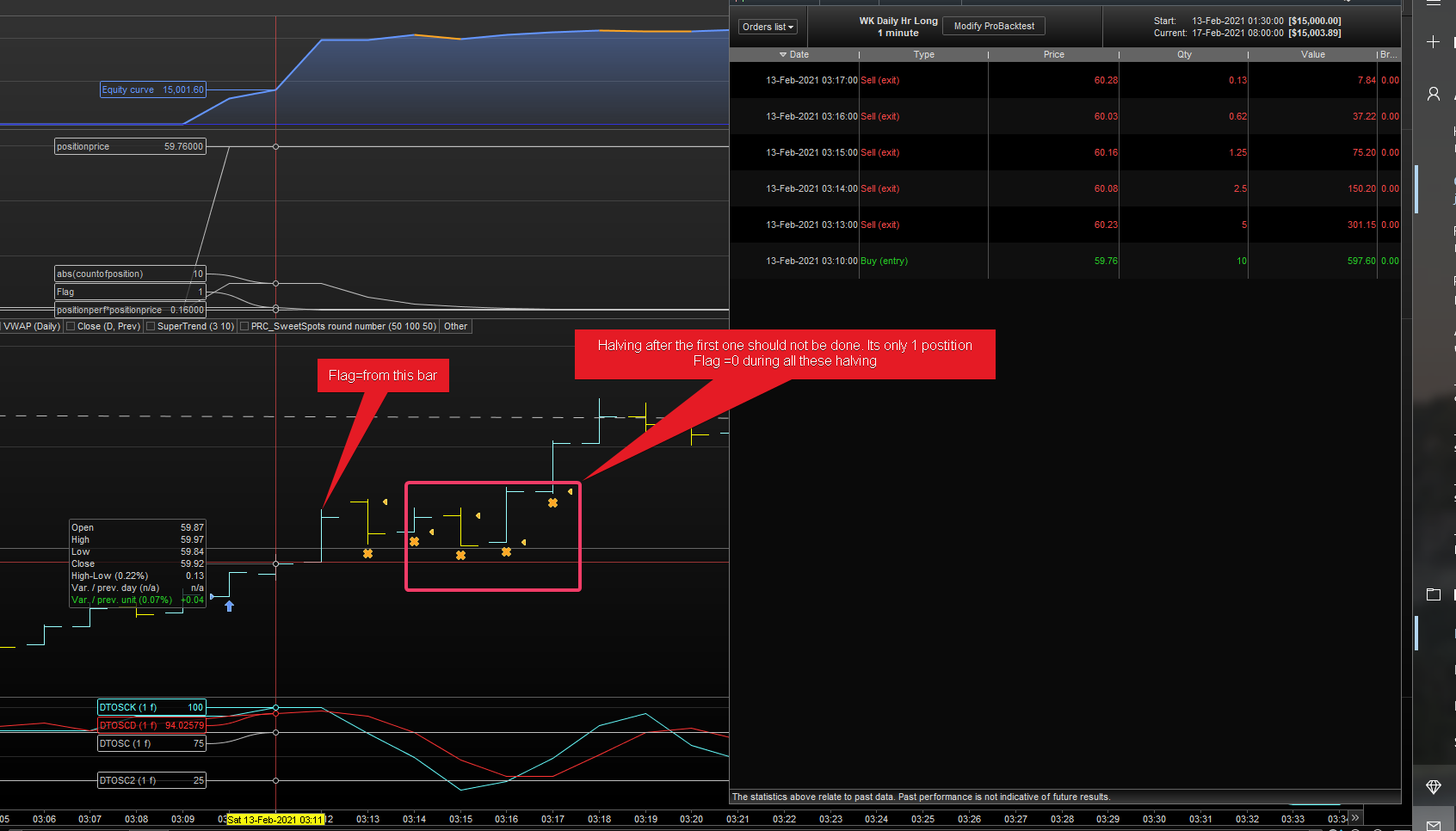
No, it’s not halving a position despite Flag=0, it’s Flag=0 because a position had been halved (because Flag=1 before that partial closure).
Bear in mind that GRAPH shows the value retained at the end of the execution, not the one retained ar the beginning (the beginning is just the end of the previous candle).
I get what you mean. See image below.
Note that only 1 buy order was executed and all the orders closed are half of remaining position.
The first halving is correct, and Flag thereafter is zero. So, I wonder why its continuing to execute the code despite the FLAG=1 condition not being met. If I check previous bars from 2nd halving as highlighted in image, Flag is zero, so code should not run after the first 50% is closed. In this case, its halving until, the qty is less than 0.5 contract.
I can only try to replicate your trades, provided:
- you post the code you used in your tests
- you post what instrument, TF, date and time those trades refer to
This is the code,
Instrument- APT (Afterpay Ltd) in 1 Min Timeframe. 3K unit data loaded
// Definition of code parameters
DEFPARAM CumulateOrders = False // Cumulating positions deactivated
Timeframe (Daily)
indicator1d, indicator2d, ignored, ignored = CALL DTOSC[1, 0](close)


Timeframe (1 Hour)
indicator1, indicator2, ignored, ignored = CALL DTOSC[1, 0](close)
c1 = (indicator1 >= indicator2 ) or (indicator2<25)

Condition=C1 and (indicator1d>indicator2d)

// Conditions to enter long positions
ONCE PerCent     = 0.5              //50%  = positions to close
ONCE Pips        = 20 * PipSize
ONCE MinLotSize  = 0.5              //0.5  lots minimum
ExitQuantity     = abs(CountOfPosition) * PerCent
LeftQty          = max(MinLotSize,abs(CountOfPosition) - ExitQuantity)
CloseQuantity    = abs(CountOfPosition) - LeftQty
IF Not OnMarket THEN
Flag = 1
ENDIF
IF close crosses over highest[20](high[1]) and Condition and not OnMarket THEN
buy 10 contract at market
endif
//IF close crosses under lowest[20](low[1]) and not OnMarket THEN
//sellshort 1 contract at market
//endif
IF close >= (PositionPrice + Pips) AND LongOnMarket AND Flag THEN
SELL CloseQuantity Contracts AT Market
Flag = 0
ELSIF close <= (PositionPrice - Pips) AND ShortOnMarket AND Flag THEN
EXITSHORT CloseQuantity Contracts AT Market
Flag = 0
ENDIF
set target pprofit 200
set stop   ploss   100
graph abs(countofposition)
graph Flag
graph positionperf*positionprice
graph positionprice
The DTOSC in the library requires no parameters.
Please post a complete working code or I won’t be able to help you!
Post the ITF file of the indicator.
I had modified the DTOSC code to include cross over dot that’s why it needs two values. Here is the ITF file attached
Itested it on DAX because with Afterpay Ltd I couldn’t get any trade.
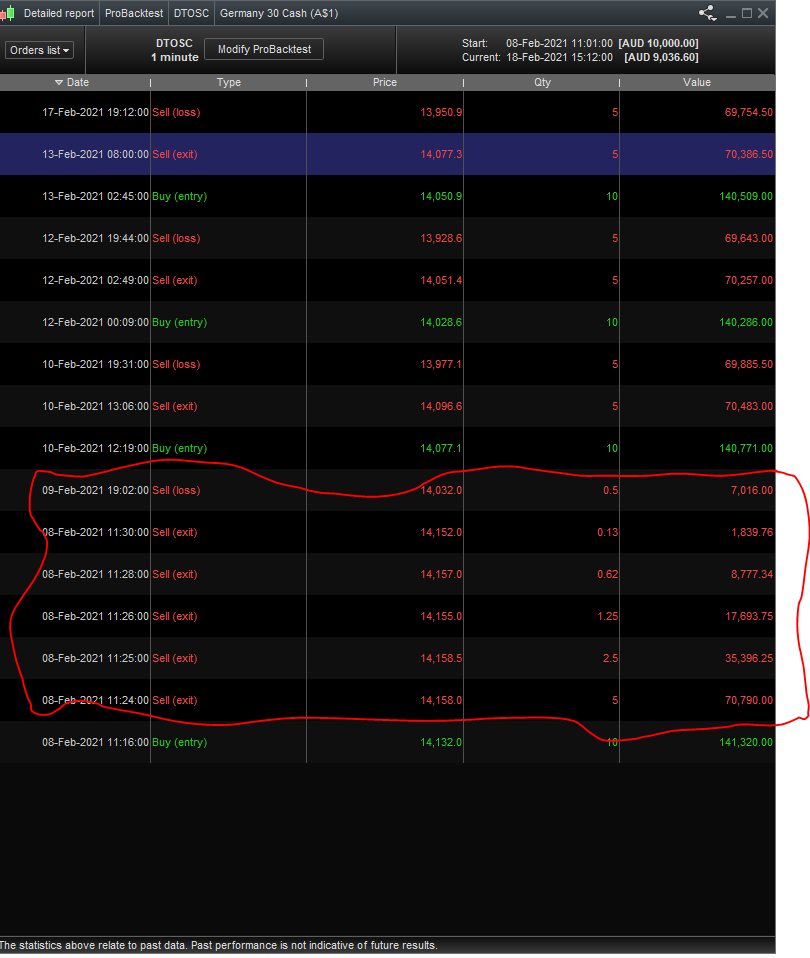
Everything works fine and it halves positions only once per trade.
Ran the same code in DAX, it keeps halving positions, see the image attached
Ok, I got it.
It’s because you are using the MTF support incorrectly.
You are using a 1-minute TF but have no support for the DEFAULT TF, so it is executed every minute but you have writtem only instructions for the Daily and 1h TF’s.
If you add UPDATEONCLOSE to your TIMEFRAME instruction everything is fine.
If you DO NOT want to use UPDATEONCLOSE then you have to use TIMEFRAME(default) for the FLAG variable, as follows:
// Definition of code parameters
DEFPARAM CumulateOrders = False // Cumulating positions deactivated
Timeframe (Daily)
indicator1d, indicator2d, ignored, ignored = CALL DTOSC[1, 0](close)


Timeframe (1 Hour)
indicator1, indicator2, ignored, ignored = CALL DTOSC[1, 0](close)
c1 = (indicator1 >= indicator2 ) or (indicator2<25)

Condition=C1 and (indicator1d>indicator2d)

// Conditions to enter long positions
ONCE PerCent     = 0.5              //50%  = positions to close
ONCE Pips        = 20 * PipSize
ONCE MinLotSize  = 0.5              //0.5  lots minimum
ExitQuantity     = abs(CountOfPosition) * PerCent
LeftQty          = max(MinLotSize,abs(CountOfPosition) - ExitQuantity)
CloseQuantity    = abs(CountOfPosition) - LeftQty
timeframe(default)
IF Not OnMarket THEN
Flag = 1
ENDIF
Timeframe (1 Hour)
IF close crosses over highest[20](high[1]) and Condition and not OnMarket THEN
buy 10 contract at market
endif
//IF close crosses under lowest[20](low[1]) and not OnMarket THEN
//sellshort 1 contract at market
//endif
Timeframe(default)
IF close >= (PositionPrice + Pips) AND LongOnMarket AND Flag=1 THEN
SELL CloseQuantity Contracts AT Market
Flag = 0
ELSIF close <= (PositionPrice - Pips) AND ShortOnMarket AND Flag=1 THEN
EXITSHORT CloseQuantity Contracts AT Market
Flag = 0
ENDIF
set target pprofit 200
set stop   ploss   100
//
graph abs(countofposition)
graph Flag
graph positionperf*positionprice
Thank you. You are right. Its now working as expected. Thanks for the help
Ciao Roberto, thanks very much for the work you’ve done on the partial close code.
If I wanted to close 25% of my position after a .5% gain, another 25% after 1% gain, and the same after 1.5% (leaving the remainder to run to the TP or trailing stop) would this be the best way to do it?
// partial close
ONCE partialclose = 1
if partialclose then
ONCE PerCent     = 0.25              //25%  = positions to close
ONCE PerCentGain = 0.005            //0.5% increase
ONCE MinLotSize  = 0.5              //0.5  lots minimum
ExitQuantity     = abs(CountOfPosition) * PerCent
LeftQty          = max(MinLotSize,abs(CountOfPosition) - ExitQuantity)
CloseQuantity    = abs(CountOfPosition) - LeftQty
IF Not OnMarket THEN
Flag = 1
ENDIF
IF close >= (PositionPrice * (1 + PerCentGain)) AND LongOnMarket AND Flag THEN
SELL CloseQuantity Contracts AT Market
Flag = 0
ENDIF

ONCE PerCentGain2 = 0.01            //1%  increase
ExitQuantity     = abs(CountOfPosition) * PerCent
LeftQty          = max(MinLotSize,abs(CountOfPosition) - ExitQuantity)
CloseQuantity    = abs(CountOfPosition) - LeftQty
IF Not OnMarket THEN
Flag2 = 1
ENDIF
IF close >= (PositionPrice * (1 + PerCentGain2)) AND LongOnMarket AND Flag2 THEN
SELL CloseQuantity Contracts AT Market
Flag2 = 0
ENDIF

ONCE PerCentGain3 = 0.015            //1.5%  increase
ExitQuantity     = abs(CountOfPosition) * PerCent
LeftQty          = max(MinLotSize,abs(CountOfPosition) - ExitQuantity)
CloseQuantity    = abs(CountOfPosition) - LeftQty
IF Not OnMarket THEN
Flag3 = 1
ENDIF
IF close >= (PositionPrice * (1 + PerCentGain3)) AND LongOnMarket AND Flag3 THEN
SELL CloseQuantity Contracts AT Market
Flag3 = 0
ENDIF
endif
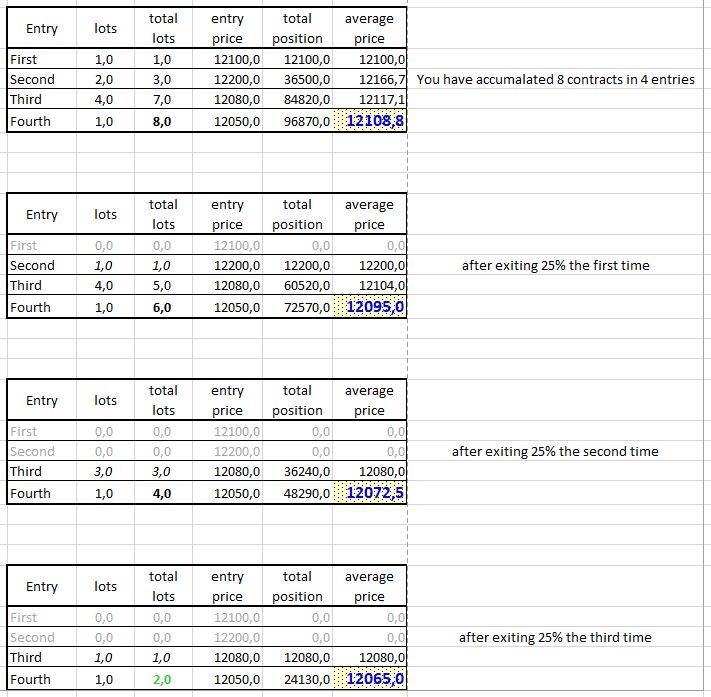
That’s correct, but you only need the EXITING calculations and instructions only ONCE, since the next time it will still be 25% of the remaining opositions. Well… not exactly, if you BUY 8 contracts the first time you will close 2 contracts (8 * 0.25), while next time you will close 1.5 contracts (6 * 0.25), etc…
To overcome this, if you plan to always close, not a percentage, but a fixed number like the first time, you simply need to compute the number of contracts to exit the first time and use that number (instead of a percentage) for any subsequent closure.
In any case you don’t need to use 3 IF…ENDIF’s.
Of course that would be completely different if you wanted to close, say 10% the first time, then 13% the second time, 21% the third time, etc…
you only need the EXITING calculations and instructions only ONCE
ah yes, of course (too much copy and pasting), thanks for that!
that would be completely different if you wanted to close, say 10% the first time, then 13% the second time, 21% the third time
Something like this then?
// partial close
ONCE partialclose = 1
if partialclose then
ONCE PerCent     = 0.1              //10%  positions to close
ONCE PerCent2     = 0.2              //20%  positions to close
ONCE PerCent3     = 0.4              //40%  positions to close
ONCE PerCentGain = 0.005            //0.5%  increase
ONCE PerCentGain2 = 0.01            //1%  increase
ONCE PerCentGain3 = 0.015            //1.5%  increase
ONCE MinLotSize  = 0.5              //0.5  lots minimum
ExitQuantity     = abs(CountOfPosition) * PerCent
LeftQty          = max(MinLotSize,abs(CountOfPosition) - ExitQuantity)
CloseQuantity    = abs(CountOfPosition) - LeftQty

ExitQuantity2     = abs(CountOfPosition) * PerCent2
LeftQty2          = max(MinLotSize,abs(CountOfPosition) - ExitQuantity2)
CloseQuantity2    = abs(CountOfPosition) - LeftQty2

ExitQuantity3     = abs(CountOfPosition) * PerCent3
LeftQty3          = max(MinLotSize,abs(CountOfPosition) - ExitQuantity3)
CloseQuantity3    = abs(CountOfPosition) - LeftQty3

IF Not OnMarket THEN
Flag = 1 and Flag2 = 1 and Flag3 = 1
ENDIF

IF close >= (PositionPrice * (1 + PerCentGain)) AND LongOnMarket AND Flag THEN
SELL CloseQuantity Contracts AT Market
Flag = 0
endif

IF close >= (PositionPrice * (1 + PerCentGain2)) AND LongOnMarket AND Flag2 THEN
SELL CloseQuantity2 Contracts AT Market
Flag2 = 0
endif

IF close >= (PositionPrice * (1 + PerCentGain3)) AND LongOnMarket AND Flag3 THEN
SELL CloseQuantity3 Contracts AT Market
Flag3 = 0
ENDIF
endif
turns out that must be wrong as it either runs with no effect at all (same result as with no partial close) or it gets a parsing error (must begin and end with the same entity).
what am i doing wrong?