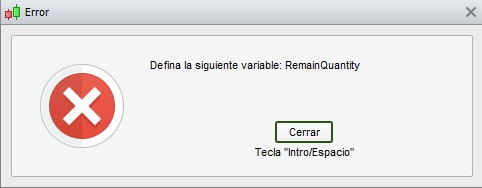
Please, code for partial close with porcentage?
There you go (not tested):
ONCE PerCent = 0.50            //0.50 = close half positions
IF MyLongExitConditions AND LongOnMarket THEN
   SELL (abs(CountOfPosition) * PerCent) AT Market
ELSIF MyLongExitConditions AND ShortOnMarket THEN
   EXITSHORT (abs(CountOfPosition) * PerCent) AT Market
ENDIF
Really fast, thanks Roberto!
 AE
AEParticipant
Senior
There you go (not tested):
ONCE PerCent = 0.50 //0.50 = close half positions
IF MyLongExitConditions AND LongOnMarket THEN
SELL (abs(CountOfPosition) * PerCent) AT Market
ELSIF MyLongExitConditions AND ShortOnMarket THEN
EXITSHORT (abs(CountOfPosition) * PerCent) AT Market
ENDIF
ONCE PerCent = 0.50 //0.50 = close half positions
IF MyLongExitConditions AND LongOnMarket THEN
SELL (abs(CountOfPosition) * PerCent) AT Market
ELSIF MyLongExitConditions AND ShortOnMarket THEN
EXITSHORT (abs(CountOfPosition) * PerCent) AT Market
ENDIF
This is already available with PRT 11? Because on PRT 10 it wasn’t possible partial closed.
Thanks
Yes, it is available with v11.
Help for code. I need that if the price falls 0.5% from the opening price, it partially closes 0.2% of the position. Thank you.
There you go (not tested):
ONCE PerCent     = 0.002            //0.2% = positions to close
ONCE FallPerCent = 0.005            //0.5% = price drop
ONCE MinLotSize  = 0.5              //0.5  lots minimum
ExitQuantity     = abs(CountOfPosition) * PerCent
RemainQuantity   = max(MinLotSize,abs(CountOfPosition) - ExitQuantity)
CloseQuantity    = abs(CountOfPosition) - RemainQuantity
IF close <= (PositionPrice * (1 - FallPerCent)) AND LongOnMarket THEN
   SELL CloseQuantity Contracts AT Market
ELSIF close >= (PositionPrice * (1 + FallPerCent)) AND ShortOnMarket THEN
   EXITSHORT CloseQuantity Contracts AT Market
ENDIF
I added a check to make sure the quantity left open is not < to the Minimum Lot Size required (that you can set at line 3, after checking with the broker).
My code in the previous post was missing the word Contracts.
You may either write lines 5-6 manually or try to replace them with:
RemainQty   = max(MinLotSize,abs(CountOfPosition) - ExitQuantity)
CloseQuantity    = abs(CountOfPosition) - RemainQty
Using a different name.
This with partial close is interesting.
If you want to close 50% of the position when you have 20 points plus.
What does that code look like?
Long, (1+fallpercent).
Short, (1-fallpercent).
You can change “ONCE percent” and “ONCE fallpercent” to others %.
There you go:
ONCE PerCent     = 0.5              //50%  = positions to close
ONCE Pips        = 20 * PipSize
ONCE MinLotSize  = 0.5              //0.5  lots minimum
ExitQuantity     = abs(CountOfPosition) * PerCent
RemainQty        = max(MinLotSize,abs(CountOfPosition) - ExitQuantity)
CloseQuantity    = abs(CountOfPosition) - RemainQty
IF close >= (PositionPrice + Pips) AND LongOnMarket THEN
   SELL CloseQuantity Contracts AT Market
ELSIF close <= (PositionPrice - Pips) AND ShortOnMarket THEN
   EXITSHORT CloseQuantity Contracts AT Market
ENDIF
Thanks Roberto but I got an error “RemainQty” when I run your code.
what am I doing wrong?
I have position size = 4 and want to close 2 contracts when I am 20 points plus.
Regards
So how do I enter the values in row 5 if I have 4 contracts from the beginning and want to close 2 contracts.
You may either write lines 5-6 manually or try to replace them with:
RemainQty = max(MinLotSize,abs(CountOfPosition) – ExitQuantity)
CloseQuantity = abs(CountOfPosition) – RemainQty
RemainQty = max(MinLotSize,abs(CountOfPosition) – ExitQuantity)
CloseQuantity = abs(CountOfPosition) – RemainQty
Using a different name.
I’m probably pretty stupid.
Is there an opportunity to explain in a simpler way how I do with “RemainQty”.
Gets error no matter what I do!