Clore une position avec BladeScalper

Viewing 7 posts - 1 through 7 (of 7 total)

  • Author
    Posts
  • #201135 quote
    wlshr27
    Participant
    New

    Bonjour à tous, je suis VRAIMENT catastrophique en coding, je suis un littéraire j’ai horreur des logiques mathematiques, malgré tout je me force à comprendre comment coder un algo que je trouve interessant… J’apprecierai enormement un coup de pouce pour m’aider à finaliser un code :

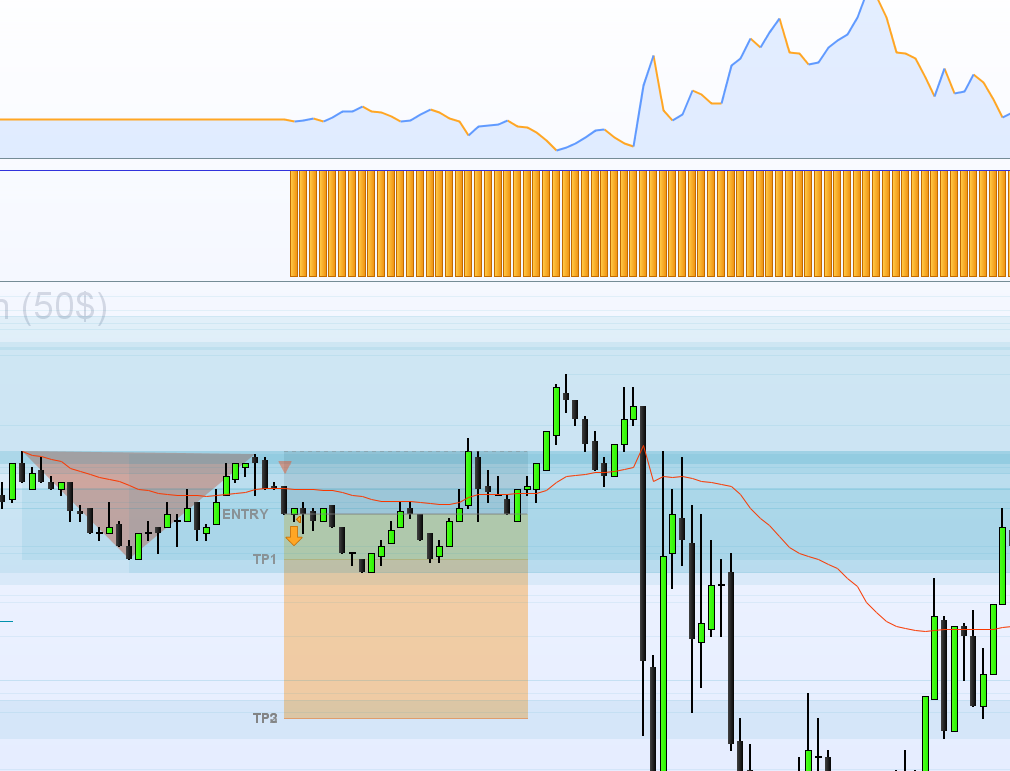
    Voici mon probleme, j’utilise BladeScalper pour entrer en position, j’ai l’impression qu’il rentre au bon moment, mais ne se stoppe jamais au TP1 et pire il poursuit la position sans se stopper au SL.

    J’utilise ce code :

    ignored, BladeSignal = CALL "BladeSCALPER"[1, 1, 1, 1, 0.7, 25, 0.7, 0, 0.7, 15000, 1, 3.6, 29.6, 0, 1, 0, 200, 0, 0](close)
    //of course you need to adapt each parameter of the PatternFactor and the MovingAverageFILTER (23.6, ... , ..., 0, 200, 0)
    
    if not longonmarket and BladeSignal =1 then
    buy 0.4 contract at market
    endif
    
    if not shortonmarket and BladeSignal =-1 then
    sellshort 0.4 contract at market
    endif


    Oui je sais c’est basique mais j’ai fait des efforts j’ai essayé manuellement :

    // Définition des paramètres du code
    DEFPARAM CumulateOrders = False // Cumul des positions désactivé
    
    // Conditions pour ouvrir une position acheteuse
    ignored, indicator1 = CALL "BladeSCALPER"[1, 1, 1, 1, 0.7, 25, 3.2, 0, 3.2, 15000, 1, 3.6, 31.6, 1, 1, 0, 200, 0, 1](close)
    c1 = (close CROSSES UNDER indicator1)
    
    IF c1 THEN
    BUY 0.45 CONTRACT AT MARKET
    ENDIF
    
    // Conditions pour fermer une position acheteuse
    ignored, indicator2 = CALL "BladeSCALPER"[1, 1, 1, 1, 0.7, 25, 0.7, 0, 0.7, 15000, 1, 3.6, 31.6, 1, 1, 0, 200, 0, 1](close)
    c2 = (close CROSSES UNDER indicator2)
    
    IF c2 THEN
    SELL AT MARKET
    ENDIF

    Bref rien n’y fait, mais je suis sur que la communauté pourra m’aider à coder correctement….


    Désolé pour le charabia…

    PRTTTT.png PRTTTT.png
    #201151 quote
    Nicolas
    Keymaster
    Master

    Sauf erreur de ma part, ce CALL ne te renvoi pas la valeur du Takeprofit, tu ne peux récupérer que la valeur 1 ou -1 (comme tu l’as fait) pour créer des signaux d’alertes dans la plateforme.

    Il faudrait voir avec l’auteur comment faire pour récupérer ces valeurs de TP.

    #201158 quote
    Meta Signals Pro
    Participant
    Veteran

    Bonjour Leo,
    Merci @Nicolas pour la réponse  ;
    => possible de créer un fil “BladeSCALPER : Screeners & BackTests” sur le forum français avec la question de Leo ?

    En l’état nous ne produisons en effet pas les TP ; la principale raison pour cela est de rappeler que les TP sont placés de façon théorique et les statisitiques sont indicatives ; c’est une aide pour profiler un asset mais on ne peut pas s’en satisfaire pour créer une stratégie ;

    la vraie performance de cet indicateur est quand on ajuste les TP de façon circonstanciée aux PowerZONES en les plaçant juste en dessous des résistances lors d’un Buy ou juste au-dessus des supports lors d’un Short ;

    Bien à toi,

    Christophe

    #201424 quote
    wlshr27
    Participant
    New

    J’ai fait un backtest avec des TakeProfit fixes à chaque entrée en position grace au signal BladeScalper et les résultats sont pourtant enthousiasmant… Pas forcement besoin des PowerZones…

    Si quelqu’un est interessé et arrive à intégrer un take profit et un stop loss fixe au code initial qui se declencheraient dès le signal, le code deviendrait vraiment interessant :

    ignored, BladeSignal = CALL "BladeSCALPER"[1, 1, 1, 1, 1, 20, 1.5, 0, 2, 1000, 3, 1, 23.6, 0, 1, 0, 200, 0, 0](close)
    //of course you need to adapt each parameter of the PatternFactor and the MovingAverageFILTER (23.6, ... , ..., 0, 200, 0)
    
    if not longonmarket and BladeSignal =1 then
    buy at market
    endif
    
    if not shortonmarket and BladeSignal =-1 then
    sellshort at market
    endif
    #201524 quote
    wlshr27
    Participant
    New

    Bonjour à tous, bonjour Nicolas et merci pour ta réponse encore !

    Je progresse, doucement mais surement.
    Quelqu’un aurait la moindre idée pourquoi quand je lance mon algo je recois cette alerte : ‘votre systeme automatisé s’est arreté en raison d’un indice dans le tableau qui est hors limite”


    voici mon code


    // Définition des paramètres du code
    DEFPARAM CumulateOrders = False // Cumul des positions désactivé
    // Annule tous les ordres en attente et ferme toutes les positions à 0:00, puis empêche toute création d'ordre avant l'heure "FLATBEFORE".
    DEFPARAM FLATBEFORE = 153000
    // Annule tous les ordres en attente et ferme toutes les positions à l'heure "FLATAFTER"
    DEFPARAM FLATAFTER = 223000
    
    // Empêche le système de placer des ordres pour entrer sur le marché ou augmenter la taille d'une position avant l'heure spécifiée
    noEntryBeforeTime = 153000
    timeEnterBefore = time >= noEntryBeforeTime
    
    // Empêche le système de placer des ordres pour entrer sur le marché ou augmenter la taille d'une position après l'heure spécifiée
    noEntryAfterTime = 223000
    timeEnterAfter = time < noEntryAfterTime
    
    ignored, BladeSignal = CALL "BladeSCALPER"[1, 1, 1, 1, 1, 25, 1, 0, 1, 15000, 1, 3.6, 29.6, 0, 1, 0, 200, 0, 0](close)
    //of course you need to adapt each parameter of the PatternFactor and the MovingAverageFILTER (23.6, ... , ..., 0, 200, 0)
    
    if not longonmarket and BladeSignal =1 then
    buy 0.3 contract at market
    endif
    
    if not shortonmarket and BladeSignal =-1 then
    sellshort 0.3 contract at market
    endif
    
    SL = 7 // Initial SL
    TP = 10
    TSL = 1 // Use TSL?
    TrailingDistance = 5 // Distance from close to TSL
    TrailingStep = 3 // Pips locked at start of TSL
    
    //************************************************************************
    IF TSL = 1 THEN
    
    //reset the stoploss value
    IF NOT ONMARKET THEN
    newSL = 0
    CAND = 0
    ENDIF
    
    //manage long positions
    IF LONGONMARKET THEN
    //first move (breakeven)
    IF newSL = 0 AND CLOSE - TRADEPRICE(1) >= TrailingDistance*PipSize THEN
    newSL = TRADEPRICE(1) + TrailingStep*PipSize
    ENDIF
    //next moves
    CAND = BarIndex - TradeIndex
    IF newSL > 0 AND CLOSE[1] >= HIGHEST[CAND](CLOSE) THEN
    newSL = CLOSE[1] - TrailingDistance*PipSize
    ENDIF
    ENDIF
    
    //manage short positions
    IF SHORTONMARKET THEN
    //first move (breakeven)
    IF newSL = 0 AND TRADEPRICE(1) - CLOSE[1] >= TrailingDistance*PipSize THEN
    newSL = TRADEPRICE(1) - TrailingStep*PipSize
    ENDIF
    //next moves
    CAND = BarIndex - TradeIndex
    IF newSL > 0 AND CLOSE[1] <= LOWEST[CAND](CLOSE) THEN
    newSL = CLOSE[1] + TrailingDistance*PipSize
    ENDIF
    ENDIF
    
    //stop order to exit the positions
    IF newSL > 0 THEN
    SELL AT newSL STOP
    EXITSHORT AT newSL STOP
    ENDIF
    SET STOP pLOSS SL
    ENDIF


    Autre question : dois-je cocher “réajustement des stops ” lorsque je lance mon algo ?


    Merci beaucoup vous êtes au top !!

    #201532 quote
    wlshr27
    Participant
    New

    C’est bon j’ai trouvé l’erreur !!! Petite question : me conseillez vous de cocher la case de “reajustement de stop” ? Merci

    #201559 quote
    Nicolas
    Keymaster
    Master

    C’est à ta libre appréciation, mais en effet c’est parfois fort utile pour que le courtier ajuste automatiquement la distance au stop qu’on ne peut pas tester dans le code (pour éviter le rejet des ordres notamment).

Viewing 7 posts - 1 through 7 (of 7 total)
  • You must be logged in to reply to this topic.

Clore une position avec BladeScalper


ProOrder : Trading Automatique & Backtests

New Reply
Author
author-avatar
wlshr27 @wlshr27 Participant
Summary

This topic contains 6 replies,
has 3 voices, and was last updated by Nicolas

3 years, 5 months ago.

Topic Details
Forum: ProOrder : Trading Automatique & Backtests
Language: French
Started: 09/21/2022
Status: Active
Attachments: 1 files
Logo Logo
Loading...