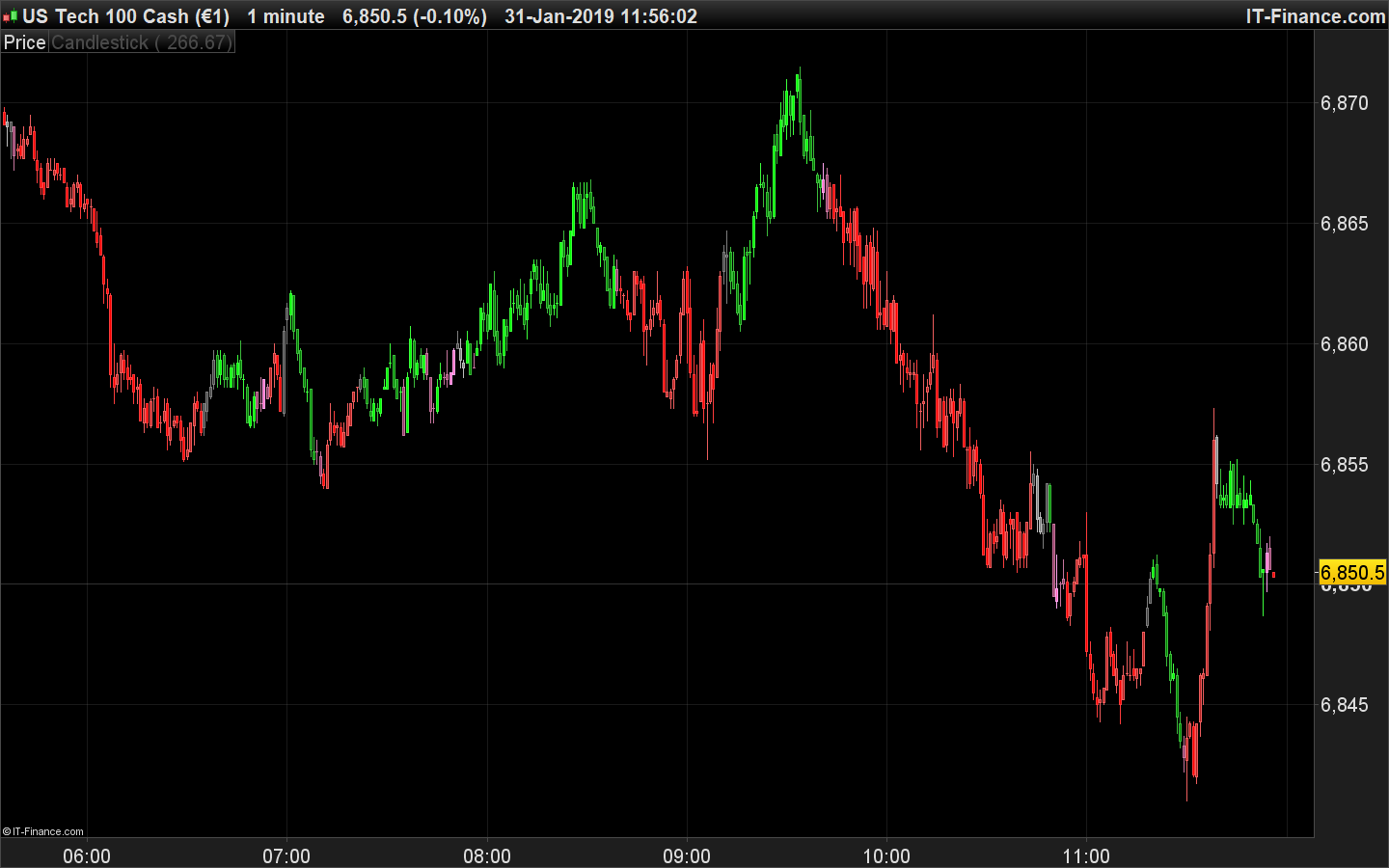
Changing TMA Slope indicator by Nicolas to appear on candle sticks!!

Viewing 7 posts - 16 through 22 (of 22 total)
  • Author
    Posts
  • #89970 quote
    Nicolas
    Keymaster
    Master

    [attachment file=89971]

    #89973 quote
    Nicolas
    Keymaster
    Master

    😆 ok, more seriously, I’ll try to fix it tomorrow.

    #89994 quote
    crolakstrading
    Participant
    Senior

    😉 sorry again to bother you.. promise that will be the last thing i ask you on this!!! thanks in advance

    #90013 quote
    Nicolas
    Keymaster
    Master

    Here is the code and commented, I’m sure you’ll find easily where to change color depending of the conditions of where is the curve:

    // --- settings
    eintPeriod = 20
    edblHigh1 = 0.04
    edblLow1 = -0.04
    atrPeriod = 100
    // --- end of settings
    
    atr = AverageTrueRange[atrPeriod](close)
    
    dblTma = TriangularAverage[eintPeriod](close)
    
    if barindex>eintPeriod then
    dblPrev = dblTma[1]
    gadblSlope = ( dblTma - dblPrev ) / atr
    
    //BUY ONLY
    if ( gadblSlope[0] > edblHigh1 ) then //above the higher line
    if(close < open) then
    drawcandle(open,high,low,close)coloured(0,128,0) //light blue
    else
    drawcandle(open,high,low,close)coloured(0,255,0) //dark blue
    endif
    //SELL ONLY
    elsif ( gadblSlope[0] < edblLow1 ) then //below the lower line
    if(close < open) then
    drawcandle(open,high,low,close)coloured(255,0,0) //light red
    else
    drawcandle(open,high,low,close)coloured(178,34,34) //dark red
    endif
    else //ranging between the 2 lines
    if(gadblSlope[0] < gadblSlope[1]) then 
    drawcandle(open,high,low,close)coloured(255,105,180) //curve is declining
    else
    drawcandle(open,high,low,close)coloured(128,128,128) //curve is ascending
    endif
    endif
    endif
    
    return

    Sorry but i’m still struggling to understand what you need exactly about the colors 🙂

    #90062 quote
    crolakstrading
    Participant
    Senior
    sorry im confusing you.. this great as it is and now more clear!! it just last two in the code //the ranging between the 2 lines.
    lets say
    if(gadblSlope[0] < gadblSlope[1]) then
    drawcandle(open,high,low,close)coloured(255,105,180) //curve is declining (Pink to go Dark pink if close < open) 


    and
    drawcandle(open,high,low,close)coloured(128,128,128) //curve is ascending (grey to go dark grey if  close > open)


    sorry again for complicating…. i think happy with you created already!! thank you nicolas
    #90134 quote
    Nicolas
    Keymaster
    Master

    Hopefully this new code will be the good one!! 😆

    // --- settings
    eintPeriod = 20
    edblHigh1 = 0.04
    edblLow1 = -0.04
    atrPeriod = 100
    // --- end of settings
    
    atr = AverageTrueRange[atrPeriod](close)
    
    dblTma = TriangularAverage[eintPeriod](close)
    
    if barindex>eintPeriod then
    dblPrev = dblTma[1]
    gadblSlope = ( dblTma - dblPrev ) / atr
    
    //BUY ONLY
    if ( gadblSlope[0] > edblHigh1 ) then //above the higher line
    if(close < open) then
    drawcandle(open,high,low,close)coloured(0,128,0) //light blue
    else
    drawcandle(open,high,low,close)coloured(0,255,0) //dark blue
    endif
    //SELL ONLY
    elsif ( gadblSlope[0] < edblLow1 ) then //below the lower line
    if(close < open) then
    drawcandle(open,high,low,close)coloured(255,0,0) //light red
    else
    drawcandle(open,high,low,close)coloured(178,34,34) //dark red
    endif
    else //ranging between the 2 lines
    if(gadblSlope[0] < gadblSlope[1]) then
    if close>open then 
    drawcandle(open,high,low,close)coloured(255,105,180) //curve is declining and close>open
    else
    drawcandle(open,high,low,close)coloured(139,58,98) //curve is declining and close<open
    endif
    else
    if close<open then 
    drawcandle(open,high,low,close)coloured(128,128,128) //curve is ascending and close<open 
    else
    drawcandle(open,high,low,close)coloured(66,66,66) //curve is ascending and close>open
    endif
    endif
    endif
    endif
    
    return
    
    crolakstrading thanked this post
    candlesticks-color-tma-slope.png candlesticks-color-tma-slope.png
    #90268 quote
    crolakstrading
    Participant
    Senior

    Wow… This exactly what i was trying to explain!!! thanks a million Nicolas.. this can be really used as a trading system!! need to change numbers and try!! thank you again!!

Viewing 7 posts - 16 through 22 (of 22 total)
  • You must be logged in to reply to this topic.

Changing TMA Slope indicator by Nicolas to appear on candle sticks!!


ProBuilder: Indicators & Custom Tools

New Reply
Author
Summary

This topic contains 21 replies,
has 3 voices, and was last updated by crolakstrading
7 years ago.

Topic Details
Forum: ProBuilder: Indicators & Custom Tools
Language: English
Started: 12/25/2018
Status: Active
Attachments: 4 files
Logo Logo
Loading...