But this is not related to what’s odd today (in V11).
I meant to say : in V10.3.
Anyway, just use the code I first posted AS IS (you may change it at a later moment), but with the correct spelling, and don’t be afraid of using GRAPH:
// pl: 130 sl: 70 t & ts: 50 x: 1 = 3min 528$, 46,88W, 25% BE, 3.1 G/L ratio, 1,82 time in the market. 64 trades

DEFPARAM CumulateOrders = FALSE
//
ONCE x             = 5
ONCE y             = 1
ONCE LotSize       = y
ONCE WinningTrades = 0
ONCE LosingTrades  = 0
IF StrategyProfit > StrategyProfit[1] THEN
WinningTrades = WinningTrades + 1
IF WinningTrades >= x THEN
WinningTrades = 0
LotSize       = y
ENDIF
ELSIF StrategyProfit < StrategyProfit[1] THEN
LosingTrades  = LosingTrades  + 1
IF LosingTrades >= x THEN
LosingTrades = 0
LotSize      = LotSize + y
ENDIF
ENDIF
//
ONCE MaxTrades = x                     //no more than 2 trades a day
ONCE Tally     = 0
IF IntraDayBarIndex = 0 THEN
Tally = 0
ENDIF
IF Not OnMarket THEN
MyExit = 0
ELSE
c1 = 0
ENDIF
//
once sl = 30
once pl = sl * 2
once adr = 30
once t = 10
once ts = t
////////////////////////////////////////////////////////////////////////////////////////////////////////////
NewTrade = (OnMarket AND Not OnMarket[1]) OR (LongOnMarket AND ShortOnMarket[1]) OR (LongOnMarket[1] AND ShortOnMarket) OR ((Not OnMarket AND Not OnMarket[1]) AND (StrategyProfit <> StrategyProfit[1]))
IF NewTrade THEN
Tally = Tally + 1
ENDIF
////////////////////////////////////////////////////////////////////////////////////////////////////////////
// ADR Average Daily Range
MyADR       = average[20,0](Dhigh(1) - Dlow(1))
//
IF (Time = 000000) OR ((Time > 000000) AND (Time < Time[1])) THEN
MyHI     = high
MyLO     = low
c1       = 0
ENDIF
IF Time <= 142900 THEN
MyHI     = max(MyHI,high)
MyLO     = min(MyLO,low)
MyRange  = MyHI - MyLO
c1       = ((MyRange / MyADR) * 100) < adr
ENDIF
IF LongOnMarket THEN
SET TARGET pPROFIT PL          //you can change this value for LONG trades
SET STOP   pLOSS   SL         //you can change this value for LONG trades
ELSIF ShortOnMarket THEN
SET TARGET pPROFIT PL          //you can change this value for SHORT trades
SET STOP   pLOSS   SL         //you can change this value for SHORT trades
ENDIF
IF Time >= 142900 AND Time <= 220000 AND c1 AND Tally < MaxTrades AND Not OnMarket THEN   //trade only between 15:30 and 18:00
BUY       LotSize Contract AT MyHI + 1 * pipsize STOP
SELLSHORT LotSize Contract AT MyLO - 1 * pipsize STOP
SET TARGET pPROFIT PL     //initial values cannot be different with pending orders
SET STOP   pLOSS   SL
ENDIF
IF MyExit = 0 THEN
IF LongOnMarket AND (close - TradePrice) >= t * pipsize THEN    //you can change this value for LONG trades
MyExit = TradePrice
ENDIF
IF ShortOnMarket AND (TradePrice - close) >= ts * pipsize THEN   //you can change this value for SHORT trades
MyExit = TradePrice
ENDIF
ENDIF
IF MyExit > 0 THEN
IF LongOnMarket THEN
SELL      AT MyExit STOP
ELSIF ShortOnMarket THEN
EXITSHORT AT MyExit STOP
ENDIF
ENDIF
graph LotSize
Here’s my take, based on the original snippet from Roberto.
Ulle, As far as I can see this should do what you want.
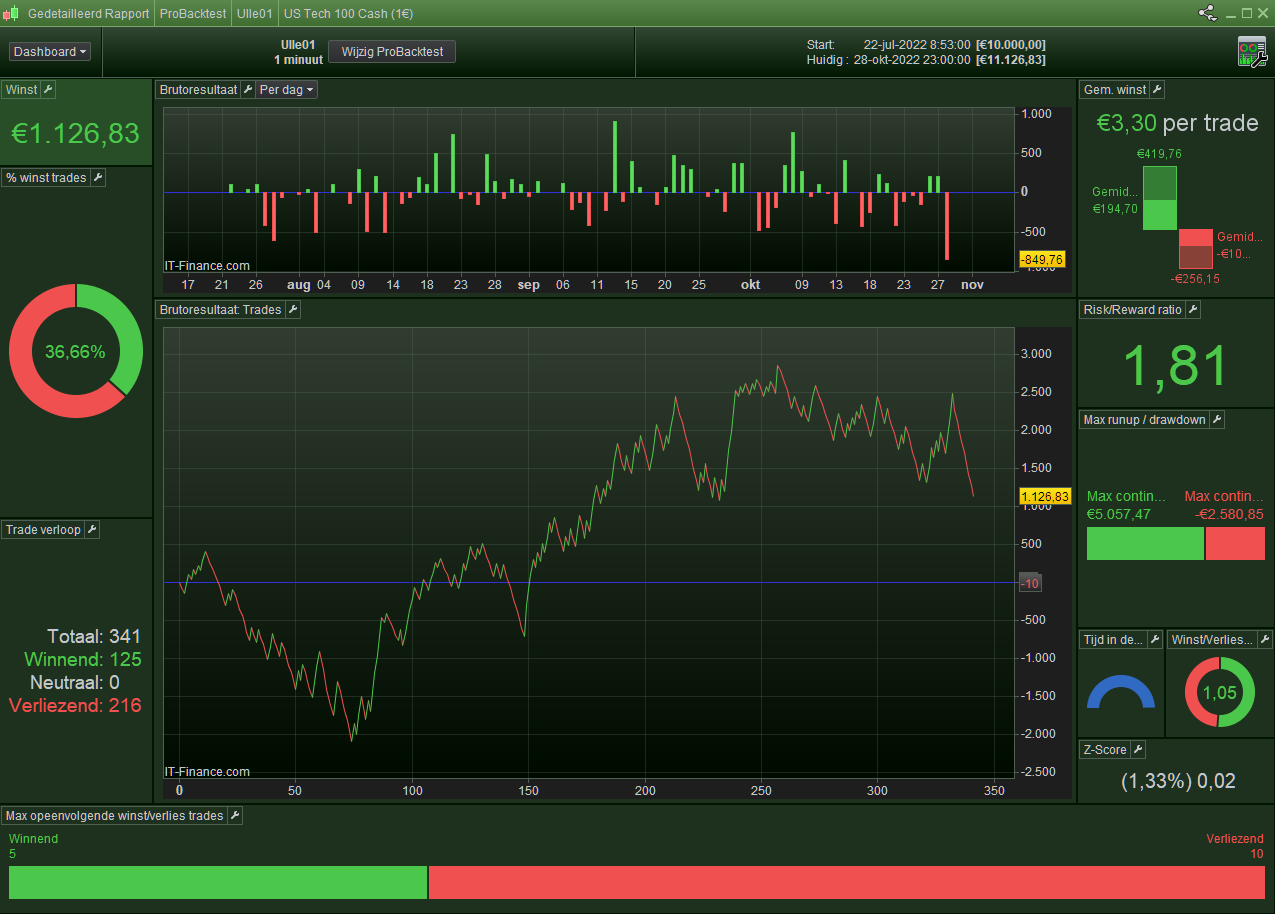
It is optimized on the TakeProfit and the StopLoss, and I would not use this in Live. Also, I made it a version for Short only, as this works out for the better (Long loses whatever I try within the mechanism).
ONCE x             = 5
ONCE y             = 1
ONCE LotSize       = y
ONCE WinningTrades = 0
ONCE LosingTrades  = 0
ONCE Spread = 1.5   // Nasdaq average of the day. Fill this at Backtest (Editor) start as well.

// These are (over-)optimized, so be careful :
ONCE TPA = 124
ONCE SLA = 66   // Set to 33 for a nice test.

IF StrategyProfit > StrategyProfit[1] THEN
  WinningTrades = WinningTrades + 1
  LosingTrades = 0   // Reset.
  IF WinningTrades >= x THEN
    WinningTrades = 0   // Start all over.
    LotSize = y
  ENDIF
ELSIF StrategyProfit < StrategyProfit[1] THEN
  LosingTrades  = LosingTrades  + 1
  WinningTrades = 0   // Reset.
  IF LosingTrades >= x THEN
    LotSize = LotSize + (y / 5)  // = 0.2
    LosingTrades = 0   // Start all over.
  ENDIF
ENDIF

TP = TPA * LotSize
SL = SLA * LotSize

If Not OnMarket then
  //Buy Lotsize Shares at Market   // Long version.
  SellShort Lotsize Shares at Market   // Short version.
else
  Gain = (PositionPerf * abs(countofposition) * TradePrice) - (Spread * CountOfPosition)
  If Gain > TP then
    //Sell at Market   // Long version.
  ExitShort at market   // Short version.
  else
    If Gain < -SL then   // Don't make too small or else no subsequent losses of x will occur.
      //Sell at market   // Long version.
      ExitShort at market   // Short version.
    endif
  endif
endif

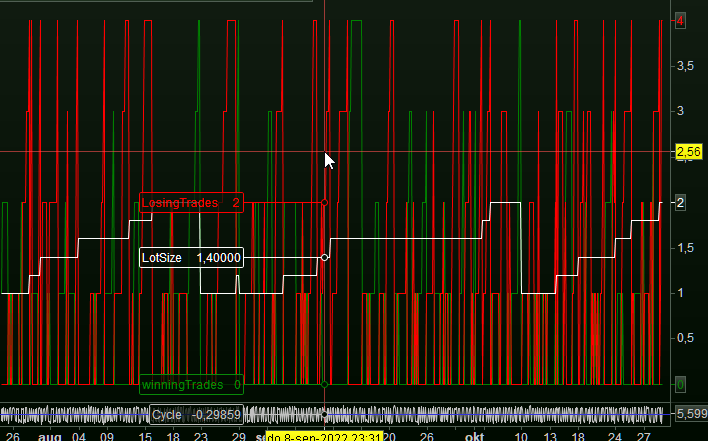
Graph winningTrades Coloured ("Green")
Graph LosingTrades Coloured ("Red")
Graph LotSize Coloured ("White")
Use this on Nasdaq (Tech 100), Contract size of 1 euro.
Timeframe 1 minute.
Load 100K bars.
The problem with this idea – at least how I see it – is that the subsequent losses form the mechanism, while the subsequent losses only form (really emerge) at the lower SL which implies losing because of the Spread. And thus the SL must be higher than the mechanism desires, and next the mechanism doesn’t work well.
Have fun now !