Cassure de l’Open Price Range

Viewing 6 posts - 1 through 6 (of 6 total)
  • Author
    Posts
  • #152187 quote
    z0om
    Participant
    Average

    Bonjour,

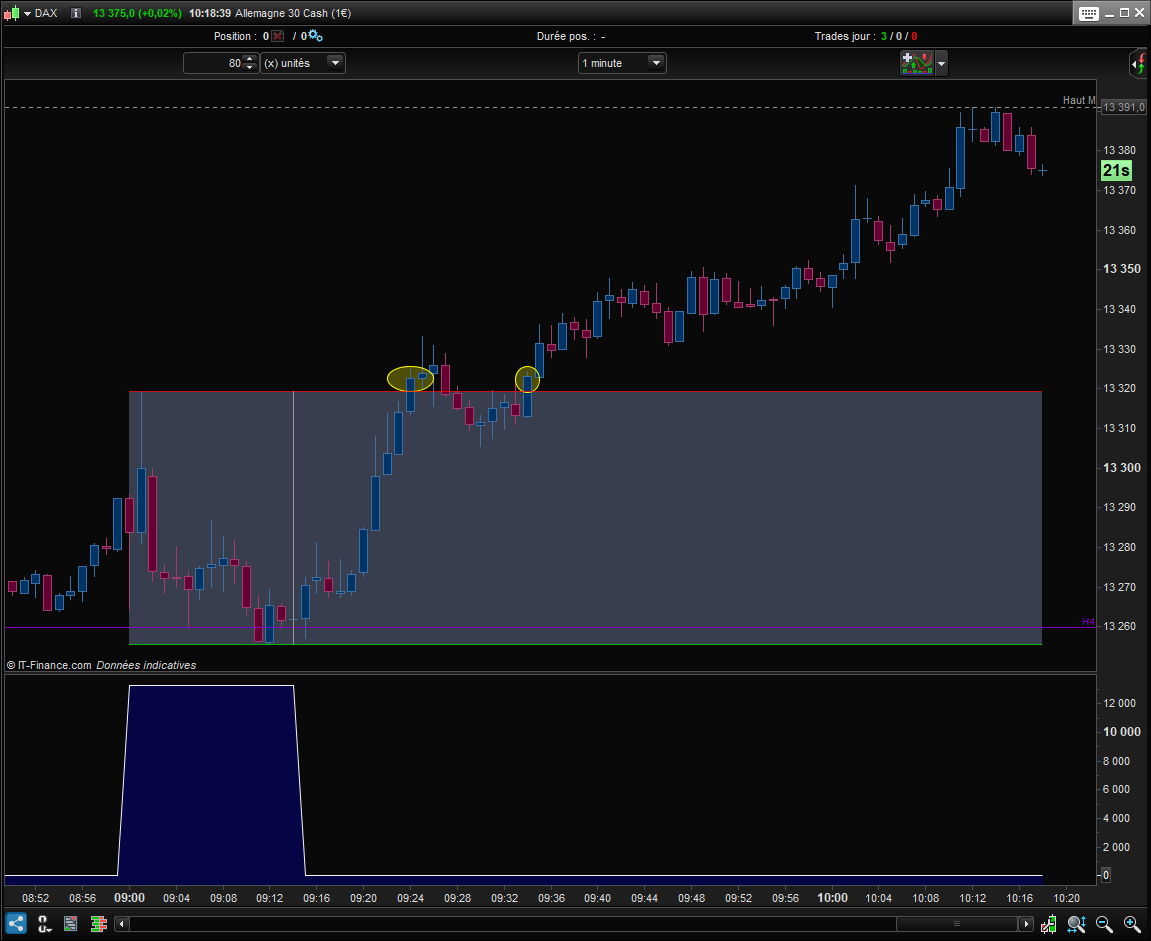
    J’ai essayé d’adapter un code glané sur le site pour détecter les cassures de l’OPR (15 premières minutes après l’ouverture) à partir de 9h15 jusqu’à 11h. Autant, j’arrive à bien dessiner le range, autant je n’arrive pas à détecter les cassures.

    Voici mon code :

    starttime = 090100
    endtime = 091500
    finishtime = 110000
    
    hh = 0
    ll = 0
    res = 0
    
    if time >= starttime and time <= endtime then
    if high>hh or hh=0 then
    hh = high
    endif
    if low<ll or ll=0 then
    ll = low
    endif
    endif
    
    if time > endtime AND time < finishtime then
    IF Close CROSSES OVER hh THEN
    res = 1
    ELSIF Close CROSSES UNDER ll THEN
    res = -1
    ENDIF
    endif
    
    RETURN res
    

    Le problème, c’est qu’il retourne un signal à tort entre 9h00 et 9h15 mais pas les 2 cassures signalées en jaune. Exemple en pièce jointe.

    Merci beaucoup pour votre aide.

    OPR.png OPR.png
    #152194 quote
    JC_Bywan
    Moderator
    Master

    Bonjour, voici une autre façon parmi d’autres d’initialiser tes hh et ll pour qu’ils ne soient pas remis à 0 après endtime et pouvoir détecter les cassures de ton open price range:

    starttime = 090000
    endtime = 091500
    finishtime = 110000
    
    if opentime<starttime then
     hh = 0
     ll = 0
    endif
    res = 0
     
    if opentime >= starttime and time <= endtime then
     if high>hh or hh=0 then
      hh = high
     endif
     if low<ll or ll=0 then
      ll = low
     endif
    endif
     
    if time > endtime AND time < finishtime then
     IF Close CROSSES OVER hh THEN
      res = 1
     ELSIF Close CROSSES UNDER ll THEN
      res = -1
     ENDIF
    endif
     
    RETURN res
    z0om and PLermite thanked this post
    #152197 quote
    z0om
    Participant
    Average

    Impeccable ! Merci pour la l’aide et la réactivité.

    JC_Bywan thanked this post
    #152292 quote
    z0om
    Participant
    Average

    A tout hasard, est-ce compliqué pour le faire pour 2 plages horaires, EU et US, au sein d’un même indicateur ?

    Variables EU

    starttime = 090100
    endtime = 091500
    finishtime = 110000

    Variables US

    starttime = 153100
    endtime = 154500
    finishtime = 170000
    #152293 quote
    JC_Bywan
    Moderator
    Master

    Pour tout mettre dans le même indicateur, tu peux tout simplement ajouter un 2ème jeu de variables (par exemple en ajoutant un 2 à la fin de chacune: starttime2, endtime2, finishtime2, hh2, ll2, res2 … ) et faire la même chose avec elles une 2ème fois à la suite de la première (hors ligne return bien sûr) et changer la ligne return unique à la fin par:

    return res, res2
    z0om thanked this post
    #152323 quote
    z0om
    Participant
    Average

    Tout simplement. Voici le code pour ceux que ça pourrait aider :

    DEFPARAM DRAWONLASTBARONLY = true
    
    // Pramètres
    startOpen1 = 090100
    endOpen1 = 091500
    finishOpen1 = 170000
    
    startOpen2 = 153100
    endOpen2 = 154500
    finishOpen2 = 170000
    
    // Initialisation des variables
    IF IntradayBarIndex = 0 THEN
    HH1 = 0
    LL1 = 0
    HH2 = 0
    LL2 = 0
    ENDIF
    
    // Indexes des ouvertures/clôtures
    IF TIME = startOpen1 THEN
    startBar1  =  barIndex
    ENDIF
    
    IF TIME = startOpen2 THEN
    startBar2  =  barIndex
    ENDIF
    
    IF TIME = endOpen1 THEN
    endBar1  =  barIndex
    ENDIF
    
    IF TIME = endOpen2 THEN
    endBar2  =  barIndex
    ENDIF
    
    // Calcul des hauts et bas du l'OPR
    IF TIME >=  startOpen1 AND TIME <=  endOpen1 THEN
    IF high > HH1 THEN
    HH1 = high
    ENDIF
    IF low < LL1 or LL1 = 0 THEN
    LL1 = low
    ENDIF
    ENDIF
    
    IF TIME >=  startOpen2 AND TIME <=  endOpen2 THEN
    IF high > HH2 THEN
    HH2 = high
    ENDIF
    IF low < LL2 or LL2 = 0 THEN
    LL2 = low
    ENDIF
    ENDIF
    
    // Dessins
    IF TIME > startOpen1 AND TIME < finishOpen1 THEN
    DRAWRECTANGLE(startBar1,HH1,barIndex,LL1)COLOURED(100,100,100,0)
    DRAWSEGMENT(startBar1, HH1, barIndex, HH1)COLOURED(255,0,0,180)
    DRAWSEGMENT(startBar1,LL1, barIndex, LL1)COLOURED(0,255,0,180)
    DRAWSEGMENT(endBar1,HH1,endBar1,LL1)COLOURED(150,150,150)
    ENDIF
    
    IF TIME > startOpen2 AND TIME < finishOpen2 THEN
    DRAWRECTANGLE(startBar2,HH2,barIndex,LL2)COLOURED(100,100,100,0)
    DRAWSEGMENT(startBar2, HH2, barIndex, HH2)COLOURED(255,0,0,180)
    DRAWSEGMENT(startBar2,LL2, barIndex, LL2)COLOURED(0,255,0,180)
    DRAWSEGMENT(endBar2,HH2,endBar2,LL2)COLOURED(150,150,150)
    ENDIF
    
    RETURN
    
    PLermite thanked this post
Viewing 6 posts - 1 through 6 (of 6 total)

  • You must be logged in to reply to this topic.

Cassure de l’Open Price Range


ProBuilder : Indicateurs & Outils Personnalisés

New Reply
Author
author-avatar
z0om @sebastien_ozanne Participant
Summary

This topic contains 5 replies,
has 2 voices, and was last updated by z0om
5 years, 3 months ago.

Topic Details
Forum: ProBuilder : Indicateurs & Outils Personnalisés
Language: French
Started: 11/30/2020
Status: Active
Attachments: 1 files
Logo Logo
Loading...