Cassure de l’Open Price Range

Viewing 6 posts - 1 through 6 (of 6 total)
  • Author
    Posts
  • #152187 quote
    z0omz0om
    Participant
    Average

    Bonjour,

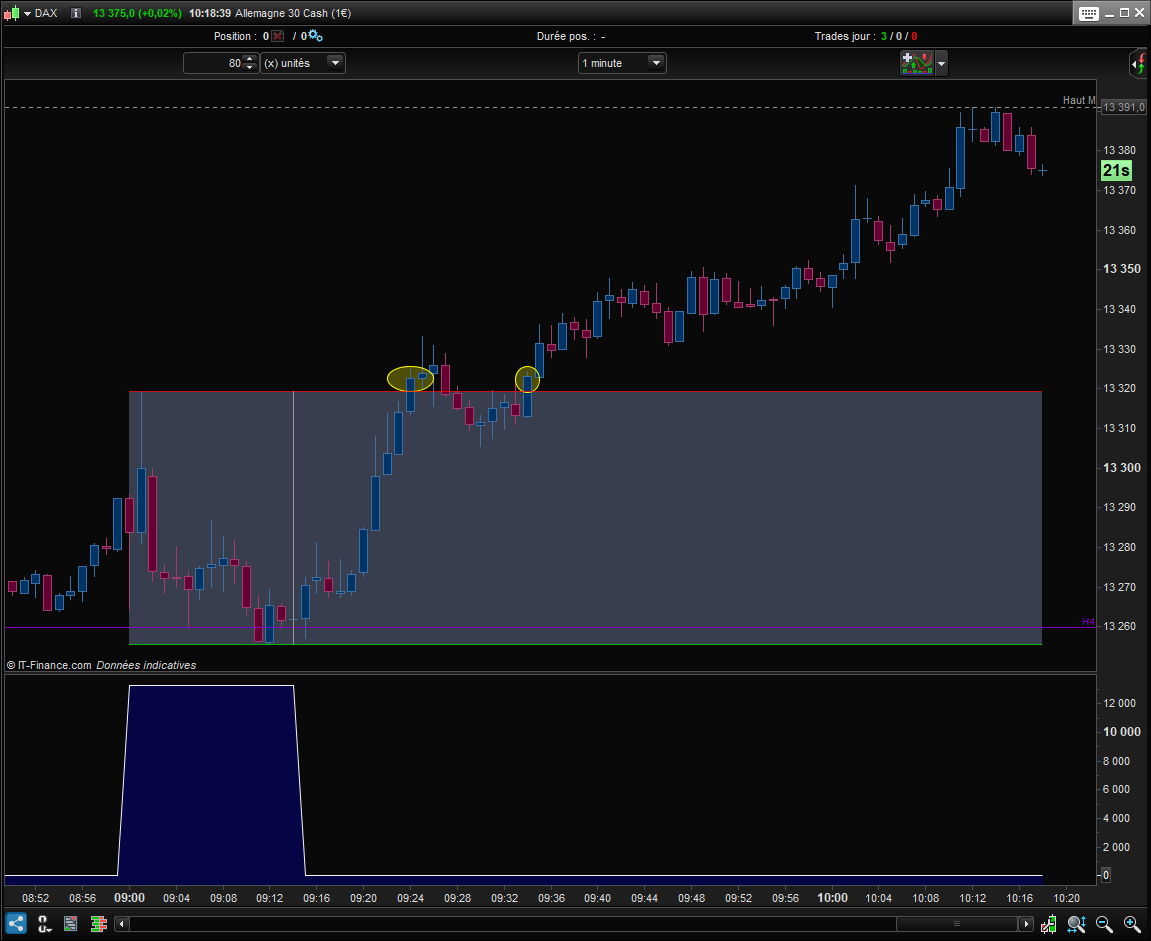
    J’ai essayé d’adapter un code glané sur le site pour détecter les cassures de l’OPR (15 premières minutes après l’ouverture) à partir de 9h15 jusqu’à 11h. Autant, j’arrive à bien dessiner le range, autant je n’arrive pas à détecter les cassures.

    Voici mon code :

    starttime = 090100
    endtime = 091500
    finishtime = 110000
    
    hh = 0
    ll = 0
    res = 0
    
    if time >= starttime and time <= endtime then
    if high>hh or hh=0 then
    hh = high
    endif
    if low<ll or ll=0 then
    ll = low
    endif
    endif
    
    if time > endtime AND time < finishtime then
    IF Close CROSSES OVER hh THEN
    res = 1
    ELSIF Close CROSSES UNDER ll THEN
    res = -1
    ENDIF
    endif
    
    RETURN res
    

    Le problème, c’est qu’il retourne un signal à tort entre 9h00 et 9h15 mais pas les 2 cassures signalées en jaune. Exemple en pièce jointe.

    Merci beaucoup pour votre aide.

    OPR.png OPR.png
    #152194 quote
    JC_BywanJC_Bywan
    Moderator
    Master

    Bonjour, voici une autre façon parmi d’autres d’initialiser tes hh et ll pour qu’ils ne soient pas remis à 0 après endtime et pouvoir détecter les cassures de ton open price range:

    starttime = 090000
    endtime = 091500
    finishtime = 110000
    
    if opentime<starttime then
     hh = 0
     ll = 0
    endif
    res = 0
     
    if opentime >= starttime and time <= endtime then
     if high>hh or hh=0 then
      hh = high
     endif
     if low<ll or ll=0 then
      ll = low
     endif
    endif
     
    if time > endtime AND time < finishtime then
     IF Close CROSSES OVER hh THEN
      res = 1
     ELSIF Close CROSSES UNDER ll THEN
      res = -1
     ENDIF
    endif
     
    RETURN res
    z0om and PLermite thanked this post
    #152197 quote
    z0omz0om
    Participant
    Average

    Impeccable ! Merci pour la l’aide et la réactivité.

    JC_Bywan thanked this post
    #152292 quote
    z0omz0om
    Participant
    Average

    A tout hasard, est-ce compliqué pour le faire pour 2 plages horaires, EU et US, au sein d’un même indicateur ?

    Variables EU

    starttime = 090100
    endtime = 091500
    finishtime = 110000

    Variables US

    starttime = 153100
    endtime = 154500
    finishtime = 170000
    #152293 quote
    JC_BywanJC_Bywan
    Moderator
    Master

    Pour tout mettre dans le même indicateur, tu peux tout simplement ajouter un 2ème jeu de variables (par exemple en ajoutant un 2 à la fin de chacune: starttime2, endtime2, finishtime2, hh2, ll2, res2 … ) et faire la même chose avec elles une 2ème fois à la suite de la première (hors ligne return bien sûr) et changer la ligne return unique à la fin par:

    return res, res2
    z0om thanked this post
    #152323 quote
    z0omz0om
    Participant
    Average

    Tout simplement. Voici le code pour ceux que ça pourrait aider :

    DEFPARAM DRAWONLASTBARONLY = true
    
    // Pramètres
    startOpen1 = 090100
    endOpen1 = 091500
    finishOpen1 = 170000
    
    startOpen2 = 153100
    endOpen2 = 154500
    finishOpen2 = 170000
    
    // Initialisation des variables
    IF IntradayBarIndex = 0 THEN
    HH1 = 0
    LL1 = 0
    HH2 = 0
    LL2 = 0
    ENDIF
    
    // Indexes des ouvertures/clôtures
    IF TIME = startOpen1 THEN
    startBar1  =  barIndex
    ENDIF
    
    IF TIME = startOpen2 THEN
    startBar2  =  barIndex
    ENDIF
    
    IF TIME = endOpen1 THEN
    endBar1  =  barIndex
    ENDIF
    
    IF TIME = endOpen2 THEN
    endBar2  =  barIndex
    ENDIF
    
    // Calcul des hauts et bas du l'OPR
    IF TIME >=  startOpen1 AND TIME <=  endOpen1 THEN
    IF high > HH1 THEN
    HH1 = high
    ENDIF
    IF low < LL1 or LL1 = 0 THEN
    LL1 = low
    ENDIF
    ENDIF
    
    IF TIME >=  startOpen2 AND TIME <=  endOpen2 THEN
    IF high > HH2 THEN
    HH2 = high
    ENDIF
    IF low < LL2 or LL2 = 0 THEN
    LL2 = low
    ENDIF
    ENDIF
    
    // Dessins
    IF TIME > startOpen1 AND TIME < finishOpen1 THEN
    DRAWRECTANGLE(startBar1,HH1,barIndex,LL1)COLOURED(100,100,100,0)
    DRAWSEGMENT(startBar1, HH1, barIndex, HH1)COLOURED(255,0,0,180)
    DRAWSEGMENT(startBar1,LL1, barIndex, LL1)COLOURED(0,255,0,180)
    DRAWSEGMENT(endBar1,HH1,endBar1,LL1)COLOURED(150,150,150)
    ENDIF
    
    IF TIME > startOpen2 AND TIME < finishOpen2 THEN
    DRAWRECTANGLE(startBar2,HH2,barIndex,LL2)COLOURED(100,100,100,0)
    DRAWSEGMENT(startBar2, HH2, barIndex, HH2)COLOURED(255,0,0,180)
    DRAWSEGMENT(startBar2,LL2, barIndex, LL2)COLOURED(0,255,0,180)
    DRAWSEGMENT(endBar2,HH2,endBar2,LL2)COLOURED(150,150,150)
    ENDIF
    
    RETURN
    
    PLermite thanked this post
Viewing 6 posts - 1 through 6 (of 6 total)

  • You must be logged in to reply to this topic.

ProRealAI ProRealAI New

Stuck on this ProBuilder code?

Describe what this topic is trying to build, in plain English, and ProRealAI writes the ProRealTime™ indicator, screener or system for you.

Available in 7 languages
Try ProRealAI

Cassure de l’Open Price Range


ProBuilder : Indicateurs & Outils Personnalisés

New Reply
Author
author-avatar
z0om @sebastien_ozanne Participant
Summary

This topic contains 5 replies,
has 2 voices, and was last updated by z0omz0om
5 years, 9 months ago.

Topic Details
Forum: ProBuilder : Indicateurs & Outils Personnalisés
Language: French
Started: 11/30/2020
Status: Active
Attachments: 1 files
ProRealCode ProRealCode
Loading...