Can’t get specific date on screener to work

Viewing 11 posts - 1 through 11 (of 11 total)
  • Author
    Posts
  • #158599 quote
    cc267
    Participant
    Average

    I want to use a specific date in my screener. My understanding is, I need to create a “date” indicator myself in probuilder to work as a variable in a screener?

    so i went into probuilder and my syntax is:

    idate = Date
    RETURN Date/100000

    Its divided by 100000 as it doesn’t seem to display correctly on the chart. I have attached screenshot of the chart.

    I have produced simple screener below to illustrate date issue as i’m clearly not doing something correct here as the screener is blank.

    indicator1 = CALL "idate"
    c1 = (indicator1 = 202.10104)
    indicator2 = ADX[14]
    c2 = (indicator2 < 60)
    
    criteria = Volume
    
    SCREENER[c1 AND c2] (criteria AS "Volume")
    
    #158602 quote
    robertogozzi
    Moderator
    Master

    That seems correct. Try eliminating line 1 from the indicator.

    #158605 quote
    cc267
    Participant
    Average

    Deleted line 1 on the indicator but the screener is still showing no stocks.

    #158613 quote
    robertogozzi
    Moderator
    Master

    Is that date the current date?

    Because screeners can only screen live.

    Or try replacing the last line with:

    SCREENER[summation[20](c1 AND c2)] (criteria AS "Volume")

    So that you check conditions for all days in 2021.

    #158681 quote
    cc267
    Participant
    Average

    I’ve changed the last line to what you suggested but it still brings up nothing.

    I was under the impression from previous threads that you could scan on a specific day? https://www.prorealcode.com/topic/scan-on-specific-date/

    Do you know why the indicator shows the date with several decimals instead of the format its suppose to (YYYYMMDD)? I found a thread where someone else also said the date is not showing how it should? https://www.prorealcode.com/topic/date-in-proscreener-is-displayed-as-20-2m/ Is this a glitch with the software?

    #158684 quote
    robertogozzi
    Moderator
    Master

    You shouldn’t use division, because it may be displayed by the indicator as, say, 20M, but it’s kept internally as a complete number, so it won’t affect expressions.

    It’s not a real glitch, simply date & time data type are not supported.

    I think you should try removing the division and compare the returned value with a complete date such as 20210104.

    #158687 quote
    cc267
    Participant
    Average

    This is what I get without the division (see screenshot), it reverts to two decimals. So when i enter a date in screener as YYYMMDD it doesn’t recognise it.

    #158819 quote
    Vonasi
    Moderator
    Master

    (see screenshot),

    What screenshot? There is nothing attached.

    #158831 quote
    cc267
    Participant
    Average

    I click select file and can see the picture attached but then when i submit nothing is showing up?

    #158850 quote
    robertogozzi
    Moderator
    Master

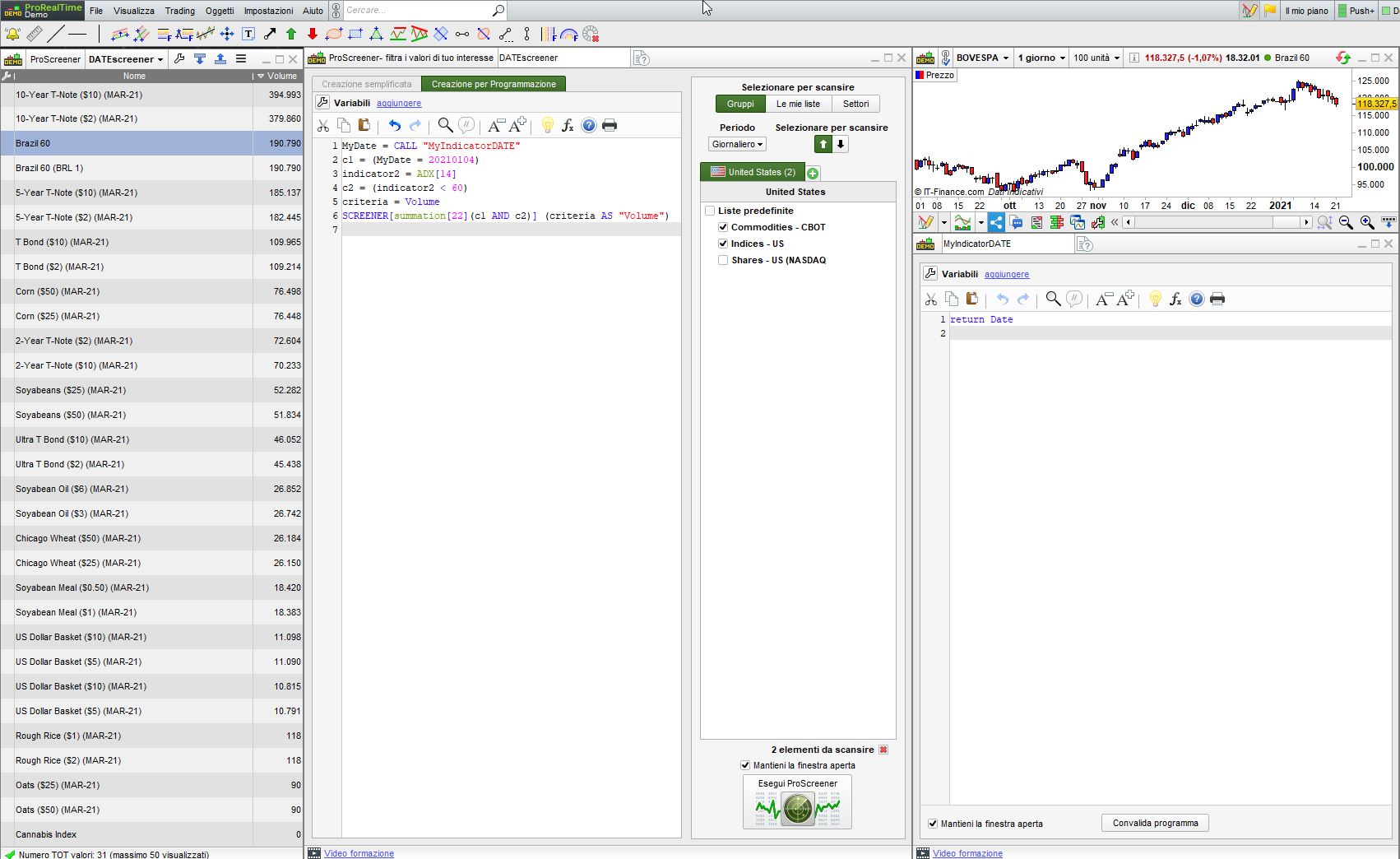
    This is the indicator:

    return Date

    This is the screener:

    MyDate     = CALL "MyIndicatorDATE"
    c1         = (MyDate = 20210104)
    indicator2 = ADX[14]
    c2         = (indicator2 < 60)
    criteria   = Volume
    SCREENER[summation[22](c1 AND c2)] (criteria AS "Volume")

    they work.

    MyIndicatorDATE.itf DATEscreener.itf DATEscreener-pic.jpg DATEscreener-pic.jpg
    #158858 quote
    cc267
    Participant
    Average

    Thankyou Roberto! This works perfectly now, thanks for all your help.

Viewing 11 posts - 1 through 11 (of 11 total)

  • You must be logged in to reply to this topic.

Can’t get specific date on screener to work


ProScreener: Market Scanners & Detection

New Reply
Author
author-avatar
cc267 @cc267 Participant
Summary

This topic contains 10 replies,
has 3 voices, and was last updated by cc267

5 years, 1 month ago.

Topic Details
Forum: ProScreener: Market Scanners & Detection
Language: English
Started: 01/20/2021
Status: Active
Attachments: 3 files
Logo Logo
Loading...