Candele in trasparenza

Viewing 12 posts - 16 through 27 (of 27 total)
  • Author
    Posts
  • #185859 quote
    robertogozzirobertogozzi
    Moderator
    Legend

    Ho aggiunto il codice per stampare il bordo quando ci sono 5 candele consecutive dello stesso segno.
    Non capisco cosa mi stai chiedendo.

    #185873 quote
    supertitisupertiti
    Participant
    Master

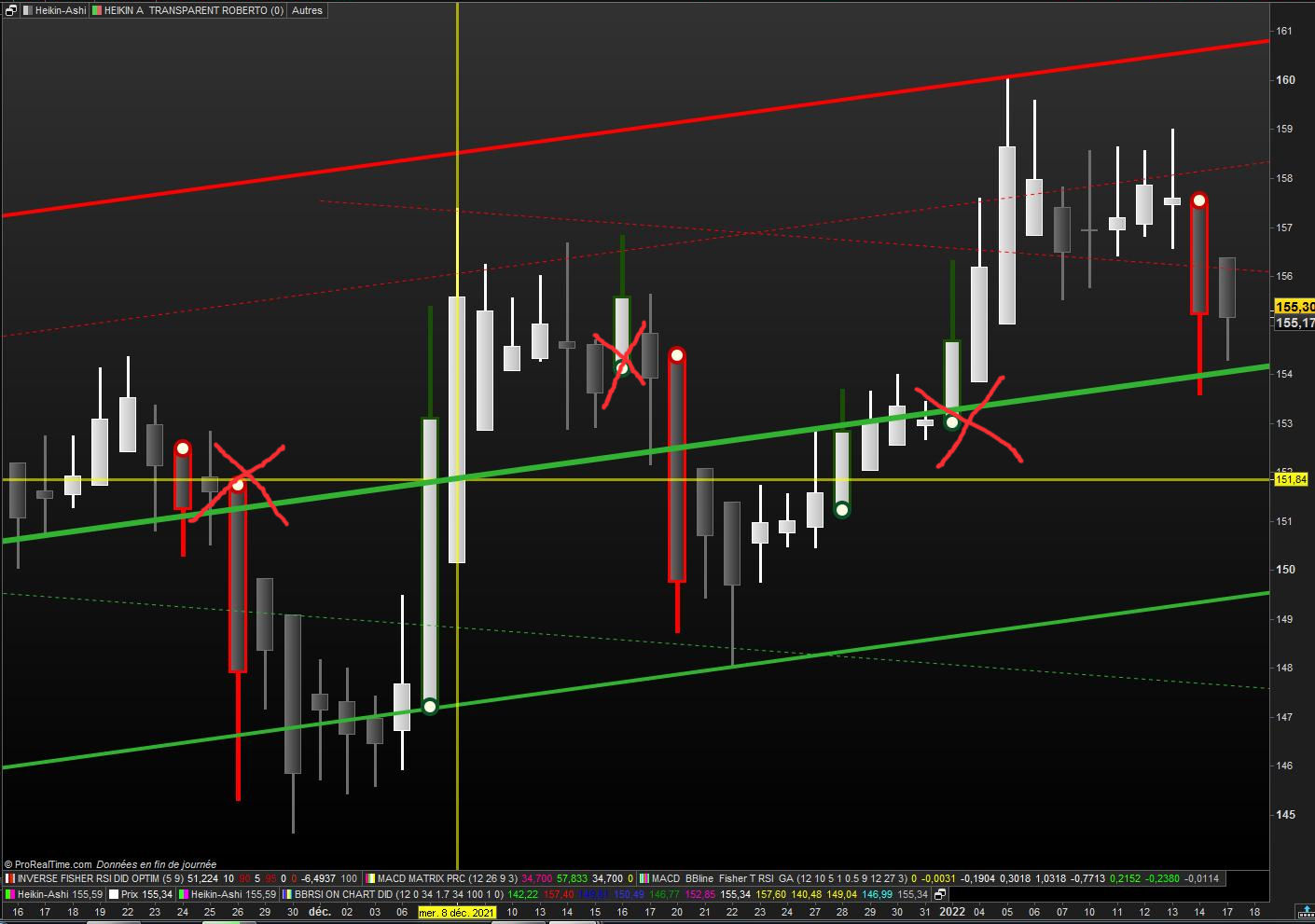
    Voglio solo i punti di svolta, in altre parole i cambiamenti di tendenza.

    Non voglio avere 3,4,5 punti ecc visibili. 1 solo punto al turnaround.

    HA-exemple-1.jpg HA-exemple-1.jpg
    #186280 quote
    robertogozzirobertogozzi
    Moderator
    Legend

    Ho capito, questo mi sembra che vada bene:

    // HEIKIN ASHI TRANSPARENTS ROBERTO  15.01.2022
    // cul plat Nicolas 07.01.2022
    //defparam CALCULATEONLASTBARS = 50
    // Variable :
    // t = 0   (de 0 à 255)
    xClose = (open+high+low+close)/4
    IF BarIndex=0 THEN
    xOpen = open
    xHigh = high
    xLow = low
    ELSe
    xOpen = (xOpen[1] + xClose[1])/2
    xHigh = Max(Max(high, xOpen), xClose)
    xLow = Min(Min(low, xOpen), xClose)
    ENDIF
    green = xopen<xclose and xlow=xopen
    red   = xopen>xclose and xhigh=xopen
    greensum = summation[5](xClose > xOpen) = 5
    redsum   = summation[5](xClose < xOpen) = 5
    ////////////////////////////////////////////////////
    if green and not green[1] then
    lastpointx = 1
    IF lastpointx <> lastpointx[1] THEN
    drawpoint(barindex,xlow,5) coloured (9,82,40,255) //(0,200,0)// green
    ENDIF
    elsif red and not red[1] then
    lastpointx = 2
    IF lastpointx <> lastpointx[1] THEN
    drawpoint(barindex,xhigh,5) coloured(200,0,0,255)// red
    ENDIF
    endif
    /////////////////////////////////////////////////OK
    if  green > green [1] then
    lastpointy = 1
    IF lastpointy <> lastpointy[1] THEN
    drawpoint(barindex,xlow,3) coloured (254,254,0,255) // jaune clair //(9,82,40) // green
    ENDIF
    elsif  red < red [1] then
    lastpointy = 2
    IF lastpointy <> lastpointy[1] THEN
    drawpoint(barindex,xhigh,3) coloured (0,254,255,255) // jaune clair //(200,0,0)// red
    ENDIF
    endif
    //IF close > open THEN
    if  greensum then //green > green [1] then
    DrawCandle(xOpen,xHigh,xLow,xClose) coloured(0,255,0,0) bordercolor(227,0,0)    // vert clair bordure vert foncé
    //ELSE
    elsif  redsum then //red > red [1] then
    DrawCandle(xOpen,xHigh,xLow,xClose) coloured(255,0,255,0) bordercolor(255,0,0)  // rose magenta bordure rouge
    ENDIF
     
    RETURN// t as " HA transparent "
    #186326 quote
    supertitisupertiti
    Participant
    Master


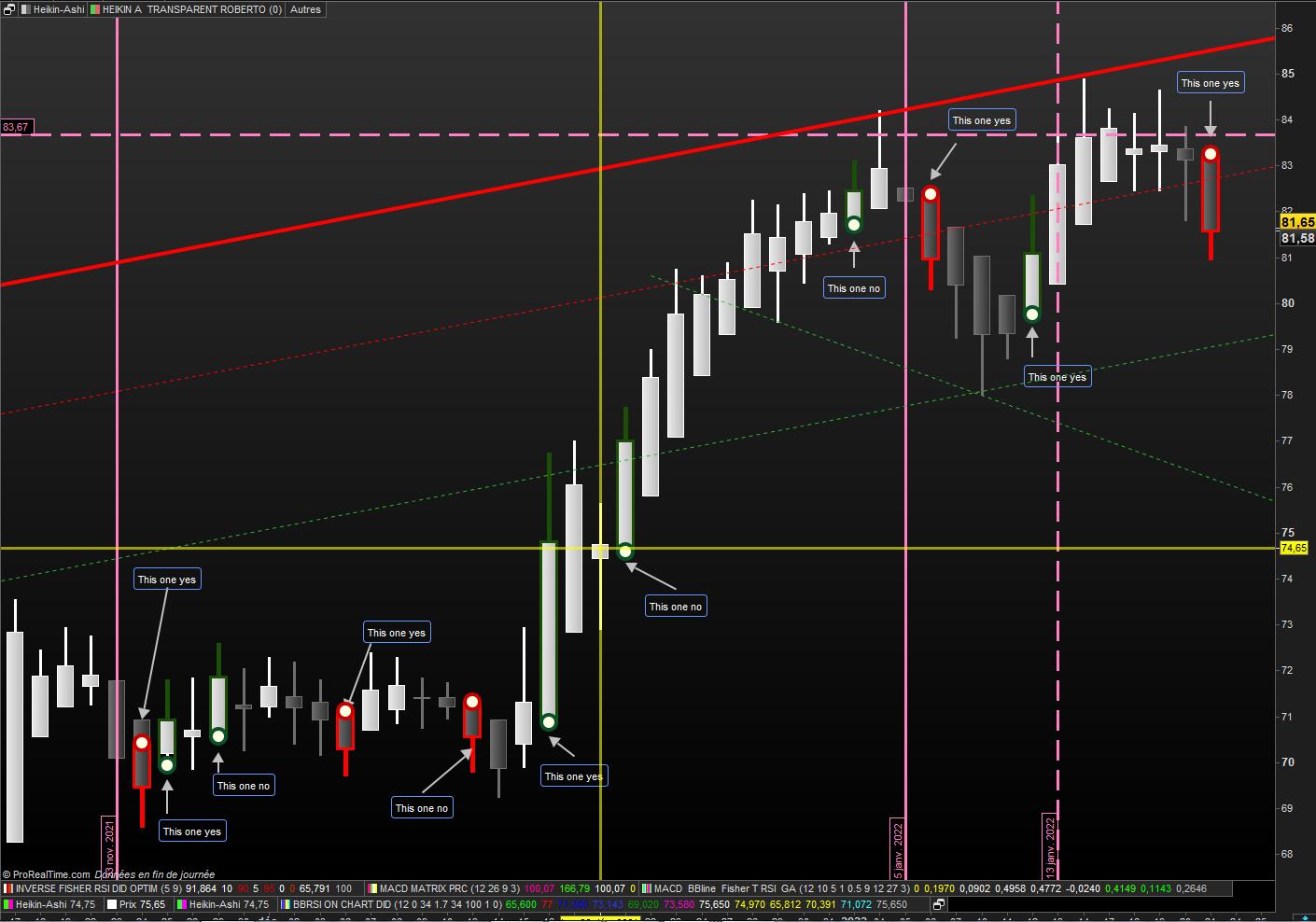
    Scusa Roberto ma il codice non funziona come vorrei
    Allego un grafico di GTT con il ‘sì’ e il ‘no’

    GTT-Roberto.jpg GTT-Roberto.jpg
    #186478 quote
    robertogozzirobertogozzi
    Moderator
    Legend

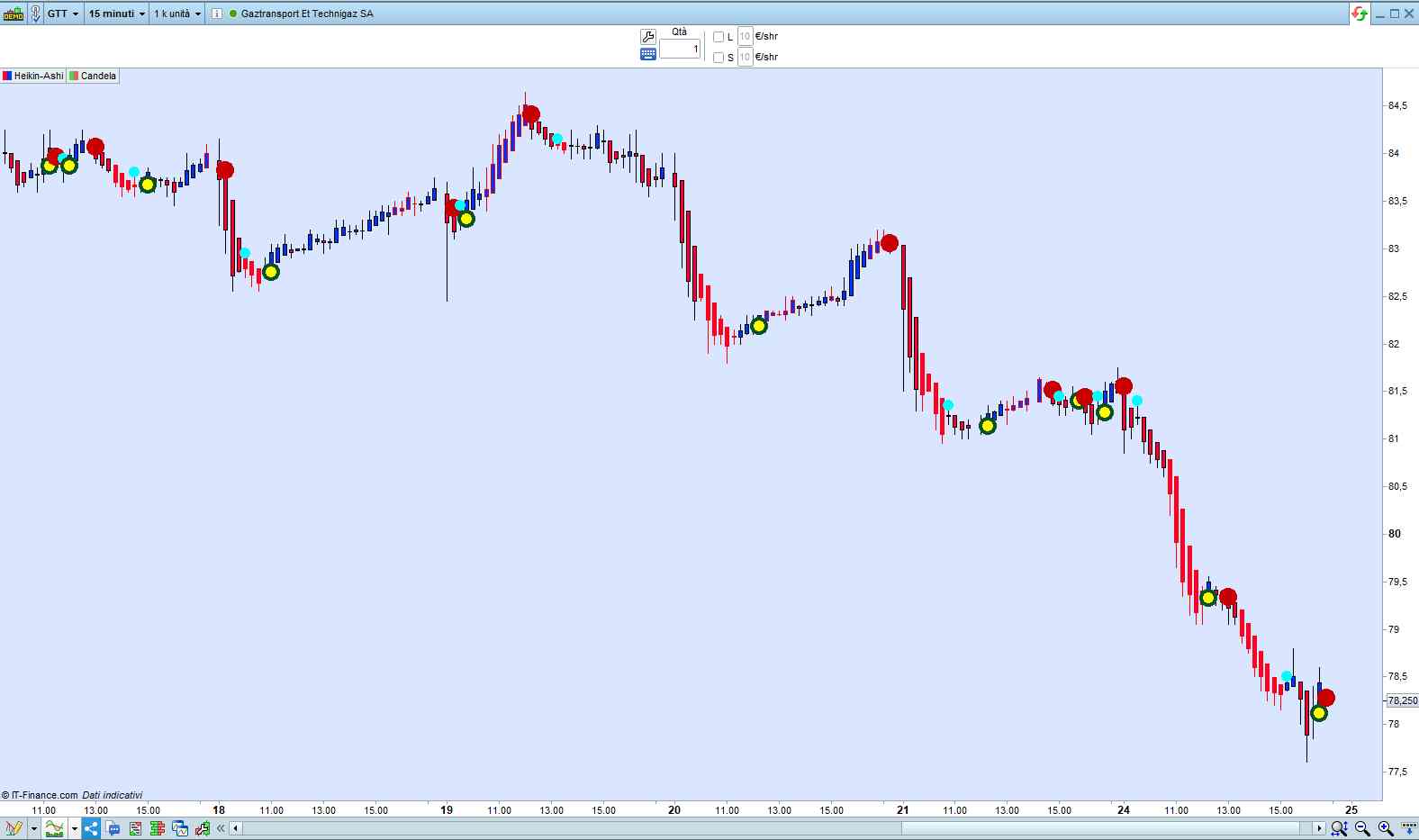
    Non ci sono mai due simboli uguali.

    x-15.jpg x-15.jpg
    #186490 quote
    supertitisupertiti
    Participant
    Master

    Buonasera Roberto

    Sapreste dirmi a cosa corrispondono i puntini azzurri? e come rimuoverli.

    Grazie per la vostra pazienza.

    #186500 quote
    supertitisupertiti
    Participant
    Master


    Il codice funziona così Rimane

    solo per avere i punti verdi e rossi con il centro più chiaro o bianco.

    grazie per l’aiuto


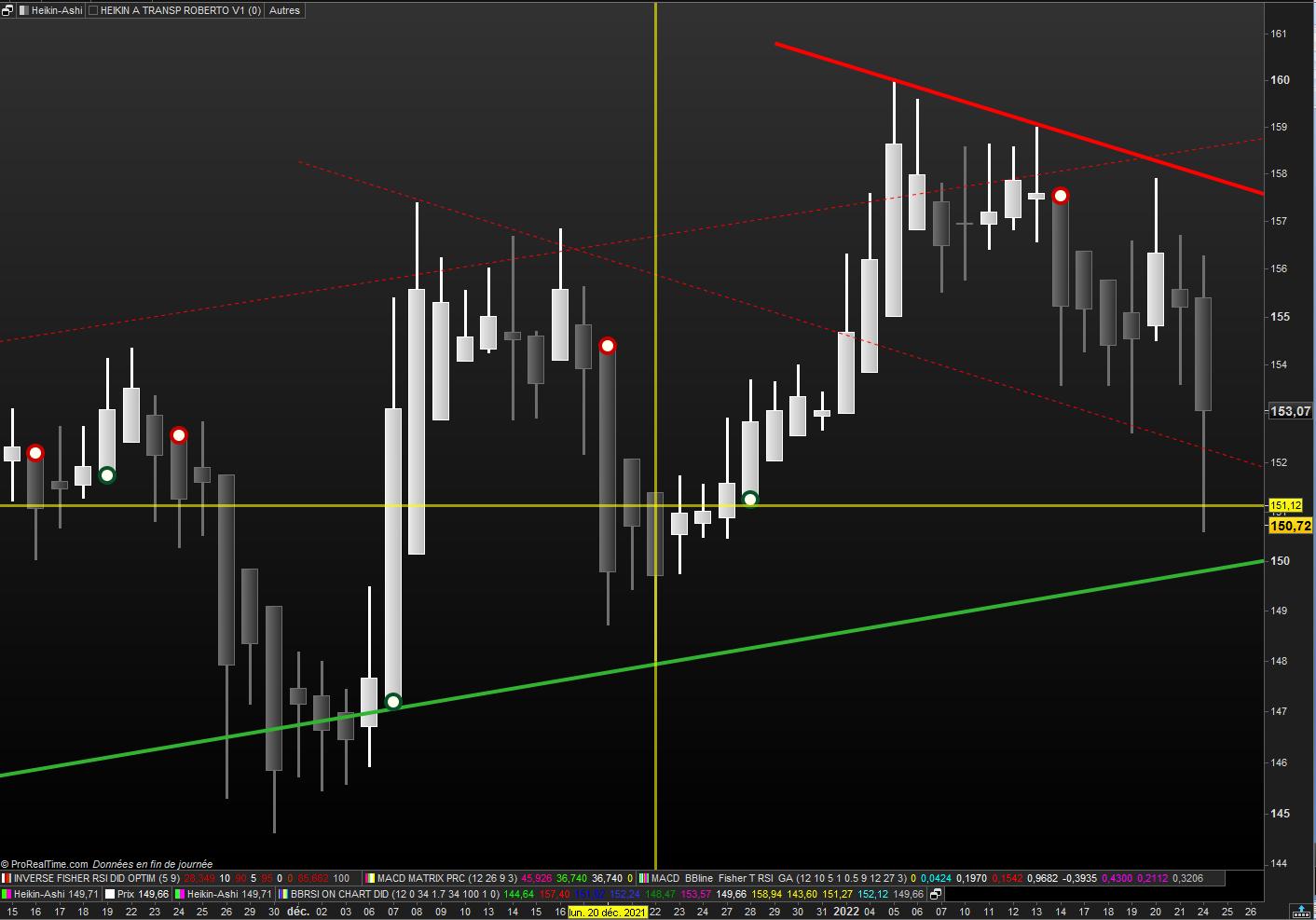
    // HEIKIN ASHI TRANSPARENTS ROBERTO V1 15.01.2022
    
    // cul plat Nicolas 07.01.2022
    //defparam CALCULATEONLASTBARS = 50
    // Variable :
    // t = 0   (de 0 à 255)
    xClose = (open+high+low+close)/4
    IF BarIndex=0 THEN
    xOpen = open
    xHigh = high
    xLow = low
    ELSe
    xOpen = (xOpen[1] + xClose[1])/2
    xHigh = Max(Max(high, xOpen), xClose)
    xLow = Min(Min(low, xOpen), xClose)
    ENDIF
    green = xopen<xclose and xlow=xopen
    red   = xopen>xclose and xhigh=xopen
    greensum = summation[5](xClose > xOpen) = 5
    redsum   = summation[5](xClose < xOpen) = 5
    ////////////////////////////////////////////////////
    if green and not green[1] then
    lastpointx = 1
    IF lastpointx <> lastpointx[1] THEN
    drawpoint(barindex,xlow,5) coloured (9,82,40,255) // green
    ENDIF
    elsif red and not red[1] then
    lastpointx = 2
    IF lastpointx <> lastpointx[1] THEN
    drawpoint(barindex,xhigh,5) coloured(200,0,0,255)// red
    ENDIF
    endif
    /////////////////////////////////////////////////OK
    if  green > green [1] then
    lastpointy = 1
    IF lastpointy <> lastpointy[1] THEN
    drawpoint(barindex,xlow,3) coloured (254,254,0,255) // jaune clair
    ENDIF
    //elsif  red < red [1] then
    //lastpointy = 2
    //IF lastpointy <> lastpointy[1] THEN
    //drawpoint(barindex,xhigh,3) coloured (0,254,255,255) // bleu ciel
    //ENDIF
    endif
    //IF close > open THEN
    if  greensum then //green > green [1] then
    DrawCandle(xOpen,xHigh,xLow,xClose) coloured(0,255,0,0) //bordercolor(6,43,22)    // vert clair bordure vert foncé
    //ELSE
    elsif  redsum then //red > red [1] then
    DrawCandle(xOpen,xHigh,xLow,xClose) coloured(255,0,255,0) //bordercolor(255,0,0)  // rose magenta bordure rouge
    ENDIF
    RETURN   // t as " HA transparent "
    
    HA-V1.jpg HA-V1.jpg
    #186529 quote
    robertogozzirobertogozzi
    Moderator
    Legend

    Bene, qui puoi trovare i colori principali http://cloford.com/resources/colours/500col.htm.

    I 3 parametri del colore sono R,G,B (r,g,b,t). Il quarto, facoltativo, è la trasparenza, che va da da 0 a 255.

    #186581 quote
    supertitisupertiti
    Participant
    Master

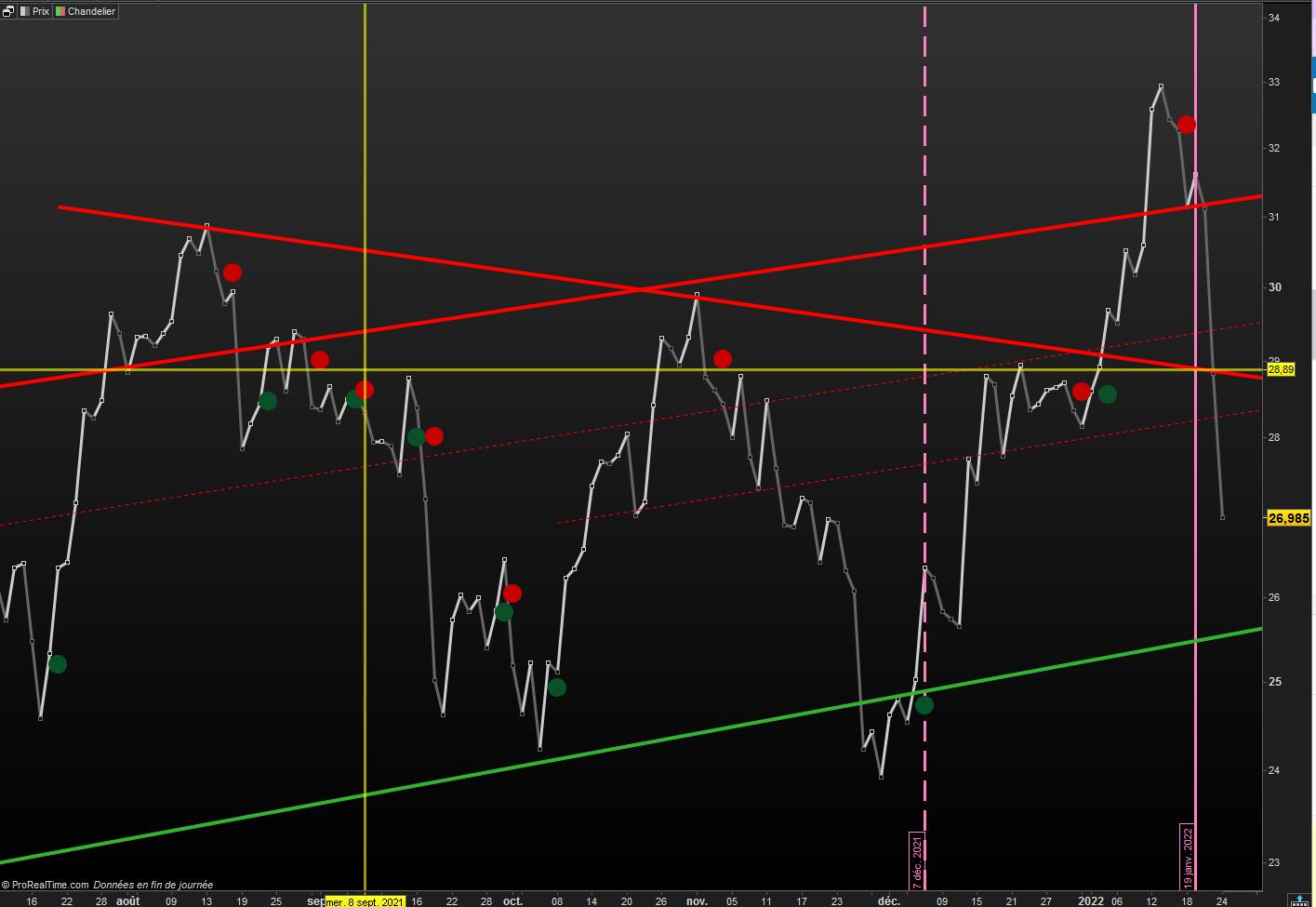
    Eureka! riga di modifica 29 e il codice bene

    Grazie Roberto


    // HEIKIN ASHI TRANSPARENTS ROBERTO V1 15.01.2022
    
    // cul plat Nicolas 07.01.2022
    
    defparam CALCULATEONLASTBARS = 100
    xClose = (open+high+low+close)/4
    IF BarIndex=0 THEN
    xOpen = open
    xHigh = high
    xLow = low
    ELSe
    xOpen = (xOpen[1] + xClose[1])/2
    xHigh = Max(Max(high, xOpen), xClose)
    xLow = Min(Min(low, xOpen), xClose)
    ENDIF
    green = xopen<xclose and xlow=xopen
    red   = xopen>xclose and xhigh=xopen
    greensum = summation[5](xClose > xOpen) = 5
    redsum   = summation[5](xClose < xOpen) = 5
    ////////////////////////////////////////////////////
    if green and not green[1] then
    lastpointx = 1
    IF lastpointx <> lastpointx[1] THEN
    drawpoint(barindex,xlow,5) coloured (9,82,40,255) // green
    ENDIF
    elsif red and not red[1] then
    lastpointx = 2
    IF lastpointx <> lastpointx[1] THEN
    drawpoint(barindex,xhigh,5) coloured(200,0,0,255)// red
    ENDIF
    endif
    /////////////////////////////////////////////////OK
    if  green > green [1] then
    lastpointy = 1
    IF lastpointy <> lastpointy[1] THEN
    drawpoint(barindex,xlow,3) coloured (255,255,240)// Ivoire 
    ENDIF
    elsif  red > red [1] then
    lastpointy = 2
    IF lastpointy <> lastpointy[1] THEN
    drawpoint(barindex,xhigh,3) coloured (255,255,240)// Ivoire  
    ENDIF
    endif
    //IF close > open THEN
    if  greensum then //green > green [1] then
    DrawCandle(xOpen,xHigh,xLow,xClose) coloured(0,255,0,0) //bordercolor(6,43,22)    // vert clair bordure vert foncé
    //ELSE
    elsif  redsum then //red > red [1] then
    DrawCandle(xOpen,xHigh,xLow,xClose) coloured(255,0,255,0) //bordercolor(255,0,0)  // rose magenta bordure rouge
    ENDIF
    RETURN t
    
    
    // Variables :
    // t = 0
    // décocher heikin A transp Roberto V1
    // décocher Chandelier
    
    robertogozzi thanked this post
    HA-V1-OK.jpg HA-V1-OK.jpg
    #186600 quote
    supertitisupertiti
    Participant
    Master

    Ciao Roberto

    Da quest’ultimo codice è possibile creare gli screener UP e DOWN dell’ultimo giorno di negoziazione?

    Buon pomeriggio

    #186606 quote
    robertogozzirobertogozzi
    Moderator
    Legend

    Quali sono i punti UP e DOWN che t’interessano?

    #186616 quote
    supertitisupertiti
    Participant
    Master

    l’ultimo punto Up o DOWN se compare nell’ultimo giorno di negoziazione e solo nell’ultimo giorno di negoziazione

Viewing 12 posts - 16 through 27 (of 27 total)
  • You must be logged in to reply to this topic.

ProRealAI ProRealAI New

Stuck on this ProBuilder code?

Describe what this topic is trying to build, in plain English, and ProRealAI writes the ProRealTime™ indicator, screener or system for you.

Available in 7 languages
Try ProRealAI

Candele in trasparenza


ProBuilder: Indicatori & Strumenti Personalizzati

New Reply
Author
author-avatar
Stenozar @stenozar Participant
Summary

This topic contains 26 replies,
has 3 voices, and was last updated by supertitisupertiti

4 years, 7 months ago.

Topic Details
Forum: ProBuilder: Indicatori & Strumenti Personalizzati
Language: Italian
Started: 01/13/2022
Status: Active
Attachments: 11 files
ProRealCode ProRealCode
Loading...