buy and sell conditions

Viewing 8 posts - 1 through 8 (of 8 total)
  • Author
    Posts
  • #224669 quote
    killerplatuze
    Participant
    New

    Hi,

    how can i build the buy and sell conditions for this indicator: https://www.prorealcode.com/prorealtime-indicators/pivot-point-supertrend/

    I need help for this szenario:  3 contracts with different TP’s, first after 100 Point, second after 200 Points, third one if the trend changes

    How it is possible to draw the trailingsl in the cahrt if the strategy is running?

    Thanks in adcance

    #224698 quote
    killerplatuze
    Participant
    New

    It doesnt work, how can help?


    IF NOT LongOnMarket AND close > trailingsl THEN
    BUY 3 CONTRACTS AT MARKET
    SET TARGET PROFIT 1 = TPL1
    SET TARGET PROFIT 2 = TPL2
    ENDIF
    // Bedingungen zum Ausstieg von Long-Positionen
    if longonmarket and close – tradeprice(1) >= TPL1 AND abs(CountOfPosition) = 3 then
    SELL 1 CONTRACT AT MARKET
    endif
    if longonmarket and close – tradeprice(1) >= TPL2 AND abs(CountOfPosition) = 2 then
    SELL 1 CONTRACT AT MARKET
    endif
    If LongOnMarket AND close CROSSES UNDER trailingsl THEN
    SELL AT MARKET
    ENDIF

    // Bedingungen zum Einstieg in Short-Positionen
    IF NOT ShortOnMarket AND close < trailingsl THEN
    SELLSHORT 3 CONTRACTS AT MARKET
    SET TARGET PROFIT 1 = TPS1
    SET TARGET PROFIT 2 = TPS2
    ENDIF

    // Bedingungen zum Ausstieg aus Short-Positionen
    if ShortOnMarket and tradeprice(1) – close >= TPS1 AND abs(CountOfPosition) = 3 then
    EXITSHORT 1 CONTRACT AT MARKET
    endif
    if ShortOnMarket and tradeprice(1) – close >= TPS2 AND abs(CountOfPosition) = 2 then
    EXITSHORT 1 CONTRACT AT MARKET
    endif
    IF ShortOnMarket AND close CROSSES OVER trailingsl THEN
    EXITSHORT AT MARKET
    ENDIF

    #224713 quote
    robertogozzi
    Moderator
    Master

    You first need to CALL it from your strategy (I used the same names for variables, as they are shown with RETURN in the indicator):

    trailingsl, center, sr = CALL "PRC_Pivot Point Supertrend"[2, 3, 10, 0, 1, 1](close)

    then you will have to use those data as you wish to enter trades, like any other condition.

    killerplatuze thanked this post
    #225081 quote
    killerplatuze
    Participant
    New

    Hi,

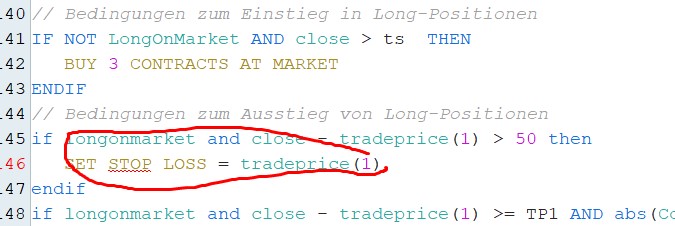
    dont know whats wrong, but PRT dont know the Stop Loss Order anymore?


    IF NOT LongOnMarket AND close > ts  THEN
    BUY 3 CONTRACTS AT MARKET
    ENDIF
    // Bedingungen zum Ausstieg von Long-Positionen
    if longonmarket and close - tradeprice(1) > 50 then
    SET STOP LOSS = tradeprice(1)
    endif
    if longonmarket and close - tradeprice(1) >= TP1 AND abs(CountOfPosition) = 3 then
    SELL 1 CONTRACT AT MARKET
    endif
    if longonmarket and close - tradeprice(1) >= TP2 AND abs(CountOfPosition) = 2 then
    SELL 1 CONTRACT AT MARKET
    endif
    If LongOnMarket AND close < ts THEN
    SELL AT MARKET
    ENDIF
    PeterSt thanked this post
    Screenshot_3.jpg Screenshot_3.jpg
    #225083 quote
    PeterSt
    Participant
    Master

    Yeah, the 6 Dec V12 upgrade isn’t one of the best in PRT’s history.
    No Detailed Report data as well , only a few things work. They are working on this one already.

    killerplatuze and GraHal thanked this post
    #225141 quote
    PeterSt
    Participant
    Master

    So I waited till today (Tuesday) and contacted local (Dutch) support about both issues, with the Set Stop Loss the most prominent of course and they heard …
    Nothing.

    This tells me how many people use PRT-IB and autotrading under V12. A virtual zero (maybe I count for 1, but I did not call either).

    The Detailed Report issue I reported by means of Technical Report on Saturday. Meanwhile for other (memory) issues, I was advised this morning to retry something “because there’s a new version now” (which is the one from Dec. 6).
    Sure.

    I really don’t know what they are doing in Paris. Fact is : if nobody reports the errors (I deem these more than just bugs), they probably “can’t know”.

    #225148 quote
    PeterSt
    Participant
    Master

    Small correction :

    It is the Syntax Highlighting which is messy in this case. See below;
    When the command is typed fully, it is just accepted. And @killerplatuze, when you can’t complete the command because of a syntax error (the = does not belong), it keeps on telling you that the “Stop” part is rejected.

    Maybe I still don’t know what they are doing in Paris, but it sure are good things as well. 🙂
    The syntax highlighting issue was passed on to ProRealTime, but is no big deal anyway, once you know how to deal with it.

    Not to justify my own mistake, but I am not using PRT’s editor, so I never saw what’s going on with the syntax highlighting.

    image_2023-12-12_103936892.png image_2023-12-12_103936892.png image_2023-12-12_104037527.png image_2023-12-12_104037527.png image_2023-12-12_104210963.png image_2023-12-12_104210963.png
    #225219 quote
    robertogozzi
    Moderator
    Master

    I suggest to code line 6 as:

    SET STOP PRICE TradePrice(1)

    as in your case, say you work with DAX, that would be over a 16K-pip Stop Loss!  (LOSS requires a price distance, PLOSS a pip difference, $LOSS a currency difference and %LOSS a percentage difference).

    killerplatuze and ashehzi thanked this post
Viewing 8 posts - 1 through 8 (of 8 total)

  • You must be logged in to reply to this topic.

buy and sell conditions


ProOrder: Automated Strategies & Backtesting

New Reply
Author
Summary

This topic contains 7 replies,
has 3 voices, and was last updated by robertogozzi
2 years, 2 months ago.

Topic Details
Forum: ProOrder: Automated Strategies & Backtesting
Language: English
Started: 11/30/2023
Status: Active
Attachments: 4 files
Logo Logo
Loading...