Bug Affichage Pivot 1heure

Viewing 15 posts - 1 through 15 (of 19 total)
  • Author
    Posts
  • #160610 quote
    Ichimoku Reading
    Participant
    Master

    Bonjour !

    Suite à mon précédent poste, j’ai souhaité prendre un peu d’avance et codé tous les points pivot en correspondance avec ceux sur la plateforme PRT

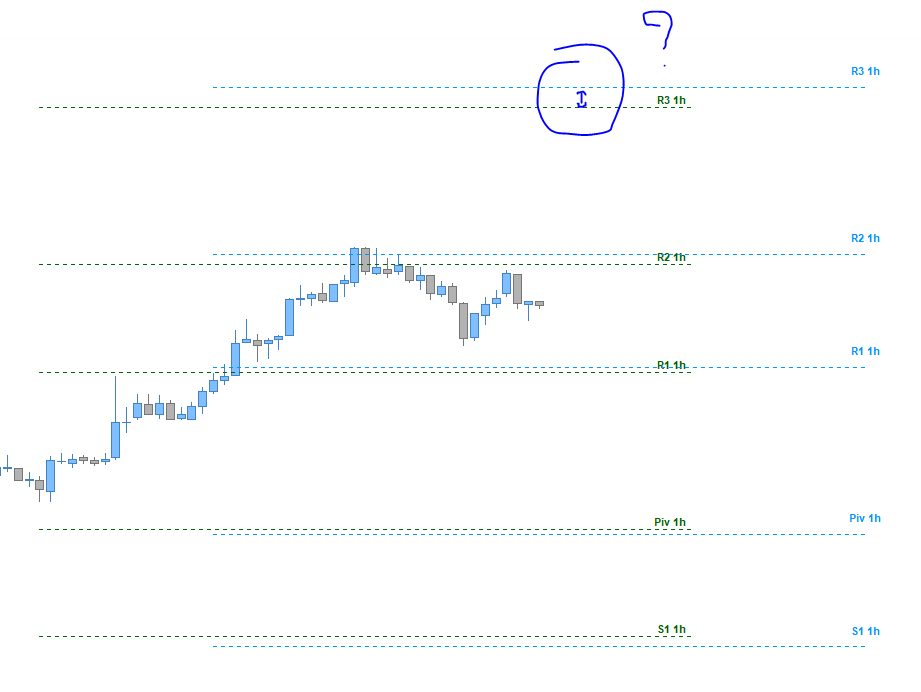
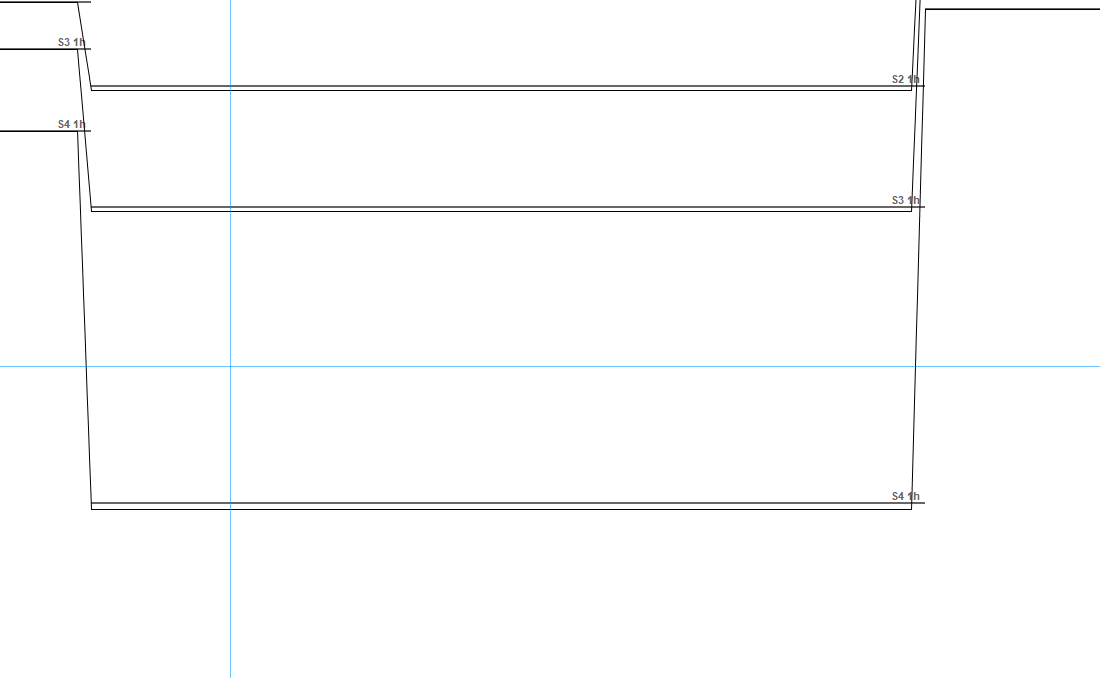
    J’ai un souci sur l’affichage des pivots 1 heure…

    Sur toutes les unités de temps supérieur à 1 minute, l’affichage est impeccable et précis, mais sur le 1 minute, les pivots sont décalés verticalementÉtant donné qu’il fonctionne sur les autres UT, j’ai du mal à trouver le problème.

    Je partage ce code, si vous avez une idée du correctif à appliquer ‘-‘ ?

    PS : désactiver les donné weekend sur toutes les UT pour ne pas avoir de soucis d’affichage

    Capture-3.png Capture-3.png Point-Pivot.itf
    #160613 quote
    Ichimoku Reading
    Participant
    Master

    PS n°2 : indicateur uniquement sur V11

    #160614 quote
    Ichimoku Reading
    Participant
    Master

    Sur le forex aucun souci, je pense que le souci vient du gap au passage du jour suivant sur indices, je ne sais pas si vous pourrez voir le souci demain

    Si ça provient des trous de cotation ou gap, une idée des correctifs a appliqué ?

    #160616 quote
    Ichimoku Reading
    Participant
    Master

    C’est de partout maintenant ‘-‘

    #160617 quote
    Ichimoku Reading
    Participant
    Master

    OK, petit changement dans le code, j’ai supprimé certaines lignes qui calculer les points pivot seulement si la variable externe était cocher

    Maintenant, cocher ou non les point pivot sont calculer, en revanche, il reste le problème des gap ou trous de cotation

    Le problème vient certainement de là étant donné que le problème n’est plus sur le pivot 1 heure, mais 2 heure ou le gap fait parti du calcul

    ALL-Point-Pivot.itf
    #160619 quote
    Ichimoku Reading
    Participant
    Master

    Pour éviter quelques soucis lors de l’importation, j’ai coupé le code en plusieurs parties étant donné que des variable multitiframe sont utilisé


    Pour le souci de gap, si le problème vient bien de là, je n’ai aucune solution pour le moment..

    Si vous avez une idée

    Merci d’avance pour les réponses !

    Pivot-1H.itf Pivot-4H.itf Pivot-Day.itf
    #160626 quote
    Nicolas
    Keymaster
    Master

    Pourrais-tu poster en clair dans le forum, le code des pivots H1 qui ne fonctionnent pas ? Merci.

    #160643 quote
    Ichimoku Reading
    Participant
    Master

    Voici

    //
    //=/===============/=//=/===============/=//=/ Paramettre de Base
    //
    
    defparam drawonlastbaronly = true
    
    //
    //=/===============/=//=/===============/=//=/ Interface Visuel
    //
    
    //=// Couleur
    RxH1 = 0
    GxH1 = 150
    BxH1 = 255
    
    //=/ Visuel
    drawsegment(barindex[30],PP,Barindex+30,PP) coloured(RxH1,GxH1,BxH1) style(dottedline,1)
    //=//
    drawsegment(barindex[30],Rx1,Barindex+30,Rx1) coloured(RxH1,GxH1,BxH1) style(dottedline,1)
    drawsegment(barindex[30],Rx2,Barindex+30,Rx2) coloured(RxH1,GxH1,BxH1) style(dottedline,1)
    drawsegment(barindex[30],Rx3,Barindex+30,Rx3) coloured(RxH1,GxH1,BxH1) style(dottedline,1)
    drawsegment(barindex[30],Rx4,Barindex+30,Rx4) coloured(RxH1,GxH1,BxH1) style(dottedline,1)
    //=//
    drawsegment(barindex[30],Sx1,Barindex+30,Sx1) coloured(RxH1,GxH1,BxH1) style(dottedline,1)
    drawsegment(barindex[30],Sx2,Barindex+30,Sx2) coloured(RxH1,GxH1,BxH1) style(dottedline,1)
    drawsegment(barindex[30],Sx3,Barindex+30,Sx3) coloured(RxH1,GxH1,BxH1) style(dottedline,1)
    drawsegment(barindex[30],Sx4,Barindex+30,Sx4) coloured(RxH1,GxH1,BxH1) style(dottedline,1)
    
    if Text then
    //=//
    Drawtext("Piv 1h",barindex+35,PP,dialog,bold,11) coloured(RxH1,GxH1,BxH1)
    //=//
    Drawtext("R1 1h",barindex+35,Rx1,dialog,bold,11) coloured(RxH1,GxH1,BxH1)
    Drawtext("R2 1h",barindex+35,Rx2,dialog,bold,11) coloured(RxH1,GxH1,BxH1)
    Drawtext("R3 1h",barindex+35,Rx3,dialog,bold,11) coloured(RxH1,GxH1,BxH1)
    Drawtext("R4 1h",barindex+35,Rx4,dialog,bold,11) coloured(RxH1,GxH1,BxH1)
    //=//
    Drawtext("S1 1h",barindex+35,Sx1,dialog,bold,11) coloured(RxH1,GxH1,BxH1)
    Drawtext("S2 1h",barindex+35,Sx2,dialog,bold,11) coloured(RxH1,GxH1,BxH1)
    Drawtext("S3 1h",barindex+35,Sx3,dialog,bold,11) coloured(RxH1,GxH1,BxH1)
    Drawtext("S4 1h",barindex+35,Sx4,dialog,bold,11) coloured(RxH1,GxH1,BxH1)
    endif
    
    if Middle then
    //=//
    drawsegment(barindex[30],MxR1,Barindex+30,MxR1) coloured(RxH1,GxH1,BxH1) style(dottedline,1)
    drawsegment(barindex[30],MxR2,Barindex+30,MxR2) coloured(RxH1,GxH1,BxH1) style(dottedline,1)
    drawsegment(barindex[30],MxR3,Barindex+30,MxR3) coloured(RxH1,GxH1,BxH1) style(dottedline,1)
    drawsegment(barindex[30],MxR4,Barindex+30,MxR4) coloured(RxH1,GxH1,BxH1) style(dottedline,1)
    //=//
    drawsegment(barindex[30],MxS1,Barindex+30,MxS1) coloured(RxH1,GxH1,BxH1) style(dottedline,1)
    drawsegment(barindex[30],MxS2,Barindex+30,MxS2) coloured(RxH1,GxH1,BxH1) style(dottedline,1)
    drawsegment(barindex[30],MxS3,Barindex+30,MxS3) coloured(RxH1,GxH1,BxH1) style(dottedline,1)
    drawsegment(barindex[30],MxS4,Barindex+30,MxS4) coloured(RxH1,GxH1,BxH1) style(dottedline,1)
    endif
    
    if MiddleText then
    //=//
    Drawtext("mR1 1h",barindex+35,MxR1,dialog,bold,11) coloured(RxH1,GxH1,BxH1)
    Drawtext("mR2 1h",barindex+35,MxR2,dialog,bold,11) coloured(RxH1,GxH1,BxH1)
    Drawtext("mR3 1h",barindex+35,MxR3,dialog,bold,11) coloured(RxH1,GxH1,BxH1)
    Drawtext("mR4 1h",barindex+35,MxR4,dialog,bold,11) coloured(RxH1,GxH1,BxH1)
    //=//
    Drawtext("mS1 1h",barindex+35,MxS1,dialog,bold,11) coloured(RxH1,GxH1,BxH1)
    Drawtext("mS2 1h",barindex+35,MxS2,dialog,bold,11) coloured(RxH1,GxH1,BxH1)
    Drawtext("mS3 1h",barindex+35,MxS3,dialog,bold,11) coloured(RxH1,GxH1,BxH1)
    Drawtext("mS4 1h",barindex+35,MxS4,dialog,bold,11) coloured(RxH1,GxH1,BxH1)
    endif
    
    //
    //=/===============/=//=/===============/=//=/ Pivot
    //
    
    timeframe(1hours)
    
    //=/ H & L & C
    LL  = low[1]
    HH  = high[1]
    CC  = close[1]
    
    //=/ S & R & P
    PP  = (LL+HH+CC)/3
    //=//
    Rx1  = 2 * PP - LL
    MxR1 = (PP+Rx1)/2
    Rx2  = PP + (HH-LL)
    MxR2 = (Rx2+Rx1)/2
    Rx3  = Rx2 + (Rx1-PP)
    MxR3 = (Rx3+Rx2)/2
    Rx4  = Rx3 + (Rx2-PP)
    MxR4 = (Rx4+Rx3)/2
    //=//
    Sx1  = 2 * PP - HH
    MxS1 = (PP+Sx1)/2
    Sx2  = PP - (HH-LL)
    MxS2 = (Sx1+Sx2)/2
    Sx3  = Sx2 - (PP-Sx1)
    MxS3 = (Sx2+Sx3)/2
    Sx4  = Sx3 - (PP-Sx2)
    MxS4 = (Sx3+Sx4)/2
    
    timeframe(default)
    
    //
    //=/===============/=//=/===============/=//=/ Fin
    //
    
    return
    
    #160810 quote
    Nicolas
    Keymaster
    Master

    Le code étant lu de haut en bas, je ne comprends pas pourquoi tu traces les segments avant de définir les variables qu’ils utilisent pour se placer ? Essai de déplacer les instructions graphiques sous ton instruction timeframe(default), pour voir ? 🙂

    Ichimoku Reading thanked this post
    #160831 quote
    Ichimoku Reading
    Participant
    Master

    Bonjour Nicolas, merci pour ta réponse

    J’ai pensé que le problème pouvait venir de là, mais ça n’a rien changer, ça arrive parfois sur les changements de jour/semaine ou mois..

    #160832 quote
    Ichimoku Reading
    Participant
    Master

    J’ai constater ça en retournant directement les point pivot sans instruction graphique

    #160842 quote
    Nicolas
    Keymaster
    Master

    Je viens de tester sur le changement d’heure dans le TF 1-minute et tout se calcule et se trace correctement.. (DAX).

    Aurais-tu par hasard des horaires personnalisés ? Les points pivots calculés par la plateforme utilisent les vrais données de marché et pas celles que tu lui impose, sauf erreur de ma part.

    #160882 quote
    Ichimoku Reading
    Participant
    Master

    Tu as bien raison, en essayant de modifier l’horaire et afficher uniquement la plage de cotation “réelle”, l’indicateur a planter, donc les horaires ne peuvent pas être imposé, en tout cas, pas avec l’instruction timeframe..

    J’ai les réglages par défaut pour les horaires, ce problème arrive de façon aléatoire en début de Jours/semaine/mois ou année

    Le dernier Bug remonte au Lundi 8 janvier sur les pivots horaire

    Le calcul des points pivot étant correct et l’instruction timeframe étant aussi correcte, le problème ne pourrait t’il pas venir de la plateforme ?

    J’ai noté une subtilité sur un autre indicateur en codant ichimoku, j’ai utilisé deux méthodes différente pour le calcul de la SSA, seul une sur les deux était juste bien que les deux calculs étaient bon..

    Capture-4.png Capture-4.png
    #160886 quote
    Ichimoku Reading
    Participant
    Master

    Également Nicolas, je vais réviser l’affichage pour qu’il soit comme les points pivot, pour ça, j’ai besoin de pouvoir reconnaître un trou de cotation, tu sais me dire s’il y a une méthode ??

    #160887 quote
    Ichimoku Reading
    Participant
    Master

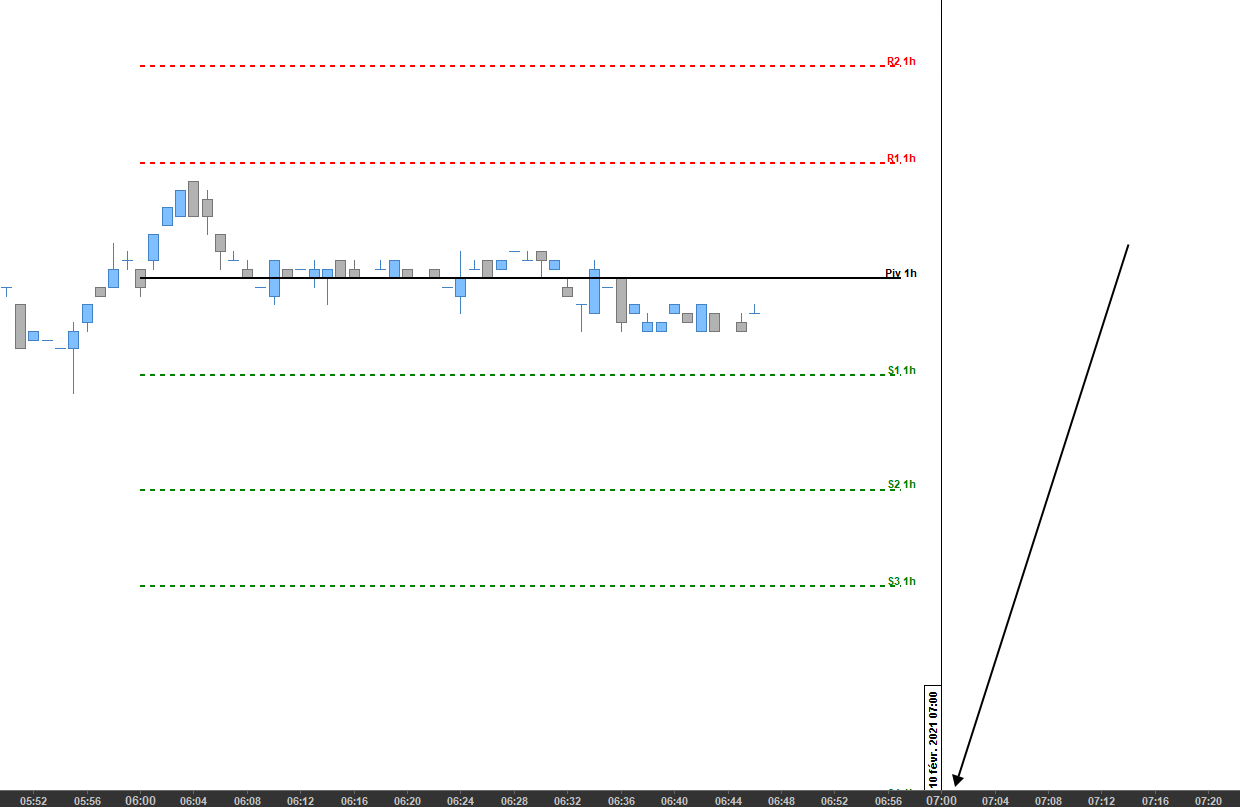
    Le trou ne cotation m’empêche d’atteindre l’heure suivante

    Capture-5.png Capture-5.png
Viewing 15 posts - 1 through 15 (of 19 total)
  • You must be logged in to reply to this topic.

Bug Affichage Pivot 1heure


ProBuilder : Indicateurs & Outils Personnalisés

New Reply
Author
Summary

This topic contains 18 replies,
has 2 voices, and was last updated by Ichimoku Reading
5 years, 1 month ago.

Topic Details
Forum: ProBuilder : Indicateurs & Outils Personnalisés
Language: French
Started: 02/08/2021
Status: Active
Attachments: 11 files
Logo Logo
Loading...