Hi everyone,
I’m new to this community and I would like to develop a code for automated trading within ProRealTime with Pivot Points and Dojis as triggers. That system should be able to automatically execute a trade when a doji (or a different reversal pattern) appears at a S2 or R2 pivot line. These patterns could occur within a specific distance to the S2 and R2 line (e. g. 10 – 20 points when trading the DAX). It should sell at the R2 and buy at the S2 line. Furthermore the exit of the trade should be on the close or on the first open of a candle that makes a lower low after a prolonged uptrend, or on the first higher high after a downtrend.
The potential markets I want to trade are DAX, DOW JONES and EUR/USD.
Any help is highly appreciated!
Thank you very much;)
It reminds me of this code I made as a scanner: Doji entry scanner
Could be easily converted to an automatic trading program. Someone? 😉
// --- settings
DEFPARAM CumulateOrders = False
DojiSize = 20 //x% percent of body size compared to the complete range of the candlestick
mode = 1 //Pivot calculation method
// ---

If Day>Day[1] then
If mode = 0 then
Pivot = (DHigh(1) + DLow(1) + Close[1]) / 3
Elsif mode = 1 then
Pivot = (Open + DHigh(1) + DLow(1) + Close[1]) / 4
Elsif mode = 2 then
Pivot = (DHigh(1) + DLow(1) + Close[1]*2) / 4
Else
Pivot = (Open*2 + DHigh(1) + DLow(1)) / 4
Endif
R1 = 2*Pivot - DLow(1)
S1 = 2*Pivot - DHigh(1)
rR2 = Pivot + (DHigh(1) - DLow(1))
S2 = Pivot - (DHigh(1) - DLow(1))
R3 = R1 + (DHigh(1) - DLow(1))
S3 = S1 - (DHigh(1) - DLow(1))
Endif

doji=(abs(open - close) <= (high - low) * DojiSize/100)

bullish = doji and (high crosses over pivot or high crosses over r1 or high crosses over s1 or high crosses over rr2 or high crosses over s2 or high crosses over r3 or high crosses over s3)

bearish = doji and (low crosses under pivot or low crosses under r1 or low crosses under s1 or low crosses under rr2 or low crosses under s2 or low crosses under r3 or low crosses under s3)

If bullish Then
Buy 1 Contract at Market
Endif

If bearish Then
SellShort 1 Contract at Market
Endif

SET TARGET PPROFIT 150
SET STOP PLOSS 300
I’m sure it can be improved, ideas anybody?
Feel free to change / add code etc?
All credit goes to Nicolas as it’s his Scanner quickly converted to an Auto-System.
Wow, that is pretty awesome, thank you very much!:)
Does the code automatically consider my Pivot Point time frame? Where can I adjust the distance from the dojis to the R2 and S2 line?
All credit goes to Nicolas as it’s his Scanner quickly converted to an Auto-System.
I was in from jobs in the garden having a coffee and saw Nicolas post.
So no, it’s not tailored specifically to your System specification. I just thought it might get you going and save Nicolas some time! 😉
Oh well … back to my summerhouse painting! 🙂
Thank you Grahal, I was in my swimming pool, that’s why I didn’t code the strategy and asked a mate to code it for me 😆
I hope you enjoyed the sun today!
Thanks again!:) I really tried to adjust the code to do the following tasks:
- It should only place a trade if the first candle after the doji closes higher or lower than the high or the low of the doji, this depends wether it is a buy or a sell.
- It should place a stop at the high or the low of the entry doji.
- It should get out of a position (set target) right after a candle closes below the low of a previous candle in an uptrend and vice versa in a downtrend.
I’m really not sure if it will work like I wanted it to do.
Thank you!;)
// Bedingungen zum Einstieg in Long-Positionen// --- settings
DEFPARAM CumulateOrders = False

Pivot = (DHigh(1) + DLow(1) + Close[1]) / 3
R1 = 2*Pivot - DLow(1)
S1 = 2*Pivot - DHigh(1)
rR2 = Pivot + (DHigh(1) - DLow(1))
S2 = Pivot - (DHigh(1) - DLow(1))
R3 = R1 + (DHigh(1) - DLow(1))
S3 = S1 - (DHigh(1) - DLow(1))


doji = Range > ABS(Open - Close) * 5


bullish = doji and (high crosses over pivot or high crosses over r1 or high crosses over s1 or high crosses over rr2 or high crosses over s2 or high crosses over r3 or high crosses over s3) and close>high[1]

bearish = doji and (low crosses under pivot or low crosses under r1 or low crosses under s1 or low crosses under rr2 or low crosses under s2 or low crosses under r3 or low crosses under s3) and close<low[1]

If bullish Then

Buy 1 Contract at Market
set stop ploss high[1]
set target pprofit (close<low[1])
Endif

If bearish Then
SellShort 1 Contract at Market
set stop ploss low[1]
set target pprofit (close>high[1])
Endif
Hi,
sorry to bother you guys again! I made a few changes to the code but for some reason the stops and the exits do not work.
Do you have any idea why that is?
Thank you so much! 🙂
// Bedingungen zum Einstieg in Long-Positionen// --- settings
DEFPARAM CumulateOrders = true

Pivot = (DHigh(1) + DLow(1) + Close[1]) / 3
R1 = 2*Pivot - DLow(1)
S1 = 2*Pivot - DHigh(1)
rR2 = Pivot + (DHigh(1) - DLow(1))
S2 = Pivot - (DHigh(1) - DLow(1))
R3 = R1 + (DHigh(1) - DLow(1))
S3 = S1 - (DHigh(1) - DLow(1))

DojiSize = 20
doji=(abs(open[1] - close[1]) <= (high[1] - low[1]) * DojiSize/100)


bullish = (doji and (high[1] crosses over pivot or high[1] crosses over r1 or high[1] crosses over s1 or high[1] crosses over rr2 or high[1] crosses over s2 or high[1] crosses over r3 or high[1] crosses over s3) and close[0]>high[1])

bearish = (doji and (low[1] crosses under pivot or low[1] crosses under r1 or low[1] crosses under s1 or low[1] crosses under rr2 or low[1] crosses under s2 or low[1] crosses under r3 or low[1] crosses under s3) and close[0]<low[1])

stoplownextcandle = low<low[1]
stoplowdoji = low>low[1]

stophighdoji = high<high[1]
stophighnextcandle = high>high[1]

If bullish Then

Buy 1 Contract at Market
Endif

IF longonmarket and bullish and stoplowdoji then

set stop ploss (low[1])

endif

If longonmarket and bullish and stoplownextcandle then
set stop ploss (low)

endif

IF longonmarket and bullish and (close < low[1]) then

sell 1 contract at market
endif

If bearish Then

SellShort 1 Contract at Market

Endif

if shortonmarket and bearish and stophighnextcandle then
set stop ploss (high)
endif

if shortonmarket and bearish and stophighdoji then
set stop ploss high[1]
endif

IF shortonmarket and bearish and (close >high[1]) then
exitshort 1 contract at market

ENDIF
Is it because you set the Stops within If statements and so conditions (other than price level) have to be met to trigger the stop?
Normally it would be price level ONLY that would trigger Set Stop PLoss xx ?
Thank you! If you delete the conditions “bullish” and “bearish” within the statements, then the stops are working:) Is there also a way to exit the trade immediately when hitting a specific resistance or support line and not just when the next new candle begins?
Yes but first you would have to code the Supp or Res Line into the System.
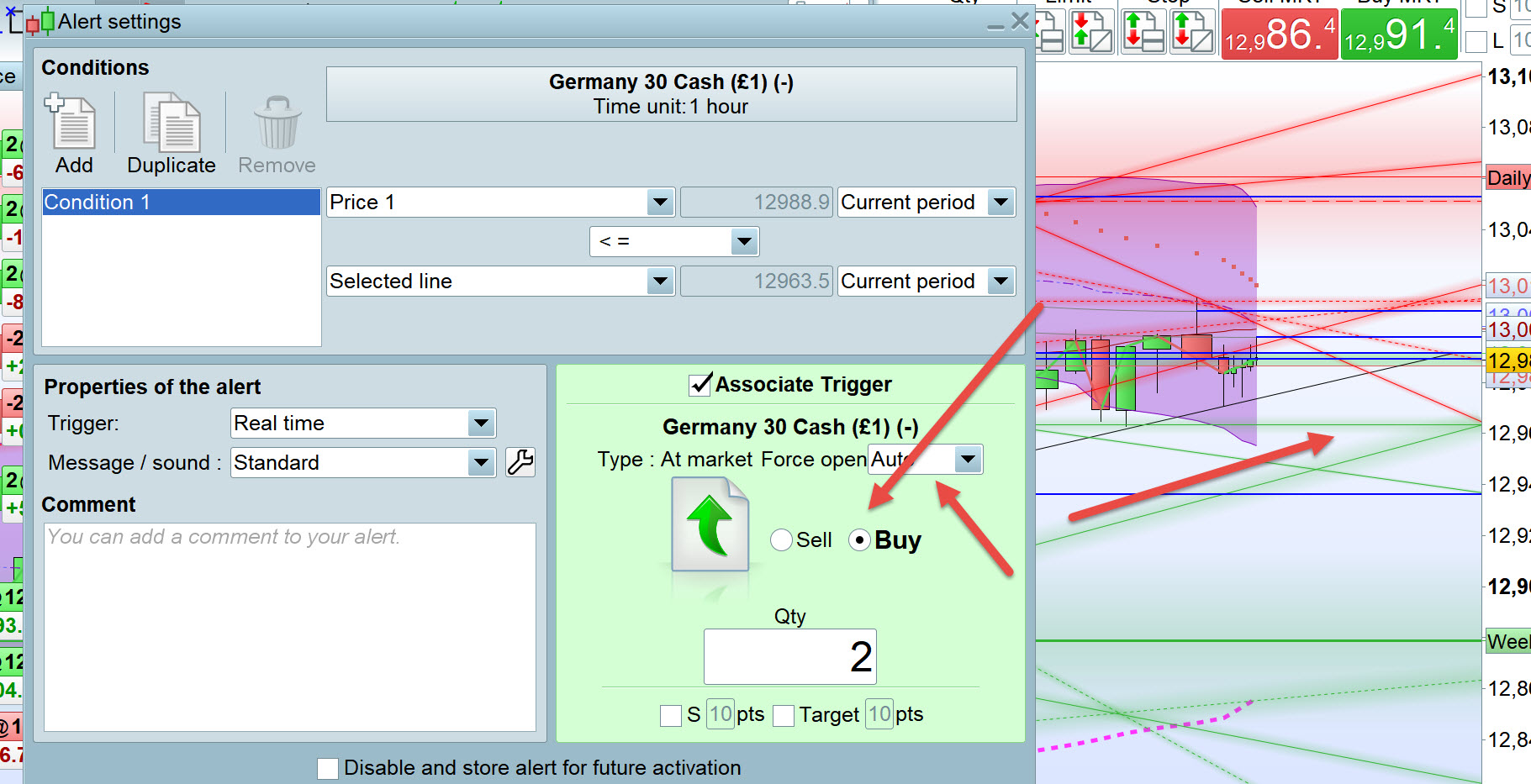
You could use
Alerts and then pick off one of the
horizontal default PRT Supp / Res line conditions (see attached) or set your own price level line.
Make sure you get that drop down box set correct on the red arrow … read up on the optional settings.
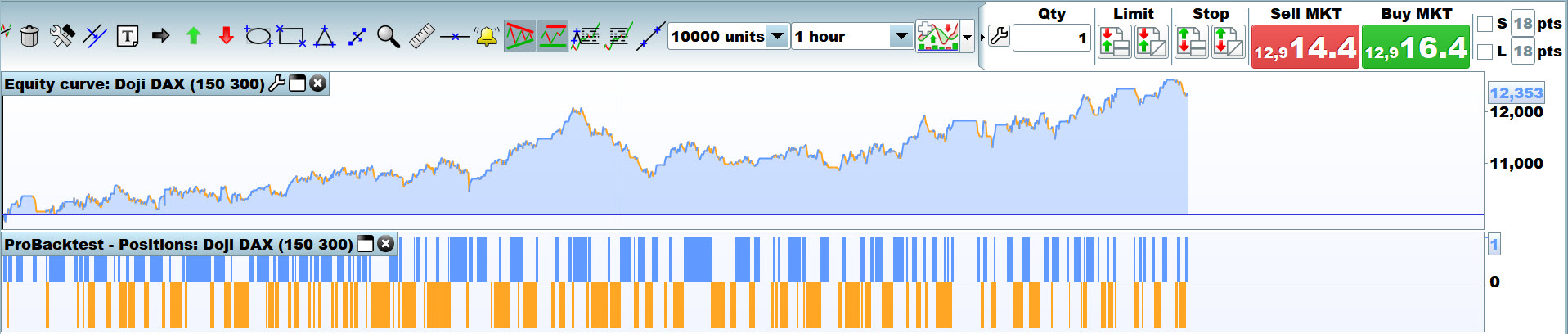
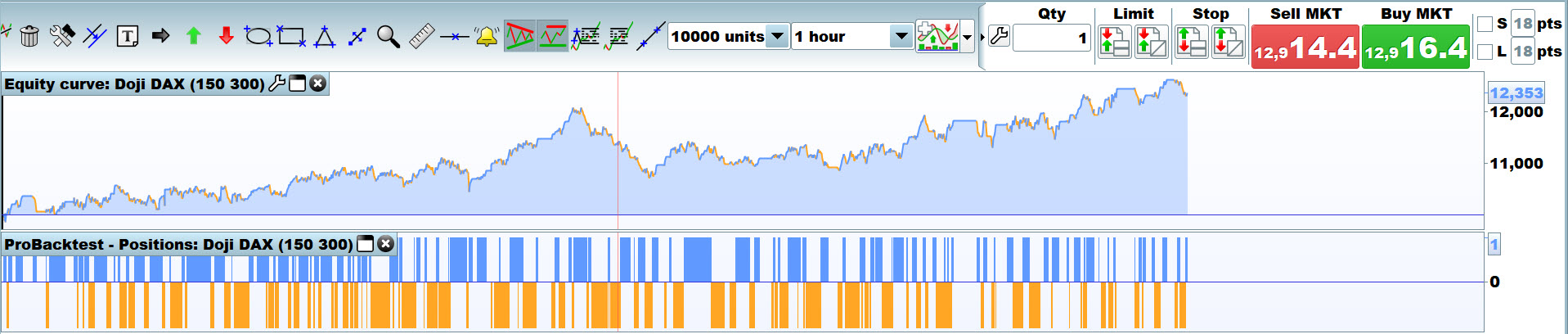
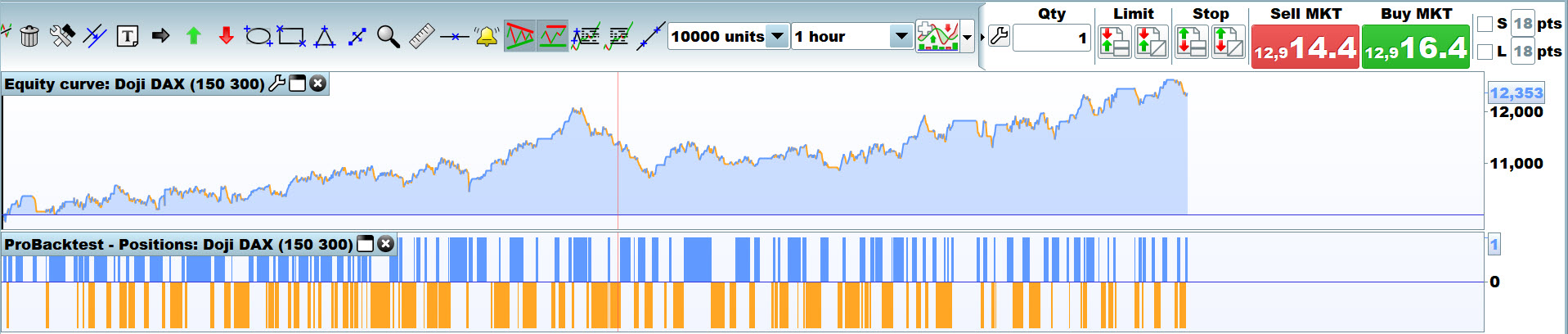
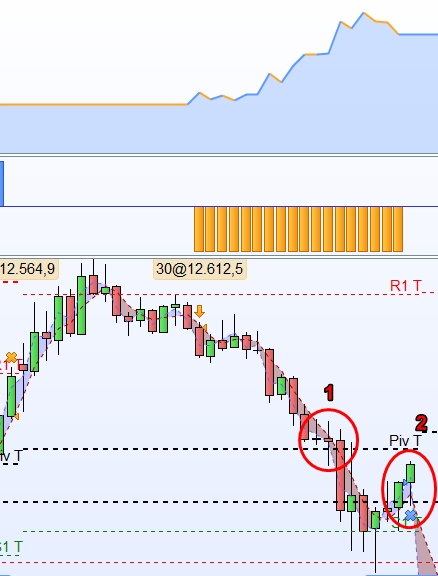
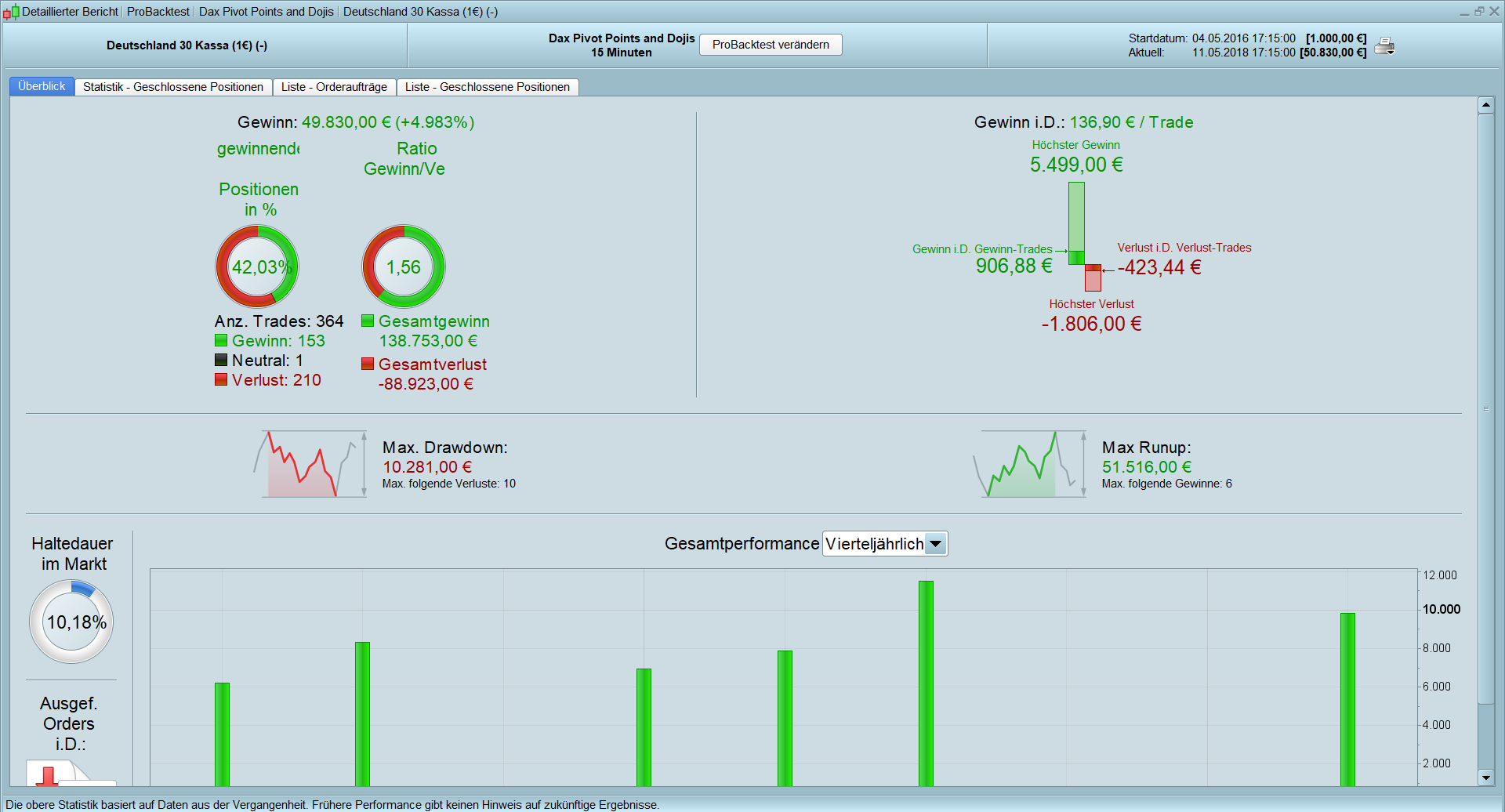
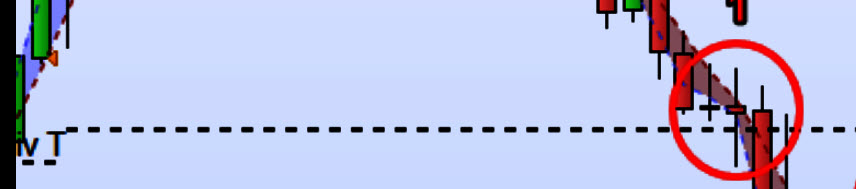
So far the performance is not bad as you can see in the attached picture. But the exit strategy when hitting the next pivot line does still not work. It should have stopped out as soon as the candle in the red first circle of the first picture was touched, but the exit was made in the second red circle because of the end of the trading day. For example for the case when a doji forms within a range of 4 points next to the R1 line and is supposed to exit at the pivot line, the code looks like this:
DEFPARAM CumulateOrders = false
DEFPARAM FlatBefore = 090000
DEFPARAM FlatAfter = 171500

Pivot = (DHigh(1) + DLow(1) + DClose(1)) / 3
R1 = 2*Pivot - DLow(1)
S1 = 2*Pivot - DHigh(1)
rR2 = Pivot + (DHigh(1) - DLow(1))
S2 = Pivot - (DHigh(1) - DLow(1))
R3 = R1 + (DHigh(1) - DLow(1))
S3 = S1 - (DHigh(1) - DLow(1))

dojisize = 4.2
doji = Range >= ABS(Open[1] - Close[1]) * dojisize

bearishr1 = (doji and (close[1] <= r1+4 and close[1] >= r1-4) and close<low[1])

stoplownextcandle = low<low[1]
stoplowdoji = low>low[1]

stophighdoji = high<high[1]
stophighnextcandle = high>high[1]

size = 30
stopbull = 2
stopbear = 2

If bearishr1 Then

SellShort size Contract at Market

Endif

if shortonmarket  and stophighnextcandle then
set stop ploss (high+stopbear)
endif

if shortonmarket  and stophighdoji then
set stop ploss (high[1]+stopbear)
endif

IF shortonmarket  and (close >high[1]) then
exitshort size contract at market

ENDIF

IF shortonmarket then
SET TARGET PROFIT pivot

ENDIF
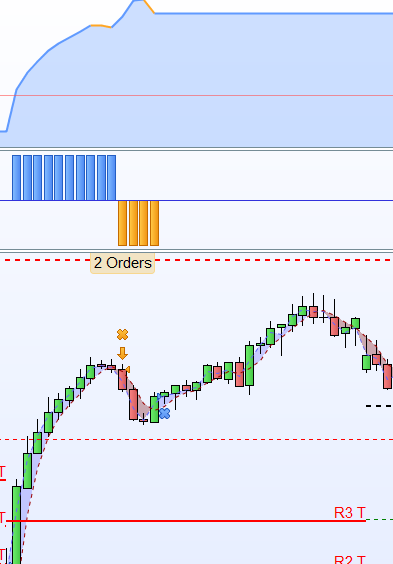
And the second Problem is, that I’m not even sure if the trade is only triggered when the doji is within the range of +- 4 points, because when you take a look at picture number 3 I don’t understand why it sold 1 contract short. There is no pivot line close to it.
Is it because the code is not right?
Thank you so much for your help!!:)
IF shortonmarket then SET TARGET PROFIT pivot
So taking one step at a time, are you saying that the Piv T Line equates to Pivot in your code?
See attached … and that is why you expected to ExitShort as price had reached Piv T / your code pivot??
Yes that is what I was thinking. I thought, that the calculated pivot lines from the code should be the same as the pivot lines from the indicators.
Right let’s slow this down a bit! 🙂 Which I don’t do when I’m working on my own Systems! 🙂 If something doesn’t jump right out at me, I move on and let it knaw away at my subconscious and often when I wake up the answer is there! 🙂
Where does the T come from in Piv T?
I can only get it to show Piv D (for Daily) of Piv for less than 1 day (e.g. 15 mins).