Bonjour @Brent38,
Réponse dans les 2 langues (français pour être sûr que la réponse puisse vous aider, anglais pour respecter la langue de ce fil “automatic trading”), le temps d’être sûr que la réponse ait pu être lue au même endroit que là où elle a d’abord été postée. Ensuite (plus tard) on déplacera probablement ces quelques posts vers un sujet à part entière en forum français “bienvenue aux nouveaux membres” pour ne pas rester au milieu du sujet “automatic trading avec IBKR”.
Concernant “comment poser une question sur ce forum“:
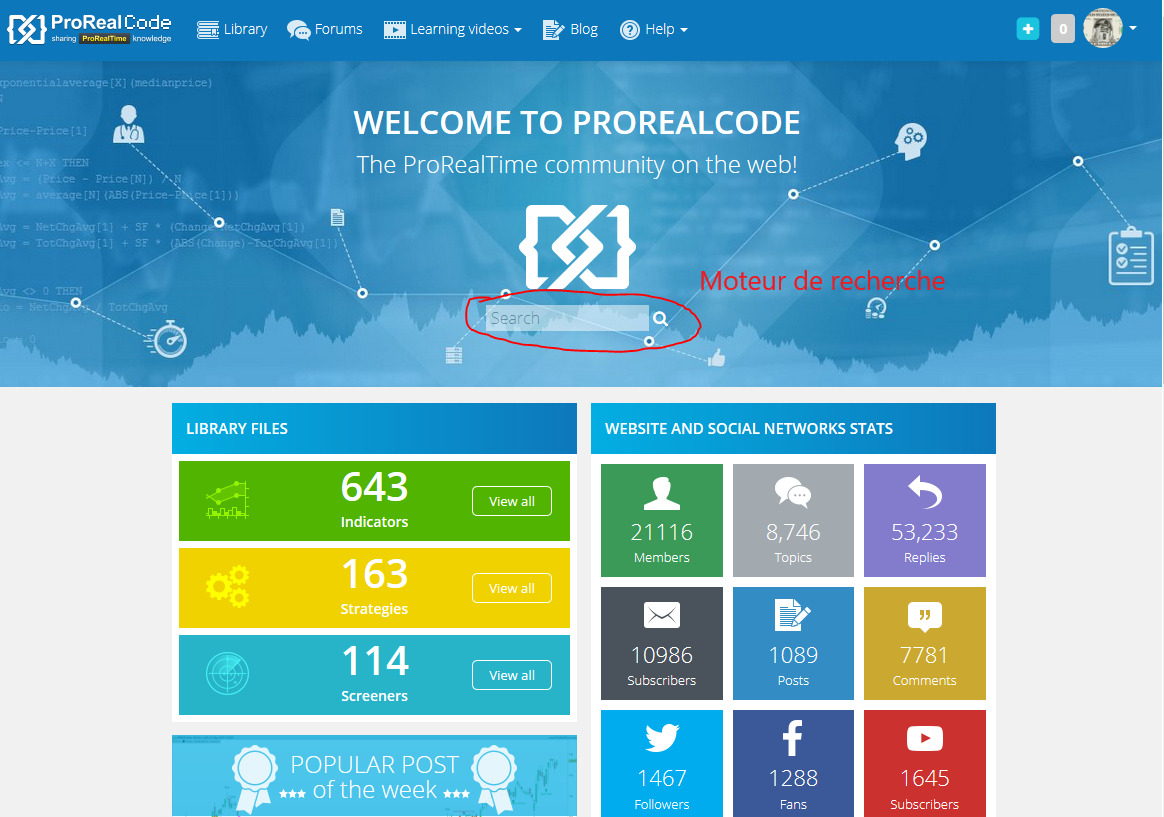
si on clique dans le menu principal en haut sur “forums” (bandeau bleu, juste à droite de “library”), on arrive sur la liste de tous les forums, groupés par langage 6 par 6, les 6 premiers étant en français, les 6 suivants en anglais, etc… On choisit celui des 6 premiers en français qui correspond le mieux à la question à poser en cliquant dessus, on arrive à une page avec la liste des sujets, d’abord une série de titres de sujets à fond jaune (les messages dits “sticky” qui peuvent être présents sur plusieurs forums à la fois en haut de page, et parfois internationaux donc quelques uns peuvent être en anglais), suivie d’une série de titres de sujets à fond blanc en partant de celui à l’activité la plus récente. Pour poser une nouvelle question (=ouvrir un nouveau sujet), il faut faire défiler jusqu’en bas de la page, et là on arrive au cadre où on met le titre de son sujet suivi du cadre où on tape le message lui-même (ainsi que, plus bas, éventuellement le bouton “select file” si on veut attacher une image au sujet).
Concernant “recherche comme on en a l’habitude, genre une loupe quelque part“:
voir capture écran ci-jointe de la page d’accueil pour la localiser si on la préfère à l’autre depuis le menu déroulant de l’avatar.
Hello @Brent38,
Answer in 2 languages (French to be sure that the answer can help you, English to respect the language of this “automatic trading” thread), the time to be sure that the answer could have been read in the same place as where it was posted first. Then (later) we will probably move these few posts to a subject in its own right in the French forum “bienvenue aux nouveaux membres” so as not to stay in the middle of the subject “automatic trading with IBKR”.
Regarding “how to ask a question on this forum“:
if you click in the main menu at the top on “forums” (blue banner, just to the right of “library”), you arrive on the list of all the forums, grouped by language 6 by 6, the first 6 being in French, the next 6 in English, etc… We choose the one of the first 6 in French which best corresponds to the question to be asked by clicking on it, we arrive at a page with the list of subjects, first a series of titles of topics with a yellow background (the so-called “sticky” messages which can be present on several forums at the same time at the top of the page, and sometimes international so some may be in English), followed by a series of topic titles with a white background starting from the one with the most recent activity. To ask a new question (= open a new topic), you have to scroll to the bottom of the page, and there you get to the box where you put the title of your topic followed by the box where you type the message itself (as well as, further down, if needed the “select file” button if you want to attach an image to the subject).
Regarding “search as usual, like a magnifying glass somewhere“:
see attached screenshot of the home page to locate it if preferred over the other from the avatar drop-down menu.