IF barindex >= 2 then

PDmin= 8
LBmax= 48 -1
For LB= 0 to LBmax DO
For PD= LBmax DownTo PDmin DO
$HP1[LB*LBmax+PD]= $HP1[(LB+1)*LBmax+PD]
$HP2[LB*LBmax+PD]= $HP2[(LB+1)*LBmax+PD]
$HP[LB*LBmax+PD]= $HP[(LB+1)*LBmax+PD]

$BP1[LB*LBmax+PD]= $BP1[(LB+1)*LBmax+PD]
$BP2[LB*LBmax+PD]= $BP2[(LB+1)*LBmax+PD]
$BP[LB*LBmax+PD]= $BP[(LB+1)*LBmax+PD]

$SS1[LB*LBmax+PD]= $SS1[(LB+1)*LBmax+PD]
$SS2[LB*LBmax+PD]= $SS2[(LB+1)*LBmax+PD]
$SS[LB*LBmax+PD]= $SS[(LB+1)*LBmax+PD]
NEXT
NEXT

For PD= PDmin to LBmax DO
LB2= (LB-2)*LBmax+PD
LB1= (LB-1)*LBmax+PD
LB0= (LB-0)*LBmax+PD

REM High Pass Filter
HPPrice= close // WhiteNoise //Zeros
HPPeriod= PD // (20)
HPBandwidth= 0.3 // (0.1) 2013--> 0.3 (0.10-0.50)
HPbeta= 0.25*HPBandwidth*360/HPPeriod
HPalpha= (COS(HPbeta) + SIN(HPbeta)-1) / COS(HPbeta)
//HP1= (1+HPalpha/2) * (HPPrice-HPPrice[1]) + (1-HPalpha)*HP1[1]
$HP1[LB0]= (1+HPalpha/2) * (HPPrice-HPPrice[1]) + (1-HPalpha)*$HP1[LB1]
$HP2[LB0]= (1+HPalpha/2) * ($HP1[LB*LBmax+PD]-$HP1[(LB-1)*LBmax+PD]) + (1-HPalpha)*$HP2[LB1]
$HP[LB0]= 2*$HP1[LB0] - $HP2[LB0]

REM BandPass Filter
BPPeriod= PD // (20)
BPBandwidth= HPBandwidth // 2013 => 0.3 (0.10-0.50)
BPbeta= COS(360/BPPeriod)
BPgamma= 1/COS(360*BPBandwidth/BPPeriod) // (720) 2013 => 360,
BPalpha= BPgamma - SQRT(BPgamma*BPgamma-1)
//BP1= 0.5*(1-BPalpha)*(HP1[0]-HP1[2]) + BPbeta*(1+BPalpha)*BP1[1] - BPalpha*BP1[2]
$BP1[LB0]= 0.5*(1-BPalpha)*($HP[LB0]-$HP[LB2]) + BPbeta*(1+BPalpha)*$BP1[LB1] - BPalpha*$BP1[LB2]
$BP2[LB0]= 0.5*(1-BPalpha)*($BP1[LB0]-$BP1[LB2]) + BPbeta*(1+BPalpha)*$BP2[LB1] - BPalpha*$BP2[LB2]
$BP[LB0]= 2*$BP1[LB0] - $BP2[LB0]
BP= $BP[LB0]

REM super smoother filter
SSPrice= $HP[LB0]
SSPeriod= PD
SSa1= exp(-1.414*3.14159/SSPeriod)
SSb1= 2*SSa1*Cos(1.414*180/SSPeriod)
SScoef2= SSb1
SScoef3= -SSa1*SSa1
SScoef1= 1-SScoef2-SScoef3
//SS1= SScoef1*SSPrice + SScoef2*SS1[1] + SScoef3*SS1[2]
$SS1[LB0]= SScoef1*SSPrice + SScoef2*$SS1[LB1] + SScoef3*$SS1[LB2]
$SS2[LB0]= SScoef1*$SS1[LB0] + SScoef2*$SS2[LB1] + SScoef3*$SS2[LB2]
$SS[LB0]= 2*$SS1[LB0] - $SS2[LB0]
SS= $SS[LB0]

Power= 0
For LBP= 0 to PD-1 DO
LBP0= LBP*LBmax+PD
Power= Power + square($BP[LBP0]) + square($BP[LBP0+ROUND(PD/4)])
NEXT
NEXT
ENDIF

return BP as "Band Pass", SS as "Super Smother Filter", Power as "Power"
Dear Nicolas,
I would like to ask you for an array programming support.
For each day a 2 pole bandpass filters shall be calculated for periods from PD= 8 to 48 (swami).
The Bandpass filter looks back 1 and 2 days “BP= ….. + ……. BP[1] + …….BP[2]“.
By using the normal programming, the BP[i] is always stored from the last calculated Period.
That is not correct for swami.
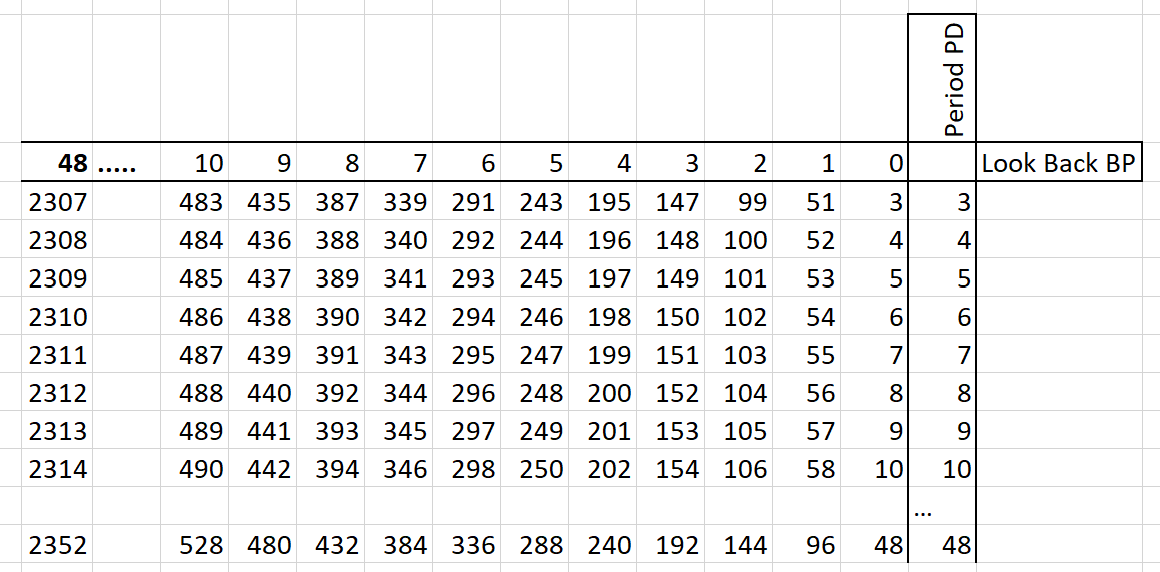
Correct would be for example:
BP[0] at Period 3 has to be calculated as BP[0]= ….. + ……. BP[51] + …….BP[99]
BP[0] at Period 48 BP has to be calculated as BP[0]= ….. + ……. BP[96] + …….BP[144]
In order to calculate the Peak to Peak cycle amplitude wave the following loop is required:
Power= 0
FOR count=0 to Period-1 DO
Power= Power + square(BP[count]) + square(BP[count+ROUND(count/4)])
NEXT
For this the array has to be designed for 48-1 look back days as follows (0 to 47=48 steps)
By the above the calculating time of my code is very very long (not practicable for using).
Do you have an idea for optimising the code in order to speed it up?
An adjustable PD calculation step (for example 2) could also be helpful to optimize the calculating time.
Many thanks for your support in advance.
Best regards
Hasardeur
Here the array sample in order for easier understanding of the above description.
Hasardeur – Please be more careful when posting. Your post was a total mess of HTML that took a lot of time to tidy up.
Hallo Vonasi,
I am very sorry about the mess i have caused. I have seen it but have not been able to formate it fine. Is there any trick? Sorry once again.
Cutting and pasting from other websites often causes issues as well as trying to edit code that has already been inserted in the text box from within the text box.
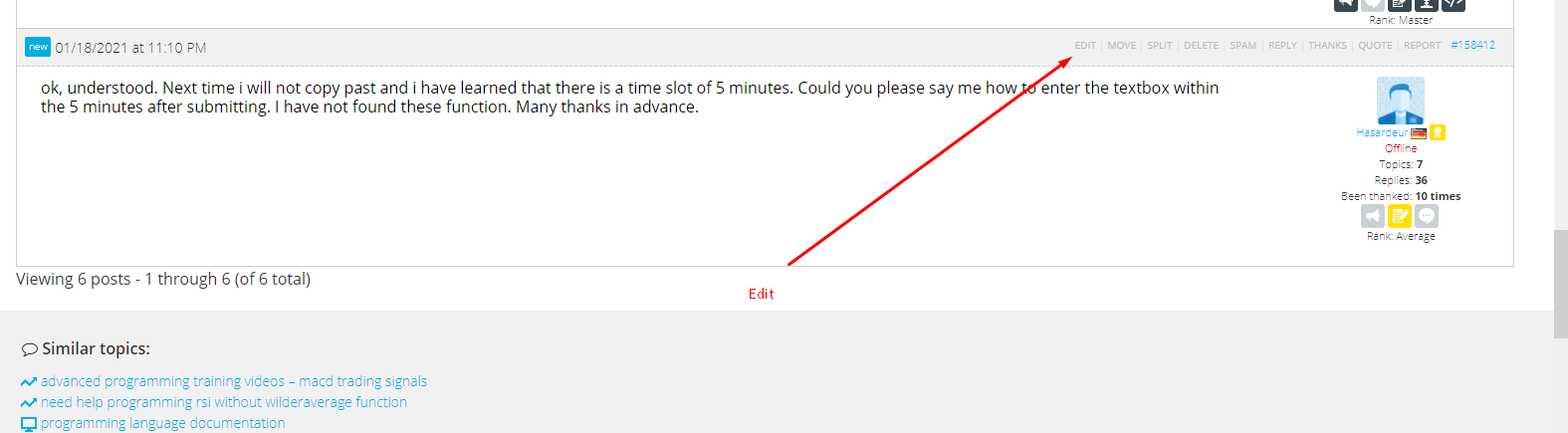
You have five minutes to edit your post after hitting submit. If it looks like a total mess that will take a lot of work to correct then you are better to delete and start again. This save moderators an awful lot of work! 🙂
ok, understood. Next time i will not copy past and i have learned that there is a time slot of 5 minutes. Could you please say me how to enter the textbox within the 5 minutes after submitting. I have not found these function. Many thanks in advance.
Hello Hasardeur,
Did you try to replace this line :
Power= Power + square(BP[count]) + square(BP[count+ROUND(count/4)])
with your complete Indicator code ?
I know it will be “bad programming” like that, but you should at least test the speed one time because proceeding by impossible (?) means might not lead anywhere anyway. If the speed now suits you, you can proceed from there.
How long does it take currently ? What do you want to achieve regarding “speed up” ? (2x faster etc. is an answer)
Can’t you use less wave cycles ? -> obviously not. … I suppose I now like to look into Swami (sorry to be unexperienced) – but not easy to find quickly in this context.
Peter
Sorry, i’m lost in your code. I’m not sure about the nested loops, are they mandatory in order to achieve your calculation?
A better way to code with arrays, and make it faster, is to calculate what you need at first read of history and store the value in an array with BARINDEX as column number.
Then, on the current bar, do your calculation included into an IsLastBarUpdate in order to fill your array with the results (result of the current bar or back in history).
Keep in mind that it is better to loop through arrays on the last bar only, than loop through candlesticks to fill an array on each bar. To be clear, you can make your code do what is needed, but in multiple steps.
HalloNicolas,
hallo all
may thanks to for your assistance.
Nicolas, do you have a sample foryouraboveexplanation.
The lines of array organisation is enough, i will be able to fill it with the required code by my own. Hopefully.
Many thanks for your replay in advanced.
Best regards
Hasardeur
@Hasardeur
Do not use the ‘Insert PRT Code’ button for text.
Thank you 🙂
This is what I’m doing in this example: https://www.prorealcode.com/topic/array-variables-availability-in-prorealtime/#post-118817
While the chart history is loaded (at start of the code and then on each new bar created), I store fractals points into arrays, so that I can use that complete set of values but only when the current bar is updated (with IsLastBarUpdate).
Dear Nicolas,
many thanks for your support.