Aggiunta di indicazione

Viewing 15 posts - 1 through 15 (of 20 total)
  • Author
    Posts
  • #73631 quote
    Gianco
    Participant
    Senior

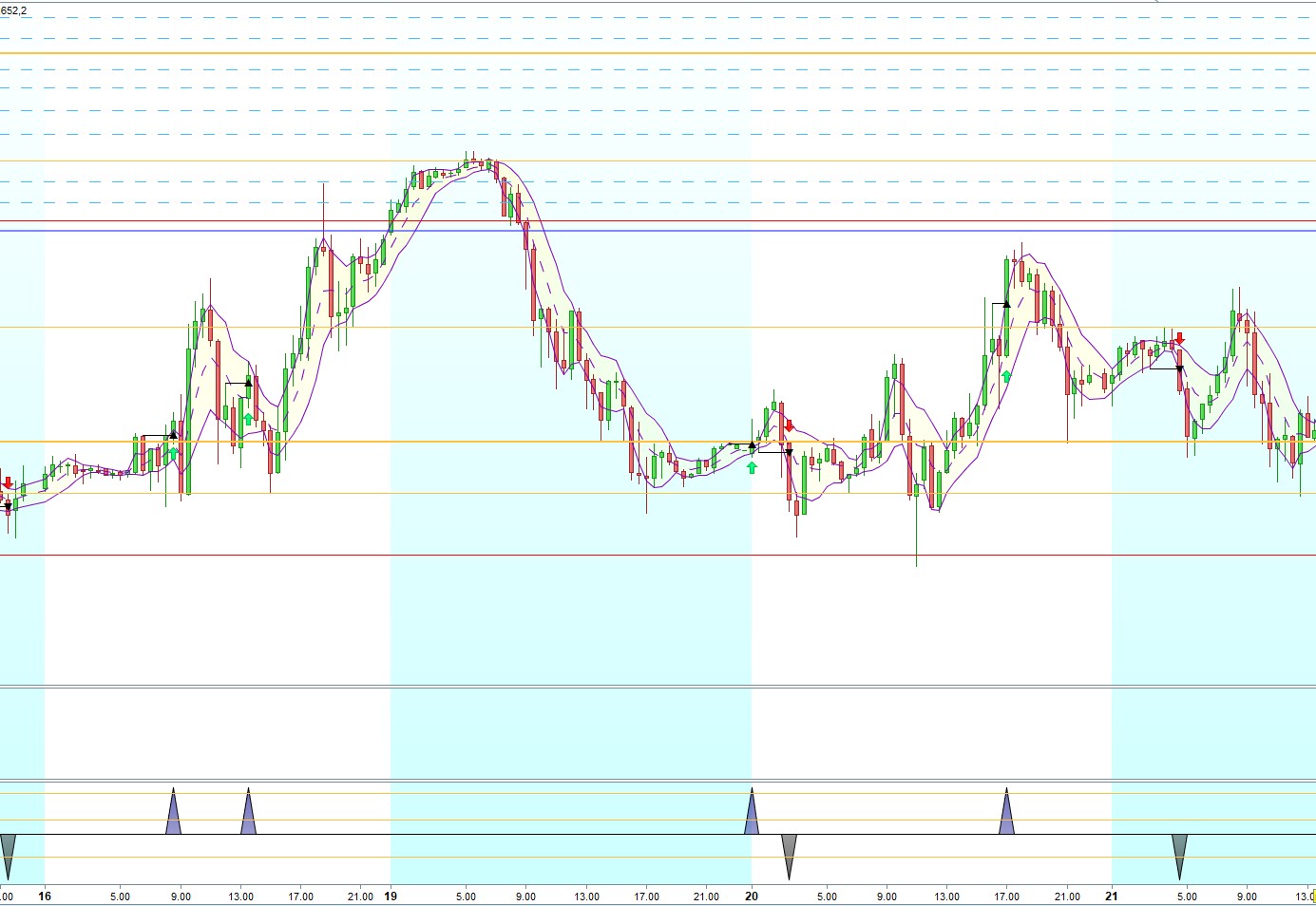
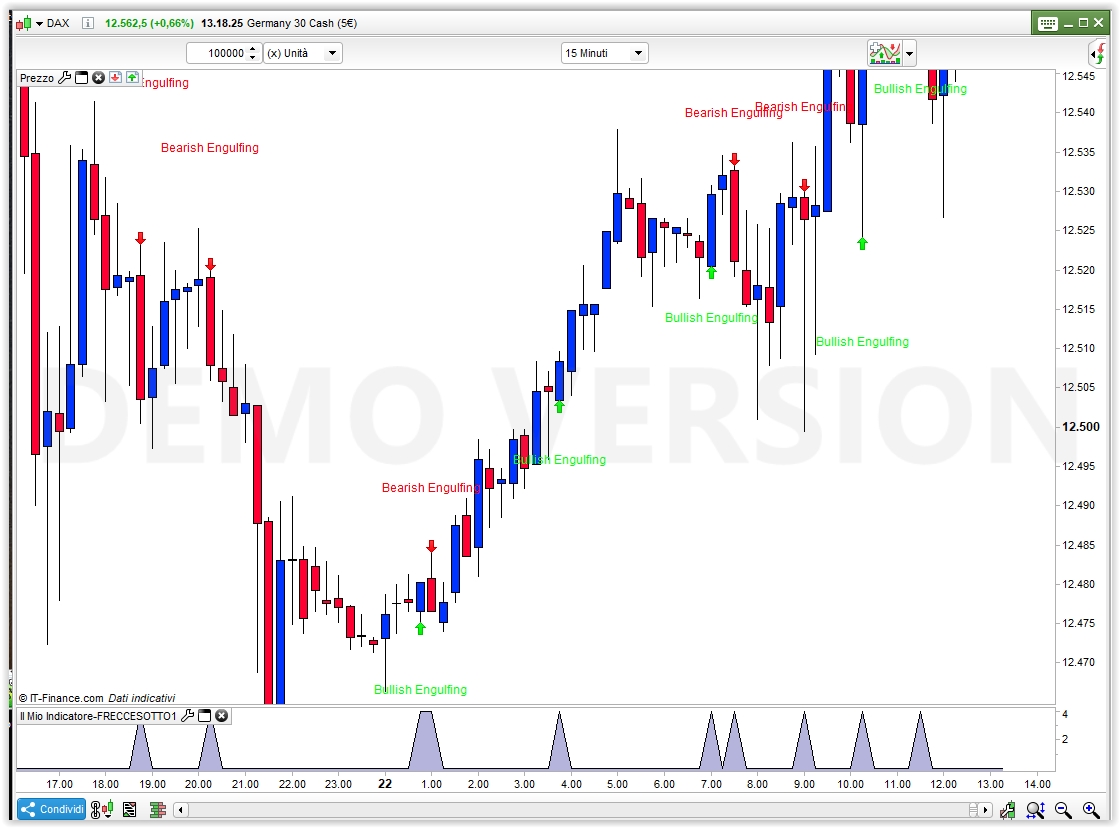
    Buongiorno , vorrei chiedere gentilmente se si può aggiungere a questo codice  (foto PRT A1 ) una ulteriore indicazione come già funzionante in questo altro codice (foto PRT A2) , allego immagini

    DEFPARAM CalculateOnLastBars = 1000
    
    //computation of the radius to draw ellipses
    
    //radius=average[200](range)/4
    
    //if golong=1 then
    
    //golong=0
    
    //endif
    
    //formula to compute short term swing points
    
    if (high>alto[1]) and not (high<high[1] and low>low[1]) then
    
    alto=high
    
    basso=low
    
    markup=barindex
    
    markhigh=high
    
    endif
    
    if (low<basso[1]) and not (high<high[1] and low>low[1]) then
    
    alto=high
    
    basso=low
    
    markdown=barindex
    
    marklow=low
    
    endif
    
    
    if alto<alto[1] and trend=1 then
    
    trend=0
    
    //drawarrowdown(markup,markhigh)
    
    mediummarkup=shortmarkup
    
    shortmarkup=markup
    
    longmarkhigh=mediummarkhigh
    
    mediummarkhigh=shortmarkhigh
    
    shortmarkhigh=markhigh
    
    //intermediate high swing points
    
    if longmarkhigh<mediummarkhigh and mediummarkhigh>shortmarkhigh then
    
    //DRAWELLIPSE(mediummarkup-1, mediummarkhigh-radius, mediummarkup+1, mediummarkhigh+radius)
    
    drawarrowdown(mediummarkup,markhigh+10)
    
    endif
    
    endif
    
    
    if basso>basso[1] and trend=0 then
    
    trend=1
    
    //drawarrowup(markdown,marklow)
    
    mediummarkdown=shortmarkdown
    
    shortmarkdown=markdown
    
    longmarklow=mediummarklow
    
    mediummarklow=shortmarklow
    
    shortmarklow=marklow
    
    //intermediate low swing points
    
    if longmarklow>mediummarklow and mediummarklow<shortmarklow then
    
    //DRAWELLIPSE(mediummarkdown-1, mediummarklow-radius, mediummarkdown+1, mediummarklow+radius)
    
    drawarrowup(mediummarkdown,marklow-20)
    
    endif
    
    endif


    drawcandle(open,high,low,close)
    
    return
    

    sarei lieto di aggiungere a questo codice sopra una altra indicazione di frecce sotto come foto PRT A2  di cui allego un codice che funziona con queste frecce e mi servono solo quelle sotto .

    DEFPARAM CalculateOnLastBars = 1000
     
    //text color
    // white = 255,255,255 ; black = 0,0,0
     
    //atr = averagetruerange[10](close)*0.5              //offset per il display di frecce e nomi sul grafico dei prezzi
     
    x = 0
     
    data8=(close[1] > open[1] and open > close and open >= close[1] and open[1] >= close and open - close > close[1] - open[1] )
    if data8 then
    x = 4
    r = 34
    g = 139
    b = 34
    //DRAWTEXT("Bearish Engulfing", barindex, high+atr*1.5, Dialog, Standard, 12) COLOURED(255,0,10) Verde
    //DRAWARROWDOWN(barindex,high) COLOURED(255,0,10)(VERDE)
    endif
    
     
    data9=(open[1] > close[1] and close > open and close >= open[1] and close[1] >= open and close - open > open[1] - close[1] )
    if data9 then
    x = 4
    r = 255
    g = 0
    b = 255
    //DRAWTEXT("Bullish Engulfing", barindex, low-atr*1.5, Dialog, Standard, 12) COLOURED(0,255,10)Fuxia scuro
    //DRAWARROWUP(barindex,low) COLOURED(0,255,10)(FUXIA)
    endif


    RETURN x COLOURED(r,g,b) STYLE(histogram,1)
    
    PRT-A1.jpg PRT-A1.jpg PRT-A2.jpg PRT-A2.jpg
    #73634 quote
    Gianco
    Participant
    Senior

    per spiegarmi meglio : il secondo codice di foto PRT A2 oltre a indicare le frecce sul grafico , ha delle ulteriori frecce sotto di corrispondenza  , ecco , vorrei se possibile aggiungere queste ulteriori frecce sotto al grafico del primo codice , che non le ha .

    #73640 quote
    robertogozzi
    Moderator
    Master

    Non capisco, già nella foto1 ci sono sia frecce sopra che sotto, dove vuoi che ne vengono visualizzate altre?

    #73708 quote
    Gianco
    Participant
    Senior

    Ciao Roberto , la prima foto ha sia le frece sul grafico che delle altre corrispondenti sotto , e quello è un codice che ho messo per prelevare eventualmente la scrittura per : impostare sul secondo codice , come da foto PRT A2 , che ha un codice diverso , ma gli mancano le frecce sotto di aggiunta

    #73712 quote
    robertogozzi
    Moderator
    Master

    Non riesco a  capire, hai indicato il primo codice con la prima foto ed il secondo codice con la seconda foto, ma sembra non corrispondono, le hai forse invertite?

    Comunque dimmi su quale strumento e TF lo hai usato, poi dovresti dirmi quando e dove vuoi che ti stampi le frecce e troveremo una soluzione.

    #73737 quote
    Gianco
    Participant
    Senior

    Si Roberto , hai ragionr , non mi ero accorto che i files erano invertiti ,  allora la seconda foto A2 ha delle indicazioni di frecce in più sotto , e il codice in realtà è il primo descritto , che ha in più questa possibilità di indicazioni di queste frecce , e la prima foto A1 è quella a cui vorrei aggiungere queste frecce come la foto A2 . Scusami

    #73751 quote
    robertogozzi
    Moderator
    Master

    Il primo codice che hai postato stampa già le frecce, sia verso l’alto che verso il basso.

    Il secondo codice lo fa già anch’esso, basta che togli il commento alle righe 17 e 28.

    Non ho guardato le foto perché sono diverse, per un confronto dovrebbero essere sullo stesso strumento, stesso TF e stesso orario (ed occorrerebbe conoscere questi dettagli).

    #73768 quote
    Gianco
    Participant
    Senior

    eccomi Roberto , ripartiamo : tutti e due i codici che sono diversi tra loro , creano le frecce SUL GRAFICO . il codice  Frecce Sotto oltre alle frecce sul grafico traccia anche dei triangoli sotto alla base del grafico . Ora il codice  GIAN 16 06 18  è di diverso tipo ma traccia anche lui le frecce sul grafico , ecco , a lui mancano in aggiunta i triangoli di stesso riferimento alle frecce

    GIAN 16 06 18 , che se si formano posso far funzionare l’allarme , ecco .

    #73963 quote
    Gianco
    Participant
    Senior

    Roberto , tutto bene ? mi sono spiegato male ?

    #73970 quote
    robertogozzi
    Moderator
    Master

    Scusami, ho avuto un pò da fare. Ci darò un’occhiata domani.

    #74003 quote
    Gianco
    Participant
    Senior

    scusami Tu , pensavo di non aver fatto bene

    #74007 quote
    Gianco
    Participant
    Senior

    Dimenticavo : ho notato una cosa sul     GIAN 16 06 18    mettendolo ai 5 minuti ho notato che le frecce sul grafico nascono dopo 6-8 candele , è un ritardo di calcolo o manca un ricalcolo  ad ogni candela ?  provo a chiedere . . . . .    oppure è per dei time più brevi ?  se si potesse ridurre sarebbe molto bello come indicatore

      Per vedere il ritardo metto a mano una linea verticale ad ogni ultima candela completata , così conto quante candele passano prima che compaia la freccia , ecco , si può far fare la linea verticale in automatico ad ogni completamento dell’ultima candela ?  Oppure , meglio ancora , si possono contare le candele oltre la freccia appena nata ?  Se si può ridurre il tempo di attesa non serve tutto questo

    #74071 quote
    robertogozzi
    Moderator
    Master

    Se per frecce intendi l’istogramma sotto il grafico, devi semplicemente metterlo sotto, invece che sul prezzo, se vuoi le frecce invece dell’istogramma basta mettere alla fine solo RETURN X e commentare le linee dove ci sono R, G e B ed atr.

    Poi dalle proprietà dell’indicatore basta che selezioni i colori come preferisci, eventualmente aggiungendo le zone di colore.

    In pratica puoi metterne due (quasi) uguali sul grafico, uno priprio sul prezzo che stampa le frecce ed il testo (togli i commenti da dove preferisci tu), l’altro (come è adesso quello che hai pubblicato), da mettere sotto i prezzi, come ti ho indicato sopra, cioè senza riferimenti ai colori ed atr, semplicemente con RETURN X.

    Comunque ti allego le due versioni.

    Spero di avere capito bene stavolta. Fammi sapere.

    DEFPARAM CalculateOnLastBars = 1000
    //atr = averagetruerange[10](close)*0.5              //offset per il display di frecce e nomi sul grafico dei prezzi
    x = 0
    data8=(close[1] > open[1] and open > close and open >= close[1] and open[1] >= close and open - close > close[1] - open[1] )
    if data8 then
    x = 4
    //r = 34
    //g = 139
    //b = 34
    //DRAWTEXT("Bearish Engulfing", barindex, high+atr*1.5, Dialog, Standard, 12) COLOURED(255,0,10) //Verde
    //DRAWARROWDOWN(barindex,high) COLOURED(255,0,10)//(VERDE)
    endif
    data9=(open[1] > close[1] and close > open and close >= open[1] and close[1] >= open and close - open > open[1] - close[1] )
    if data9 then
    x = 4
    //r = 255
    //g = 0
    //b = 255
    //DRAWTEXT("Bullish Engulfing", barindex, low-atr*1.5, Dialog, Standard, 12) COLOURED(0,255,10)//Fuxia scuro
    //DRAWARROWUP(barindex,low) COLOURED(0,255,10)//(FUXIA)
    endif
    RETURN x //COLOURED(r,g,b) STYLE(histogram,1)
    DEFPARAM CalculateOnLastBars = 1000
    atr = averagetruerange[10](close)*0.5              //offset per il display di frecce e nomi sul grafico dei prezzi
    x = 0
    data8=(close[1] > open[1] and open > close and open >= close[1] and open[1] >= close and open - close > close[1] - open[1] )
    if data8 then
    x = 4
    r = 34
    g = 139
    b = 34
    DRAWTEXT("Bearish Engulfing", barindex, high+atr*1.5, Dialog, Standard, 12) COLOURED(255,0,10) //Verde
    DRAWARROWDOWN(barindex,high) COLOURED(255,0,10)//(VERDE)
    endif
    data9=(open[1] > close[1] and close > open and close >= open[1] and close[1] >= open and close - open > open[1] - close[1] )
    if data9 then
    x = 4
    r = 255
    g = 0
    b = 255
    DRAWTEXT("Bullish Engulfing", barindex, low-atr*1.5, Dialog, Standard, 12) COLOURED(0,255,10)//Fuxia scuro
    DRAWARROWUP(barindex,low) COLOURED(0,255,10)//(FUXIA)
    endif
    RETURN x
    Nicolas thanked this post
    x-5.jpg x-5.jpg
    #74090 quote
    Gianco
    Participant
    Senior

    ti chiedo scusa Roberto , sicuramente mi sono spiegato male io , è a questo codice che vorrei aggiungere l’istogramma sotto al grafico , ho provato ma sbaglio qualcosa e mi da errori , ti allego il codice a cui vorrei far mettere l’istogramma di sotto al grafico :
    <pre class=”lang:probuilder decode:true “>DEFPARAM CalculateOnLastBars = 1000

    //computation of the radius to draw ellipses

    //radius=average[200](range)/4

    //if golong=1 then

    //golong=0

    //endif

    //formula to compute short term swing points

    if (high>alto[1]) and not (high<high[1] and low>low[1]) then

    alto=high

    basso=low

    markup=barindex

    markhigh=high

    endif

    if (low<basso[1]) and not (high<high[1] and low>low[1]) then

    alto=high

    basso=low

    markdown=barindex

    marklow=low

    endif

    if alto<alto[1] and trend=1 then

    trend=0

    //drawarrowdown(markup,markhigh)

    mediummarkup=shortmarkup

    shortmarkup=markup

    longmarkhigh=mediummarkhigh

    mediummarkhigh=shortmarkhigh

    shortmarkhigh=markhigh

    //intermediate high swing points

    if longmarkhigh<mediummarkhigh and mediummarkhigh>shortmarkhigh then

    //DRAWELLIPSE(mediummarkup-1, mediummarkhigh-radius, mediummarkup+1, mediummarkhigh+radius)

    drawarrowdown(mediummarkup,markhigh+10)

    endif

    endif

    if basso>basso[1] and trend=0 then

    trend=1

    //drawarrowup(markdown,marklow)

    mediummarkdown=shortmarkdown

    shortmarkdown=markdown

    longmarklow=mediummarklow

    mediummarklow=shortmarklow

    shortmarklow=marklow

    //intermediate low swing points

    if longmarklow>mediummarklow and mediummarklow<shortmarklow then

    //DRAWELLIPSE(mediummarkdown-1, mediummarklow-radius, mediummarkdown+1, mediummarklow+radius)

    drawarrowup(mediummarkdown,marklow-10)

    endif

    endif

    drawcandle(open,high,low,close)

    return

    #74091 quote
    Gianco
    Participant
    Senior

    ho utilizzato la finestra ma non l’ha sistemato

    DEFPARAM CalculateOnLastBars = 1000
    
    //computation of the radius to draw ellipses
    
    //radius=average[200](range)/4
    
    //if golong=1 then
    
    //golong=0
    
    //endif
    
    //formula to compute short term swing points
    
    if (high>alto[1]) and not (high<high[1] and low>low[1]) then
    
    alto=high
    
    basso=low
    
    markup=barindex
    
    markhigh=high
    
    endif
    
    if (low<basso[1]) and not (high<high[1] and low>low[1]) then
    
    alto=high
    
    basso=low
    
    markdown=barindex
    
    marklow=low
    
    endif
    
    
    if alto<alto[1] and trend=1 then
    
    trend=0
    
    //drawarrowdown(markup,markhigh)
    
    mediummarkup=shortmarkup
    
    shortmarkup=markup
    
    longmarkhigh=mediummarkhigh
    
    mediummarkhigh=shortmarkhigh
    
    shortmarkhigh=markhigh
    
    //intermediate high swing points
    
    if longmarkhigh<mediummarkhigh and mediummarkhigh>shortmarkhigh then
    
    //DRAWELLIPSE(mediummarkup-1, mediummarkhigh-radius, mediummarkup+1, mediummarkhigh+radius)
    
    drawarrowdown(mediummarkup,markhigh+10)
    
    endif
    
    endif
    
    
    if basso>basso[1] and trend=0 then
    
    trend=1
    
    //drawarrowup(markdown,marklow)
    
    mediummarkdown=shortmarkdown
    
    shortmarkdown=markdown
    
    longmarklow=mediummarklow
    
    mediummarklow=shortmarklow
    
    shortmarklow=marklow
    
    //intermediate low swing points
    
    if longmarklow>mediummarklow and mediummarklow<shortmarklow then
    
    //DRAWELLIPSE(mediummarkdown-1, mediummarklow-radius, mediummarkdown+1, mediummarklow+radius)
    
    drawarrowup(mediummarkdown,marklow-10)
    
    endif
    
    endif


    drawcandle(open,high,low,close)
    
    return
    
Viewing 15 posts - 1 through 15 (of 20 total)
  • You must be logged in to reply to this topic.

Aggiunta di indicazione

ProBuilder: Indicatori & Strumenti Personalizzati

New Reply
Author
author-avatar
Gianco @gianco Participant
Summary

This topic contains 19 replies,
has 2 voices, and was last updated by Gianco

7 years, 8 months ago.

Topic Details
Forum: ProBuilder: Indicatori & Strumenti Personalizzati
Language: Italian
Started: 06/19/2018
Status: Active
Attachments: 3 files
Logo Logo
Loading...