


Affichage des Tailles

Viewing 2 posts - 1 through 2 (of 2 total)
  • Author
    Posts
  • #253963 quote
    Bernard13
    Participant
    Average

    Bonjour,
    On peut utiliser les variables de Tailles des instruments, mais comment peut-on les afficher ?

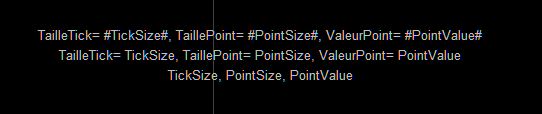
    DrawText(“TailleTick= #TickSize#, TaillePoint= #PointSize#, ValeurPoint= #PointValue#”, 0, -50) Anchor(Top)
    DrawText(“TailleTick= TickSize, TaillePoint= PointSize, ValeurPoint= PointValue”, 0, -70) Anchor(Top)
    DrawText(“TickSize, PointSize, PointValue”, 0, -90) Anchor(Top)
    RETURN

    a retourné la capture d’écran ci-dessous.
    Merci par avance.

    Tailles-Capture-decran-2025-11-25-165736.png Tailles-Capture-decran-2025-11-25-165736.png
    #253965 quote
    JC_Bywan
    Moderator
    Master

    Bonjour, en passant par des noms de variable qui ne sont pas des mots réservés du langage:

    mavariable1=TickSize
    mavariable2=PointSize
    mavariable3=PointValue
    
    DrawText("TailleTick= #mavariable1#, TaillePoint= #mavariable2#, ValeurPoint= #mavariable3#", 0, -50) Anchor(Top)
    
    RETURN
    Bernard13, robertogozzi and Iván González thanked this post
Viewing 2 posts - 1 through 2 (of 2 total)
  • You must be logged in to reply to this topic.

Affichage des Tailles


ProBuilder : Indicateurs & Outils Personnalisés

New Reply
Author
author-avatar
Bernard13 @bernard13 Participant
Summary

This topic contains 1 reply,
has 2 voices, and was last updated by JC_Bywan

3 months, 1 week ago.

Topic Details
Forum: ProBuilder : Indicateurs & Outils Personnalisés
Language: French
Started: 11/25/2025
Status: Active
Attachments: 1 files
Logo Logo
Loading...
