





Advice on combining conditions

Viewing 15 posts - 1 through 15 (of 48 total)
  • Author
    Posts
  • #50227 quote
    thetragiccircle
    Participant
    Junior

    Hi Guys,

    I am totally new to this and would appreciate some advice on how to build my scanner. I have “built” 2 scanners using the easy creation facility on ProScreener but would appreciate advice on how to combine both into the one scanner.

    At the moment I have built one scanner with the conditions – Stochastic level above 80 on 1hr timeframe + MACD signal value>MACD value on 4hr timeframe…..ie I want this to signal when overbought (ie>80) on the 1hr when MACD indicator on 4hr timeframe is red over green. (ie to signal a 1hr pullback into potential resistance,  into the direction of indicated MACD movement on the 4hr timeframe in order to short the market from 1hr chart)

    The other scanner is the opposite, and has the conditions where Stochastic level moves below 20 on 1hr timeframe + MACD value>MACD signal value on 4hr timeframe…..ie I want this to signal when oversold (ie <20) on the 1hr when MACD indicator on 4hr timeframe is green over red. (to signal a 1hr pullback into potential support, into the direction of indicated MACD movement on the 4hr timeframe in order to go long in the market).

    I hope I have explained myself fully, and would appreciate any advice to combine these 2 scanners into one, which will be set to scan the 1hour timeframe.

    Many thanks.

    David

    #50239 quote
    robertogozzi
    Moderator
    Master

    I suggest that you post the code for your scanners so anyone can work on combining them rather than writing them from scratch.

    Roberto

    thetragiccircle thanked this post
    #50269 quote
    thetragiccircle
    Participant
    Junior

    Thanks Roberto.

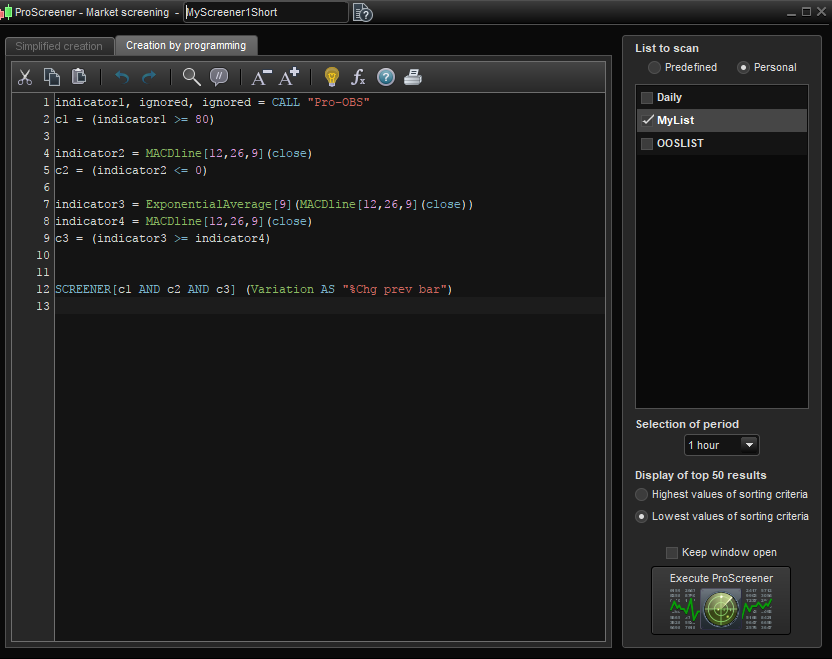
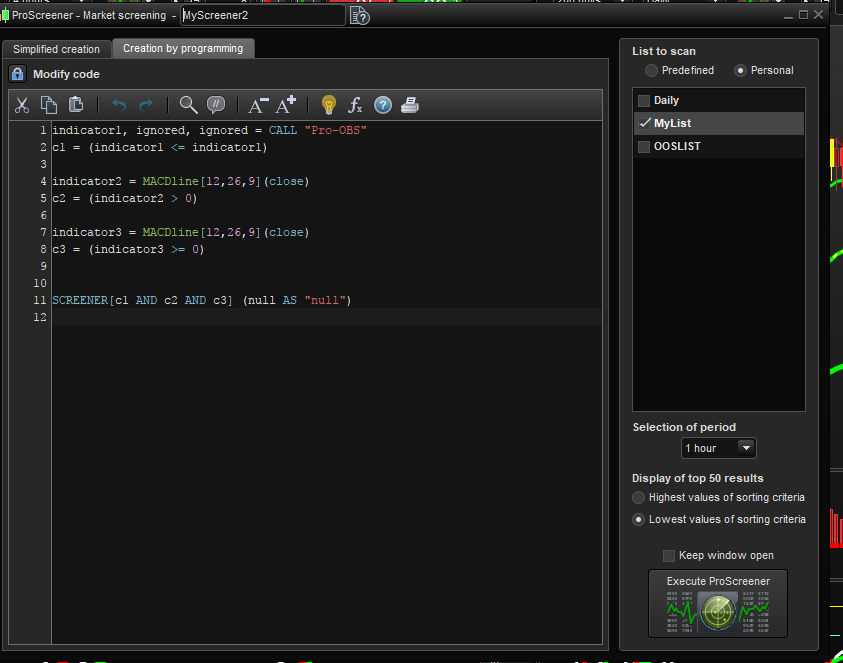
    Is this the correct way to post code?..or a cut and paste into the post?

    code1.png code1.png code2.png code2.png
    #50272 quote
    robertogozzi
    Moderator
    Master

    Cut & Past pleae, so we don’t have to rewrite it. Thanks.

    thetragiccircle thanked this post
    #50332 quote
    thetragiccircle
    Participant
    Junior

    Thanks Roberto, I appreciate your advice

    As per the layout of the photos above, here is the 1hr Short code:

    indicator1, ignored, ignored = CALL “Pro-OBS”
    c1 = (indicator1 >= 80)

    indicator2 = MACDline[12,26,9](close)
    c2 = (indicator2 <= 0)

    indicator3 = ExponentialAverage[9](MACDline[12,26,9](close))
    indicator4 = MACDline[12,26,9](close)
    c3 = (indicator3 >= indicator4)


    SCREENER[c1 AND c2 AND c3] (Variation AS “%Chg prev bar”)


    and here is the 1hr Long code:

    indicator1, ignored, ignored = CALL “Pro-OBS”
    c1 = (indicator1 <= indicator1)

    indicator2 = MACDline[12,26,9](close)
    c2 = (indicator2 > 0)

    indicator3 = MACDline[12,26,9](close)
    c3 = (indicator3 >= 0)


    SCREENER[c1 AND c2 AND c3] (null AS “null”)

    For return of results, is it possible to add prefix – to a short? (ie minus)

    Thank you very much, I really appreciate this

    David

    #50338 quote
    robertogozzi
    Moderator
    Master

    When posting code (be it a strategy, screener or indicator) you should use the “Insert PRT code” on the grey bar (identified by <>) when writing your post, to make your code easier to read.

    This is the result of combining the two indicators, though you can only return ONE criteria and there’s no way to change the displayed data to tell between long and short.

    // SHORT
    indicator1, ignored, ignored = CALL "Pro-OBS"
    c1 = (indicator1 >= 80)
    indicator2 = MACDline[12,26,9](close)
    c2 = (indicator2 <= 0)
    indicator3 = ExponentialAverage[9](MACDline[12,26,9](close))
    indicator4 = MACDline[12,26,9](close)
    c3 = (indicator3 >= indicator4)
    //LONG
    indicator1a, ignored, ignored = CALL "Pro-OBS"
    c4 = (indicator1a <= indicator1)
    indicator2a = MACDline[12,26,9](close)
    c5 = (indicator2a > 0)
    indicator3a = MACDline[12,26,9](close)
    c6 = (indicator3a >= 0)
    SCREENER[(c1 AND c2 AND c3) OR (c4 AND c5 AND c6)] (Variation AS "%Chg prev bar")
    
    #50445 quote
    thetragiccircle
    Participant
    Junior

    Thank you very much Roberto, I am grateful for your expertise and advise, and really appreciate everything you have done.

    #50958 quote
    thetragiccircle
    Participant
    Junior

    Hi Roberto,


    Thanks again for joining both pieces of code together as per my last post, however it did not work as I had not included the references to different time frames.

    I will again post the 2 “halves” of the screener below and would be obliged if you could again “join” them together as one please. I could`nt post both in the <> section above, so the code for the long signal below will be in a separate post

    below this post

    The first half is a short signal, when conditions are : 15 minute “ProOBS” (RSI) >80 + 60 min MACD (green) < 0 + 240 min MACD red signal line over green

    The second half is a long signal, when conditions are : 15 min “ProOBS” <20  + 60 min MACD (green) > 0  +  240 min MACD green over red signal line

    // The following code is related to this timescale:15 minutes
    TIMEFRAME(15 minutes)
    indicator1, ignored, ignored = CALL "Pro-OBS"
    c1 = (indicator1 >= 80)
    
    // The following code is related to this timescale:1 hour
    TIMEFRAME(1 hour)
    indicator2 = MACDline[12,26,9](close)
    c2 = (indicator2 <= 0)
    
    // The following code is related to this timescale:4 hours
    TIMEFRAME(4 hours)
    indicator3 = ExponentialAverage[9](MACDline[12,26,9](close))
    indicator4 = MACDline[12,26,9](close)
    c3 = (indicator3 >= indicator4)
    
    // The following code is related to this timescale:DEFAULT
    TIMEFRAME(DEFAULT)
    
    SCREENER[c1 AND c2 AND c3] (Variation AS "%Chg prev bar")
    #50959 quote
    thetragiccircle
    Participant
    Junior
    // The following code is related to this timescale:15 minutes
    TIMEFRAME(15 minutes)
    indicator1, ignored, ignored = CALL "Pro-OBS"
    c1 = (indicator1 <= 20)
    
    // The following code is related to this timescale:1 hour
    TIMEFRAME(1 hour)
    indicator2 = MACDline[12,26,9](close)
    c2 = (indicator2 >= 0)
    
    // The following code is related to this timescale:4 hours
    TIMEFRAME(4 hours)
    indicator3 = MACDline[12,26,9](close)
    indicator4 = ExponentialAverage[9](indicator3)
    c3 = (indicator3 >= indicator4)
    
    // The following code is related to this timescale:DEFAULT
    TIMEFRAME(DEFAULT)
    
    SCREENER[c1 AND c2 AND c3] (Variation AS "%Chg prev bar")
    #50969 quote
    robertogozzi
    Moderator
    Master

    In your first post you also did not include the Exponential Average in the LONG code. Now you have, but with the same relational operators as for the SHORT one and I left it unchanged (you may change it as you prefer).

    Here’s the updated code (I changed the names for variables c4, c5 and c6, to match the ones in the first part of the code):

    // SHORT
    TIMEFRAME(15 minutes)
    indicator1, ignored, ignored = CALL "Pro-OBS"
    c1 = (indicator1 >= 80)
    TIMEFRAME(1 hour)
    indicator2 = MACDline[12,26,9](close)
    c2 = (indicator2 <= 0)
    TIMEFRAME(4 hours)
    indicator3 = ExponentialAverage[9](MACDline[12,26,9](close))
    indicator4 = MACDline[12,26,9](close)
    c3 = (indicator3 >= indicator4)
    //LONG
    TIMEFRAME(15 minutes)
    indicator1a, ignored, ignored = CALL "Pro-OBS"
    c1a = (indicator1a <= indicator1)
    TIMEFRAME(1 hour)
    indicator2a = MACDline[12,26,9](close)
    c2a = (indicator2a > 0)
    TIMEFRAME(4 hours)
    indicator3a = ExponentialAverage[9](MACDline[12,26,9](close))
    indicator4a = MACDline[12,26,9](close)
    c3a = (indicator3 >= indicator4a)
    TIMEFRAME(default)
    SCREENER[(c1 AND c2 AND c3) OR (c1a AND c2a AND c3a)] (Variation AS "%Chg prev bar")
    
    thetragiccircle thanked this post
    #51015 quote
    thetragiccircle
    Participant
    Junior

    Thanks again Roberto

    #51045 quote
    robertogozzi
    Moderator
    Master

    Sorry, but these lines have to be changed.

    line 15 should read:

    c1a = (indicator1a <= 20)

    line 22 should read:

    c3a = (indicator3a >= indicator4a)

    And, I want to point it out again, lines 11 and 22 share the same relational operators, which I assume is a logical error.

    Sorry for the inconvenience, but modifying code with copy & paste may often lead to such errors.

    thetragiccircle thanked this post
    #51087 quote
    thetragiccircle
    Participant
    Junior

    Hi Roberto,


    Thanks for that. I actually spotted these as soon as I saw the post this morning and changed them accordingly. Lines 11 and 22 are correct.

    I have noticed some days ago when I was trying to learn this and experiment with code, that cutting and pasting tends to lead to automatic syntax errors, which I presume is something to do with Windows (not sure if this also happens on a MAC). I also found that I could not remove the errors from the coding box (as highlighted by the yellow triangle in the margin and a red character, usually a comma or bracket.). I found the only way to remove this was not to cut and paste, but to delete the whole box and input it manually character by character.

    Anyway, it is all good and the screener is working perfectly. Thanks again Roberto, your assistance has been tremendous.

    David

    robertogozzi thanked this post
    #51095 quote
    robertogozzi
    Moderator
    Master

    Syntax errors are only due to miswriting or miscopying code. If the code has been selected properly it cannot generate syntax errors, as far as I experienced so far.

    Logic errors are easier to be made because when you write something (looking at the source code) you may easily notice those errors but copying a whole line will make you overlook those errors relying on the code you are just copying!

    It was a pleasure to help you as well as other traders novice to programming PRT.

    Have fun autotrading!

    thetragiccircle thanked this post
    #51276 quote
    Nicolas
    Keymaster
    Master

    How to copy/paste codes from prorealcode forums (picture attached).. without weird syntax errors! 🙂

    thetragiccircle thanked this post
    how-to-copy-paste-codes-from-prorealcode-forums.png how-to-copy-paste-codes-from-prorealcode-forums.png
Viewing 15 posts - 1 through 15 (of 48 total)
  • You must be logged in to reply to this topic.

Advice on combining conditions


ProScreener: Market Scanners & Detection

New Reply
Author
Summary

This topic contains 47 replies,
has 3 voices, and was last updated by thetragiccircle
8 years, 3 months ago.

Topic Details
Forum: ProScreener: Market Scanners & Detection
Language: English
Started: 10/22/2017
Status: Active
Attachments: 7 files
Logo Logo
Loading...
