Hi
I want to know if it is possible to keep orders open until one is filled then after candle close it must close other pending order. Reason why i ask is. the system now places 2 pending orders. But if they are not triggered in the first 5 min the system closes both of them. And like today it took more then 5 minutes for price to pass the point where pending order was. I hope its clear. Just keep orders open until 1 is filled and then close other order.
Thank you for all your help
Pending orders only last one bar and need to be placed again and again, if needed.
As you have written your conditions at present the two orders will be placed continuously if not OnMarket since STARTTIME is always true, being 090000.
This version allows 1 trade per day and keeps the orders on the market until one (or both) are filled.
I added a variable v as I couldn’t find any 20 pip breakouts on the Russell 2000 index.
DEFPARAM CumulateOrders = false
DEFPARAM FLATBefore     = 084500
DEFPARAM FLATAfter      = 210000
DEFPARAM PreLoadBars    = 2000

v = 20
nLots = 5
ONCE MaxPrice = 999999
ONCE MinPrice = 0
starttime = 090000

IF time = starttime THEN
MaxPrice = highest[6](high)
MinPrice = lowest[6](low)
flag = 0
ENDIF

if onmarket then
flag = 1
endif

if not onmarket and time >= starttime and flag = 0 then
buy Nlots contract at MaxPrice + v * pointsize STOP
set stop loss close- Minprice + v * pointsize
endif

if not onmarket and time >= starttime and flag = 0 then
sellshort Nlots contract at MinPrice - v * pointsize STOP
set stop loss MaxPrice - close - v * pointsize
endif

SET TARGET PROFIT 120
Moderators Note: Code edited to remove incorrect lines 30 and 31.
Thank you
The thing is after 5 min both sell and buy orders were gone. today at 9:05 pending order were deleted. I dont know why an how to change the code so it places trades until one is triggered.
Delete lines 30 and 31 in my last code as they accidentally got left in from your incorrect code that you posted before. They will stop the orders from being placed again.
Here is an MTF version that can be used on the 1 second time frame to ensure that orders in the opposite direction are cancelled a soon as an order is filled.
DEFPARAM CumulateOrders = false
DEFPARAM FLATBefore     = 084500
DEFPARAM FLATAfter      = 210000
DEFPARAM PreLoadBars    = 2000

v = 20
nLots = 5
starttime = 090000

timeframe(15 minutes, updateonclose)
ONCE MaxPrice = 999999
ONCE MinPrice = 0

IF time = starttime THEN
MaxPrice = highest[6](high)
MinPrice = lowest[6](low)
ENDIF

timeframe(1 second)
IF time = starttime THEN
flag = 0
ENDIF

if onmarket then
flag = 1
endif

if not onmarket and time >= starttime and flag = 0 then
buy Nlots contract at MaxPrice + v * pointsize STOP
set stop loss close- Minprice + v * pointsize
endif

if not onmarket and time >= starttime and flag = 0 then
sellshort Nlots contract at MinPrice - v * pointsize STOP
set stop loss MaxPrice - close - v * pointsize
endif

SET TARGET PROFIT 120
Hi
Thank you again for the help.. I have tried you new code from the post this morning.. It works great but if i remove line 30-31 it just keeps on placing orders during the day. What I want is for the system just to place pending orders until 1 is filled and when bar close it closes other pending order.
So it must only do the 1 trade per day but must keep orders at that level until it is activated. If for some reason both is activated one will close and we go in the other direction so that is ok. I just need it to keep order open until its triggered. But for example if buy trade is activated on the close of the bar where it is activated it must close the sell pending order. So keep orders open until 1 is activated. Thats it.
Thanks again
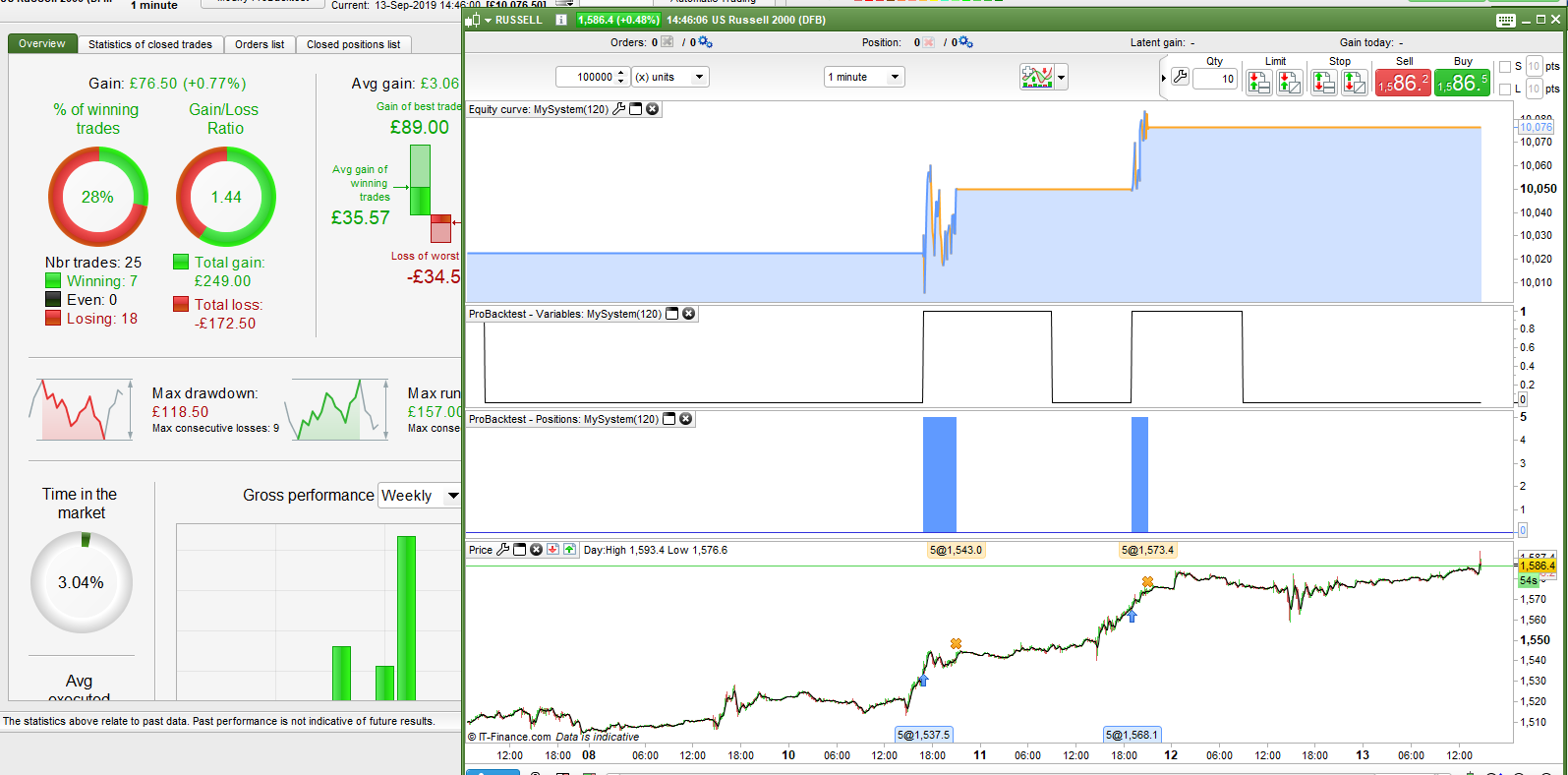
You must be doing something wrong then because it works just fine when I test it. In the image which is on the 1 minute chart the flag switch is graphed and when it is 1 it is impossible for another trade to be opened. It works exactly as it should.
No not the MTF code
this code
DEFPARAM CumulateOrders = false
DEFPARAM FLATBefore     = 084500
DEFPARAM FLATAfter      = 210000
DEFPARAM PreLoadBars    = 2000

v = 20
nLots = 5
ONCE MaxPrice = 999999
ONCE MinPrice = 0
starttime = 090000

IF time = starttime THEN
MaxPrice = highest[6](high)
MinPrice = lowest[6](low)
flag = 0
ENDIF

if onmarket then
flag = 1
endif

if not onmarket and time >= starttime and flag = 0 then
buy Nlots contract at MaxPrice + v * pointsize STOP
set stop loss close- Minprice + v * pointsize
endif

if not onmarket and time >= starttime and flag = 0 then
sellshort Nlots contract at MinPrice - v * pointsize STOP
set stop loss MaxPrice - close - v * pointsize
endif

SET TARGET PROFIT 120
Yes that code is the one and it works just fine for me.
Just a thought / trying to help … don’t shoot the messenger!
I edited it after my last post – I did worry that it might lead to confusion – hence the moderators note!
Why don’t you also test the code GraHal then if it works OK for you too then we know that it is definitely something Lombard974 is doing wrong?
Hello Guys
Yes i understand what you means and i saw the note.. If i removed the lines it just kept on placing trades during the day. I dont know how to limit it to just 1 trade. But keep orders open until 1 is filled.
This code below works great on testing with tick by tick and spread. But still orders are canceled after close of first 5 min candle and maybe trade comes a little later. So i want to keep orders open until 1 is filled. The biggest problem with this code is some days it doesnt trade at all? I dont know why? But what I think is system can place trades because its too close to price.. How can this be adjusted to place trade at the nearest available price?
Thanks
//-------------------------------------------------------------------------
// Main code : UltimateSAF
//-------------------------------------------------------------------------
//-------------------------------------------------------------------------
// Main code : MySystem(8)
//-------------------------------------------------------------------------
DEFPARAM CumulateOrders = false
DEFPARAM FLATBefore     = 084500                         //09:00
DEFPARAM FLATAfter      = 210000                         //21:00
DEFPARAM PreLoadBars    = 2000

ONCE nLots              = 5
ONCE MaxPrice           = 999999
ONCE MinPrice           = 0
starttime = 090000


SET TARGET PROFIT 120


IF time = starttime THEN
MaxPrice = highest[6](high)                          //Il massimo/minimo delle ultime 12 barre
MinPrice = lowest[6](low)                            //   (ogni ora = 12 barre da 5 minuti)
flag=0
ENDIF
if onmarket then
flag = 1
endif
//************************************************************************
//                           LONG


if not onmarket and time >= starttime and flag = 0 then
buy Nlots contract at MaxPrice  STOP
set stop loss close- Minprice - 60 * pointsize

if not onmarket and time >= starttime and flag = 0 then
sellshort Nlots contract at MinPrice  STOP
set stop loss MaxPrice - close + 60 * pointsize
MaxPrice = 999999
MinPrice = 0
endif
endif
So now we can see the problem. You have modified the code and you are not testing exactly the same code that I am!!!
You have changed your pending order levels and yes if they are calculated too close to price then the orders will be rejected. The only way to overcome this is to never send orders too close to price!
You can set a minimum distance using a MAX and a MIN in the order price calculation.
Obviously you are no longer buying at your desired 6 candle highest high and lowest low prices though.
MaxPrice = max(close + 60, highest[6](high))
MinPrice = min(close - 60, lowest[6](low))