Adding & Removing to and from favorite Proscreeners List

Viewing 2 posts - 1 through 2 (of 2 total)
  • Author
    Posts
  • #73234 quote
    therock88
    Participant
    New

    Good day,

    I have a number of screeners in my favorites list but cannot for the life of me recall how I put them there! I would like to replace them with others now and of course not knowing how they got there I do not know how to remove them.

    Thanks

    #73235 quote
    Vonasi
    Moderator
    Master

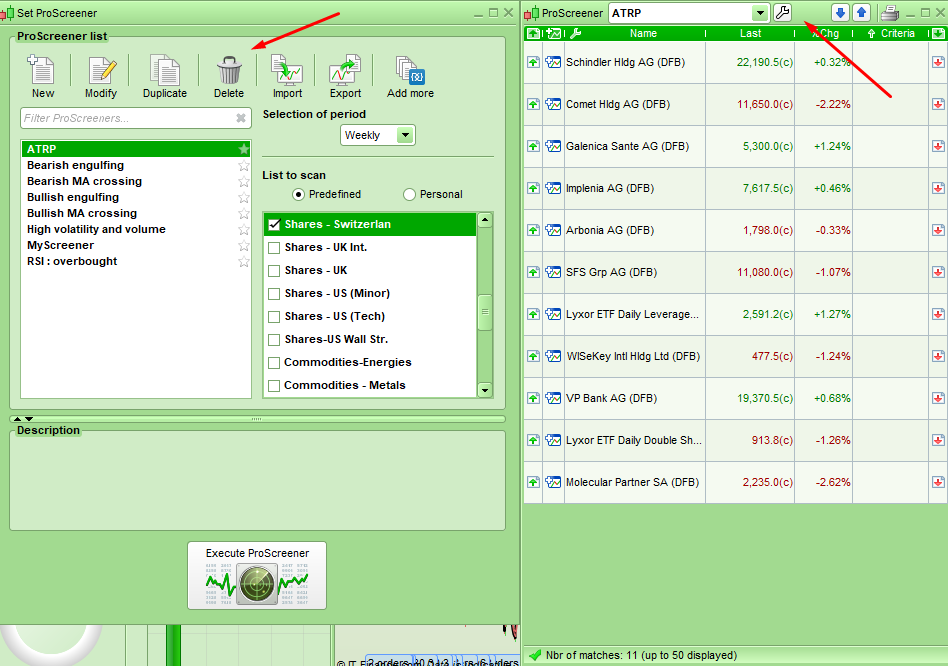
    Click on the spanner next to the box and another window comes up with a delete facility.

    [attachment file=73236]

    Screenshot_4-1.png Screenshot_4-1.png
Viewing 2 posts - 1 through 2 (of 2 total)
  • You must be logged in to reply to this topic.

Adding & Removing to and from favorite Proscreeners List


ProScreener: Market Scanners & Detection

New Reply
Author
author-avatar
therock88 @therock88 Participant
Summary

This topic contains 1 reply,
has 2 voices, and was last updated by Vonasi

7 years, 9 months ago.

Topic Details
Forum: ProScreener: Market Scanners & Detection
Language: English
Started: 06/14/2018
Status: Active
Attachments: 1 files
Logo Logo
Loading...