


Add text for Supertrends

Viewing 3 posts - 1 through 3 (of 3 total)
  • Author
    Posts
  • #102135 quote
    segie
    Participant
    Senior

    Good day,

    Please can you assist with the following.

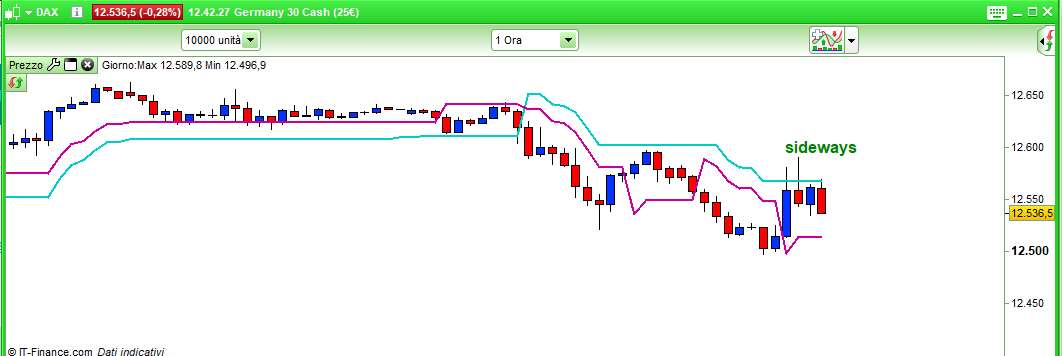
    When price is between two Supertrends I need a text to appear above the candle e.g “Sideways”

    Can use e.g Supertrend 3.10 and 2.10 as an example


    Regards,

    Segie

    #102156 quote
    robertogozzi
    Moderator
    Master

    There you go:

    DEFPARAM DrawOnLastBarOnly = true
    ST1    = Supertrend[3,10]
    ST2    = Supertrend[2,10]
    offset = max(St1,ST2)
    IF ((close >= ST1) AND (close <= ST2)) OR ((close >= ST2) AND (close <= ST1)) THEN
       DRAWTEXT("sideways",barindex,Offset + range,SansSerif,Bold,16) coloured(0,128,0,255)
    ENDIF
    RETURN
    segie thanked this post
    x-3.jpg x-3.jpg
    #102263 quote
    segie
    Participant
    Senior

    Thank you!

Viewing 3 posts - 1 through 3 (of 3 total)
  • You must be logged in to reply to this topic.

Add text for Supertrends


ProBuilder: Indicators & Custom Tools

New Reply
Author
author-avatar
segie @segie Participant
Summary

This topic contains 2 replies,
has 2 voices, and was last updated by segie

6 years, 7 months ago.

Topic Details
Forum: ProBuilder: Indicators & Custom Tools
Language: English
Started: 07/08/2019
Status: Active
Attachments: 1 files
Logo Logo
Loading...
