


Add text for Supertrends

Viewing 3 posts - 1 through 3 (of 3 total)
  • Author
    Posts
  • #102135 quote
    segiesegie
    Participant
    Senior

    Good day,

    Please can you assist with the following.

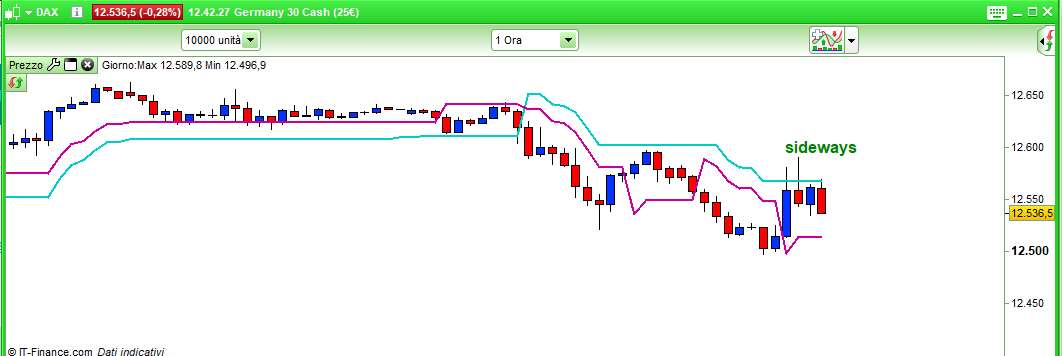
    When price is between two Supertrends I need a text to appear above the candle e.g “Sideways”

    Can use e.g Supertrend 3.10 and 2.10 as an example


    Regards,

    Segie

    #102156 quote
    robertogozzirobertogozzi
    Moderator
    Legend

    There you go:

    DEFPARAM DrawOnLastBarOnly = true
    ST1    = Supertrend[3,10]
    ST2    = Supertrend[2,10]
    offset = max(St1,ST2)
    IF ((close >= ST1) AND (close <= ST2)) OR ((close >= ST2) AND (close <= ST1)) THEN
       DRAWTEXT("sideways",barindex,Offset + range,SansSerif,Bold,16) coloured(0,128,0,255)
    ENDIF
    RETURN
    segie thanked this post
    x-3.jpg x-3.jpg
    #102263 quote
    segiesegie
    Participant
    Senior

    Thank you!

Viewing 3 posts - 1 through 3 (of 3 total)
  • You must be logged in to reply to this topic.

ProRealAI ProRealAI New

Stuck on this ProBuilder code?

Describe what this topic is trying to build, in plain English, and ProRealAI writes the ProRealTime™ indicator, screener or system for you.

Available in 7 languages
Try ProRealAI

Add text for Supertrends


ProBuilder: Indicators & Custom Tools

New Reply
Author
author-avatar
segie @segie Participant
Summary

This topic contains 2 replies,
has 2 voices, and was last updated by segiesegie

7 years, 2 months ago.

Topic Details
Forum: ProBuilder: Indicators & Custom Tools
Language: English
Started: 07/08/2019
Status: Active
Attachments: 1 files
ProRealCode ProRealCode
Loading...

