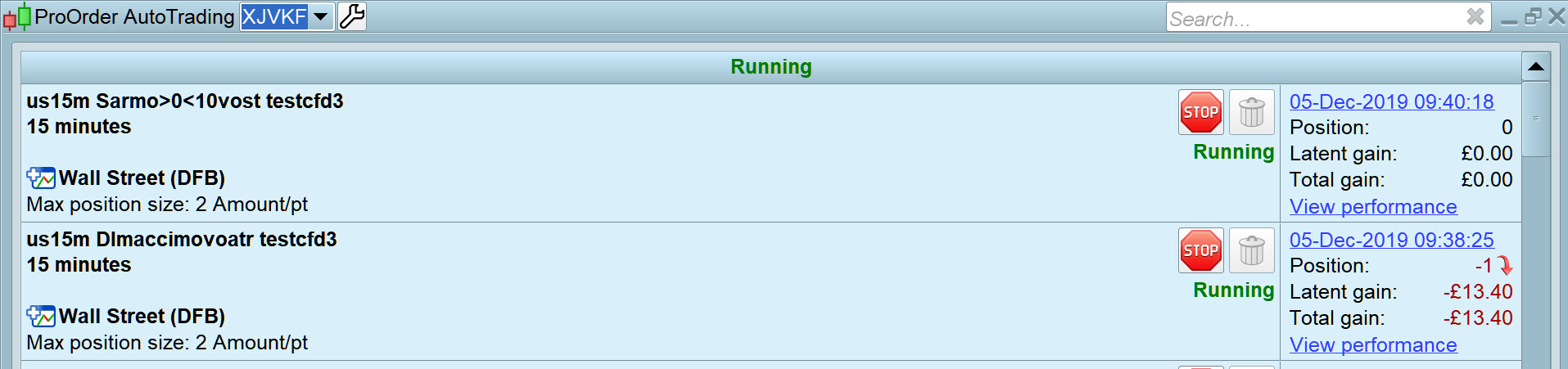
Hi, kindly refer to the attachment for 2 EAs.
Based on the backtest result of 100,000 units, the EAs show high winning rate of more than 90% with minimal stop loss.
However, when I put them to run in Proorder, I discover that the EAs are automatically stopped from the system in the next morning.
Two weeks ago, I had informed this problem to help centre but they cannot settle it till now.
Could anyone please help me in this matter? I have another 20EAs having the same problem.
Many thanks,
Roger
What is the rejected order in your orders list?
The system asks me to add the code “DEFPARAM PreLoadBars = 2000” for the EA’s parameter.
I have added the code in the 2 EAs but it doesn’t work.
Then I contact help centre again but no solution provided from them.
Many thanks,
Roger
try adding DEFPARAM PreLoadBars = 10,000
I’m going to try your EA’s now.
EDIT / PS
What market are they on … US Tech100, DJI or what and what Timeframe please??
If the code is not too long then it might be a good idea to post it here using the ‘Insert PRT Code’ button rather than as an ITF file. This avoids people having to open their platform and import the files just to see if there is something in the code that is causing the problem.
I also received that messages several times on several strategies. They sometimes stop, while sometimes they don’t. No matter how many PRELOADBARS I set.
I never investigated to see what really causes these problems, but since they occur only on some strategies and not on others, I guess there must be some code that is not 100% compatible with DEFPARAM PRELOADBARS.
It’s sounds a bit like ONCE, the only place where it works as expected is ProOrder, while ProScreener hates it! ProBuilder doen’t love it too much. In the latter two tools I started replacing ONCE with IF BarIndex = 0 THEN… without addressing PRT anymore.
us15m DImaccimovoatr testcfd3
I’ve set both EA’s going on DJI 15 min FT on Demo … I’ll report back.
// Definition of code parameters
DEFPARAM CumulateOrders = False // Cumulating positions deactivated

// Conditions to enter long positions
indicator1 = Average[1](DI[14](close))
c1 = (indicator1 CROSSES OVER -40)
indicator2 = Momentum[12](close)
c2 = (indicator2 <= -350)
indicator3 = CCI[20]
c3 = (indicator3 < -95)

IF c1 AND c2 AND c3 THEN
BUY 1 PERPOINT AT MARKET
ENDIF

// Conditions to exit long positions
indicator4 = SAR[0.02,0.02,0.2]
c4 = (close CROSSES UNDER indicator4)

IF c4 THEN
SELL AT MARKET
ENDIF

// Conditions to enter short positions
indicator5 = Average[1](DI[14](close))
c5 = (indicator5 CROSSES UNDER 10)
indicator6 = Momentum[12](close)
c6 = (indicator6 <= 33)
indicator7 = Volume
c7 = (indicator7 <= 1300)
indicator8 = Volume
c8 = (indicator8 >= 100)
indicator9 = ExponentialAverage[9](MACDline[12,26,9](close))
indicator10 = MACDline[12,26,9](close)
c9 = (indicator9 <= indicator10)
indicator11 = Average[5](volume)-Average[25](volume)
c10 = (indicator11 >= -300)
indicator12 = AverageTrueRange[14](close)
c11 = (indicator12 >= 12)
indicator13 = Stochastic[14,3](close)
c12 = (indicator13 < 88)
indicator14 = ExponentialAverage[9](MACDline[12,26,9](close))
indicator15 = MACDline[12,26,9](close)
c13 = (indicator14[1] < indicator15[1])
indicator16 = ExponentialAverage[9](MACDline[12,26,9](close))
indicator17 = MACDline[12,26,9](close)
c14 = (indicator16[2] < indicator17[2])
c15 = (close < close[1])
indicator18 = MoneyFlowIndex[14]
c16 = (indicator18 <= 75)
indicator19 = MoneyFlowIndex[14]
c17 = (indicator19 >= 40)
indicator20 = Momentum[12](close)
c18 = (indicator20 >= 20)

IF c5 AND c6 AND c7 AND c8 AND c9 AND c10 AND c11 AND c12 AND c13 AND c14 AND c15 AND c16 AND c17 AND c18 THEN
SELLSHORT 1 PERPOINT AT MARKET
ENDIF

// Conditions to exit short positions
indicator21 = SAR[0.02,0.02,0.2]
c19 = (close CROSSES OVER indicator21)

IF c19 THEN
EXITSHORT AT MARKET
ENDIF
Hi, GraHal
Thank you very much.
Yes, you are right.
The EA is for DJI market and based on 15 min timeframe.
hahah I guessed right, well I tried it on a few TF’s.
Performance results look good and I like that lots of trades are in and out in a few hours!
Only an OOS / Forward Test will give confidence.
Like Roberto, I’ve had that ‘preLoad bars’ error message kinda randomly and never got to the bottom of it to any satisfaction as I recall.
It seems like you have worked by using the “simplified creation” mode and not from scratch. Maybe if you copy paste your code in a new system it will work better… just an idea
I have copied paste the code to another new EA and add ‘DEFPARAM PreLoadBars = 2000 for the parameter.
But it still doesn’t work.
I have few other EAs having the same problem.
Maximum preloadbars is 10.000, try with: DEFPARAM PreLoadBars = 10000
What is the timeframe?
Hi Nicolas
The EA is for DJI market and based on 15 min timeframe.
Are you going to try for me? I know you are the expert in this area.
There you go … one has successfully taken a trade!
I used DEFPARAM PreLoadBars = 10000.
MoneyFlowIndex uses Volumes and you are also using average of Volumes. Why are you using it 24h/24h while no volumes are available before and after market hours?