Hi,
In the tutorial for ProScreener (Verison 2023), page 14, there si an example:
TIMEFRAME(weekly)
Condition1 = Williams[14](Close) < 0 AND Williams[14](Close) > -20
TIMEFRAME(30 minutes)
Condition2 = ExponentialAverage[20](Close) CROSSES OVER ExponentialAverage[12](Close)
SCREENER[Condition1 AND Condition2]
And: To return to the data of the selected period in the ProScreener interface, we can write :
TIMEFRAME(default)
What does “the selected period” mean? The weekly or the 30_minutes?
timeframe(default) refers to the timeframe you have selected in the screener window.
When you use this instruction in an indicator or backtest, it refers to the timeframe of the chart you are working with.
must I use the TIMEFRAME(default) at the end of my screener or not?
Using TIMEFRAME(default) at the end isn’t mandatory, but it depends on what data you want to use to sort your results or if you want to add a last-minute condition.
Only use it if, after defining specific timeframes (such as Weekly), you want to “return” to the tool’s base timeframe to perform further calculations.
I create an indicator as follow:
TIMEFRAME(weekly)
//Condition1 = MACDline[12,26,9](close) > 0 //MACDSignal[12,26,9](close)
Condition1 = LinearRegressionSlope[3](MACDline[12,26,9](close)) > 0
TIMEFRAME(daily)
Condition2 = MACDline[12,26,9](close) crosses over MACDSignal[12,26,9](close)
//TIMEFRAME(default)
GoLong = Condition1 AND Condition2
if GoLong then
out = 1
else
out = 0
endif
return out as "Multi TF Long"
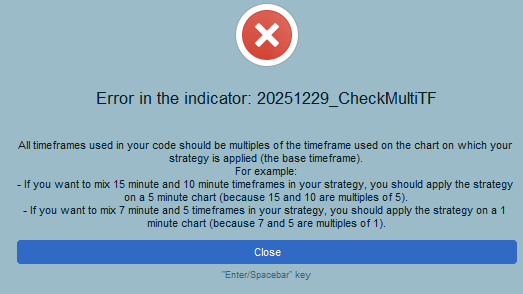
I can insert it in a daily chart. But as I try to insert it in the weekly chart, I got error as shown in attached screenshot.
In order to get the indicator calculate correctly, the minimal timeframe data is needed (daily in this case), and it is not possible to get inferior timeframe data when browsing the weekly timeframe, therefore use it on any timeframe equal or inferior to daily.