A Previous 20 & 40 Day Rectangle – A Request Please?

Viewing 15 posts - 1 through 15 (of 15 total)

  • Author
    Posts
  • #229010 quote
    Andre36
    Participant
    New

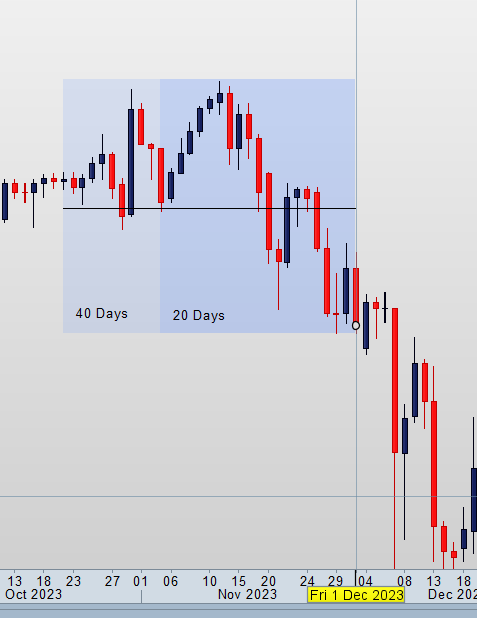
    Hi all! I’d like to humbly ask a request from someone to code a dynamic rectangle with a centre line for me that marks the high and low of the past 20 & 40 days from the 1st of the current and previous month. I’d like there to be no borders but just a coloured but transparent rectangle of a 20 and 40 daily high and low? I searched the forum and found this as the closest example.

    I’d be very much grateful. Thank you.

    #229014 quote
    robertogozzi
    Moderator
    Master

    You need 8 lines:

    • 4 lines marking the high and low of the last 20 and 40 periods starting from day 1 of the previous month
    • 4 lines marking the high and low of the last 20 and 40 periods starting from day 1 of the current month.
    • All these lines need to be embedded in a rectangle.
    • The lines need to be at the center of the rectangle, so the rectangle has to have both the upper and lower border at the same distance from the outer lines.

    Is that correct?

    #229031 quote
    Andre36
    Participant
    New

    Hi Roberto! Good morning, yes that sounds about right. I’ve attached a screenshot as an example just for your confirmation. Thank you!

    #229063 quote
    Andre36
    Participant
    New

    Hi Roberto, I’ve just re-read this post from this morning. Maybe I didn’t read it properly, if you mean 4 lines as in both sides of a rectangle then yes if that is how it will turn out if you can do it for me. You can see the attachment I posted above to see what I was try to explain. You will see from the 1st of the month one rectangle is 20 days and the second rectangle would mark forth days from the same point. The rectangles are not attached to each other, they are just on top of each other or can be toggled on or off. Hope that helps.

    #229085 quote
    druby
    Participant
    New

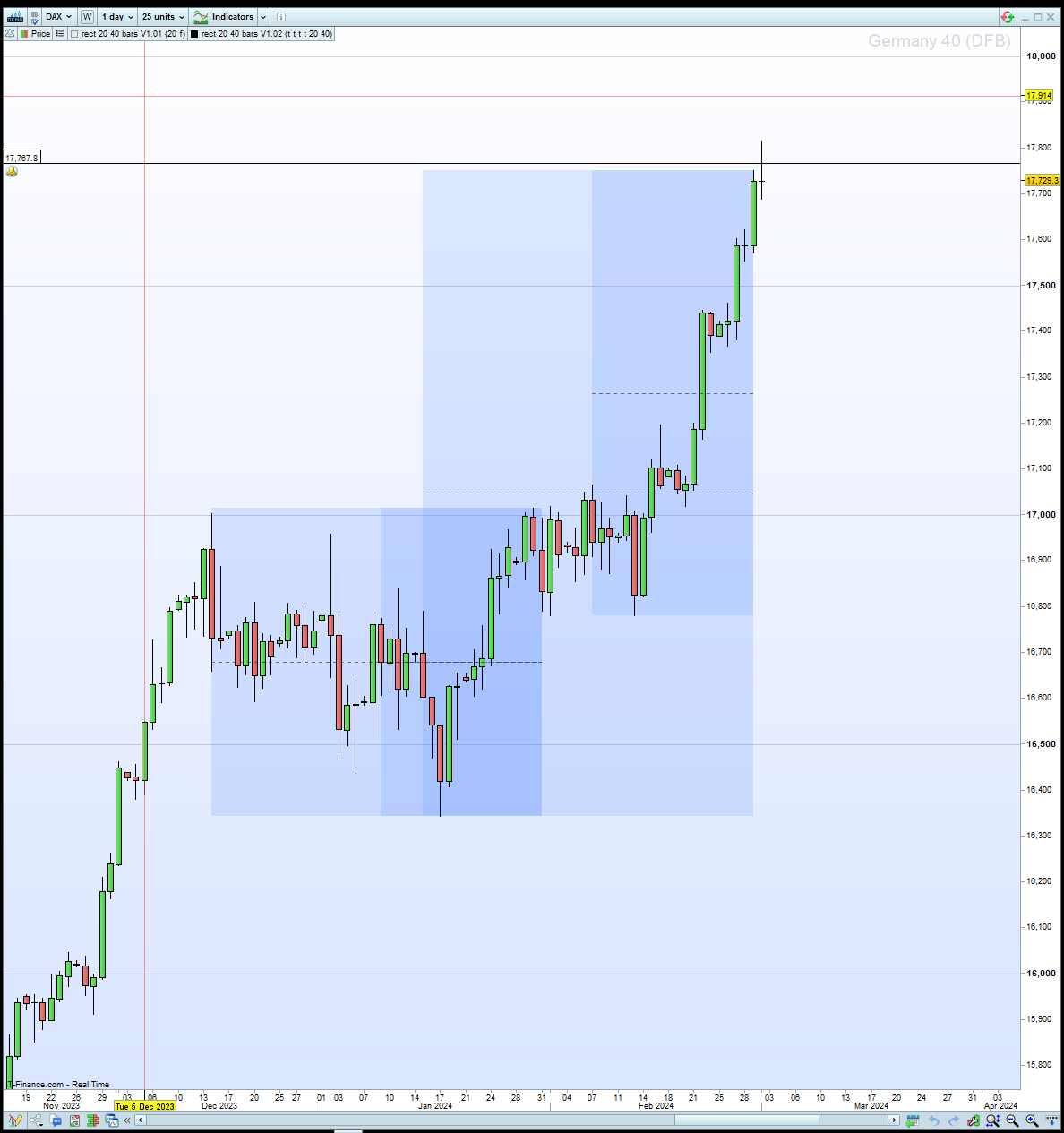
    Hi Andre, have a look at this!

    I just through this together to get something up and running based on your description, but what i’m thinking may not the same as you.

    It could help if you elaborate more on the reasoning why you want the rectangles and how you intend to use and interpret them and where.

    If you import the .itf file you can dynamically change the variables through the indicator config setting. If you cut/paste you will have to remove the ‘//’ at the beginning of lines 4-9 and save again via [Apply to… xxxxxxx…] button .

    regard druby

    defparam drawonlastbaronly = true
    
    ////dynamic variables with default values
    //current = 1   // boolean, display current month rectangles
    //previous = 1  // boolean, display previous month rectangles
    //draw1 = 1     // boolean, draw lbk1 rectangle(s)
    //draw2 = 1     // boolean, draw lbk2 rectangle(s)
    //lbk1 = 20     // integer, lookback 'n' bars
    //lbk2 = 40     // integer, lookback 'n' bars
    
    once idx = -1
    // entry guard
    lbk1 = abs(max(lbk1,1)) // positive, not zero
    lbk2 = abs(max(lbk2,1)) // positive, not zero
    
    if month <> month[1] then           // change of month
    idx = idx + 1                    // increment the array index
    $bar[idx] = barindex             // store bar and highs and lows
    $HH1[idx] = highest[lbk1](high)
    $HH2[idx] = highest[lbk2](high)
    $LL1[idx] = lowest[lbk1](low)
    $LL2[idx] = lowest[lbk2](low)
    endif
    
    // rgba settings
    r = 100
    g = 150
    b = 255
    a = 255
    
    if islastbarupdate then
    if isset($bar[1]) then
    for i = lastset($bar)-1 to lastset($bar) // loop the last two entries
    
    // switch for previous and current
    if previous and lastset($bar)-1 = i   or current and lastset($bar) = i  then
    
    // retrieve data from arrays
    bar = $bar[i]
    HH1 = $HH1[i]
    HH2 = $HH2[i]
    LL1 = $LL1[i]
    LL2 = $LL2[i]
    
    for i = 0 to 1  // loop for lbk1 and lbk2's data
    
    lbk = lbk1-1
    HH = HH1
    LL = LL1
    if i = 1 then
    lbk = lbk2-1
    HH = HH2
    LL = LL2
    endif
    
    // switch for draw1 and draw2
    if draw1 and i = 0 or draw2 and i = 1 then
    x1 = barindex - bar
    y1 = HH
    x2 = x1+lbk
    y2 = LL
    endif
    
    drawrectangle(barindex[x1],y1,barindex[x2],y2)bordercolor(r,g,b,0)coloured(r,g,b,a/5)
    drawsegment(barindex[x1],((y1-y2)/2)+y2,barindex[x2],((y1-y2)/2)+y2)style(dottedline,1)coloured(0,0,0,a/2)
    
    drawtext(y1,barindex+15,y1) 
    drawtext(y2,barindex+15,y2) 
     
    next
    endif
    next 
    endif
    endif
    
    return
    Andre36 and robertogozzi thanked this post
    #229091 quote
    Andre36
    Participant
    New

    HI Druby! This is exactly what I wanted! I applied it to my chart and you have understood it perfectly, thank you so much! What I was trying to re-create is an institutional reference point for how price moves in a given market. They are called IPDA ranges. I’m learning to trade from the teachings of ICT, this is his Youtube if you aren’t familiar with him. This is the particular lesson I wanted to re-create the indicator from. If you get to watch the lesson, you’ll see there are actually 20,40 and 60 days reference points but for my trading setup I don’t need to see the 60. Your time and gift to me is appreciated. Thank you very much.

    #229243 quote
    druby
    Participant
    New

    Hi Andre, took a look at that video, thought the ‘Open Interest’ looked we’ll, interesting but not expecting that to appear any time soon.

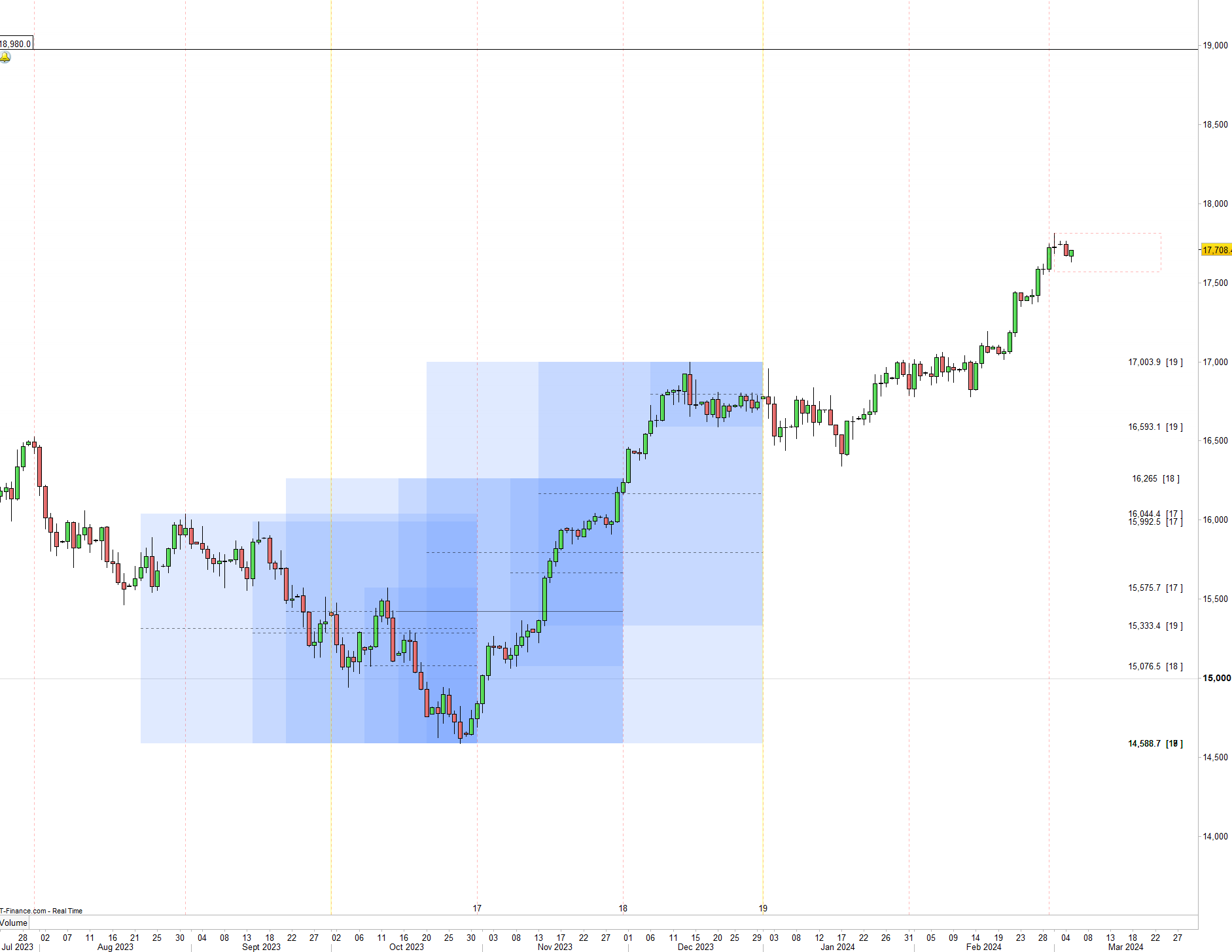
    Having been inspired, I did another version which should at default be the same as other with reference to the rectangles.

    New features are:

    To add a third lookback rectangle, if you want to go there 60 !

    ‘num’ allows more than 1 previous month to be displayed.

    ‘back’ allow shifting of the blocks back a month at a time to look at previous situations.

    ‘mnLine’ displays some guidelines on every month and highlights the quarters.

    Also a 20 bar look forward box is displayed.

    ‘text’ allow hiding the text,, encoding 0 = all, 1 = price , 2 month/array data index

    Known issues…

    using ‘back’ only goes back so far, using more units can get around this if its a deal breaker.

    The future quarterly highlight doesn’t show until its current bar.

    lookforward box may not be  20 bars, because of divergence between time/bars and market closed.

    And doesn’t choose right level as intended at times. Needs work!


    I think this type of indicator would be best implemented as just 1 rectangle and then multiple indicators could be added to a chart in a similar way as if you have multiple moving averages.

    Arrr we’ll…

    druby

    robertogozzi and Andre36 thanked this post
    #229426 quote
    druby
    Participant
    New

    Found a new issue with V1.03…

    • Not displaying any rectangles with chart units less than 150

    This appears to be the same issue affecting  ‘back’, and only being able to go back so many months.

    Changing line 48

    • From…    if isset($bar[1]) and start > $bar[1] then
    • To…      if isset($bar[1]) and start > isset($bar[1]) then

    solves both issues.

    Andre36 thanked this post
    #229666 quote
    Andre36
    Participant
    New

    Found a new issue with V1.03…

    • Not displaying any rectangles with chart units less than 150

    This appears to be the same issue affecting ‘back’, and only being able to go back so many months.

    Changing line 48

    • From… if isset($bar[1]) and start > $bar[1] then
    • To… if isset($bar[1]) and start > isset($bar[1]) then

    solves both issues.

    Hey, Sorry for the late reply, I didn’t see your replies. Thanks very much for all the updates. This is just as well because I’ve updated my trading plan for the indicator to what it was originally indented for which is how it should be used in the first place – up to 60 day lookbacks and look forwards like you mentioned. The look backs and forwards are only valid at a break or shift of structure.

    I will install the updates and get back to you.


    Thank you!

    #229667 quote
    Andre36
    Participant
    New

    Hi Andre, took a look at that video, thought the ‘Open Interest’ looked we’ll, interesting but not expecting that to appear any time soon.

    Having been inspired, I did another version which should at default be the same as other with reference to the rectangles.

    New features are:

    To add a third lookback rectangle, if you want to go there 60 !

    ‘num’ allows more than 1 previous month to be displayed.

    ‘back’ allow shifting of the blocks back a month at a time to look at previous situations.

    ‘mnLine’ displays some guidelines on every month and highlights the quarters.

    Also a 20 bar look forward box is displayed.

    ‘text’ allow hiding the text,, encoding 0 = all, 1 = price , 2 month/array data index

    Known issues…

    using ‘back’ only goes back so far, using more units can get around this if its a deal breaker.

    The future quarterly highlight doesn’t show until its current bar.

    lookforward box may not be 20 bars, because of divergence between time/bars and market closed.

    And doesn’t choose right level as intended at times. Needs work!

    I think this type of indicator would be best implemented as just 1 rectangle and then multiple indicators could be added to a chart in a similar way as if you have multiple moving averages.

    Arrr we’ll…

    druby

    Hey Druby. The Indicator was working fine for me. But then my charts started freezing and the interface went dark. Never happened before. I restarted my laptop and I haven’t had the freezing so far. I haven’t activated it again. Could there be something in the code causing this?

    #229686 quote
    druby
    Participant
    New

    Hi Andre, been using this version since a wrote it several days ago , not seen a problem like what you describe and its been running in a chart for at least 12 hours a day over 2 desktop PC at different locations and internet.

    Since I have been programming with PRT and ProBuilder  I have not seen this issue but, can’t rule it out 100%.

    If the indicator errored in some way I would expect error to be limited to the chart window where indicator added and would only expect it to affect that indicator and not other independant elements of the chart like the price candles, manual drawn objects and other added indicators or the PRT/OS. If a internal error was triggered, I would expect a possible an error message, but not that’s not 100% either

    Just to clarify, the prior versions indicator only displayed the rectangles when added to the/a price window and used on the ‘Daily’ timeframe. However, this version tests for ‘Daily’ timeframe and displays error message if on other. Returning back to ‘daily’ removes message. Message displayed, can be disabled via settings if you needed change to other timeframe and remove message. Message won’t re-appear again until enabled again.

    My current PRT version is 12.0 – 17.0.7 found under [main menu bar],[Help],[About].

    Looking at the code, the use of ‘Array’ and the ‘Anchor’ commands came in on Version 11 maybe Version 11.1, if a remember right. If your version was not compatible I would expect some error message informing you of the situation.

    Only thing I can suggest is, if it is the indicator, you would expect repeatedly getting the problem if continue to use.

    Recently adding it, and now not using it, my appear to point to it having a problem if you never get it again, but, doesn’t rule out that it could have been a coincidence with some other issue. [prt,java,windows,OS,PC, mac,internet, power spike, too much coffee, working too hard]  etc.

    If I were having the problem I would try to identify and eliminate the variables of using it in the situation when error occures and correlate them to isolate down how to trigger error and which/what variable(s) were responsible.

    I know it would be better to say it’s this!, but i don’t think were there at the moment , at this time I cannot see any thing in the indicator code, and something happened is a big gap to investigate without gathering more data/information.

    Regarding your comments and oservations when error was occurring, chart freezing could related to a loss of data connection and/or the processor doing heavy duty number cruching on something else in the background and not updating.

    Memory could have been a issue and a blank screen points possible to the video not being updated. All these could be signs of computer crashing, but why it crashed, we’ll there a good question.

    Regards druby

    Andre36 thanked this post
    #229693 quote
    PeterSt
    Participant
    Master

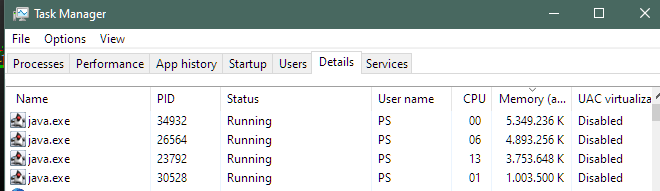
    Maybe observe the used memory of the Java instance (by means of TaskManager) and see whether it grows and grows automatically.
    When it approaches 6GB – and by further default settings within Java – you may expect problems (at 8GB all will be dead).

    To me too it looks like your laptop just crashed. And when this never happened before, the Indicator should be suspect. But as druby said, all can be coincidence.

    #229700 quote
    Andre36
    Participant
    New

    Hi Andre, been using this version since a wrote it several days ago , not seen a problem like what you describe and its been running in a chart for at least 12 hours a day over 2 desktop PC at different locations and internet.

    Since I have been programming with PRT and ProBuilder I have not seen this issue but, can’t rule it out 100%.

    If the indicator errored in some way I would expect error to be limited to the chart window where indicator added and would only expect it to affect that indicator and not other independant elements of the chart like the price candles, manual drawn objects and other added indicators or the PRT/OS. If a internal error was triggered, I would expect a possible an error message, but not that’s not 100% either

    Just to clarify, the prior versions indicator only displayed the rectangles when added to the/a price window and used on the ‘Daily’ timeframe. However, this version tests for ‘Daily’ timeframe and displays error message if on other. Returning back to ‘daily’ removes message. Message displayed, can be disabled via settings if you needed change to other timeframe and remove message. Message won’t re-appear again until enabled again.

    My current PRT version is 12.0 – 17.0.7 found under [main menu bar],[Help],[About].

    Looking at the code, the use of ‘Array’ and the ‘Anchor’ commands came in on Version 11 maybe Version 11.1, if a remember right. If your version was not compatible I would expect some error message informing you of the situation.

    Only thing I can suggest is, if it is the indicator, you would expect repeatedly getting the problem if continue to use.

    Recently adding it, and now not using it, my appear to point to it having a problem if you never get it again, but, doesn’t rule out that it could have been a coincidence with some other issue. [prt,java,windows,OS,PC, mac,internet, power spike, too much coffee, working too hard] etc.

    If I were having the problem I would try to identify and eliminate the variables of using it in the situation when error occures and correlate them to isolate down how to trigger error and which/what variable(s) were responsible.

    I know it would be better to say it’s this!, but i don’t think were there at the moment , at this time I cannot see any thing in the indicator code, and something happened is a big gap to investigate without gathering more data/information.

    Regarding your comments and oservations when error was occurring, chart freezing could related to a loss of data connection and/or the processor doing heavy duty number cruching on something else in the background and not updating.

    Memory could have been a issue and a blank screen points possible to the video not being updated. All these could be signs of computer crashing, but why it crashed, we’ll there a good question.

    Regards druby

    Good Afternoon Druby!  Thanks so much! The indicator is only used on a daily time frame so no other time frames are necessary. I checked my task manager at the time also, and it wasn’t showing anything unusual from what I saw either. My laptop is powerful enough to run a couple heavy programs but like you mentioned, these things could happen from time to time. What I have noticed with my laptop is that whenever there is significant update due it does act up and this morning I got a notice for an update. What I’ll do is setup automatic updates and see if that makes a difference in the future. My current PRT is also V12 17.07. Thank you very much for the updates.

    #229701 quote
    Andre36
    Participant
    New

    Maybe observe the used memory of the Java instance (by means of TaskManager) and see whether it grows and grows automatically.

    When it approaches 6GB – and by further default settings within Java – you may expect problems (at 8GB all will be dead).

    To me too it looks like your laptop just crashed. And when this never happened before, the Indicator should be suspect. But as druby said, all can be coincidence.

    I did have some updates to install, my laptop does have a tendency to act weird whenever an update is due for some reason. I’m going to update and see what happens and keep an eye on my task manager. Cheers!

    #229703 quote
    PeterSt
    Participant
    Master

    Yes, when a W10 or W11 update is prepared in your PC, it may misbehave for a day (everything is hogged, as it seems).

    druby and Andre36 thanked this post
Viewing 15 posts - 1 through 15 (of 15 total)
  • You must be logged in to reply to this topic.

A Previous 20 & 40 Day Rectangle – A Request Please?


ProBuilder: Indicators & Custom Tools

New Reply
Author
author-avatar
Andre36 @andre36 Participant
Summary

This topic contains 14 replies,
has 4 voices, and was last updated by PeterSt

1 year, 11 months ago.

Topic Details
Forum: ProBuilder: Indicators & Custom Tools
Language: English
Started: 03/01/2024
Status: Active
Attachments: 7 files
Logo Logo
Loading...