In 1 second graphics, I want the 9.00h to place the purchase or sale order and keep that order open for the next 5 minutes.
That would be coded this way:
while time>=090000 and time<090500 do
  if buycondition then
    .... STOP
  endif
  if sellcondition then
    .... STOP
  endif
wend
 Lyny
LynyParticipant
Junior
@ Raul, Can you rewrite the code for 1 second or something like 30seconds or 1 min chart? I tried the backtest and real results for recent 1 week, my backtest show a gain of £196 when my real Live trade lost of £304. a big different when i see the trailing stop 5 still work ok.
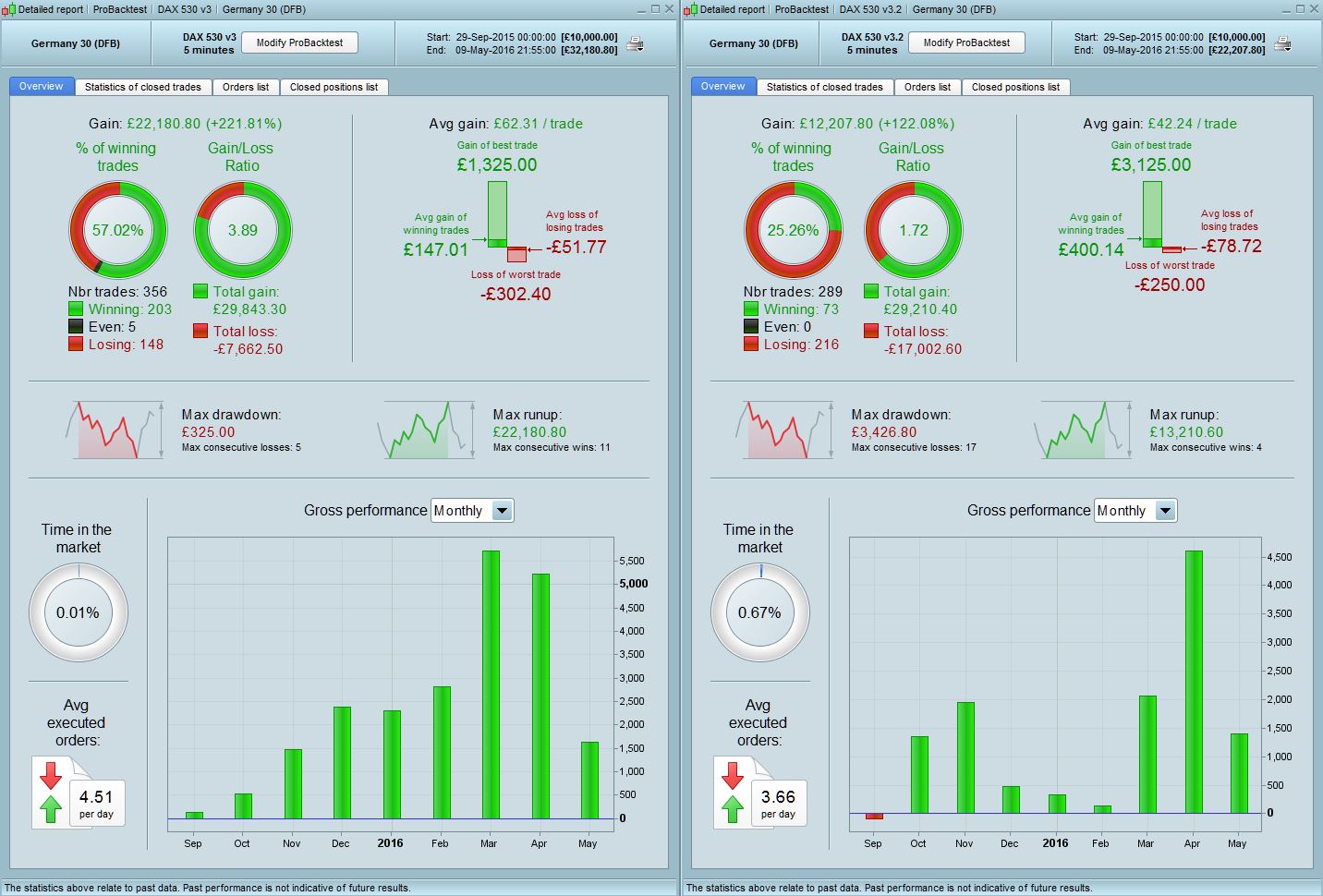
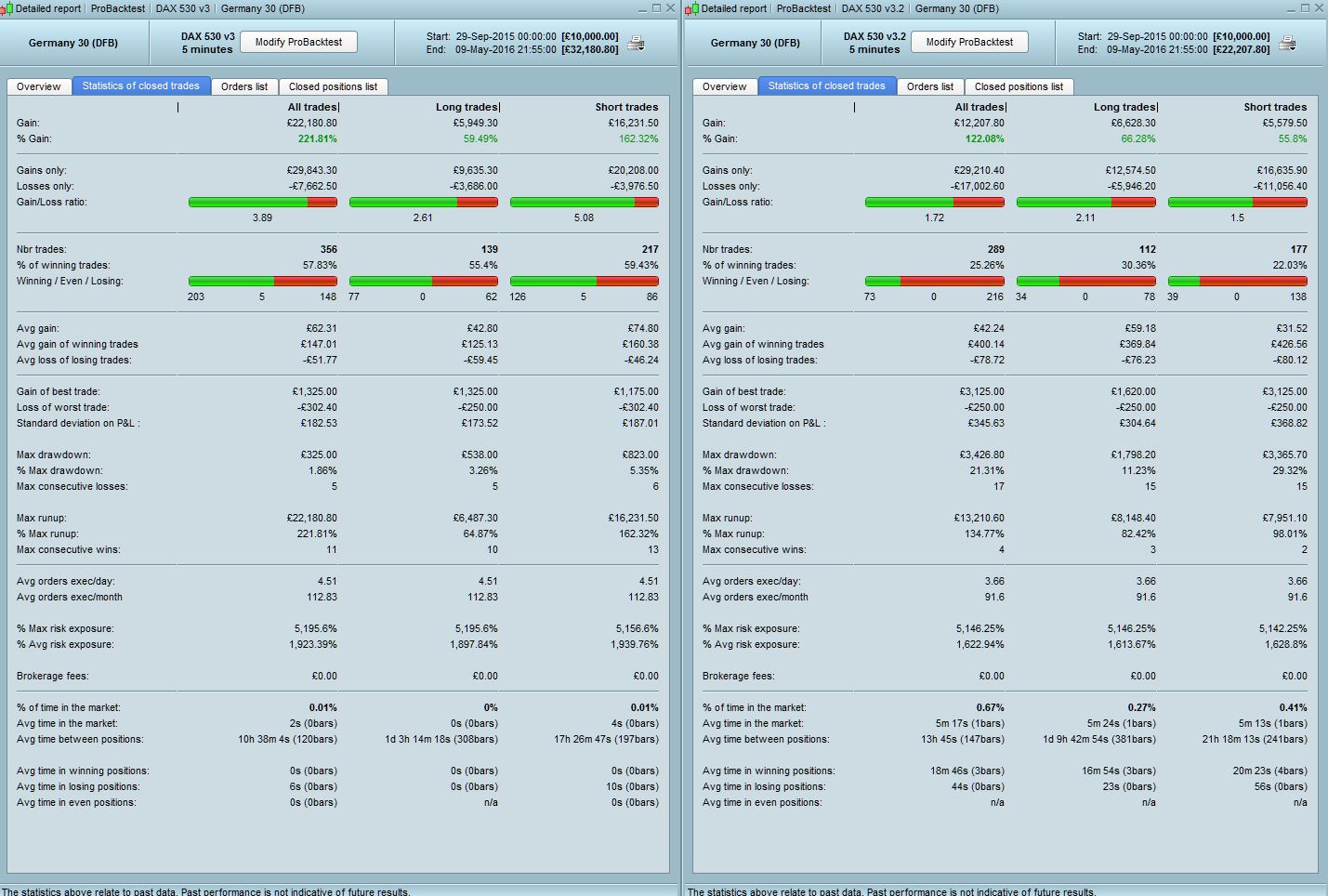
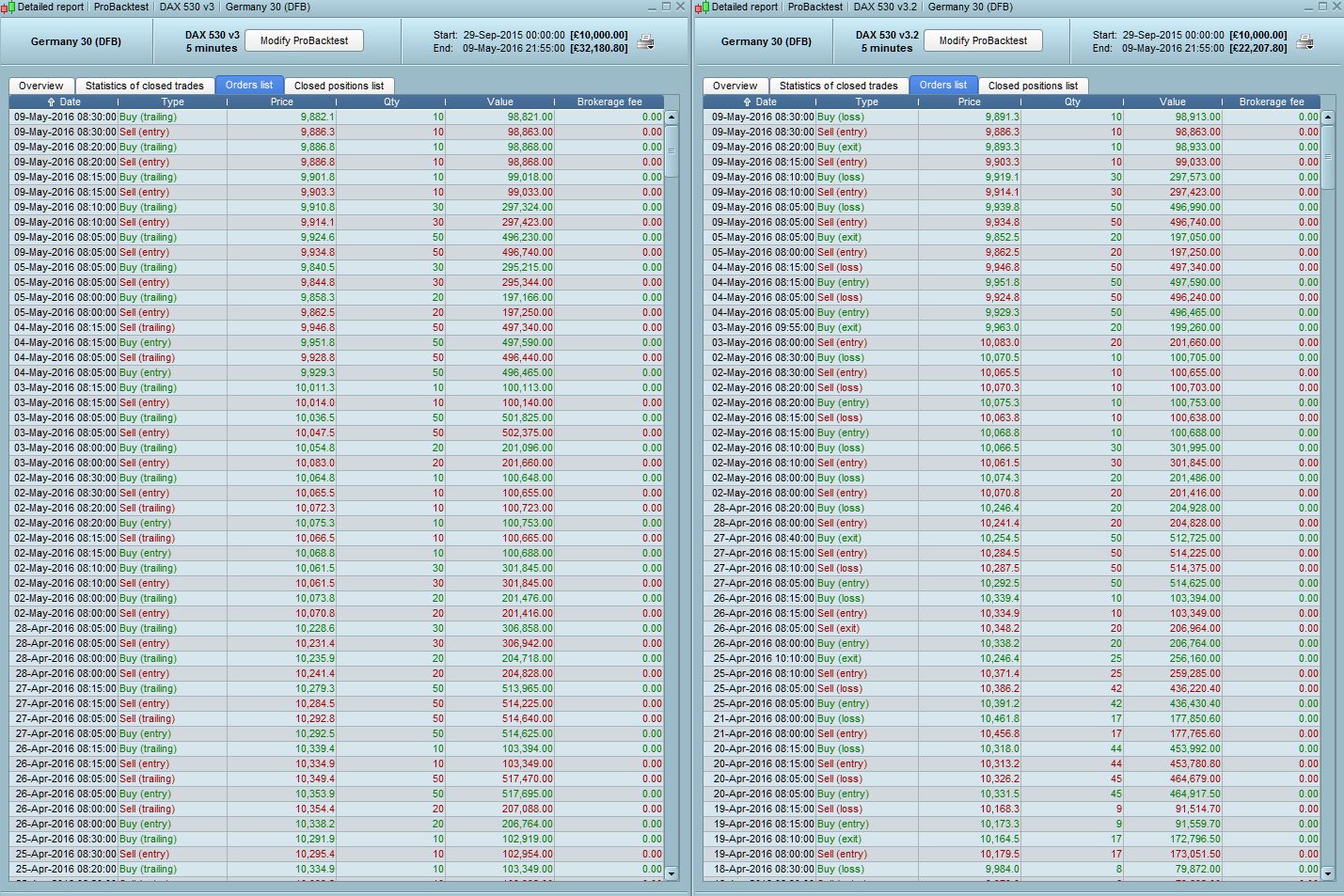
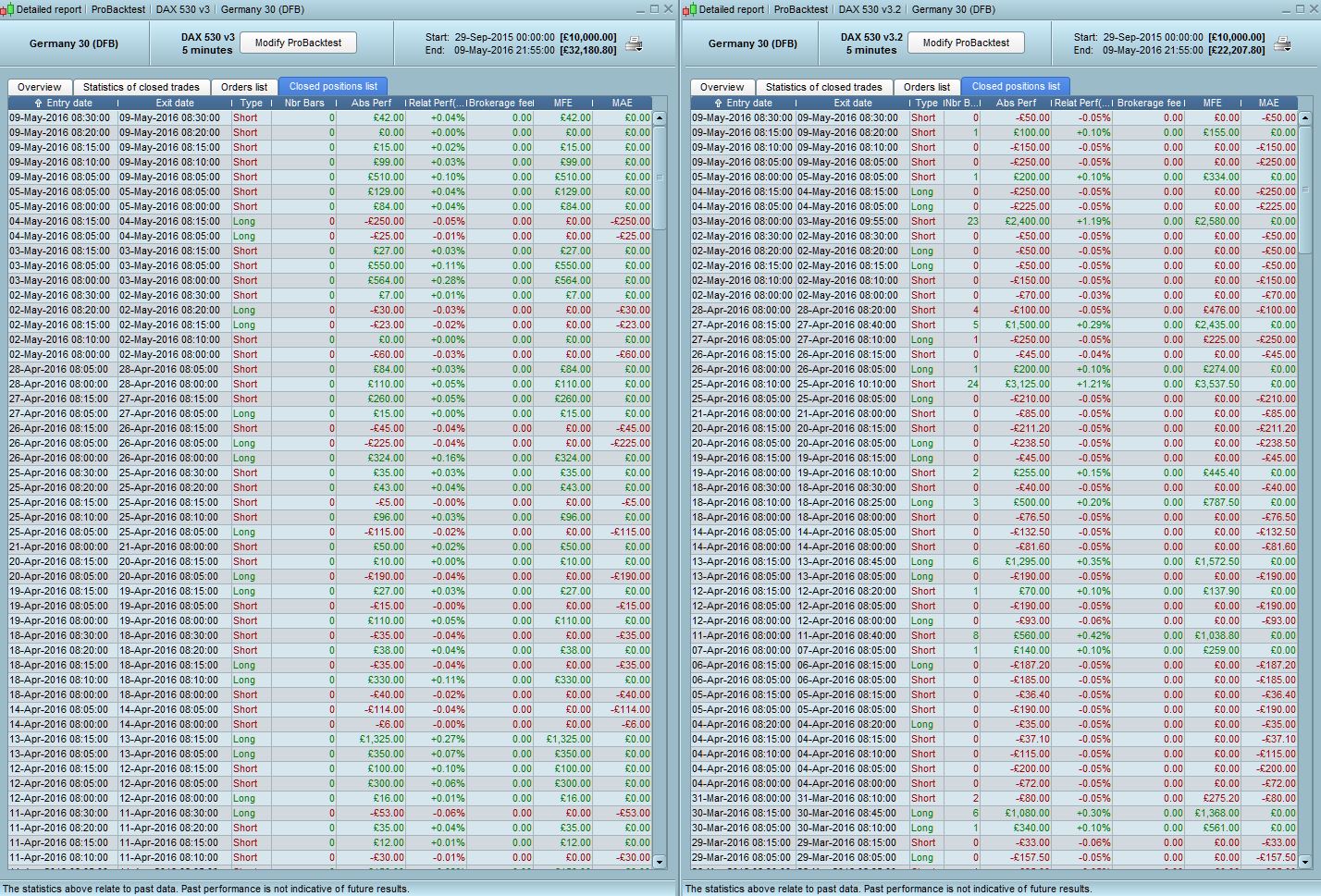
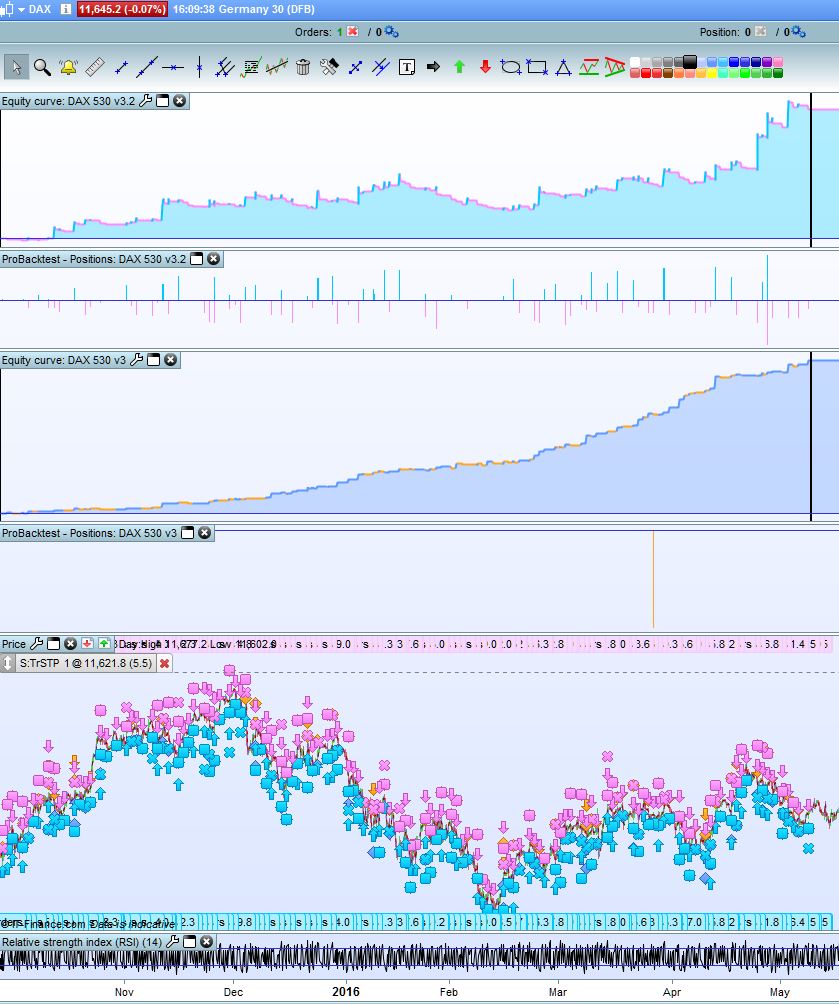
Hi All – I have tested the trailing code function that Nicolas suggested and volpiemanuele also tested earlier in #23493 with the following conclusions – Note that we are comparing the original Dax-5-min-v2 strategy with a 5 point trailing stop (labelled v3 in my screenshots below and left pic) with the same strategy using Nicolas trailing stop code (5pt trailing start, 5pt trailing step and 5pt stop loss) – labelled v3.2 in my screenshots and is right pic. Please also note that the actual p&l numbers and differences in stats between the two versions are less relevant here as we are purely testing functionality for this purpose.
1) The results for the coded trailing stop (3.2) are actually not that bad, the drawdown amount and % is quite large so there needs to be some tweaking and testing done but there is some promise.
2) Revised 3.2 produces more realistic results eg. the average time in positions seems correct eg 44s in losing positions vs 0s shown in v3 which is clearly incorrect
3) In the orders list you can see that both versions produce almost identical entry points but vastly different exit prices – suggesting indeed a problem with the way the trailing stop works in original v3 and confirming all our thoughts from earlier.
4) In the closed positions list – with the original v3 embedded PRT trailing stop code the difference between MFE (max favourable execution) and MAE (max adverse execution) ALWAYS EQUALS THE Abs performance (ie P&L) but in the revised coded version 3.2 there is usually a difference suggesting that the trailing function is working properly. This is how it should be as in real trading since a position will never always go straight to the stop loss or take profit limit, as we all know as markets constantly move up/down and never in a straight line. This gives me confidence that Nicolas’s trailing stop code indeed seems correct and is working like it should, it’s the inbuilt trailing stop function in PRT which is incorrectly executed.
Based on the above I would not trust results using the PRT trailing stop function but if you need that ability in any of your strategies please use the written code provided above earlier. Also, I feel that the original strategy Raul has suggested when he started this thread is still worth pursuing based on the revised results but with amended coding and backtesting now we are aware of the issues and limitations. I notice that it has been suggested to use 1sec timeframe which seems like something worth looking into and a step in the right direction. It’s a process, we need to be patient.
Attached is the equity curve of the two.
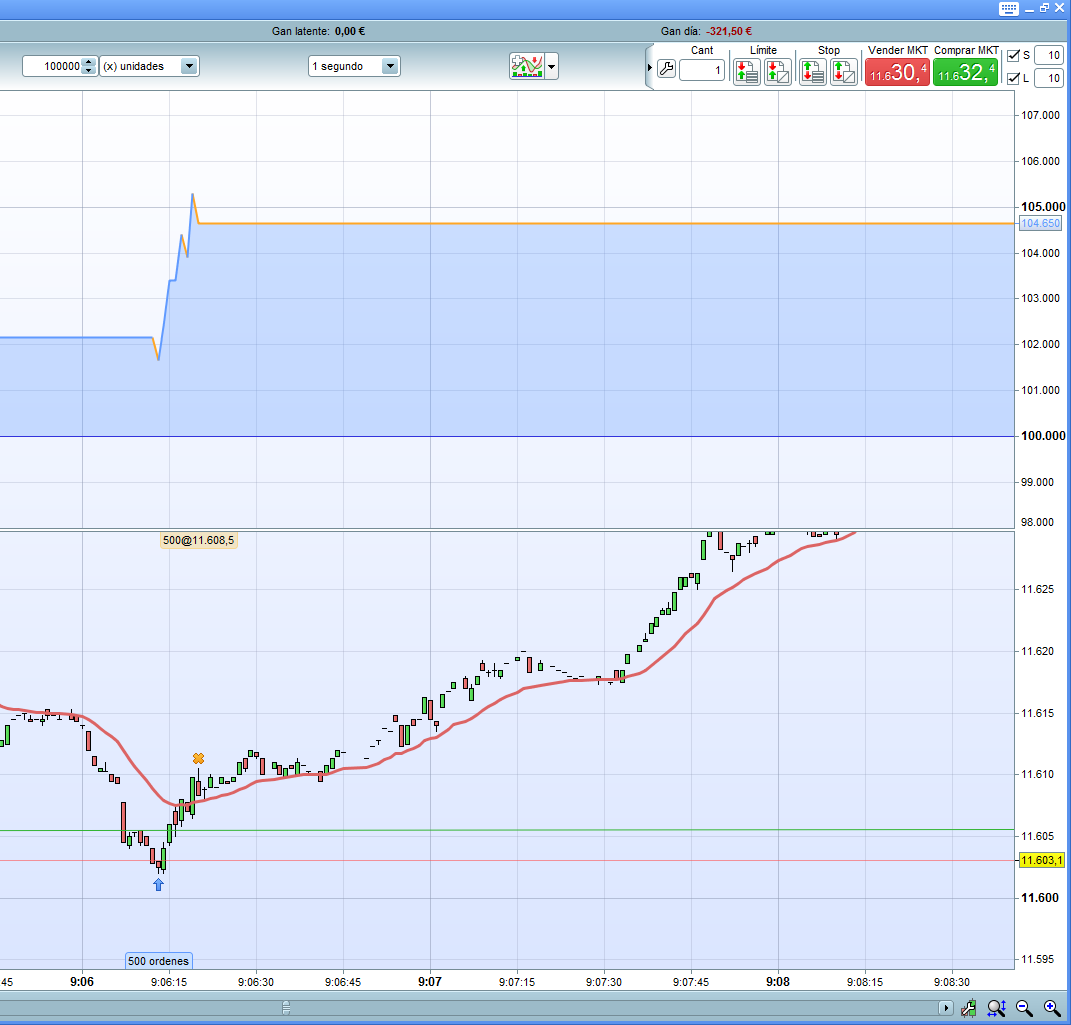
Hi nicolas, I have managed to do something, to see what you think, I note that the trailing attached is what it does is close the 5 profit points. I attach the catch made on purpose at that time so you can see that it keeps going up without going back but the operation closes to 5 points.
// Definición de los parámetros del código

DEFPARAM CumulateOrders = true // Acumulación de posiciones desactivada

DEFPARAM FlatAfter =174500
DEFPARAM PRELOADBARS = 10000

indicator2, indicator1 = CALL "valores horarios"
c1 = (indicator1 > indicator2)
c2 = (indicator1 < indicator2)
n=1


while time>=090500 and time<=091000 do

if time=090613 then

IF c1 THEN

buy n contract AT close stop
endif


IF c2 THEN
sellshort n contract AT close stop
endif
endif
wend

trailingstart = 5 //trailing will start @trailinstart points profit
trailingstep = 5 //trailing step to move the "stoploss"
IF NOT ONMARKET THEN
newSL=0
ENDIF

//manage long positions
IF LONGONMARKET THEN
//first move (breakeven)
IF newSL=0 AND close-tradeprice(1)>=trailingstart*pipsize THEN
newSL = tradeprice(1)+trailingstep*pipsize
ENDIF
//next moves
IF newSL>0 AND close-newSL>=trailingstep*pipsize THEN
newSL = newSL+trailingstep*pipsize
ENDIF
ENDIF

//manage short positions
IF SHORTONMARKET THEN
//first move (breakeven)
IF newSL=0 AND tradeprice(1)-close>=trailingstart*pipsize THEN
newSL = tradeprice(1)-trailingstep*pipsize
ENDIF
//next moves
IF newSL>0 AND newSL-close>=trailingstep*pipsize THEN
newSL = newSL-trailingstep*pipsize
ENDIF
ENDIF

//stop order to exit the positions
IF newSL>0 THEN
SELL AT newSL STOP
EXITSHORT AT newSL STOP
ENDIF

SET STOP loss 5
And I do not understand why he gets 500 contracts
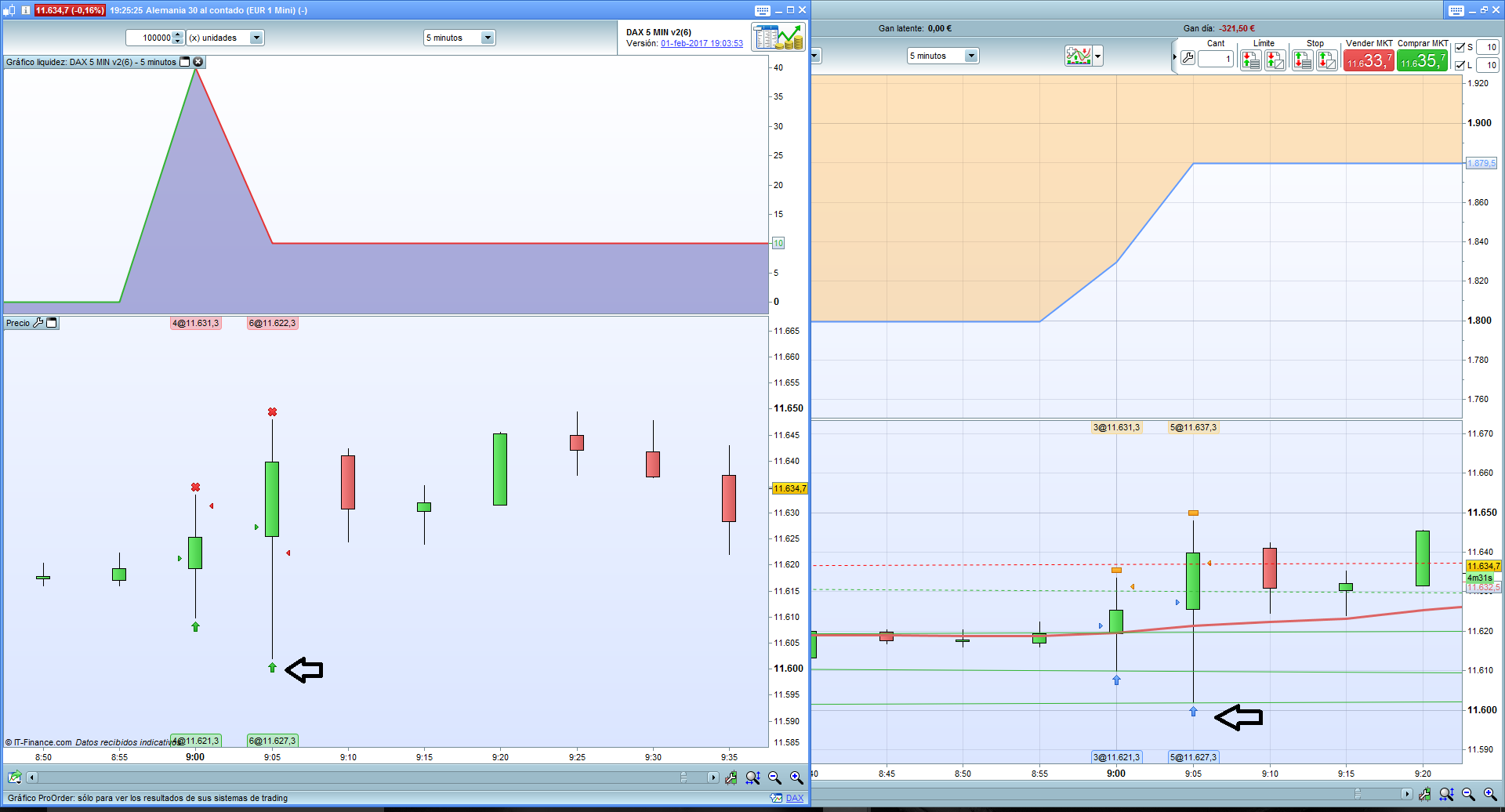
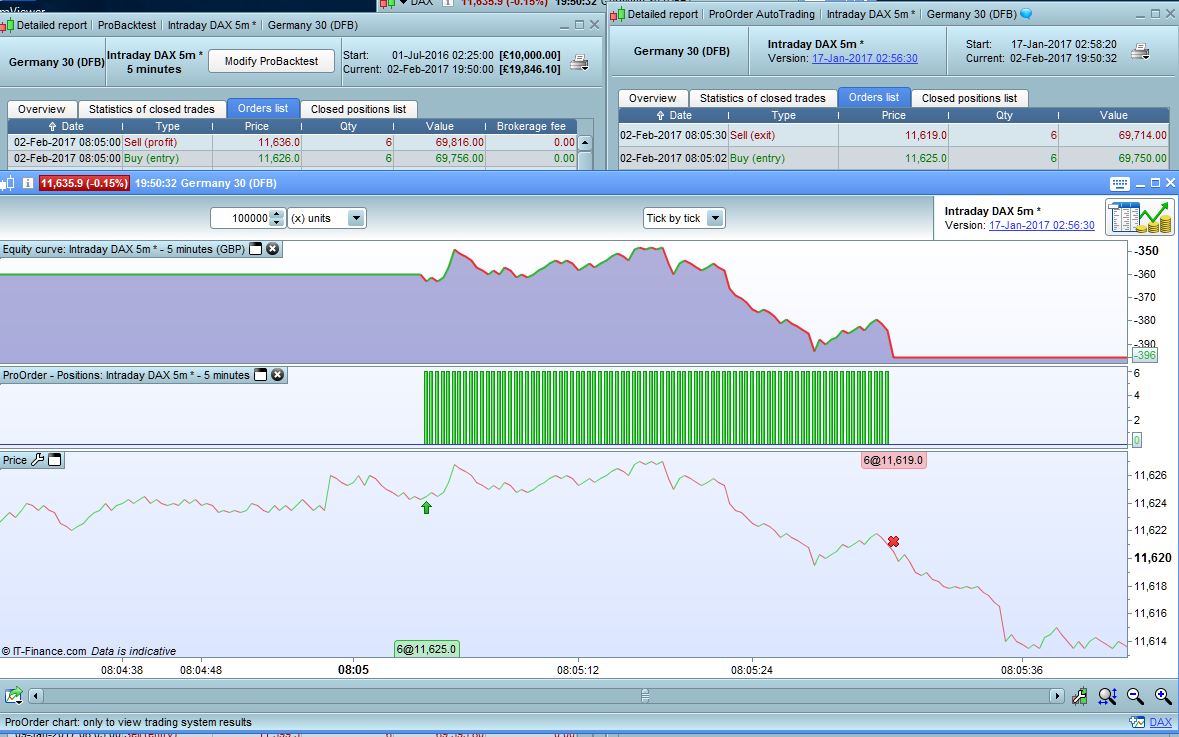
Definitely, pro real time does not do well backtest, regardless of whether you use trailing or normal stop. Attached image 1, program with normal stop 5 and take 10. left what happened in real, right backtest. We see that opens exactly to the same level: 11627.3, in real loses, in the backtest of the winner.
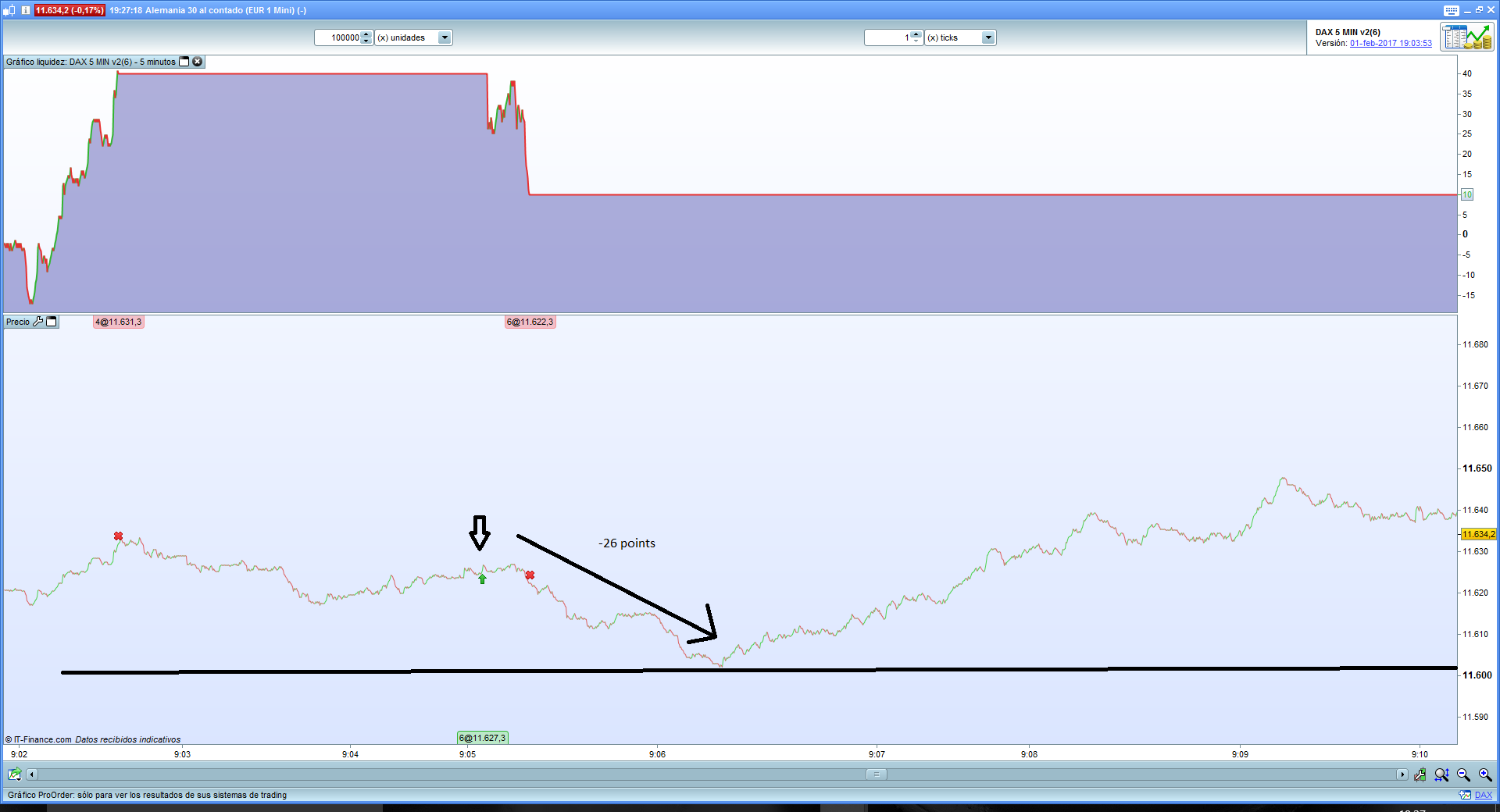
Image 2, what happens tick by tick, we see that we lose because first the price falls and then rises.
@Raul
You are accumulating contracts because you are adding 1 order at each bar (cumulateorders=true) and your trading condition is still true between the schedules.
LynyParticipant
Junior
@Raul, so what is the best code I should put in the real Live test for next week? Please attach full .itf file here, i will put it on Live trade next week for continue testing. But, consider I dont want to wipe out all my capital yet! Thank you Raul.
@Lyny we need to give them time to work it all out, it is not finalised yet. Best you QUIT your ATS from Live trading then you can sleep at night? 🙂
Effectively, I recommend to stop using the live trade because the backtest does not do them well nor using a normal stop. Would have to try in demo for a while and compare with the backtest to know how much it fails.
Oh dear, I have to agree, Raul I’ve just looked at another one of your earlier strategies in my live results from today to check and come across exactly the same problem you highlighted above. The strategy uses 10pt take profit and 5 point stop loss (ie no trailing). As you can see from the screenshot, the backtest ignores the stop loss completely and returns the 10pt take profit. In reality in the live graph as you can see the 5pt stop loss is triggered – as it correctly should be as the market went through that level.
My logical conclusion from this – I don’t think its the stop loss or take profit function that doesn’t work – if it was then it would affect pretty much every strategy here. It’s the tick by tick backtest function that definitely does not work properly (it’s essentially back to same “zero bar” problem we had before v 10.3) or if it does, it’s intermittent so best not to rely on it until PRT finds the cause and fixes it. This does not look good unfortunately I must say.
P.S – I have the tick by tick box turned on and re-run the backtest a few times just to make sure that there are no fake results.
Edit – I have just tested the strategy with the tick by tick turned off and it provides the same results for today as above (which is obviously wrong) so it’s definitely a problem with the tick by tick module ie its basically being ignored. But not all the results are the same so it’s being used for some trades but not others which is even more strange…..
I echo Grahal and Raul’s sentiments above, please don’t risk capital you cannot afford. Best to stand aside until the issues are resolved.