







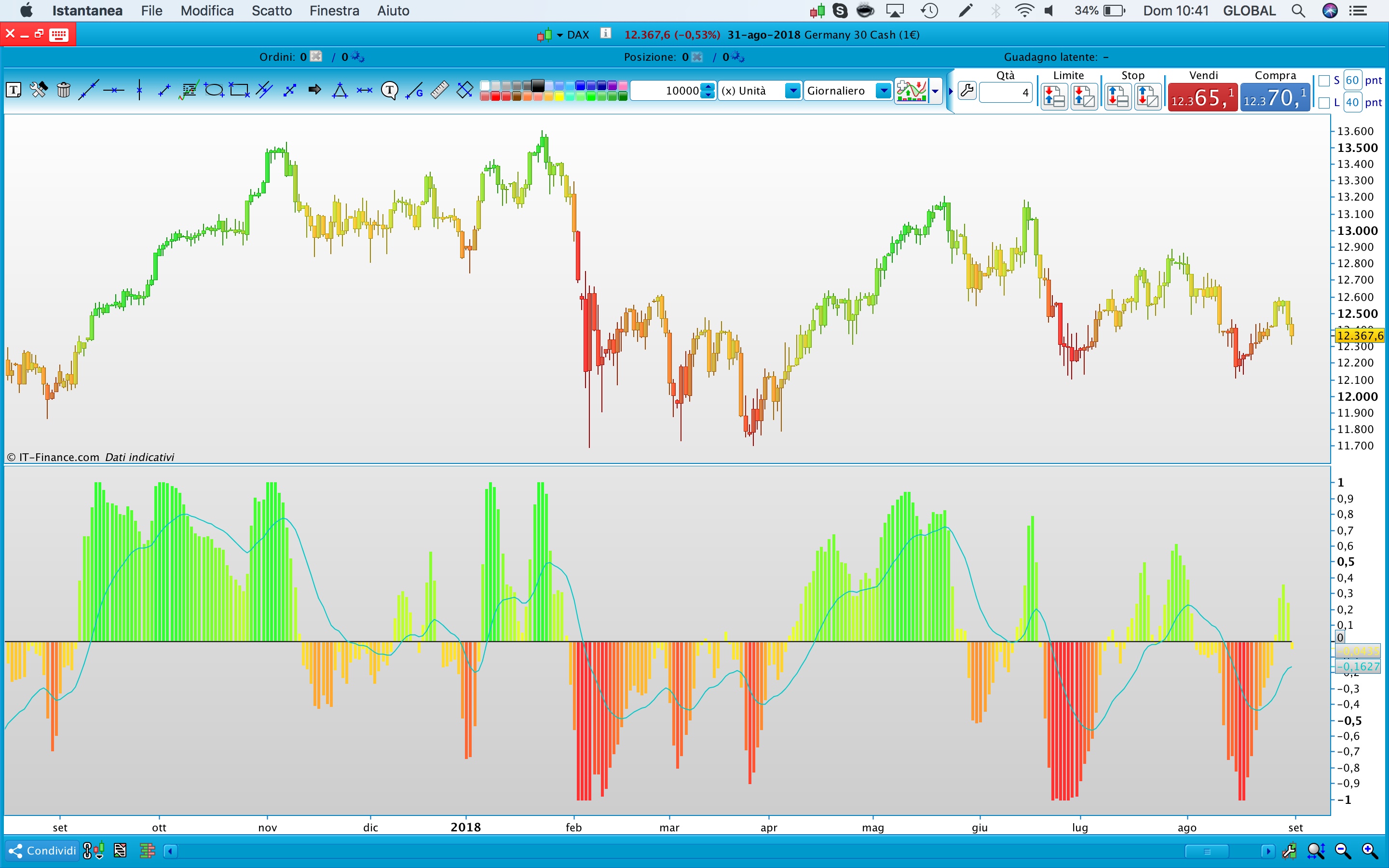
3D Candlesticks TOPIC

Viewing 15 posts - 16 through 30 (of 62 total)
  • Author
    Posts
  • #75763 quote
    ALE
    Moderator
    Master

    Ok..
    Have you some strategy idea with this code?

    #77063 quote
    supertiti
    Participant
    Master

    @ ALE

    + 11% in a few days, the idea was good!
    #77674 quote
    Takeshi
    Participant
    Junior

    Hello sir, great indicator thank you. I really would like to add it to my strategy, is there a way to use Candlesticks colors for my conditions?

    Thank you!

    #77743 quote
    ALE
    Moderator
    Master

    Hello Tekeshi

    yes there are many way, what can I do?

    #77783 quote
    Fr7
    Participant
    Master

    Can you create a system with the color changes?
    buy: when the candle is green
    closing of buy: when the candle is yellow
    Sell: when the candle is red
    closing sell: candle is yellow
    It is possible to integrate in a single candle: cci + rsi + stochastic + cycle + di?

    #77816 quote
    ALE
    Moderator
    Master

    Hi

    remeber that colours indicate values of the oscillator

    if candle is Red the oscillator is oversold

    if candle is green the oscillator is overbought

    and if it’s yellow the oscillator is in the middle of its range

    so to do system with this premises i think that you can use also auto programming of ptorealtime, but if you want example I’ll do it, let me know

    #77827 quote
    Fr7
    Participant
    Master

    Ok Ale,Would you be so kind to do the system? Thank you

    #78011 quote
    ALE
    Moderator
    Master

    Ok !

    #78171 quote
    Bard
    Participant
    Master

    Wow, @ALE that has got to be one of the coolest ideas/indicators I’ve seen.
    Can more sophisticated oscillators like John Ehler’s Universal SuperSmoother Oscillator or Cynthia Kase’s Peak Oscillator be incorporated? Just a thought, but I understand if it’s too much work.

    Best
    Bard

    //John Ehler's Universal SuperSmoother Oscillator
    
    bandedge= 25 //Default = 25
    whitenoise= (Close - Close[2])/2
    
    if barindex>bandedge then
    // super smoother filter
    a1= Exp(-1.414 * 3.14159 / bandedge)
    b1= 2*a1 * Cos(1.414*180 /bandedge)
    c2= b1
    c3= -a1 * a1
    c1= 1 - c2 - c3
    filt= c1 * (whitenoise + whitenoise[1])/2 + c2*filt[1] + c3*filt[1]
    
    filt1 = filt
    
    if ABS(filt1)>pk[1] then
    pk = ABS(filt1)
    else
    pk = 0.991 * pk[1]
    endif
    
    if pk=0 then
    denom = -1
    else
    denom = pk
    endif
    
    if denom = -1 then
    result = result[1]
    else
    result = filt1/pk
    endif
    endif
    
    RETURN result COLOURED(66,66,255) as "Universal Oscillator", 0 as "0"
    
    
    ==========================================================================
    
    
    //PRC_Kase Peak Oscillator V2 | indicator
    //19.07.2017
    //Nicolas @ www.prorealcode.com
    //Sharing ProRealTime knowledge
    //translated from MT4 code
    
    // --- settings
    kpoDeviations= 2.0 // Kase peak oscillator deviations
    kpoShortCycle= 8 // Kase peak oscillator short cycle
    kpoLongCycle = 65 // Kase peak oscillator long cycle
    kpoSensitivity = 40
    allPeaksMode = 0 //1=true ; 0=false
    // --- end of settings
    
    if barindex>kpoLongCycle*2 then
    ccLog = Log(Close[0]/Close[1])
    ccDev = std[9](ccLog)
    
    avg = average[30](ccDev)
    
    if (avg>0) then
    max1 = 0
    maxs = 0
    
    for k = kpoShortCycle to kpoLongCycle-1 do
    max1 = Max(Log(High[0]/Low[0+k])/Sqrt(k),max1)
    maxs = Max(Log(High[0+k]/Low[0])/Sqrt(k),maxs)
    next
    x1 = max1/avg
    xs = maxs/avg
    endif
    
    xp= kpoSensitivity*(average[3](x1)-average[3](xs))
    xpAbs = Abs(xp)
    
    kpoBuffer = xp
    kphBuffer  = xp
    
    tmpVal = average[50](xpAbs)+kpoDeviations*std[50](xpAbs)
    maxVal = Max(90.0,tmpVal)
    minVal = Min(90.0,tmpVal)
    
    if (kpoBuffer > 0) then
    kpdBuffer = maxVal
    kpmBuffer = minVal
    else
    kpdBuffer = -maxVal
    kpmBuffer = -minVal
    endif
    kppbuffer=0
    if (not allPeaksMode) then
    if (kpoBuffer[1]>0 and kpoBuffer[1]>kpoBuffer[0] and kpoBuffer[1]>=kpoBuffer[2] and kpoBuffer[1]>= maxVal) then
    kppBuffer = kpoBuffer[1]
    endif
    if (kpoBuffer[1]<0 and kpoBuffer[1]<kpoBuffer[0] and kpoBuffer[1]<=kpoBuffer[2] and kpoBuffer[1]<=-maxVal) then
    kppBuffer = kpoBuffer[1]
    endif
    else
    if (kpoBuffer[1]>0 and kpoBuffer[1]>kpoBuffer[0] and kpoBuffer[1]>=kpoBuffer[2]) then
    kppBuffer = kpoBuffer[1]
    endif
    if (kpoBuffer[1]<0 and kpoBuffer[1]<kpoBuffer[0] and kpoBuffer[1]<=kpoBuffer[2]) then
    kppBuffer = kpoBuffer[1]
    endif
    endif
    endif
    
    return kphBuffer coloured(105,105,105) style(histogram), kpoBuffer coloured(105,105,105) style(line,2), kpdBuffer coloured(255,0,255), kpmBuffer coloured(0,191,255), kppBuffer coloured(255,0,255) style(histogram,2)
    
    //105,105,105=grey
    //255,0,255=pink
    //0,191,255=blue


    #78439 quote
    ALE
    Moderator
    Master

    Hello Bard

    Thanks for your comment.

    I’m on holiday I’ll do it asap

    #78467 quote
    Bard
    Participant
    Master

    Hello ALE,
    Thank you, I really don’t mind waiting. Enjoy your holiday and relax if you wish.
    Cheers
    Bard

    #78521 quote
    ALE
    Moderator
    Master

    😉

    #79526 quote
    Olivier Martinez
    Participant
    Junior

    Hi Ale

    I hope you has passed great holidays.

    The indicator is very interesting, have you been able to use this indicator in a automated strategy ?

    Thank you a lot

    #79553 quote
    ALE
    Moderator
    Master

    Hello

    please find version with Universal code.

    Please let me know  as you would want to interpret the indicator kase,

    Bard thanked this post
    3D_CANDLE_V2.itf 3D_CANDLE_V2.jpeg 3D_CANDLE_V2.jpeg
    #79556 quote
    ALE
    Moderator
    Master

    @Martinez
    this is indicator is based on oscillator mentioned in the indicator. So it could be use like an oscillator…

Viewing 15 posts - 16 through 30 (of 62 total)
  • You must be logged in to reply to this topic.

3D Candlesticks TOPIC


ProBuilder: Indicators & Custom Tools

New Reply
Author
author-avatar
ALE @aleale Moderator
Summary

This topic contains 61 replies,
has 10 voices, and was last updated by Bard

5 years, 12 months ago.

Topic Details
Forum: ProBuilder: Indicators & Custom Tools
Language: English
Started: 07/08/2018
Status: Active
Attachments: 20 files
Logo Logo
Loading...
