


2 limit orders at once

Viewing 2 posts - 1 through 2 (of 2 total)

  • Author
    Posts
  • #226411 quote
    ashehzi
    Participant
    Average

    Hi,

    Sorry if it has been discussed before. I did try to do a quick search and find the answer but no avail.

    I want to do the following e.g.

    IF LONGCONDITION THEN
    
    BUY 1 CONTARCT AT ZoneFront limit
    
    BUY 1 CONTARCT AT ZoneBack limit
    
    ENDIF

    The idea is I want to leave 2 orders, one at the front of the support zone and one at the back of same zone. I don’t want 1st limit order get overriden by the 2nd.

    Thanks

    #226416 quote
    robertogozzi
    Moderator
    Master

    Your orders will be both placed and might be both triggered, as there is no OCO support.

    They are automatically cancelled when triggered OR when the bar closes (you’ll have to place them again and again if not triggered and you still need them).

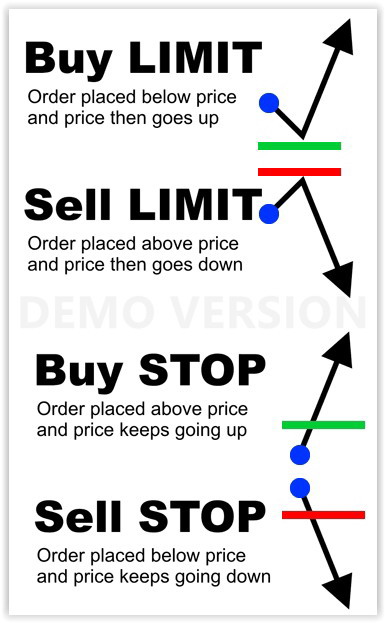
    Be warned that LIMIT and STOP orders are different and should be placed not at your chioice, but according to their rules (as per attached pic). STOP orders need to be chosen when the entry price will be worse than the current one (i.e. you plan go either Long at a higher price or go Short at a lower price), while LIMIT orders should be chosen when the entry price will be better than the current one (i.e. you go either Long at a lower price or go Short at a higher price).

    Failing to abide by this rule may imply a trade is entered at market.

    ashehzi thanked this post
    Pending-STOP-LIMIT-Orders-Ordini-Pendenti.jpg Pending-STOP-LIMIT-Orders-Ordini-Pendenti.jpg
Viewing 2 posts - 1 through 2 (of 2 total)
  • You must be logged in to reply to this topic.

2 limit orders at once


ProOrder: Automated Strategies & Backtesting

New Reply
Author
author-avatar
ashehzi @ashehzi Participant
Summary

This topic contains 1 reply,
has 2 voices, and was last updated by robertogozzi
2 years, 1 month ago.

Topic Details
Forum: ProOrder: Automated Strategies & Backtesting
Language: English
Started: 01/16/2024
Status: Active
Attachments: 1 files
Logo Logo
Loading...
