The question on maximum trailing stop reminds me that we really should add a minimum stop distance to that trailing stop code that I wrote just in case there is a big price move (big high or low) that then brings the stop level too close to the close price. This would prevent us sending orders to the market that get rejected and possibly leave us with no stop loss at all.
I had a quick look at it and this should now prevent our stop loss getting too close. Not tested so if anyone can confirm it works as it should then please let me know.
//Vonasi Trailing Stop v3
//20190509

sl = 144 //Stop loss distance
slmove = 5 //Price move needed to move stop
minstop = 10 //Minimum stop distance allowed

sl = max(sl, minstop)

if longonmarket and sladj then
slprice = positionprice - sl
sladj = 0
endif

if shortonmarket and sladj then
slprice = positionprice + sl
sladj = 0
endif

if not onmarket and (your long entry conditions) then
buy 1 contract at market
slprice = close - sl
sell at slprice stop
sladj = 1
endif

if not onmarket and (your short entry conditions) then
sellshort 1 contract at market
slprice = close + sl
exitshort at slprice stop
sladj = 1
endif

if longonmarket and high - sl > slprice + slmove then
slprice = min(high - sl, close - minstop)
endif

if shortonmarket and low + sl < slprice - slmove then
slprice = max(low + sl, close + minstop)
endif

sell at slprice stop
exitshort at slprice stop
I’ve changed the link on here
Snippet Link Library to the latest version immediately above.
I spotted a error in my adjustment of the stop loss price relative to position price at the close of the first bar. I have edited the code for v3 in my previous post. If you are using it already then you might want to change to this new version or change lines 11 and 16 which are the ones I have edited.
For fun (yes I know I’m sad) I decided to create a version that has a trailing take profit as well as a trailing stop loss. So as price moves against you your take profit expectations decrease. Not tested!
sl = 20 //Stop loss distance
slmove = 3 //Price move needed to move stop loss
slminstop = 5 //Minimum stop loss distance allowed

tp = 20 //Take profit distance
tpmove = 3 //Price move needed to move take profit
tpminstop = 5 //Minimum take profit distance allowed

sl = max(sl, slminstop)
tp = max(tp, tpminstop)

if longonmarket and adj then
slprice = positionprice - sl
tpprice = positionprice + tp
adj = 0
endif

if shortonmarket and adj then
slprice = positionprice + sl
tpprice = positionprice - tp
adj = 0
endif

if not onmarket and (your long entry conditions) then
buy 1 contract at market
slprice = close - sl
tpprice = close + tp
adj = 1
endif

if not onmarket and (your short entry conditions) then
sellshort 1 contract at market
slprice = close + sl
tpprice = close - tp
adj = 1
endif

if longonmarket and high - sl > slprice + slmove then
slprice = min(high - sl, close - slminstop)
endif

if longonmarket and low + tp < tpprice - tpmove then
tpprice = max(low + tp, close + tpminstop)
endif

if shortonmarket and low + sl < slprice - slmove then
slprice = max(low + sl, close + slminstop)
endif

if shortonmarket and high - tp > tpprice + tpmove then
tpprice = min(high - tp, close - tpminstop)
endif

sell at slprice stop
exitshort at slprice stop
sell at tpprice limit
exitshort at tpprice limit
Great idea Vonasi – Big Thanks!
Added to here
Snippet Link Library
 Paul
PaulParticipant
Master
Thanks Vonasi
A question though;
If a code takes reserve positions based on signal. How does your code handle that situation? (long goes straight short).
In the closed positions list I got a number of trades with zero bars if I have no “not onmarket”.
If I do as your example, with not onmarket, all is good. But doesn’t such code need to cover both scenarios?
Yes as the code is it does not allow for reversing of a position. If a trade is opened it is allowed to play out until either the stop loss or the take profit is hit. I generally prefer to have separate long and short strategies. I think that by changing lines 24 and 31 to the following then it should allow for reversal of position – not tested and still on first cup of tea!
if (not onmarket or shortonmarket) and (your long entry conditions) then

if (not onmarket or longonmarket) and (your short entry conditions) then
Having a NOT ONMARKET at minimum is required otherwise if you are on market and the conditions are met again then the stop loss and take profit are adjusted to the starting trailing stop again. For this reason it is not possible to use the code as it is with cumulating positions. Maybe later if I have time I’ll try to re-work it for all possibilities.
I’ve added a note of clarification (re not for cum positions) to here
Snippet Link Library
For fun (yes I know I’m sad) I decided to create a version that has a trailing take profit as well as a trailing stop loss. So as price moves against you your take profit expectations decrease. Not tested!
Thanks very much for this, Vonasi. The profit take avails better backtest results for my system on the DOW (I assume because of the volatility) but not for the DAX. I’ll watch the trades live this week and will confirm that it works as it should in real time.
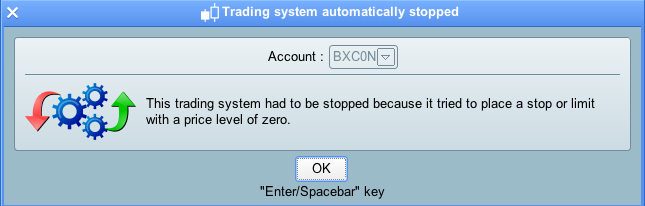
I’ve just attempted to activate a series of bots using some of the code in this thread and I’ve been given an error message (see attached screengrab).
This code has worked perfectly fine in bots in the ProRealTime version that is linked to my IG demo account, but they won’t work when I use the version of ProRealTime that is linked to my “real money” platform in IG.
Does anyone know what might be going on here?
As a reminder, here is the code (it’s the version without the profit take)
DEFPARAM CumulateOrders = False // Cumulating positions deactivated


StartTime = 133000
//timeEnterBefore = time >= noEntryBeforeTime

// Prevents the system from placing new orders to enter the market or increase position size after the specified time
LimitEntryTime = 163000
//timeEnterAfter = time < noEntryAfterTime


daysForbiddenEntry= OpenDayOfWeek=2 OR OpenDayOfWeek=3 OR OpenDayOfWeek=4 OR OpenDayOfWeek=5 OR OpenDayOfWeek=6 OR OpenDayOfWeek=0

sl= 75
slmove = 5

indicator1 = SAR[0.02,0.02,0.2]
c1 = (open > indicator1)
indicator2 = Average[20](close)+std[20](close)
c2 = (open > indicator2)
indicator4 = BollingerDown[20](close)
c3 = (indicator1 > indicator4)
indicator5 = ExponentialAverage[13](close)
indicator6 = ExponentialAverage[13](close)
c5 = (indicator5 >= indicator6[1])
indicator7 = ExponentialAverage[8](close)
indicator8 = ExponentialAverage[8](close)
c7 = (indicator7 >= indicator8[1])


IF not onmarket and c2 and c1 and c3 and c5 and c7 and time >=StartTime and time <=LimitEntrytime and not daysForbiddenEntry THEN
BUY 1 PERPOINT AT MARKET
slprice = close - sl
sell at slprice stop
ENDIF

c11 = (open < indicator1)
indicator12 = Average[20](close)-std[20](close)
c12 = (open < indicator12)
indicator14 = BollingerUp[20](close)
c13 = (indicator1 < indicator14)
c15 = (indicator5 <= indicator6[1])
c17 = (indicator7 <= indicator8[1])


IF not onmarket and c12 and c11 and c13 and c15 and c17 and time >=StartTime and time <=LimitEntrytime and not daysForbiddenEntry THEN
SELLSHORT 1 PERPOINT AT MARKET
slprice = close + sl
exitshort at slprice stop
ENDIF

if longonmarket and high - sl > slprice + slmove then
slprice = high - sl
endif

if shortonmarket and low + sl < slprice - slmove then
slprice = low + sl
endif

sell at slprice stop
exitshort at slprice stop
That’s interesting. I guess that it is due to the value of SLPRICE being zero until a trade has opened. Weird that it errors only when live. Try changing the last two lines to this:
if onmarket then
sell at slprice stop
exitshort at slprice stop
endif
Thanks very much for the suggestion. It looks like this works (or at least, it hasn’t rejected the bot in the 5 minutes since I made it live).
It really is very strange that this happened! Firstly, as discussed, it worked fine in demo mode. But secondly, none of the bots in question are supposed to be trading this morning, so it makes no sense that they were attempting to execute any orders.
Crazy!
none of the bots in question are supposed to be trading this morning, so it makes no sense that they were attempting to execute any orders.
Even though your code has restrictions that stop it trading at certain times it does not stop the code from being read through at every bar close. So it reads it through and acts on any necessary instructions and the only two would be to set stop losses and take profits at zero. By adding the condition IF ONMARKET we have stopped it acting on these instruction.
The demo engine it seems has several differences compared to the live engine. It would be better if it didn’t and was in fact exactly the same as we all test on demo to build confidence that we can go live without any issues – but instead our confidence is knocked as the strategy stops when we put it live with an error that we never saw in demo.