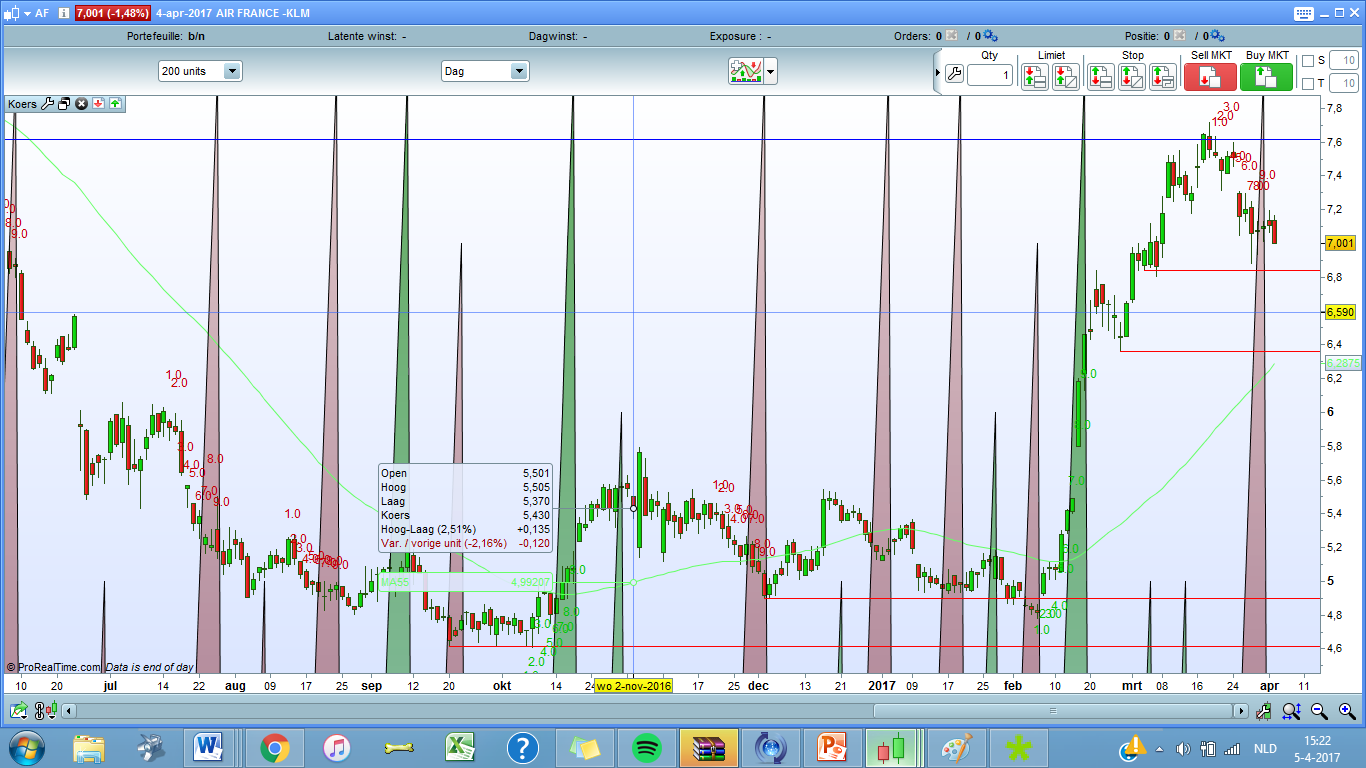
Thank you guyss its almost perfect.
Can someone explain me how i get those red green triangles out of my screen (see image)
Thanks a lot
Oh never mind its already gone haha.
It would be awesome if you could show the current swing at the moment also.
And indeed if it would be possible to change the 1.0 –> 1
cant thank you enough!
Drawn variables as text can’t be rounded with no digit.. So I assume I need to type 9 times*2 in the code to avoid the .0 digits .. argh 🙂
I’m going first to make it “live”, understand counting in real time and not draw the 9th count once when its finish already.
In the meantime, could you please explain us a bit how to you use this indicator and what it is so ‘useful’ to you? Once it will be finished, I’ll add it to the library and I’d like to add explanations for it. Thanks.
Fantastic!
Well, it is called a swingcounter and it’s main job is to signal a reversal.
when a full swing +9 or -9 has appeared the chances of an upcoming bottom or a top increases a lot. A fully upswing +9 combined with a red 10th candle suggest to exit your long position. Its the same for a downswing -9 combined with a 10th green candle means exit your short position.
This indicator combined with the bollingerbands RSI works fantastic!
Thanks joerie1,
This indicator combined with the bollingerbands RSI works fantastic!
do you have any example how to combine the count with the BollingerBands RSI?
Yess he already gave some options.
I use this one now “Trader Dynamic Index TDI” I will attach it to this message.
I will also attach a screenshot of my settings for that indicater so it will be the same as nico bakker
Hi Joeri,
Nico bakker uses the dynamic RSI a standard RSI with bollinger bands with a deviation of 2 am i right ?
rgds
John
Haha sorry thought you were the other guy, lol
Yes I can show you!
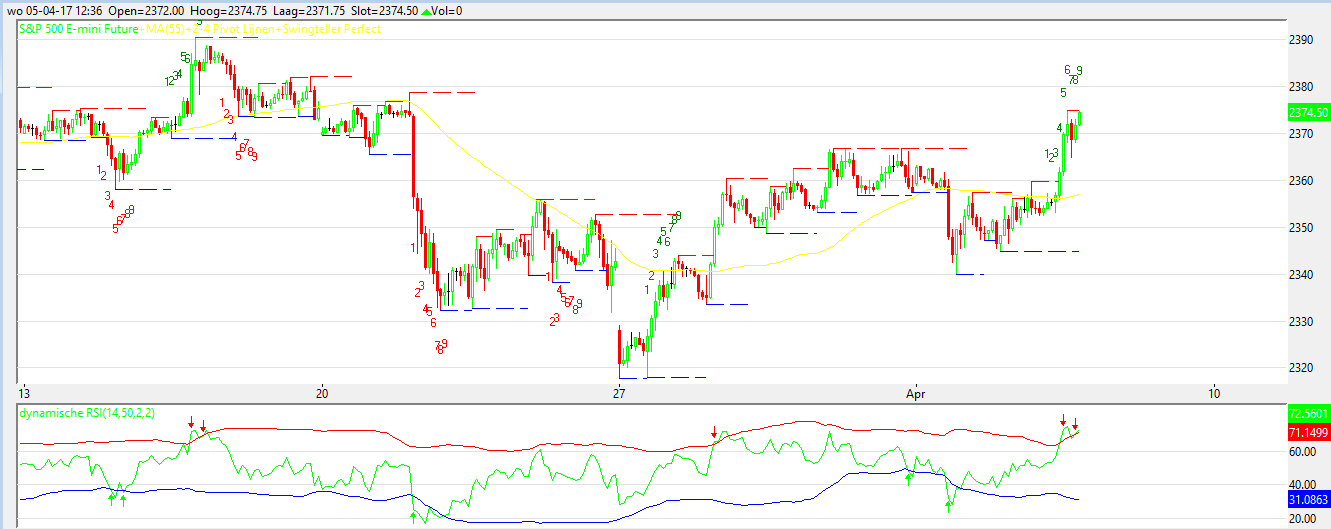
Look at the image I attache to this message. It is a 1 hour chart of the S&P at this moment. You will see that the swing 9 has almost completed. The RSI is now on overbought. When a red hour candle appears its time to exit your long position!
Yess John,
Only if I use 2 with the Trader Dynamic Index TDI indicator on Prorealtime it doesnt match with Nico. Now when I use 1 it is almost similair to Nico.
But as you can see on my Binck Protrader I use 2
Hi Joeri,
Yeah i see it The RSI does correspond with Nico’s Dynamic RSI or not ?
The code i use for the dybanic RSI is this
rem Dynamische RSI
periodmoy=50
periodeRSI=12
coeff=2
monrsi=RSI[periodeRSI](close)

ind = SQUARE(monrsi)
ind1 = Average[periodmoy](monrsi)
ind2 = Average[periodmoy](ind)

variance = ind2 - SQUARE(ind1)
ecart = SQRT(variance)

UpBand = ind1 + coeff*ecart
DownBand = ind1 - coeff*ecart
UP = 100
Middle = 50
Down = 0
RSI70 = 70
RSI30 = 30

a = downband
b = middle
cross1 = 0
cross2 = 0
// Golden Cross detection
IF a CROSSES OVER b THEN
cross1 = 50
ENDIF
// Death Cross detection
IF a CROSSES UNDER b THEN
cross2 = 50
ENDIF

RETURN monrsi AS "RSI", UpBand COLOURED (0, 255, 0) AS "UpBand", DownBand COLOURED (255, 0, 0) AS "DownBand" , Middle,UP,Down,RSI70,RSI30 , cross1 COLOURED (255, 0, 0) , cross2 COLOURED (0, 255, 0)
Maybe it helps.
To Nicolas,
I hope you can make it work for the swingcounter to start with showing 1
If only at the end of a full swing of 9 would be shown it will be to late to respond to it
System i use is for a swing to start with 1 and confirmid the next day with a 2 i step in and (hopefully ) it will last a full swing to 9.
Im sorry if some things would mean for you to do a lot of coding but trust me it will be greatly appriciated !!
If i can do something on that part please let me know i would be more then willing to do the shit stuff for you 🙂
Maybe i sound greedy now 🙂 but it would be awesome if its possible to make a screener next to the indicator that shows all the stocks, or whatever, that has the start of a swing 1 up or 1 down. Then i think the swingcounter would be complete and very easy to use on a daily basis or any timeframe ofcource.
Thank and i mean MANY thanks !!
rgds
John
John, yours is perfect thankss!
Ps: a screener with all the stocks that would have swing 1 would be awesome hahah
Joeri,
Your very welcome 🙂
Yes it sure would be making things complete i feel !
I’m afraid it’s not possible to make the counter appearing in real time and erase the already numbers drawn on chart. Probuilder don’t allow to erase graphical objects already drawn and because we cannot change variables arrays..
This is something I’m often stuck with, but I thought I could do something for this indicator though.. I’ll try another idea tomorrow.
Hey Nicolas,
You can make it happen for the swing to start with 1 and appear on the chart are you?
Maybe as an alternative you can do this :
If a swing count starts and fails at, lets say, day 5 you put something like “Fail” or “Swingend” or some other stop sign.. That way you dont have to erase anything.
Would maybe even better, we are more able to check how many time a swing fails and how many times it goes the full length.
for the rest ill leave it up to you to find any better solution but i can imagine its hard if things cant be erased anymore
rgds
John
Yes, delete previous counting would mean not to draw them at all, and since we don’t know what will happen in the next candlestick, it’s not possible..
I would ask this morning how you’d like the false counting to be displayed and you already answered it with the “fail” text idea. That’s ok to do it like this I think.
About the screener, it’s already possible to make it, but does it needs to have any RSI condition in it?