Position Size Change

Viewing 10 posts - 1 through 10 (of 10 total)
  • Author
    Posts
  • #122236 quote
    deletedaccount14122020deletedaccount14122020
    Participant
    New

    Hello,

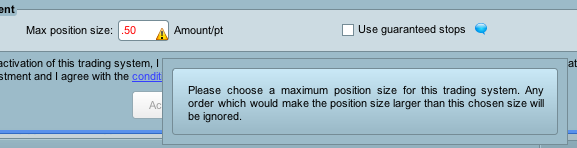
    When setting up automatic trading the Position Size has a minimum of 1, it will not take less.

    On the IG platform many of the markets have minimum position sizes of less then 1, example is Crude Oil which is £0.25 or EUR/JPY which is £0.50

    Is there anyway to hard code a position size into your system so you can place trades at the IG minimums ?

    Thanks in advance for any help

    Screen-Shot-2020-03-16-at-12.43.39.png Screen-Shot-2020-03-16-at-12.43.39.png
    #122238 quote
    GraHalGraHal
    Participant
    Legend

    Is there anyway to hard code a position size into your system so you can place trades at the IG minimums ?

    Do you mean like below?

    Try it on the DJI … it should work as it works on mine (0.2 should work also).

    If CondA Then
    Buy 0.5 Contracts at Market
    Endif
    #122239 quote
    deletedaccount14122020deletedaccount14122020
    Participant
    New

    Many thanks

    I’ll try that out now

    #122300 quote
    nonethelessnonetheless
    Participant
    Master

    I’ve found that the DJI is the only index that will accept position  < 1 for auto trading. On the Nasdaq .5 gets rejected.

    #122303 quote
    deletedaccount14122020deletedaccount14122020
    Participant
    New

    Although I have only tried this using my IG demo account with PRT I have it working with  five major Forex pairs, US Tech 100 (NASDAQ), FTSE 100, and Crude Oil with 0.5 as the size coded into the system. You still use a Position Size of 1 when preparing the system to trade but that get’s overidden.

    I will be using this with a live account as soon as my system is ready so I will then be able to confirm if it works correctly then.

    #122313 quote
    GraHalGraHal
    Participant
    Legend

    You still use a Position Size of 1 when preparing the system to trade but that get’s overidden.

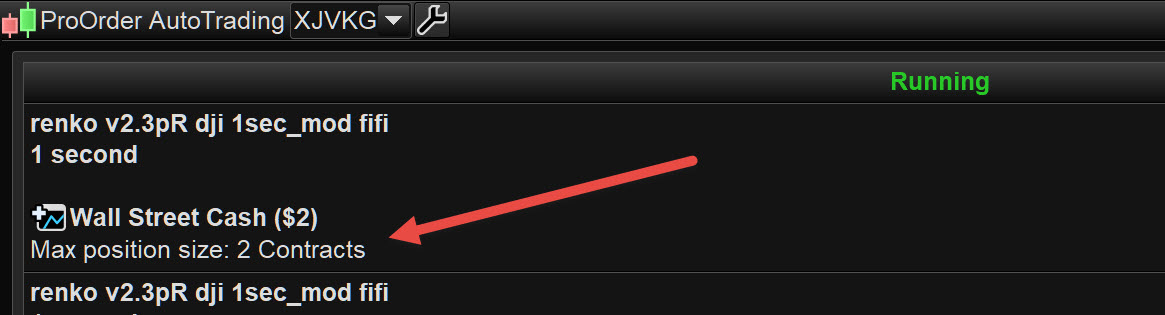
    I don’t get what you mean above … where are you setting this … I don’t set anyywhere other than the max position size in the  Autotrading window … is below what you mean??

    Richard.jpg Richard.jpg
    #122322 quote
    deletedaccount14122020deletedaccount14122020
    Participant
    New

    Sorry, “overidden” was the wrong terminology. I enter Max Position Size as 1 when I set the system for auto-trading (Screen Shot 1)

    And my system code has :

    // Conditions to enter long positions
    IF NOT LongOnMarket AND c3 AND c5 AND c7 AND TradeTime = 1THEN
    BUY 0.5 CONTRACTS AT MARKET
    ENDIF

    This works fine

    Screen-Shot-2020-03-17-at-12.30.53.png Screen-Shot-2020-03-17-at-12.30.53.png Screen-Shot-2020-03-17-at-12.32.07.png Screen-Shot-2020-03-17-at-12.32.07.png
    #122326 quote
    GraHalGraHal
    Participant
    Legend

    Yeah it is MAX position size … so if you set at     1     and tried to trade    2    then it would not let you.

    I can’t recall testing it …

    1. does it stop the System if set at 1 and code states 2

    OR

    2.     does it limit to 1 even though code states 2 ??

    Ill try later and report back.

    #122337 quote
    VonasiVonasi
    Moderator
    Master

    Max position size is exactly what it says. It is the maximum position size that you let your strategy have open. It is simply a safety feature to ensure that your strategy doesn’t open masses of positions and empty your account.

    #122338 quote
    GraHalGraHal
    Participant
    Legend

    2.     does it limit to 1 even though code states 2 ??

    To elaborate on above  .. which didn’t read what I meant to say …

    Does Max size = 1 allow System to continue running but limited to position size = 1  … even if code states position size = 2

    (or is the System stopped??)

    Ha … it’s taken me longer to type it than if I checked it out for real!? 🙂

Viewing 10 posts - 1 through 10 (of 10 total)

  • You must be logged in to reply to this topic.

ProRealAI ProRealAI New

Stuck on this ProBuilder code?

Describe what this topic is trying to build, in plain English, and ProRealAI writes the ProRealTime™ indicator, screener or system for you.

Available in 7 languages
Try ProRealAI

Position Size Change


ProOrder: Automated Strategies & Backtesting

New Reply
Summary

This topic contains 9 replies,
has 4 voices, and was last updated by GraHalGraHal

6 years, 6 months ago.

Topic Details
Forum: ProOrder: Automated Strategies & Backtesting
Language: English
Started: 03/16/2020
Status: Active
Attachments: 4 files
ProRealCode ProRealCode
Loading...