







UT BOT ALERTS
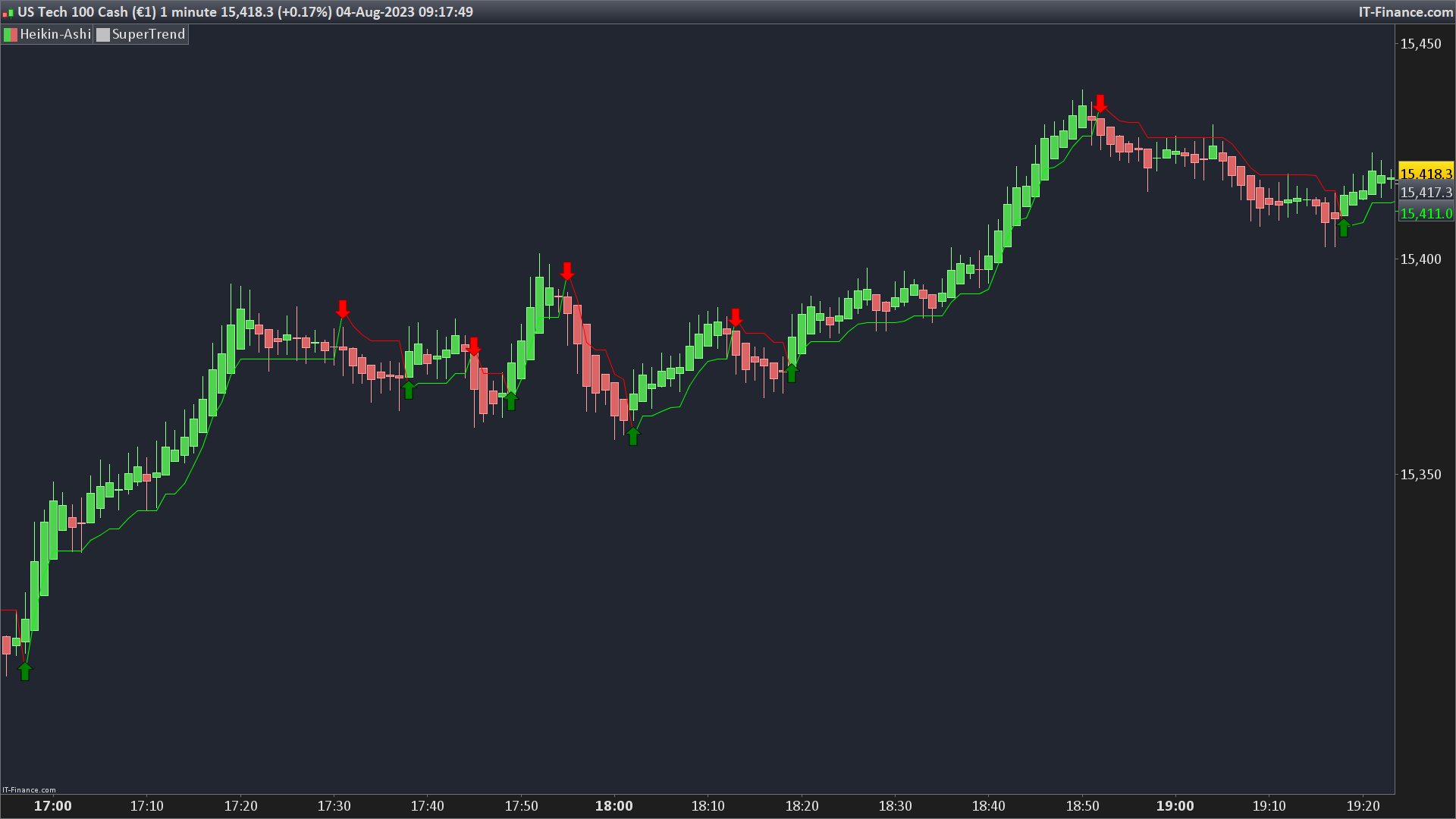
This code gives signals upon a “SuperTrend.” calculated with HeikinAshi candlesticks. It’s a way of showing where the general direction of a market (like stocks or currencies) is heading.
Here’s how it works:
- **Setting up the Basics**: At the start, there are some basic settings – a sensitivity key and a period. The sensitivity key makes the tool more or less reactive. The period refers to how many past data points we’re looking at to help make decisions.
- **True Average Range**: The code then calculates something called the “average true range.” Think of this as a way to measure how much prices are moving around.
- **Setting Upper and Lower Boundaries**: Using the average true range, it sets two boundaries: an upper one and a lower one. These boundaries help us determine if the market is going upwards or downwards.
- **Trend Determination**: If the current price goes above the upper boundary from the previous time, we think the trend is upwards. If it goes below the lower boundary, the trend is downwards.
- **Flags**: These are just little markers to help us remember if the trend just changed direction. For example, if it was going upwards and suddenly changes downwards, we set a flag.
- **Adjusting Boundaries**: If the market is moving upwards and the lower boundary drops, we stick with the previous boundary. Similarly, if the market is moving downwards and the upper boundary rises, we stick with the previous boundary. But, if a trend change was flagged, we reset our boundaries.
- **Choosing SuperTrend Value**: Depending on the trend (upwards or downwards), our SuperTrend value will equal one of the boundaries.
- **Color Coding**: If the SuperTrend value is rising, it will be colored green. If it’s dropping, it will be colored red.
- **Drawing Arrows**: If the price crosses over the SuperTrend value going up, a green arrow is drawn. If it crosses going down, a red arrow is drawn. These arrows give a visual cue about where the market is heading.
- **Final Result**: The code finally gives out the SuperTrend value, color-coded based on its direction, to visually indicate where the market might be heading.
So, in essence, this code helps traders see, at a glance, whether a market is trending upwards or downwards and gives visual cues when that trend might be changing.
a = 1 //Key Vaule. ‘This changes the sensitivity'
c = 10 //ATR Period

multiplier=a
period=10

moy=averagetruerange[period](close)
iprice=totalprice
up=iprice+multiplier*moy
dn=iprice-multiplier*moy
once trend=1
if close>up[1] then
trend=1
elsif close<dn[1] then
trend=-1
endif
if trend<0 and trend[1]>0 then
flag=1
else
flag=0
endif
if trend>0 and trend[1]<0 then
flagh=1
else
flagh=0
endif
if trend>0 and dn<dn[1] then
dn=dn[1]
endif
if trend<0 and up>up[1] then
up=up[1]
endif
if flag=1 then
up=iprice+multiplier*moy
endif
if flagh=1 then
dn=iprice-multiplier*moy
endif
if trend=1 then
mysupertrend=dn
else
mysupertrend=up
endif
if mysupertrend > mysupertrend[1] then
color1=0
color2=255
color3=0
elsif mysupertrend < mysupertrend[1] then
color1=255
color2=0
color3=0
endif

if iprice crosses over mysupertrend then
drawarrowup(barindex,mysupertrend) coloured("green")
endif
if iprice crosses under mysupertrend then
drawarrowdown(barindex,mysupertrend) coloured("red")
endif

return mysupertrend coloured (color1,color2,color3) as "SuperTrend"
![Price Acceptance Reversal Planner [AGPro Series]](https://www.prorealcode.com/wp-content/uploads/2026/05/NASDAQ-5-minutes-150x150.png)
Comments
You must be logged in to post a comment.
Modifiez la dernière ligne du code par: return mysupertrend coloured (color1,color2,color3) as "SuperTrend", trendtrend[1] as "signal" et créer l'alerte depuis l'outil de la plateforme en sélectionnant le "signal" comme activateur du signal, celui ci se déclenchera dés que la tendance change du vert au rouge ou vice-versa.




Bonjor Nicolas, je trouve votre indicateur très intéressant , je l'applique sur les graphiques prorealtime , mais je voulais vous demander si on ne pouvait pas ajouter une alerte popup ou sonore sur l'apparition des flèches ( vente ou achat ) ça serait top. Je suis sur les ETFs en position 1 Heure. Merci pour votre retour . Gildas