QQE Indicator – Quantitative Qualitative Estimation
1. Introduction
The QQE, or Quantitative Qualitative Estimation, is a technical indicator that combines a smoothed RSI with trend-following elements to provide clearer, more visual signals regarding market momentum and direction shifts.
This indicator enhances its detection capabilities by using two independent smoothed RSI calculations, adaptive dynamic bands, and a color-coded signal system that makes it easy to spot favorable market conditions for entry or exit.
The result is a more visual, intuitive, and versatile indicator—ideal for traders looking to confirm trend reversals or support trend-following strategies with a clean momentum read.
2. Indicator Logic
The QQE is primarily based on the calculation of a smoothed RSI, which is then enveloped by dynamic trailing-stop-style bands. These bands define whether the RSI has broken previous structure and is entering a new market phase, interpreted in terms of bullish or bearish trend.
The core logic is to measure the RSI’s volatility using a calculation similar to the ATR, forming a kind of “comfort zone” around the RSI line. A break of that zone indicates a potential momentum or trend shift.
In this version, two independent QQE calculations are used:
- The first one to detect trend changes.
- The second to strengthen the signal using additional filters, including overbought/oversold conditions and Bollinger Bands.
3. QQE Components
This indicator is built from several layers working together to generate accurate and visual signals:
-
RSI1 and trend definition: A short-period RSI (default: 6) is calculated and smoothed with an exponential average. From this, two bands (longband and shortband) are built, acting as dynamic breakout levels. When the RSI crosses one of them, the indicator detects a trend phase shift.
-
RSI2 as a confirmation signal: A second smoothed RSI is used as a filter layer. Its value relative to the 50 level helps determine whether bullish or bearish momentum is dominant.
-
Bollinger Bands on the QQE: Bollinger Bands are applied to the Fast QQE line (RSI1), centered around its value minus 50. These bands highlight overbought or oversold conditions relative to recent market behavior.
-
Signal and color logic: The main visual cue is the qqe histogram, which only changes color when two conditions are met:
- RSI2 indicates strong momentum (above or below threshold).
- RSI1 breaks out of the Bollinger Bands.
When both are true, a strong signal is generated in blue (bullish) or fuchsia (bearish). Otherwise, the histogram remains neutral in grey.
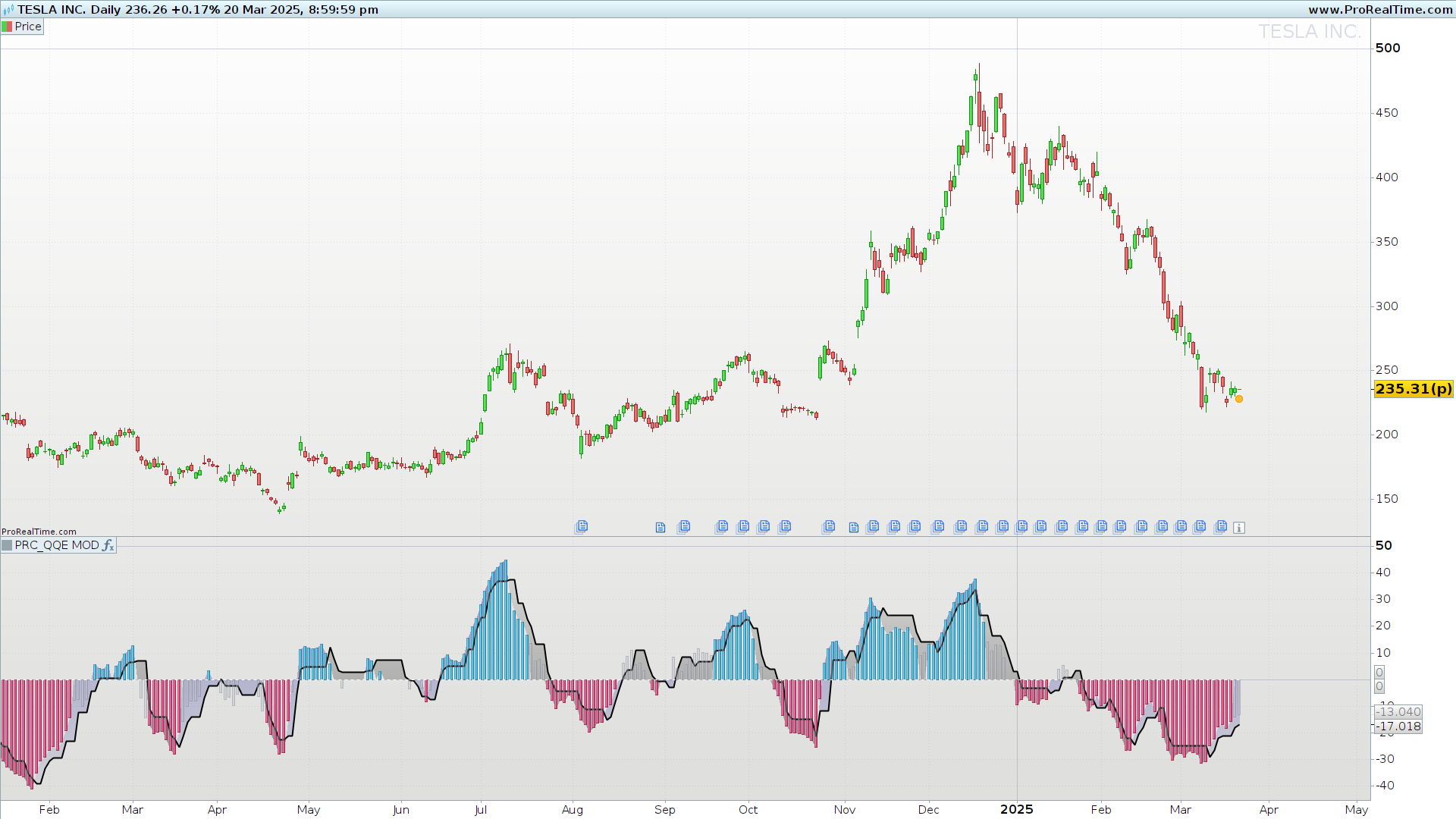
4. Chart Interpretation
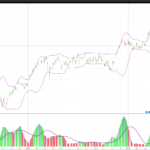
The indicator shows three key visual elements:
-
Main histogram (QQE): Centered on level 0 (which corresponds to RSI level 50). A colored histogram (blue or fuchsia) signals strong impulse; a grey one indicates neutral or weak confirmation.
-
Trendline (QQE Line): Displays the dynamic band of RSI2, adjusted to center around 0. It helps detect overall direction and potential reversals.
-
Background histogram (Histo2): Shows the centered value of RSI2. It can help anticipate momentum shifts but should not be used as a standalone signal.
Reading all three together provides a comprehensive view of momentum, trend direction, and potential exhaustion points.
5. Indicator Settings
The QQE comes with several customizable parameters to suit different trading styles and instruments:
rsiPeriod(default 6): RSI period for RSI1.SF(default 5): Smoothing factor for RSI1.QQE(default 3): Multiplier for RSI1 dynamic band.ThreshHold(default 3): Threshold for signal triggering.length(default 50): Period for Bollinger Bands.mult(default 0.35): Standard deviation multiplier for Bollinger Bands.
For the second RSI (RSI2), similar parameters are provided, with QQE2 set by default to 1.61 for increased sensitivity.
Tuning tips:
- For lower timeframes (1 min, 5 min), reduce RSI periods and increase the threshold slightly to filter out noise.
- For higher timeframes (4H, daily), default values work well, though you may adjust
multto control Bollinger Band tightness.
This indicator is especially useful as a confirmation filter in trend-following strategies or as a signal generator in momentum-based scalping systems. Its modular, color-coded design allows for quick interpretation even in volatile market conditions.
//PRC_QQE MOD
//version = 0
//08.04.24
//Iván González @ www.prorealcode.com
//Sharing ProRealTime knowledge
//-----Inputs-----------------------------------------------//
rsiPeriod=6//RSI Length
SF=5//RSI Smoothing
QQE=3//Fast QQE Factor

length=50//Bollinger Length
mult=0.35//BB Multiplier

rsiPeriod2=6//RSI Length
SF2=5//RSI Smoothing
QQE2=1.61//Fast QQE Factor
ThreshHold2=3//Thresh-hold
src=close
src2=close
//----------------------------------------------------------//
//-----RSI1 calculations and trend definition---------------//
WildersPeriod = rsiPeriod*2-1

myrsi=rsi[rsiPeriod](src)
rsiMA=average[SF,1](myrsi)
atrRSI=abs(rsiMA[1]-rsiMA)
MAatrRSI=average[WildersPeriod,1](atrRSI)
dar = average[WildersPeriod,1](MAatrRSI)*QQE

longband=0
shortband=0
trend=0

DeltaFastAtrRsi = dar
RSIndex = rsiMA
newshortband = RSIndex + DeltaFastAtrRsi
newlongband = RSIndex - DeltaFastAtrRsi
if RSIndex[1] > longband[1] and RSIndex > longband[1] then
longband=max(longband[1],newlongband)
else
longband=newlongband
endif
if RSIndex[1] < shortband[1] and RSIndex < shortband[1] then
shortband=min(shortband[1], newshortband)
else
shortband=newshortband
endif

cross1 = longband[1] crosses over RSIndex or longband[1] crosses under RSIndex
if shortband[1] crosses over RSIndex or shortband[1] crosses under RSIndex then
trend=1
FastAtrRsiTL=longband
elsif cross1 then
trend=-1
FastAtrRsiTL=shortband
else
trend=trend[1]
endif
//----------------------------------------------------------//
//-----Bollinger Bands--------------------------------------//
basis=average[length,0](FastAtrRsiTL-50)
dev=mult*std[length](FastAtrRsiTL-50)
upper=basis+dev
lower=basis-dev
//----------------------------------------------------------//
//-----RSI2 calculations and trend definition---------------//
WildersPeriod2 = rsiPeriod2*2-1

myrsi2=rsi[rsiPeriod2](src2)
rsiMA2=average[SF2,1](myrsi2)
atrRSI2=abs(rsiMA2[1]-rsiMA2)
MAatrRSI2=average[WildersPeriod2,1](atrRSI2)
dar2 = average[WildersPeriod2,1](MAatrRSI2)*QQE2

longband2=0
shortband2=0
trend2=0

DeltaFastAtrRsi2 = dar2
RSIndex2 = rsiMA2
newshortband2 = RSIndex2 + DeltaFastAtrRsi2
newlongband2 = RSIndex2 - DeltaFastAtrRsi2
if RSIndex2[1] > longband2[1] and RSIndex2 > longband2[1] then
longband2=max(longband2[1],newlongband2)
else
longband2=newlongband2
endif
if RSIndex2[1] < shortband2[1] and RSIndex2 < shortband2[1] then
shortband2=min(shortband2[1], newshortband2)
else
shortband2=newshortband2
endif

cross2 = longband2[1] crosses over RSIndex2 or longband2[1] crosses under RSIndex2
if shortband2[1] crosses over RSIndex2 or shortband2[1] crosses under RSIndex2 then
trend2=1
FastAtrRsiTL2=longband2
elsif cross2 then
trend2=-1
FastAtrRsiTL2=shortband2
else
trend2=trend2[1]
endif
//----------------------------------------------------------//
//-----Color definition------------------------------------//
if rsiMA2-50>ThreshHold2 then
r=178
g=181
b=190
a=100
elsif rsiMA2-50<0-ThreshHold2 then
r=178
g=181
b=190
a=100
else
r=178
g=181
b=190
a=0
endif
//----------------------------------------------------------//
//-----Checkings and colors---------------------------------//
greenbar1=rsiMA2-50>ThreshHold2
greenbar2=rsiMA-50>upper
redbar1=RsiMa2-50<0-ThreshHold2
Redbar2 =RsiMa-50<lower

if greenbar1 and greenbar2 then
qqe=rsiMA2-50
rb=0
gb=195
bb=255
elsif redbar1 and redbar2 then
qqe=rsiMA2-50
rb=255
gb=0
bb=98
else
qqe=0
rb=120
gb=123
bb=134
endif
//----------------------------------------------------------//
zero=0
return qqe as "QQE" coloured(rb,gb,bb)style(histogram),FastAtrRsiTL2-50 as "QQE Line"coloured("Black")style(line,2),rsiMA2-50 as"Histo2"coloured(r,g,b,a)style(histogram) ,zero as "Zero" coloured("white")style(dottedline)