







Magic Trend Indicator
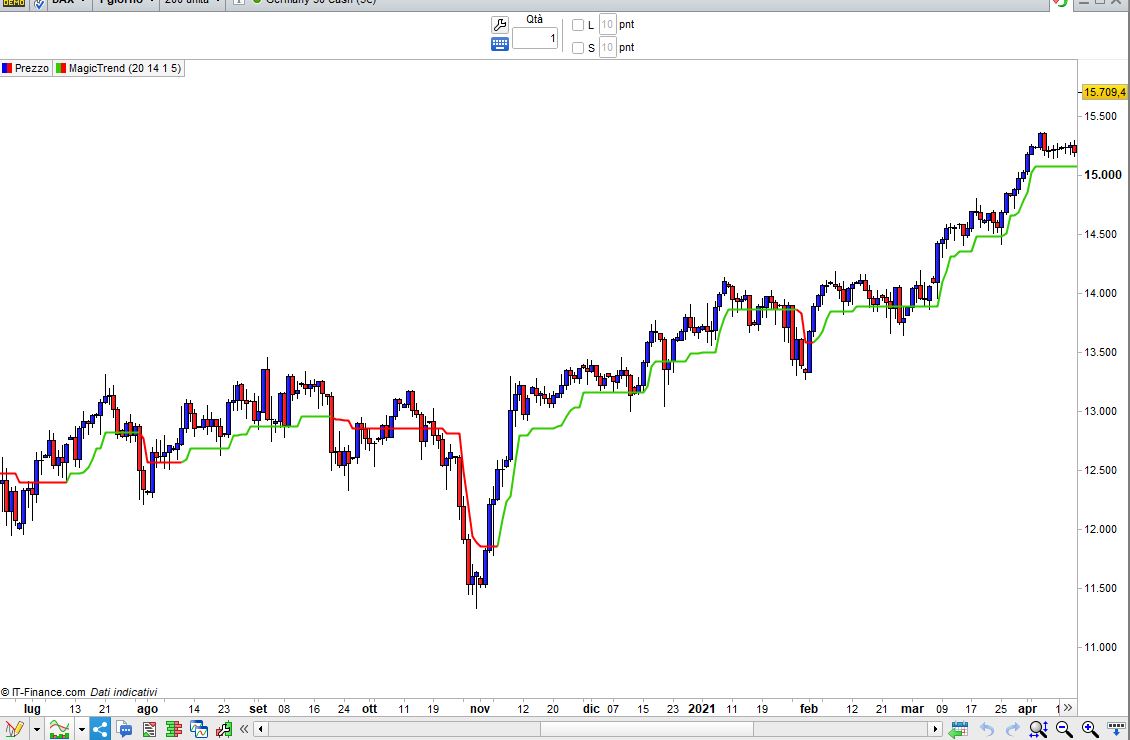
Magic Trend Indicator may help identifying the correct trend direction.
It is plotted on the price chart, like any moving average, though it is faster, more accurate
and reliable than other trend following indicators.
The calculation of indicator is based on ATR, current price direction and some more complex
logic.
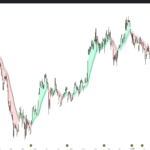
Magic Trend Indicator changes its color based on the direction of the trend, so if the line
is green then the trend is up and if it is red then the trend is down.
The value of Magic Trend indicator can be used as trend reversal trigger on closing basis.
If you are on long position and on any bar price closes below the indicator value then the
indicator turns red from the next bar to indicate the reversal of trend, so the trader can
exit his long position and take short position at the same time.
The opposite rules apply to the short positions.
A buy signal is also triggered when the closing price crosses above the Magic Trend line and
a short signal is triggered when the closing price crosses below the Magic Trend line.
//cciP = 20
//atrP = 14
//atrM = 1
//smaP = 5
cciP   = max(1,min(999,cciP))
atrP   = max(1,min(999,atrP))
atrM   = max(0.0000001,min(999,atrM))
smaP   = max(1,min(999,smaP))
//
IF BarIndex > max(cciP,atrP) THEN
   lastCCI = thisCCI
   thisCCI = CCI[cciP](typicalPrice)
   myATR   = AverageTrueRange[atrP](close)
   //
   temp1   = myATR * atrM
   upT     = low  - temp1
   downT   = high + temp1
   //
   temp2   = Average[smaP,0](myATR) * atrM
   buffDN  = high + temp2
   buffUP  = low  - temp2
   //
   IF (thisCCI >= 0) AND (lastCCI  < 0) THEN
      buffUP = buffDN[1]
   ENDIF
   IF (thisCCI <= 0) AND (lastCCI  > 0) THEN
      buffDN = buffUP[1]
   ENDIF
   IF (thisCCI >= 0) THEN
      IF (buffUP < buffUP[1]) THEN
         buffUP = buffUP[1]
      ENDIF
   ELSIF (thisCCI <= 0) THEN
      IF (buffDN > buffDN[1]) THEN
         buffDN = buffDN[1]
      ENDIF
   ENDIF
   IF thisCCI >= 0 THEN
      MagicTrend = buffUP
   ELSIF thisCCI <= 0 THEN
      MagicTrend = buffDN
   ENDIF
ELSE
   thisCCI    = 0
   lastCCI    = 0
   myATR      = 0
   buffUP     = 0
   buffDN     = 0
   buffDN     = 0
   buffUP     = 0
   MagicTrend = 0
ENDIF
RETURN MagicTrend AS "MagicTrend"
Comments
You must be logged in to post a comment.

There you go: myMagicTrend = CALL “Magic Trend custom”[20, 14, 1, 5] alpha = 105 b = 0 Green = myMagicTrend > myMagicTrend[1] Red = myMagicTrend < myMagicTrend[1] If Green THEN r = 0 g = 255 Last = 1 ELSIF Red THEN r = 255 g = 0 Last = 2 ENDIF IF Last <> Last[1] THEN DrawVline(BarIndex) coloured(r,g,b,alpha) STYLE(Line,5) //width 1-5 ENDIF Return
You can find details about the instructions at https://www.prorealcode.com/prorealtime-documentation/. Anyway, this is the code: myMagicTrend = CALL "Magic Trend custom"[20, 14, 1, 5] alpha = 105 b = 0 Green = myMagicTrend > myMagicTrend[1] Red = myMagicTrend < myMagicTrend[1] If Green THEN r = 0 g = 255 ELSIF Red THEN r = 255 g = 0 ENDIF DrawVline(BarIndex) coloured(r,g,b,alpha) Return


Ahhh, I think it rang now. MANY THANKS. I shouldn't have used "Background" in the query: Instead of: If myMagicTrend => myMagicTrend[1] THEN BACKGROUNDCOLOR(204,255,204,alpha) ELSIF ............. Right way: IF myMagicTrend > myMagicTrend[1] THEN r = 204 g = 255 b = 204 ELSIF myMagicTrend < myMagicTrend[1] THEN r = 255 g = 204 b = 204 ENDIF Sto usando il tuo codice ora. Stupido, io. Grazie molte. Tonto, yo. ;-)
Hi. I would like to color the background green or red if the "Magic Trend Custom" is green or red. Unfortunately I can't get this to work correctly. I tried the following: myMagicTrend = CALL "Magic Trend custom"[20, 14, 1, 5] //If myMagicTrend => myMagicTrend[1] THEN //BACKGROUNDCOLOR(204,255,204,alpha) //ELSIF myMagicTrend =< myMagicTrend[1] THEN //BACKGROUNDCOLOR(255,204,204,alpha) //ENDIF If myMagicTrend <> myMagicTrend[1] THEN BACKGROUNDCOLOR(204,255,204,alpha) ELSE BACKGROUNDCOLOR(255,204,204,alpha) ENDIF Return Can anyone help me? Many thanks
It's because you are NOT checking when it's green or red, but when it's different from the previous bar. This will do: myMagicTrend = CALL "Magic Trend custom"[20, 14, 1, 5] alpha = 150 Green = myMagicTrend > myMagicTrend[1] Red = myMagicTrend < myMagicTrend[1] If Green THEN r = 204 g = 255 b = 204 ELSIF Red THEN r = 255 g = 204 b = 204 ENDIF BACKGROUNDCOLOR(r,g,b,alpha) Return
You forgot to set the variable ALPHA to any value between 0 and 255 (0=invisible, 255=fully visible). place this line at the beginning (or at any point prior to where it is used): alpha = 150

A really nice indicator. Can easily be used as a strategy. I've tried a few trend indicators here but this one works perfectly for me. Thank you for sharing, Roberto.
If MagicTrend <> MagicTrend[1] then it's Green or Red

(see below)
If MagicTrend > MagicTrend[1] then it’s green, red otherwise.

Thank Roberto. I thought about that also but I would like to get only one signal. Only when the color change from green to red or red to green. If I do MagicTrend > MagicTrend[1] I will get several signals not only when the color change.
Hello Roberto. Thanks for this interesting indicator. I wanted to try use it in an automatic system in 2 different ways. First depending on its state do not enter long or short. Example if green, do not short and if red do not enter long Second trigger signal when the color change from green to red or red to green. I must admit I failed in both ways. Could you please advice? Cheers.

If MagicTrend > MagicTrend[1] then it’s green, red otherwise.
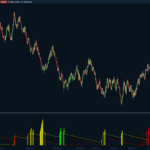
Color and other drawing indicator settings can be changed easily if you select "Properties".

DAX daily
It is well described above. To use it you can use CALL as with any other indicator. This is the instruction: myMagicTrend = CALL "Magic Trend"[20, 14, 1, 5] Parameters (you can change them as best suits you): 20 is the CCI periods 14 is the ATR periods 1 is the ATR multiplier (can be a decimal number) 5 is the periods of a Simple Moving Average.
Ciao Roberto, ho scaricato l'indicatore e come ti avevano già scritto sopra anch'io vedo la linea di un solo colore. Non sono esperto di programmazione, per fare il colore verde e rosso come nella tua foto come devo fare. Devo inserire un'altro pezzo di codice? Nel caso quale e in che posizione? Grazie