







Genesis Matrix Trading
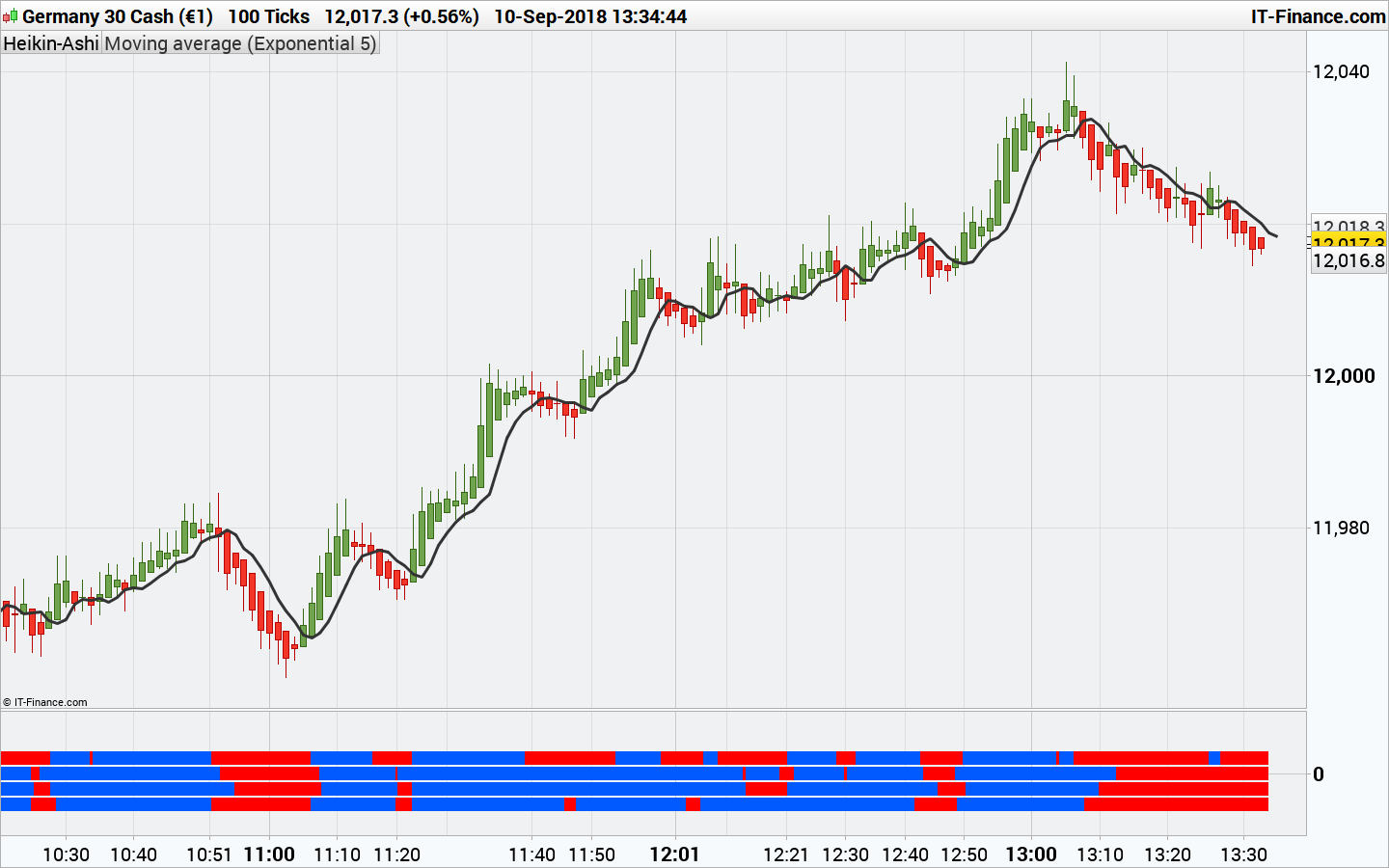
This indicator is a dashboard for the Genesis Matrix trading system. The 4 dots represents (from top to bottom):
- The TVI (Ticks Volumes Indicator) slope (ascending or descending = blue or red)
- CCI above or below 0 (blue or red)
- The T3 moving average slope (ascending or descending = blue or red)
- A GannHiLo signal (close is above the MA of Highs = blue, below the MA of Lows = red)
According to the original rules of the system, orders are triggered once all of the dots are from the same color, in two words, buy when all the dots are turned from red to blue and vice-versa. The complete system could have more rules, but I’m not aware of them.
The TVI needs Volumes to be calculated correctly (will not work on instruments that your broker don’t deal Volumes).
The indicator was converted from MT4 by a request in the spanish forum: Genesis-Matrix.Convertir de MQ4 a PRT
//PRC_Genesis Matrix | indicator
//10.09.2018
//Nicolas @ www.prorealcode.com
//Sharing ProRealTime knowledge
//converted from MT4 indi

// --- settings
//TVI_Settings
TVIr=12
TVIs=12
TVIu=5
//CCI_Settings
CCIPeriod=20
//T3_Settings
T3Period=8
//GannHiLo_Settings
GannHiLoPeriod=10
// --- end of settings

// Set histogram positions
IDXTVI=0.25
IDXCCI=0.0
IDXT3=-0.25
IDXGHL=-0.5

//TVI (Ticks Volume Indicator)
Mypoint=pointsize
UpTicks=(Volume+(Close-Open)/MyPoint)/2
DownTicks=Volume-UpTicks
EMAUpTicks=average[TVIr,1](UpTicks)
EMADownTicks=average[TVIr,1](DownTicks)
DEMAUpTicks=average[TVIs,1](EMAUpTicks)
DEMADownTicks=average[TVIs,1](EMADownTicks)
TVIcalculate=100.0*(DEMAUpTicks-DEMADownTicks)/(DEMAUpTicks+DEMADownTicks)
TVI=average[TVIu,1](TVIcalculate)
//ProcessTVI
if TVI>=TVI[1] then
 drawtext("■",barindex,IDXTVI,dialog,bold,20) coloured(0,90,255)
else
 drawtext("■",barindex,IDXTVI,dialog,bold,20) coloured(255,0,0)
endif

//CCI (Commodity Channel Index)
dSig=CCI[CCIPeriod](typicalPrice)
//ProcessCCI
if dSig>0 then
 drawtext("■",barindex,IDXCCI,dialog,bold,20) coloured(0,90,255)
else
 drawtext("■",barindex,IDXCCI,dialog,bold,20) coloured(255,0,0)
endif

//T3
e1 = ExponentialAverage[T3Period](close)
e2 = ExponentialAverage[T3Period](e1)
e3 = ExponentialAverage[T3Period](e2)
e4 = ExponentialAverage[T3Period](e3)
e5 = ExponentialAverage[T3Period](e4)
e6 = ExponentialAverage[T3Period](e5)
b = 0.618
b2 = (b * b)
b3 = (b * b * b)
c1 = -b3
c2 = (3 * b2) + (3 * b3)
c3 = (-6 * b2) - (3 * b) - (3 * b3)
c4 = 1 + (3 * b) + b3 + (3 * b2)
avg = c1 * e6 + c2 * e5 + c3 * e4 + c4 * e3
//ProcessT3
if avg>=avg[1] then
 drawtext("■",barindex,IDXT3,dialog,bold,20) coloured(0,90,255)
else
 drawtext("■",barindex,IDXT3,dialog,bold,20) coloured(255,0,0)
endif

//GannHiLo
if Close>average[gannhiloperiod](high)[1] then
 gann=1
elsif Close<average[gannhiloperiod](low)[1] then
 gann=-1
endif
//ProcessGann
if gann>0 then
 drawtext("■",barindex,IDXGHL,dialog,bold,20) coloured(0,90,255)
else
 drawtext("■",barindex,IDXGHL,dialog,bold,20) coloured(255,0,0)
endif

return
Comments
You must be logged in to post a comment.

Hi Nicolas, I'm using this indicator when there is confluence over 3 different timeframes (5min, 15min, 1h) together with ADX to confirm the strength of the trend - entering positions in dips / pull-backs. Would it be possible to code a screener that looks for the colour of the 4 boxes of the genesis matrix indicator to match (all blue or all red) and ADX is over 20/25?

Bonjour Nicolas. je vais vous parler en français. j'ai un simple abonnement prorealtime (je ne suis pas chez IG). je n'ai pas pris l'option volume. c'est peu etre pour cela que la barre du haut est toujours rouge. après je conçois qu'il y ai une petite différence. certains petits carrées ne sont pas les mêmes. Vous pensez que cette barre rouge que ne deviens jamais bleu viens de ce problème. j'ai simplement télécharger votre indicateur en haut de cette page. y a t’il un autre indicateur qui pourrai remplacer cela. merci


El sistema de trading “Genesis Matrix Trading“, se usa en gráficos de 5 Minutos. Reglas de entrada a Mercado * El indicador “Genesis Matrix Trading” debe tener los 4 cuadrados del mismo color al cierre de la vela actual * Los inidicadores “Stochasticos” tanto el stochastico de 5minutos y el stochastico de 15minutos deben venir del área de 20 – 80 * El indicador Heiken hashi debe cerrar la actual vela por encima o por debajo de la media amarilla 5 Sobre Stop Loss y Take Profit buscaremos áreas de S/R, el sistema nos proporciona un indicador que nos marca las zonas importantes, podemos establecer en esos puntos nuestro TP.
i've been using this for a few days now and it's really helped me a lot in timing the execution and closing of trades. is it easily possible to add measurable output that can be used for example in a screener , because when trying it just says "no useable output" - just a row number and 0/1 signal?