




More from ProRealCode
ProRealCode - Trading & Coding with ProRealTime™
The ProRealTime™ community on the web! Officially sharing ProRealTime knowledge to Worldwide users since 2015!



Low Frequency Filter Moving Average (LFFMA)
April 12, 2017, 12:48 PM
Indicators
7 Comments
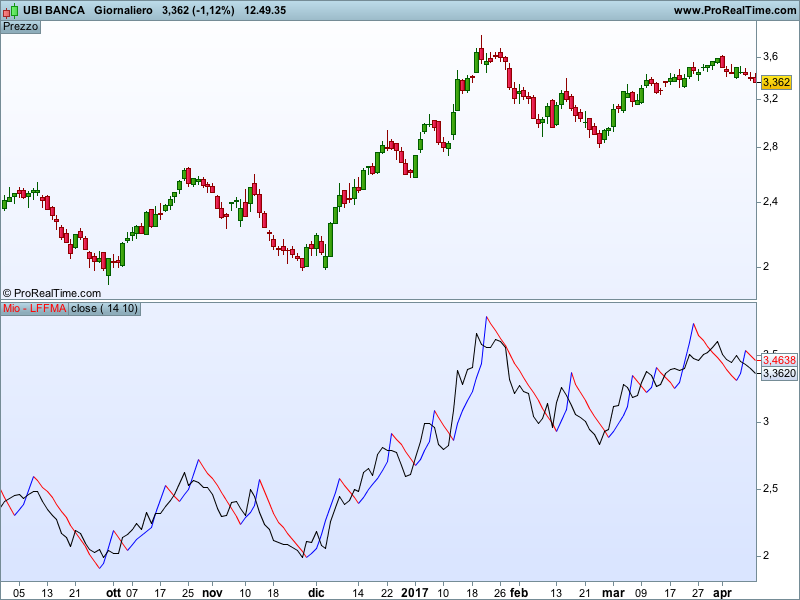
This Moving Average is based on RC filter commonly used in electronic. I needed some sort of Moving Average able to cut waves below defined frequencies and with lower intensity. This Moving Average uses one filter based on amplitude (ATR) and one filter based of frequency (all the waves with period smaller than 3.5 times the period of the filter will be cut). The result is a Moving Average that gives some good trend indications. We go long on the blue line and short on the red.
Blue skies!!
//Filter on amplitude based on ATR and filter
//on wave period based on the tau factor.
//This filter should disregard all the waves
//with a period of less than tau

once v=0
once b=1
once input=medianprice
if barindex>15 then
 a=averagetruerange[periodo](close)
 tau=periodofiltro/3.5
 if (abs(MedianPrice-v[1]))<=(a) then
  input=input[1]
  b=b[1]+1
 else
  input=MedianPrice-v[1]
  b=1
 endif
 v=v[1]+(Input*(1-exp(-b/tau)))
endif
if v>=v[1] then
 r=0
 g=0
 b=255
else
 r=255
 g=0
 b=0
endif

return v coloured (r,g,b), close as "close"
Download
Filename:
Mio-LFFMA.itf
Downloads:
249
Master
This author is like an anonymous function, present but not directly identifiable. More details on this code architect as soon as they exit 'incognito' mode.
Author’s Profile
Similar code
Hodrick-Prescott filter (HP)Indicators
Hull Trend with KahlmanIndicators
Voss Predictive Filter (VPF)Indicators
Self-Aware Trend SystemIndicators



Loading...
Bonjour Gabri, merci pour l'ensemble de vos publications, serait il possible d'avoir le screener qui indiquerait les changements (couleurs) pour mio-lffma.itf ? je ne connais pas grand chose en programmation, ce que j'ai tenté ne marche pas. Merci, bonne fin de journée