







Another ATR Trailing Stop
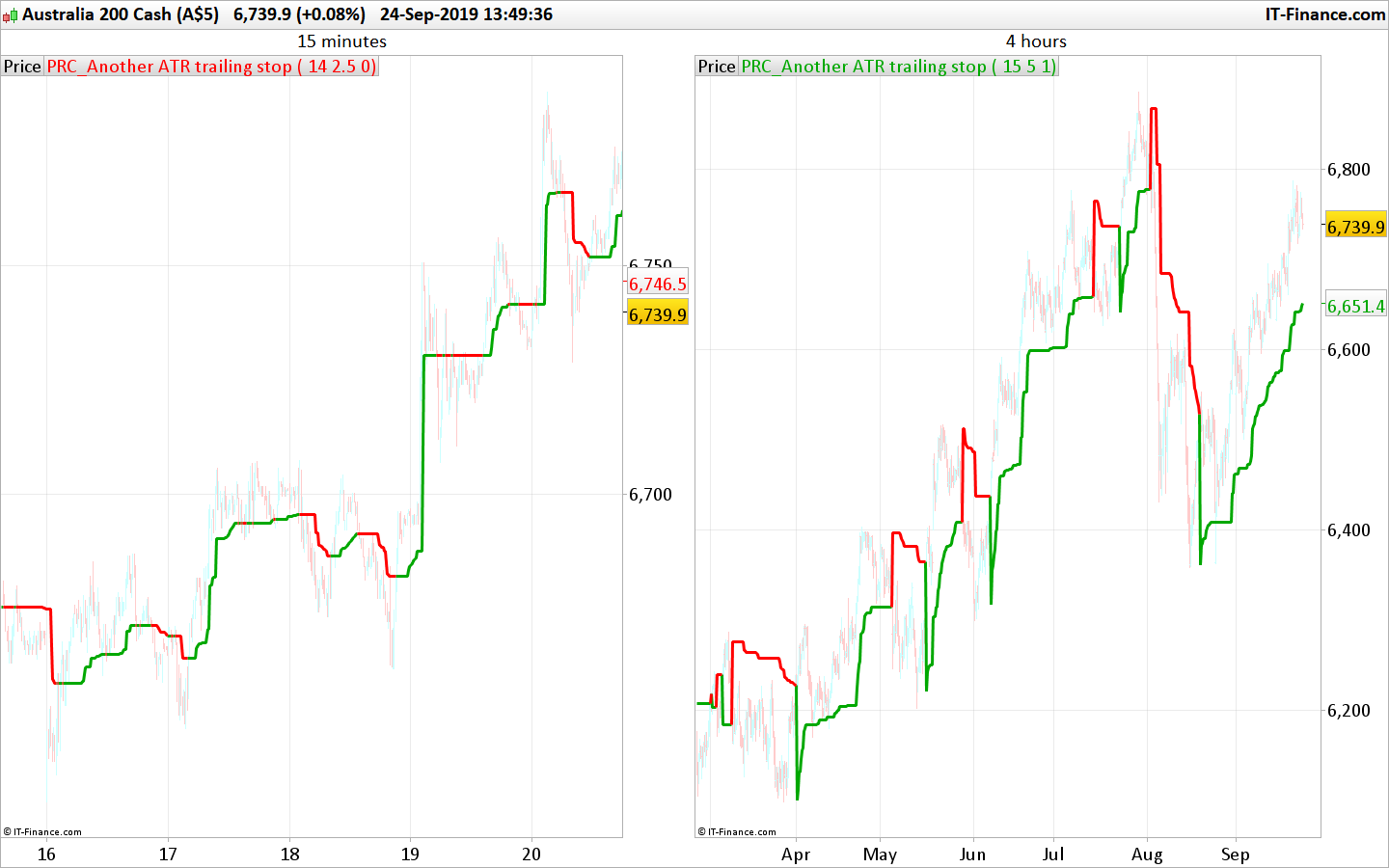
Closely following the price with the Another trailing stop ATR (Average True Range), a based trend following indicator. The idea of this indicator is to closely following the price to get out quickly if the price tends to not move enough to ensure the trend is profitable.
This version uses declining ATR to closely adapt its level to the price. The trailing stop line is following the highest Close (green when it is bullish) or Lowest Close (red when it is bearish) by adding or subtracting the ATR value multiplied with the “mult” setting.
If the ATR (aka price volatility) is ascending, then the trailing stop keep its previous level. When it is declining, the trailing stop level adapt its value according to the current trend:
- Long trend: if the new calculated level is higher than the previous one
- Short trend: if the new calculated level is lower than the previous one
The ATR trailing stop has 2 modes: (“mode” setting)
- mode=0 ; the trend line will keep the same level each time a cross over occur
- mode>0 ; the trend line will take the highest or lowest Close level each time a cross over occur
The chosen mode of the trailing stop line behavior depends of your own trading style, traded instrument and timeframe.
Idea come from this topic in the indicator’s forum: ATR TRAILING STOP
If you have other ideas, nevermind opening a new topic in the forum describing what you have in mind. The community will try to help you achieving your goal!
//PRC_Another ATR trailing stop | indicator
//24.09.2019
//Nicolas @ www.prorealcode.com
//Sharing ProRealTime knowledge

// --- settings
p=14 //ATR period
mult=2 //multiplier
mode=1 //trailing stop mode (0=straight line
// --- end of settings

atr = AverageTrueRange[p](close) * mult

once trend=1

if trend=1 then
 hh=max(hh,close)
 ll=hh
 if atr<atr[1] then
  hhlevel=hh-atr
   if hhlevel>ts then
    ts=hhlevel
   endif
 endif
 r=0
 g=168
else
 ll=min(ll,close)
 hh=ll
 if atr<atr[1] then
  lllevel=ll+atr
  if lllevel<ts then
   ts=lllevel
  endif
 endif
 r=255
 g=0
endif


if close crosses over ts then
 trend=1
 if mode>0 then
  ts=ll
 endif
elsif close crosses under ts then
 trend=-1
 if mode>0 then
  ts=hh
 endif
endif


return ts coloured(r,g,0) style(line,3)
Comments
You must be logged in to post a comment.
Pourquoi pas, mais le mieux serait d'ouvrir un sujet sur le forum de trading automatique, et de nous indiquer dans quelle stratégie il faut l'implanter, etc.. ce sera bien plus simple de traiter ta demande dans cette partie du site, merci ! Ouvre un sujet ici: https://www.prorealcode.com/forum/prorealtime-forum-francais/support-proorder/

Hello Nicolas, Can I use high and low price at lines hh=max(hh,close) and ll=min(ll,close) instead of close ? What impact would that make to my tracking? Thank you. Ahmed


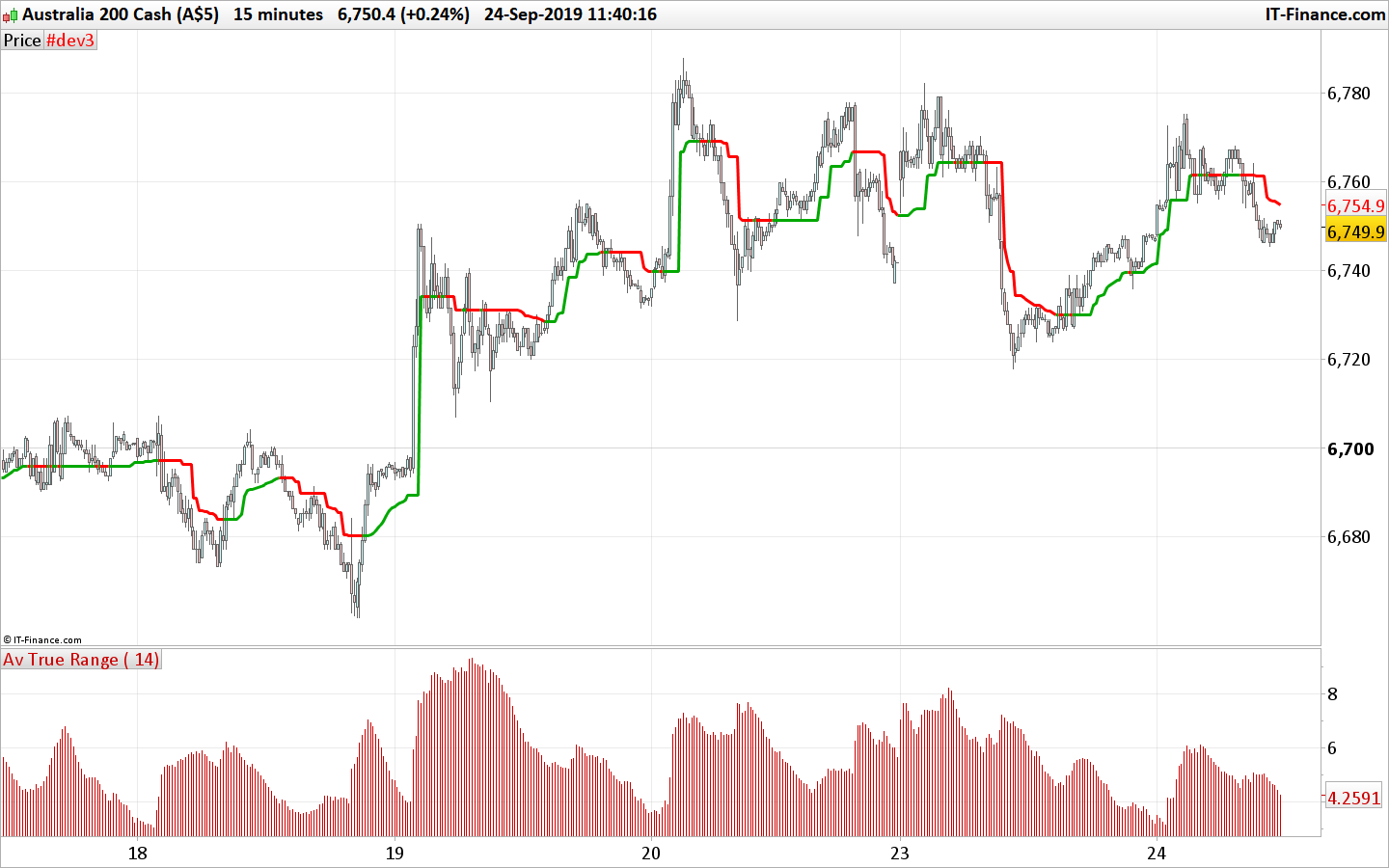
I tried this indicator to trail stop. Problem i am facing is that, when there is a trend change, say from bullish to bearish. For example, In a short entry - I get stopped out when price moves back and touches the support line of Bullish Trend. While the purpose of stop is to sell when the BEARISH upper line is crossed (when short in market), positions get stopped out at start of the trend. I think this is unintended consequence. I tried similar another indicator, same thing happens. How would be possible to BUY only when RED line above is crossed in Short Entry and Bottom Green line when Long?
Bonjour à partir de ce code j'essaie de créer un trailing short only mais j en'y arrive pas // PRC ATR trailing stop SHORT only
p=14
mult=2
atr = AverageTrueRange[p](close) * mult
once ll = close
once ts = close + atr
ll = min(ll, close)
if atr < atr[1] then
lllevel = ll + atr
if lllevel < ts then
ts = lllevel
endif
endif
return ts coloured(255,0,0) style(line,3)