


Zig Zag with Value

Viewing 7 posts - 1 through 7 (of 7 total)

  • Author
    Posts
  • #47224 quote
    Ayd68
    Participant
    New

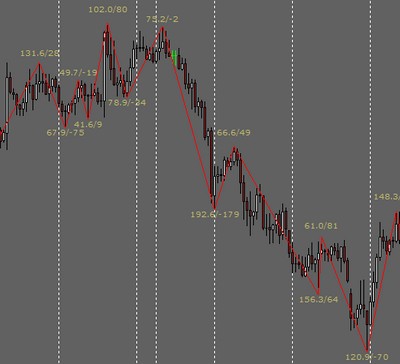
    Hi guys, Ive been having a look around the forum but cant seem to find anything which shows the value of the zig zag. I have this indicator on MT4 but much prefer Pro Realtime so hoping someone could point me in the right direction!

    I’ve attached a picture from the MT4 indicator.

    Many Thanks in advance for your help!

    #47272 quote
    AVT
    Participant
    Senior
    1. go to Library
    2. use “view entire library as list”
    3. in your browser (usually under “Edit”) use “search” and enter “zig”
    4. this will go through everything with name or tag containing zig(zag)

    You will find for example this: https://www.prorealcode.com/prorealtime-indicators/fractals-zigzag/

    It is drawing the zigzag lines and putting a square at the end point.

    1. keep the site open in case you decide for it and for comparing the picture with the code.
    2. read the code
    3. the square is done by DRAWTEXT
    4. open the PRT documentation here: https://www.prorealcode.com/prorealtime-documentation/
    5. go to graphical
    6. go to DRAWTEXT (you end up here: https://www.prorealcode.com/documentation/drawtext/ )
    7. read it
    8. in Example 3 you find how to display values with DRAWTEXT, so it should be possible to use that indicator as your base.
    9. keep the site open in case you need to have a second look how it is done.

    Download the indicator and import it to your PRT, then use “modify code”

    1. give the indicator another name like Myfractals-zigzag
    2. from documentation we know, that the y-value is the price and we need to insert price values as #value# (instead of the squares)
    3. in the code it’s important, that those are exact values, i.e. nothing like + or * something to create a distance between candle and price for better view:
    if LH>0 and (lastpoint=-1 or lastpoint=0) then
    DRAWSEGMENT(lastX,lastY,TOPx,TOPy) COLOURED(200,0,0,255) // red line from lastX/lastY to TOPx/TOPy
    DRAWTEXT("■",TOPx,TOPy,Dialog,Bold,20) coloured(200,0,0,255) // red "square" at top with y-value=TOPy
    
    if LL<0 and (lastpoint=1 or lastpoint=0) then
    DRAWSEGMENT(lastX,lastY,BOTx,BOTy) COLOURED(0,200,0,255) // green line from lastX/lastY to BOTx/BOTy
    DRAWTEXT("■",BOTx,BOTy,Dialog,Bold,20) coloured(0,200,0,255) // green "square" at bottom with y-value=BOTy


    1. the value for/instead of the red square should be TOPy and for/instead of the green square should be BOTy
    2. so we change the corresponding lines to:
    DRAWTEXT("#TOPy#",TOPx,TOPy,Dialog,Bold,20) coloured(200,0,0,255) // red "square" at top with y-value=TOPy
    
    DRAWTEXT("#BOTy#",BOTx,BOTy,Dialog,Bold,20) coloured(0,200,0,255) // green "square" at bottom with y-value=BOTy


    Save and test, if test ok, done, if not cry 😉

    Please note, due to leaving IG I don’t have PRT any longer for testing, but that’s the way I go if I need to create/modify indicators.

    Nicolas and Alai-n thanked this post
    #47280 quote
    AVT
    Participant
    Senior

    uppsss, seems we lost the closing tag for PRT code somewhere on our way.

    if LH>0 and (lastpoint=-1 or lastpoint=0) then 
     DRAWSEGMENT(lastX,lastY,TOPx,TOPy) COLOURED(200,0,0,255)     // red line from lastX/lastY to TOPx/TOPy
     DRAWTEXT("■",TOPx,TOPy,Dialog,Bold,20) coloured(200,0,0,255) // red "square" at top with y-value=TOPy
    // replaced:
     DRAWTEXT("#TOPy#",TOPx,TOPy,Dialog,Bold,20) coloured(200,0,0,255) // red "square" at top with y-value=TOPy
    
    if LL<0 and (lastpoint=1 or lastpoint=0) then
     DRAWSEGMENT(lastX,lastY,BOTx,BOTy) COLOURED(0,200,0,255)     // green line from lastX/lastY to BOTx/BOTy
     DRAWTEXT("■",BOTx,BOTy,Dialog,Bold,20) coloured(0,200,0,255) // green "square" at bottom with y-value=BOTy
    // replaced:
     DRAWTEXT("#BOTy#",BOTx,BOTy,Dialog,Bold,20) coloured(0,200,0,255) // green "square" at bottom with y-value=BOTy
    #47281 quote
    Nicolas
    Keymaster
    Master

    ahaha @AVT, I just reformatted your first post already 😆

    AVT and Ayd68 thanked this post
    #47283 quote
    AVT
    Participant
    Senior

    Hihihi, I was just going to write a note, that I have difficulties when deleting text after PRT code and catching the end-pre tag with that (missing “toggle control characters”).

    Thanks a lot for watching.

    Ayd68 thanked this post
    #47304 quote
    Ayd68
    Participant
    New

    AVT thank you so much! Ill give that a go now 🙂

    #59935 quote
    mikael
    Participant
    Average

    I have been looking to exactly the same indicator. Did you get it to work?

Viewing 7 posts - 1 through 7 (of 7 total)
  • You must be logged in to reply to this topic.

Zig Zag with Value


ProBuilder: Indicators & Custom Tools

New Reply
Author
author-avatar
Ayd68 @ayd68 Participant
Summary

This topic contains 6 replies,
has 4 voices, and was last updated by mikael

8 years ago.

Topic Details
Forum: ProBuilder: Indicators & Custom Tools
Language: English
Started: 09/25/2017
Status: Active
Attachments: 1 files
Logo Logo
Loading...


