zig zag avec valeurs en valeur ou %

Viewing 15 posts - 1 through 15 (of 16 total)
  • Author
    Posts
  • #176671 quote
    thebaron
    Participant
    Average

    Bonjour

    je recherche le code d un zig zag qui donne pour chaque variation la différence en valeur ou en %.

    Par avance merci pour votre aide

    sincerement

    #176704 quote
    Nicolas
    Keymaster
    Master

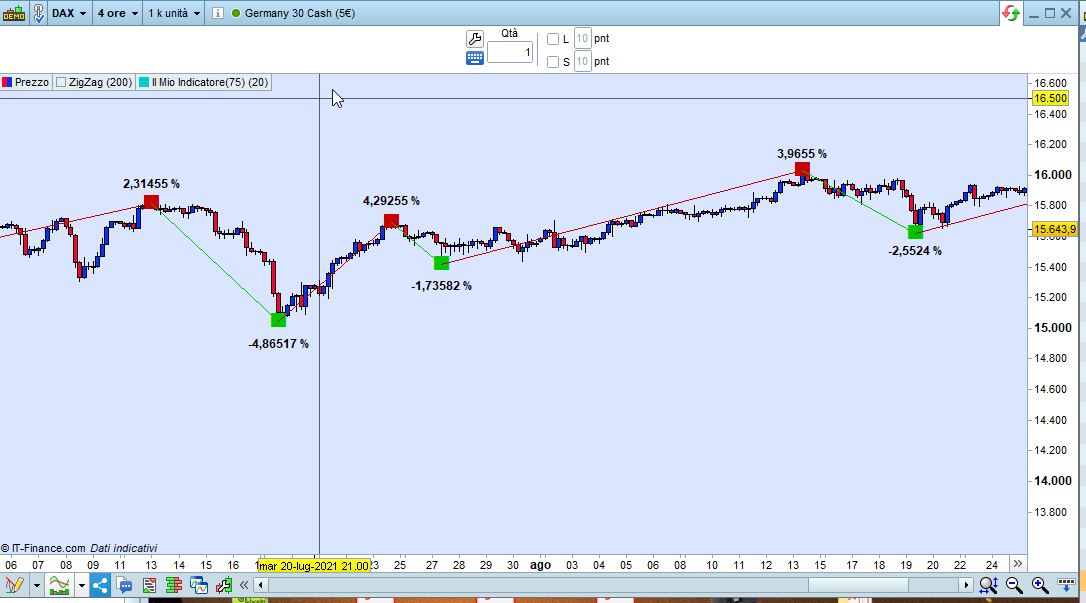
    Roberto a codé cet indicateur récemment qui indique sur chaque point du zigzag l’amplitude du mouvement en pourcentage: https://www.prorealcode.com/topic/zigzag-with-percent/#post-174627

    #176712 quote
    thebaron
    Participant
    Average

    super merci c’est ce que je cherchais

    #177048 quote
    thebaron
    Participant
    Average

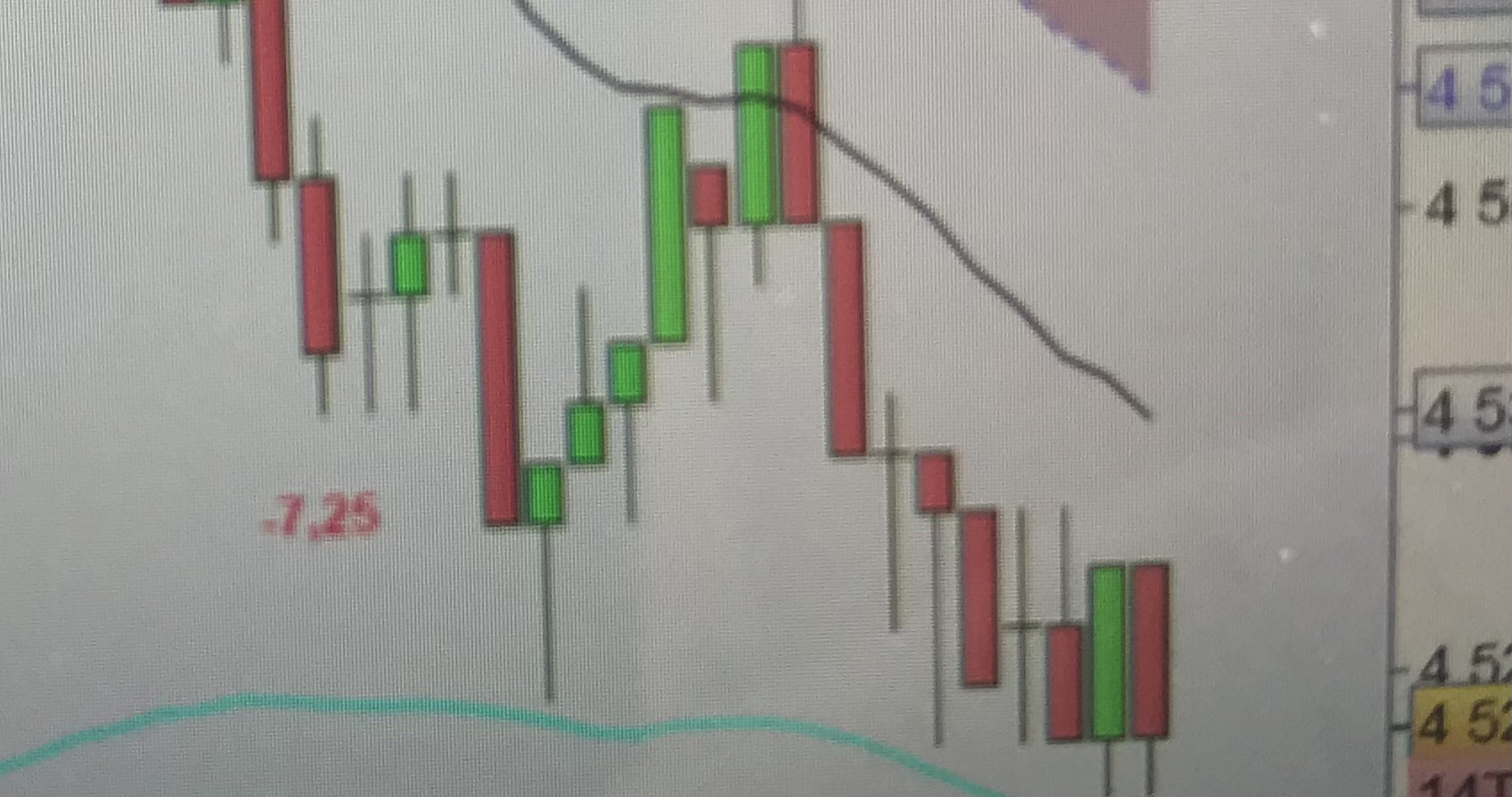
    il y a un probleme dans la formule en intra, il indique un haut  ou bas partiel et non definitif

    //DEFPARAM DrawOnLastBarOnly = true
    //ONCE p = 200
    ONCE LastPeak = 0
    ONCE Up = 1
    ONCE Down = -Up
    ONCE PeakUP1 = close
    ONCE PeakUP2 = close
    ONCE PeakDN1 = close
    ONCE PeakDN2 = close
    X = average[100,0](range) / 3 //offset to plot percentages
    ZZ = ZigZagPoint[p](close)
    PeakUP = (ZZ[1] > ZZ[2]) AND (ZZ < ZZ[1])
    PeakDN = (ZZ[1] < ZZ[2]) AND (ZZ > ZZ[1])
    IF PeakUP AND ((LastPeak = Down) OR (LastPeak = 0)) THEN
    LastPeak = Up
    PeakUPprice = close[1]
    PerCent = (PeakUPprice - PeakDNprice)
    DrawText("#PerCent#",BarIndex[1],high[1] + X,Dialog,Bold,12) coloured(0,128,0,140)
    ELSIF PeakDN AND ((LastPeak = Up) OR (LastPeak = 0)) THEN
    LastPeak = Down
    PeakDNprice = close[1]
    PerCent = (PeakDNprice - PeakUPprice)
    DrawText("#PerCent#",BarIndex[1],low[1] - X,Dialog,Bold,12) coloured(255,0,0,255)
    ENDIF
    RETURN
    IMG_7307.jpg IMG_7307.jpg
    #177063 quote
    robertogozzi
    Moderator
    Master

    Ne doublez pas les messages. Posez votre question une seule fois et dans un seul forum. Tous les messages doubles seront supprimés de toute façon, donc poster plusieurs fois la même question vous fera perdre votre propre temps et ne vous donnera pas de réponse plus rapidement. La double publication crée juste de la confusion dans les forums.

    Merci 🙂

    #177082 quote
    robertogozzi
    Moderator
    Master

    Cela fonctionne bien pour moi.

    As-tu vérifié que tous les paramètres correspondent ? Sur quel instrument, TF, réglages et date l’erreur s’est-elle produite ?

    #177095 quote
    thebaron
    Participant
    Average

    tester sur  minute et ticks, a l’installation il n y a pas de problème c’est a l actualisation quand il détermine par exemple un point bas et que ça descend encor plus bas juste après sans qu’ il y est eu un mouvement haussier égale a la variation paramétrer il n’en tient pas compte cf photo

    #177149 quote
    thebaron
    Participant
    Average

    je pense pouvoir résoudre le problème avec le zigzag fractal si vous pouvez m’aider a afficher la différence entre point haut et bas en points.

    par avance merci

    //—external parameters
    //cp = 20

    once lastpoint = 0

    if high[cp] >= highest[2*cp+1](high) then
    LH = 1
    else
    LH = 0
    endif

    if low[cp] <= lowest[2*cp+1](low) then
    LL = -1
    else
    LL = 0
    endif

    if LH = 1 then
    TOPy = high[cp]
    TOPx = barindex[cp]
    endif

    if LL = -1 then
    BOTy = low[cp]
    BOTx = barindex[cp]
    endif

    if LH>0 and (lastpoint=-1 or lastpoint=0) then
    DRAWSEGMENT(lastX,lastY,TOPx,TOPy) COLOURED(200,0,0,255)
    DRAWTEXT(“■”,TOPx,TOPy,Dialog,Bold,20) coloured(200,0,0,255)
    lastpoint = 1
    lastX = TOPx
    lastY = TOPy
    endif

    if LL<0 and (lastpoint=1 or lastpoint=0) then
    DRAWSEGMENT(lastX,lastY,BOTx,BOTy) COLOURED(0,200,0,255)
    DRAWTEXT(“■”,BOTx,BOTy,Dialog,Bold,20) coloured(0,200,0,255)
    lastpoint = -1
    lastX = BOTx
    lastY = BOTy
    endif

    RETURN

    #177157 quote
    robertogozzi
    Moderator
    Master

    Voilà:

    //—external parameters
    //cp = 20
    
    once lastpoint = 0
    offset = average[100,0](range) * 2
    if high[cp] >= highest[2*cp+1](high) then
    LH = 1
    else
    LH = 0
    endif
    
    if low[cp] <= lowest[2*cp+1](low) then
    LL = -1
    else
    LL = 0
    endif
    
    if LH = 1 then
    TOPy = high[cp]
    TOPx = barindex[cp]
    endif
    
    if LL = -1 then
    BOTy = low[cp]
    BOTx = barindex[cp]
    endif
    
    if LH>0 and (lastpoint=-1 or lastpoint=0) then
    DRAWSEGMENT(lastX,lastY,TOPx,TOPy) COLOURED(200,0,0,255)
    DRAWTEXT("■",TOPx,TOPy,Dialog,Bold,20) coloured(200,0,0,255)
    lastpoint = 1
    lastX = TOPx
    lastY = TOPy
    yy    = TOPy
    diff  = (yy - xx) / xx *100
    DrawText("#diff#%",LastX,TOPy+Offset,Dialog,Bold,12)
    endif
    
    if LL<0 and (lastpoint=1 or lastpoint=0) then
    DRAWSEGMENT(lastX,lastY,BOTx,BOTy) COLOURED(0,200,0,255)
    DRAWTEXT("■",BOTx,BOTy,Dialog,Bold,20) coloured(0,200,0,255)
    lastpoint = -1
    lastX = BOTx
    lastY = BOTy
    xx    = BOTy
    diff  = (xx - yy) / yy *100
    DrawText("#diff#%",LastX,BOTy-Offset,Dialog,Bold,12)
    endif
    
    RETURN
    x-5.jpg x-5.jpg
    #177162 quote
    thebaron
    Participant
    Average

    super merci

    #177190 quote
    Nicolas
    Keymaster
    Master

    C’est logique puisque le zigzag retrace et que le code indique la valeur en temps réel. Si le plus bas change, la valeur déjà écrite sur le graphique ne sera pas effacé. En effet la version fractal n’aura pas cet effet puisqu’un point bas ou haut fractal ne se trace qu’après confirmation en “temps” (quantité de bougies pour affirmer qu’un point bas ou haut est en effet un).

    #177194 quote
    thebaron
    Participant
    Average

    oui mais sur le zig zag de base et on n’ a pas ce probleme, le point bas et le plus bas et le haut le plus haut

    #177198 quote
    Nicolas
    Keymaster
    Master

    Non, pas en temps réel 🙂

    #177209 quote
    thebaron
    Participant
    Average

    Celui de pro se calcul sur la clôture et fonctionne très bien en temps réel, mais il n’indique pas les variations et n ont ne peut pas l’avoir sur les+hauts + bas

    #177391 quote
    Nicolas
    Keymaster
    Master

    En temps réel le prix de clôture varie, puisque c’est bien le Close (le dernier prix connu). Donc je confirme à nouveau que le zigzag en temps réel de la plateforme peut se modifier sur le dernier point haut ou bas 🙂

Viewing 15 posts - 1 through 15 (of 16 total)
  • You must be logged in to reply to this topic.

zig zag avec valeurs en valeur ou %


ProBuilder : Indicateurs & Outils Personnalisés

New Reply
Author
author-avatar
thebaron @thebaron Participant
Summary

This topic contains 15 replies,
has 3 voices, and was last updated by thebaron

4 years, 6 months ago.

Topic Details
Forum: ProBuilder : Indicateurs & Outils Personnalisés
Language: French
Started: 09/02/2021
Status: Active
Attachments: 3 files
Logo Logo
Loading...