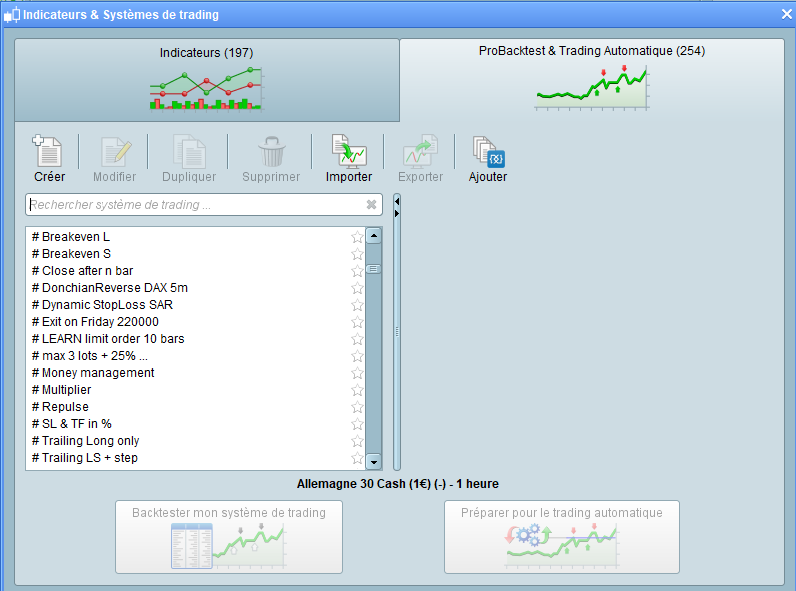
Like many I have bits of code that I regularly use in strategies for example money management code, quit fuse code, even the basic IF THEN BUY At MARKET ENDIF, trailing stop etc. Re-typing them is a total bore and remembering the name of whichever strategy you think you last used that bit of code in and then searching through all your strategies is time consuming (and requires a memory!) – so I save them all as strategies but with the word ‘Code’ in the title. So I have ‘Money Management Code’, ‘Quit Fuse Code’, ‘If Then Buy Code’ etc etc. I can then simply type the word ‘code’ into the strategy search box and bingo I have all my useful snippets to choose from and then cut and paste into my new strategy.
I also have almost complete strategy basic codes saved too – so for example with money management, fuse code, buy and sell if’s, set target and stoploss saved as ‘MM QF IFBuy IFSell TP SL Code’
I guess many may already be doing this but I thought I would share this little efficiency tip just in case it is useful to someone.
Has anybody else got any other top tips to make coding faster and easier?
Hi,
It seems that we all have the same method…
Here is a snipet “close after n bars”… I do use it live in one of the strategies (hourly basis)
x  = 8

IF BarIndex - TradeIndex = x Then
Sell at Market
endif
Great idea Vonasi, it and https://docs.google.com/spreadsheets/d/1rgboqj7sVwsP9ZRhOduOefye48QMWC07jWVXCl-KJPU/edit#gid=0 will make coding easier!
Yes the combination should work well. Search through https://docs.google.com/spreadsheets/d/1rgboqj7sVwsP9ZRhOduOefye48QMWC07jWVXCl-KJPU/edit#gid=0 for useful bits of code and if you find you use them regularly save them as your own strategy with ‘code’ in the title for quicker access when coding.
It seems that we all have the same method…
….but yours is better! The # means that there is more space for a title and it is quicker to type. Even more efficient!
Now I just have to rename all mine…… doh! 🙁
….and I have now decided to do the same with my indicators.
I have collected hundreds of the damned things and written loads myself but in reality there are only a handful that I truly use on a regular basis – but can I ever remember exactly what I called them? So I put in the word ‘high’ as the one I am loking for definitely had that in the title and fifteen come up, seven with similar names as they were slowly developed and I never deleted old versions or labelled them neatly. Not a problem any more as now if it is an indicator that I regularly check I will label it with a ‘#’ and find it easily – yippee more time saved for beer drinking!
Ok. IMHO, the thing is to find the best edge out from your 100+ indicators.
Then these elected top 5 could be on your top list.
Currently it is only me adding snippets to the link below, I had envisaged more enthusiasm and a joint effort … maybe now after this thread others will add their snippets?
I have said to Nicolas that when there are > 20 snippets in my / our database then I would ask him to add the Link as a sticky post at the top of the Forum so we can all find the database easily.
So please add your snippets guys (takes < 30 secs) as I only need 5 more (to be > 20) and then Nicolas would put the Link below in a Sticky Thread!
https://docs.google.com/spreadsheets/d/1rgboqj7sVwsP9ZRhOduOefye48QMWC07jWVXCl-KJPU/edit?usp=sharing
How about this one to help up the total in your snippet library GraHal? I’ll let you put it in there if you feel it is worthy.
It is a bit of money management code that I use on almost all my strategies.
You set the start capital and minimum bet size that you wish to start with (usually the minimum bet size for whatever instrument you are trading as a low risk starting point)
You have three options by setting the variable ‘MoneyManagement’ to either 0, 1 or 2.
0 (Default) = Level position size at minimum bet size.
1 = Position size is maintained at whatever your minimum bet size is of your starting capital as a percentage. For example 1/10000 = 0.01%. As equity increases to the point where 0.01% of equity is greater than the minimum bet size then the position size will increase. If a loser is then hit the position size will decrease as equity does. This helps protect your equity at the cost of overall profit.
2 = Same as 1 but position size never decreases. Better for profit but less equity protection.
If your strategy reverses position direction mid candle then this code may not work for you as position size adjustments are only made at the close of a candle so no floating equity is included.
Obviously use ‘PositionSize’ as your BUY/SELLSHORT position variable.
There is rounding to two decimal places to ensure that it works on IG.
//Variables
MoneyManagement = 0
Capital = 10000
MinBetSize = 1

Equity = Capital + StrategyProfit

//Increasing and decreasing position size
IF MoneyManagement = 1 THEN
PositionSize = Max(MinBetSize, Equity * (MinBetSize/Capital))
PositionSize = Round(PositionSize*100)
PositionSize = PositionSize/100
ENDIF

//Increasing only position size
IF MoneyManagement = 2 THEN
PositionSize = Max(LastSize, Equity * (MinBetSize/Capital))
PositionSize = Round(PositionSize*100)
PositionSize = PositionSize/100
LastSize = PositionSize
ENDIF

//Level position size
IF MoneyManagement <> 1 and MoneyManagement <> 2 THEN
PositionSize = MinBetSize
ENDIF
I also have this one. It is similar to the above money management but also has a risk multiplier that can be turned on or off. If equity is above the start capital then it increases position size. The more in profit the greater the increases.
As the warning says – use wisely it can easily blow up your account!
Please add it if you wish GraHal. My work here is done…..
//High RiskLevel number = Slower increase of risk.
//Lower RiskLevel number = Faster increaase of risk
//Use wisely or you will blow up your account!

MoneyManagement = 0 //1, 2 or 3
RiskManagement = 1 //0 or 1
Capital = 10000
MinBetSize = 1
RiskLevel = 20

Equity = Capital + StrategyProfit

IF MoneyManagement = 1 THEN
PositionSize = Max(MinBetSize, Equity * (MinBetSize/Capital))
ENDIF

IF MoneyManagement = 2 THEN
PositionSize = Max(LastSize, Equity * (MinBetSize/Capital))
LastSize = PositionSize
ENDIF

IF MoneyManagement <> 1 and MoneyManagement <> 2 THEN
PositionSize = MinBetSize
ENDIF

IF RiskManagement THEN
IF Equity > Capital THEN
RiskMultiple = ((Equity/Capital) / RiskLevel)
PositionSize = PositionSize * (1 + RiskMultiple)
ENDIF
ENDIF

PositionSize = Round(PositionSize*100)
PositionSize = PositionSize/100
I just noticed that the remark on the actual first line of the above code is incorrect.
MoneyManagement = 0 //1, 2 or 3

should be

MoneyManagement = 0 //0, 1 or 2
Who made that horrible mistake? Copy/paste of hell! 👿
Time for me to start working on the snippets library ON THE WEBSITE! 😐
Yep ;
who can reload the clean version of 16 septembre à 19:37 ?
who can reload the clean version of 16 septembre à 19:37 ?
GraHal – keeper of the snippet library – where are you when we need you?! 🙂