Wrong results in multi active backtests

Forums ProRealTime English forum ProOrder support Wrong results in multi active backtests

Viewing 4 posts - 1 through 4 (of 4 total)

  • #169405

    Hi all,

    I just discovered than when I run a  backtest for several actives at the same time AND the acummulated position is on (“DEFPARAM CumulateOrders = TRUE”) the results for each active that appear in the table are wrong, they are completed different than the results of the graph and the individual report for each active. When the cumulation option is FALSE the results from the table are ok.

    Does anybody else noticed that and is there anyway to fix it?

    Thanks

    #170702

    Hi again,

    following with this topic I have found other wrong results in other backtests with multiple actives but unlike the case of the previous message I have no idea the cause.

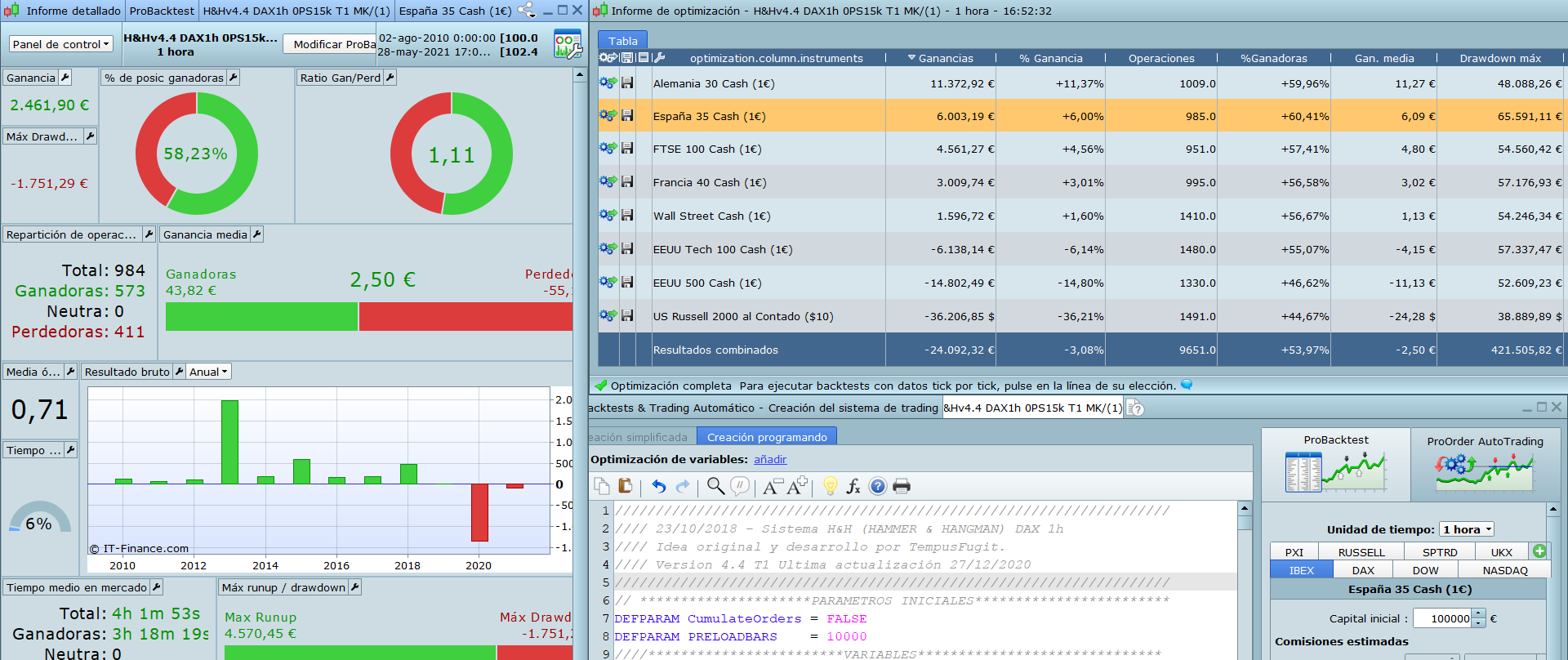
    It has happened me several times since I have started to do this multi-instruments backtests. For instance in the image attached you can see a backtest for several indexes and the result from the table for the spanish index (“España 35”) doesn´t match with the results of the report that appear clicking in that line of the table. Oddly in this backtest the only wrong results of the table are this (“España 35”) and the french (“Francia 40). The rest are ok.

    I just wanted to warn all you to not trust blindly this multi-instruments results that appear in the table


    #170703

    Sorry , what do you mean by “Backtesting several actives at the same time” ? I always thought you can run just one  backtest on just one instrument. You mean Backtesting the same robot on different instruments at the same time ? Or maybe backtest different robots on different instruments at the same time ?  How can it be done ?

    #170711

    Hello pableitor, (Cool name by the way 🙂 )

    With the new version of PRTv11 you can do a backtest for several instruments at the same time. You add the different instruments in the right part of the system window as you can see in the image I attached.

    I just realized the imaged doesn´t appear in my previous message but I am sure I attached, maybe did something wrong, I´ll try again

    1 user thanked author for this post.
Viewing 4 posts - 1 through 4 (of 4 total)
Create your free account now and post your request to benefit from the help of the community
Register or Login